


Reposting on Instagram is a nifty way to spread the love with your followers. But, not everyone knows how to repost a story on Instagram. The good news? It’s not rocket science. The bittersweet news? You can’t share an untagged Instagram story.
So, where’s the silver lining? Well, there are some cool tricks up our sleeves. In this blog, we spill the beans on ‘how to share someone’s story on Instagram to my story without being tagged.’ Stick around!
Want to create captivating Instagram stories for growth? Dive into AiGrow’s PostMate plan!
How To Repost A Story On Instagram (You’re tagged in)
To repost an Instagram story you’re tagged in, you just need to follow these simple steps:
- Go to your DMs and open the message (@… mentioned you in their story)
- Tap on “Add to your story” and share it.

How to share someone’s story on Instagram to my story without being tagged?
To repost an Instagram story you’re not tagged in, you can’t count on the app itself- it just won’t let you. But there are some tricks. Let’s explore how to repost an instagram story you’re not tagged in.
#1. How to repost Instagram story without being tagged: Take screenshots
Whether you’re on an iPhone or Android, the simple trick is to take a screenshot of the story you want and proceed from there. Here’s how to repost IG story without tags using screenshots.
- Take a screenshot and crop it to remove any phone interface.
- Head to your feed and tap on your profile picture.
- Select the cropped picture.
- Tag the account you took the shots from, and feel free to customize it as you like before sharing.
#2. How To Repost Instagram Video Stories to Your Story?
What if you want to reshare a video story that you’re not tagged in? In this case, you should take a screen recording. To find out how to repost a video on Instagram story, do as follows:
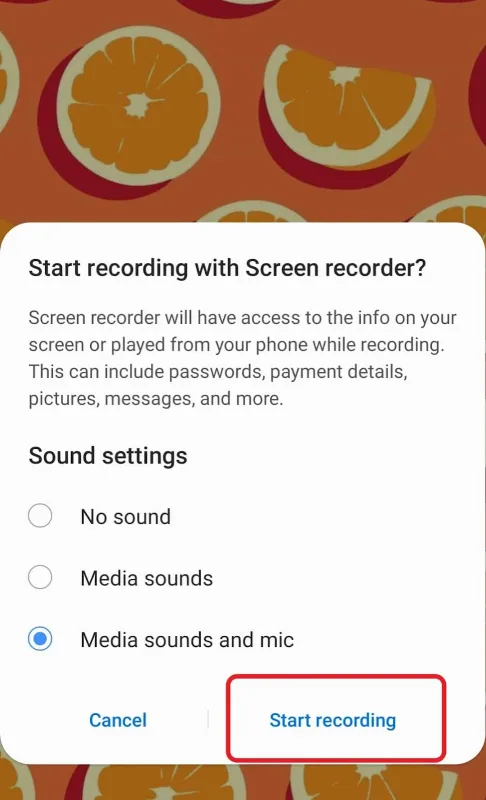
- Swipe down your phone screen and select the screen recorder.

- Tap it and hit “Start recording.”
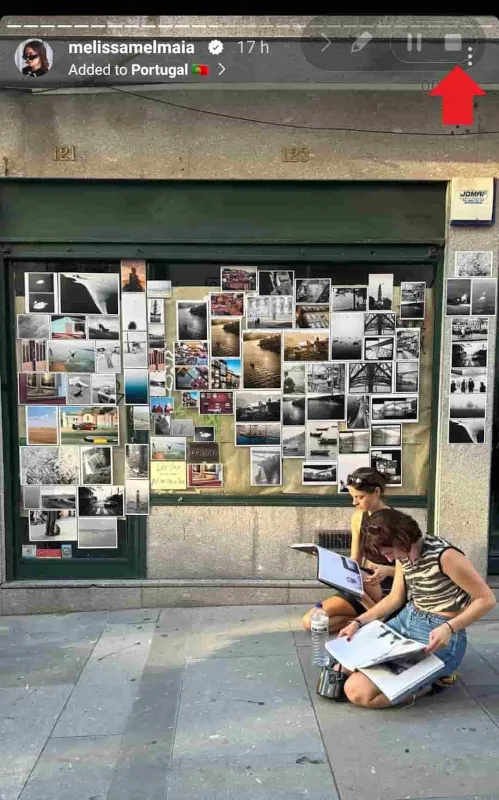
- Navigate to the story you wish to record.
- Tap the square icon at the top right corner to stop recording.
- Trim the beginning and end of your video as needed and share it.
Just a quick heads-up, this guide is for Android users. If you’re rocking an iPhone, go to your settings, find Control Center, and enable Screen Recording from there.
Suggested post: How to unview someone’s story on Instagram
Screenshots And Screen Recordings: Pros & Cons
If you’ve ever shared a Story on Instagram, it is likely that you have done so by capturing a screenshot. Let’s take a look at the pros and cons of this method to see why it might not be the best option for you.
Pros:
You can share screenshots from both private and public accounts.
Cons:
You’re going to lose the quality this way.
#3. How to repost a story on Instagram: Reposting apps
Using apps to repost Instagram Stories is one of the best and easiest ways to make the ‘reshare Instagram story’ process easier.
AiGrow is an Instagram growth agency that lets you repost an Instagram story even if you’re not tagged in. To do so,
- First, sign up on AiGrow’s website using your email address and log into your account.
- Click on “Add Instagram Account” to connect your Instagram page to AiGrow. You can add multiple accounts and manage them together.
- Select “Access.”

- Tap on Content Creation and Posting, and then View Packages.

- Once you select your favorite plan and make the purchase, you’ll have a meeting with your content team.
- All the activities including reposting will be done by your account manager.
Repost any post or story you like using AiGrow right now!
AiGrow’s Instagram Story Reposter: Pros & Cons
Up to now, you’ve learned how to repost a Story on Instagram that you’re not tagged in using AiGrow’s tool. Now, let’s see its pros and cons to help you decide if it’s a good fit for your needs.
Pros
- You will NOT lose photo/video quality
- You can save so much time
- You don’t need to crop and edit the photos/videos
Cons
- You can only repost from public accounts
Can You Repost On Instagram?
Yes. However, before learning how to repost someone else’s story on Instagram, you need to know how to legally repost user-generated content on Instagram and ask the original poster for permission.
There are several ways in which you can seek approval:
- Send a direct message to the person who posted the photo on their Instagram. You’re most likely to get a response if you direct message a creator. Here’s a template you can use:
“Hi [creator name]! We love your post about [product], and we think our followers would enjoy it too. If you’d be comfortable with sharing it on our account, we’d love to feature it—with credit, of course! What do you think?”
Note: When resharing Stories from influencers and customers on Instagram, our AiGrow reposting tool ensures that the account owners are clearly tagged.
- Comment on the post to start a discussion. Here is where you can request permission.
- Send an email to the original publisher. Taking this approach will improve your chances of getting approval.
Note: You do not need the original poster’s permission to share the post on your feed or stories if they have tagged you.
How To Repost A Reel On Instagram?
You can share reel to story from public accounts:
- Click on the full-view reel to see the video in its entirety.
- Tap the paper airplane icon in the right corner of the screen.

- A pop-up menu will let you share the Reel in your Instagram Story.

- Post the Reel after editing it
How To Repost A Live Story On Instagram?
After your live broadcast ends, a screen will pop up that displays the number of viewers who tuned in to watch you, as well as an option to add a replay of the live broadcast to your story. Just tap the “share” button at the bottom of the screen to add it.

Note: To watch a live video that someone else is broadcasting, look under their profile picture. If they have added a live video to their story, a play button will appear under their photo. Tap the play button to watch the original broadcast
How To Repost On Instagram Feed?
Another good feature AiGrow provides for users is the ability to repost feed posts on your page in a few clicks. Here is how to repost on Instagram for feed posts with AiGrow:
- Log into your AiGrow account and click on “Access.”
- Open the “Content Creation and Posting” tab and choose a plan on.
- Once you buy your posting plan, you’ll have a meeting with your content team and they’ll start reposting manually.
How to share someone’s post on Instagram story?
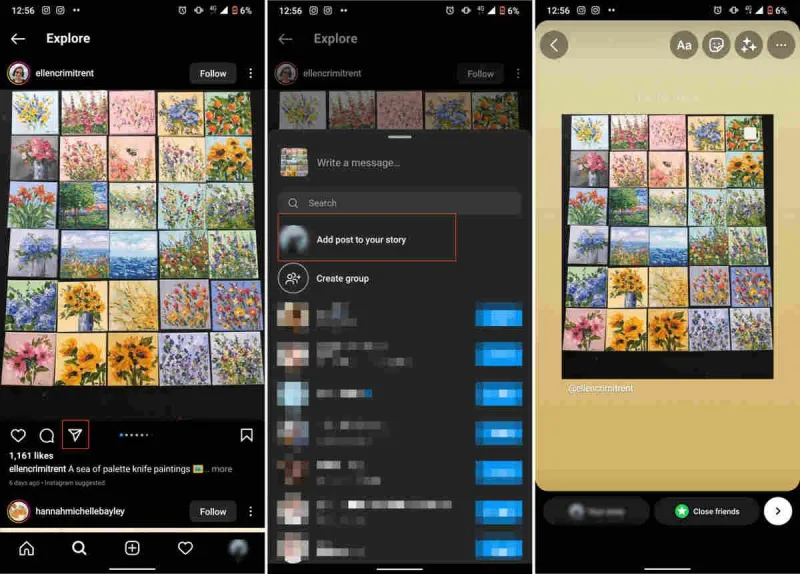
Sharing an Instagram post to a story is possible just in case the owner has a public profile. Once you repost their post, they’ll be notified. Here’s how to share Instagram posts to a story.
- Find the post you want to share on your Stories from the owner’s profile.
- Under the post, click the paper letter icon on the left, next to the comments.
- Tap “Add video/post to your story.”
S
- Then, you will be redirected to your Instagram stories. Here you can add backgrounds, stickers, filters, etc.
- Next, share the story as you always do.
Also read: How to Change Background Color on Instagram Story?
How To Repost A Story On Instagram To Your Feed?
Unfortunately, there is no direct way to do so. The only way to do that is by taking screenshots and screen recordings, editing them, and uploading them to your feed. But don’t forget to ask the owner for their permission.
Note: It is possible to repost a story on your Instagram account to your Feed.
Also read: How To Post Multiple Photos On Instagram? (Best Tool 2023)
Should You Repost Other People’s Instagram Story?
There is no must, but reposting others’ Instagram stories can bring a few benefits:
- It can save time and money.
- Reposting is a valuable strategy for marketers looking to save time on content creation. Over 72% of marketers seek ways to save time in creating content.
- When you repost and tag others, they may share your post in return, increasing exposure.
- Sharing others’ content shows you’re genuinely interested in their posts, boosting your Instagram engagement.
How To Increase Engagement With Instagram Story Reposts?
Want to use Instagram Story reposts in your Instagram growth strategies? Here are some top tips to make sure you’re getting the most out of your Instagram Story reposts.
- Get the best image quality
- Curate user-generated content
- Acknowledge accounts that have mentioned you
- Add your stamp to reshared stories
- Create Highlights of your reposts
To learn how to increase your Instagram engagement, read our expert blog post.
Get Your Instagram Stories Reposting Strategy Right With AiGrow
Instagram Stories offer a chance to engage with your audience in a more casual way. We recommend reposting stories from your followers so that you can stay connected with them. When you want to share a post on your Instagram story, it’s easiest if you’ve been tagged in the post.
You can also share feed posts. But if you haven’t been tagged in the post, it can be tricky to repost it. AiGrow offers you the ideal set of tools for managing and growing your Instagram audience. All in one place, we offer:
- Actionable Instagram analytics and insights into how your Instagram account is performing.
- A hashtag search tool that will help you find the right hashtag to collect UGC content for reposting!
- You can use our Instagram repost tool to check out the content of top-performing creators and schedule them to be posted at the right time on your account.
How To Get Reposted On Instagram?
Getting reposted on large Instagram accounts (on Instagram, such accounts are often called feature accounts or hubs), is one of the most effective Instagram marketing tactics because it’s a free and organic way to grow your followers.
Here are some tips on how to get your posts shared on your Instagram account with a lot of followers:
1. Post High-Quality Images Consistently
A great tip to remember is to consistently post high-quality content. This means using images that fit your style and are well-composed.
2. Tag Posts That Fit The Feature Account
To get your posts shared on high-profile accounts, make sure your content matches those accounts’ interests.
3. Include The Location Of The Images
If you want your photos to get featured on travel hubs, make sure that the location of the image is included either in the caption or as a link above it.
Also read: How To Add Location On Instagram Bio, Story, Reel+More Tips
4. Ensure Your Account Is Public
Having a private account does not benefit you in the HUB. Featured hubs are chosen for their merit, and private accounts do not allow the hub editors to evaluate your work.
5. Follow And Engage With The Feature Account
One way to get featured on a hub is to interact with it. This means liking its posts, following the hub, and commenting on its photos. Hub admins will often check the comments on their pictures, so if they see that you are often leaving good comments, then they may check out your work and feature you (if you tag them).
Is Instagram Now Allowing Users To Share Posts?
Yes, reposting on Instagram Feed, usually known as regramming, is a great way to share others’ posts with your followers. But ‘How to repost Instagram post?’
For feed posts, Instagram doesn’t have a repost or regram button, but that hasn’t stopped users from finding creative ways to share their favorite posts.
To regram another user’s post, you can use one of the following methods:
1. Regram Manually With A Screenshot
To regram a screenshot, you’ll have to do a few simple things:
- Open the post that you want to regram.
- Take a screenshot on your phone.
- Crop out the rest of the screen from your screenshot, including any unnecessary elements like app icons or the status bar.
- Share the photo with your followers by creating a new Instagram post, and always give credit to the owner.
2. Repost With AiGrow Regram App
As an official Instagram partner, AiGrow offers the ability to repost both Feed posts and Stories.
- After a free sign-up on AiGrow, go to Content Creation and Posting.
- You need to pick a plan that fits your goals. After purchasing, you’ll have an online meeting with our content team and they’ll manage to repost all manually.
Conclusion
“How to share someone’s story on Instagram to my story without being tagged”? This is a common concern and we addressed it in this blog. While screenshots and recordings are options, they may not maintain the original content’s quality.
That’s where AiGrow’s reposting service comes in, especially an effective way for business accounts as it preserves quality.
FAQs
Now that we’ve covered all about “How to share someone’s story on Instagram to my story without being tagged”, let’s explore FAQs on the topic:
1. Why Can’t I Repost Instagram Stories?
Wondering “Why can’t I share someone’s story to my story”?
Well, Instagram allows users to repost stories only if they are tagged in. So to repost other stories, you need to use IG repost apps or screenshots.
However, there are some other common issues you may face when reposting content and we will discuss several solutions to those issues below to possibly answer the question, ‘Why can’t I repost stories on Instagram’:
#1: Broken URL
Every time you repost something, there is a possibility of encountering incomplete or outdated URLs or finding that the address they point to is no longer valid.
How to fix it?
The easiest way to fix a broken link is to copy the URL from the post you want to share.
#2: Older Instagram Version
It’s possible that your Instagram app is outdated, and you haven’t gotten the reposting feature. If you use a mod or APK, this is more likely to be the case.
How to fix it?
When you update the Instagram app, you might be able to repost on Instagram. Also, other features that didn’t work before may start working after the update.
#3: You’re Trying To Repost From A Private Account
You can only share content from public accounts. You will not be able to reshare content from a private account in your story, except for stories where you are tagged. This restriction exists to protect user privacy.
How to fix it?
It’s important to check whether a post is private or public before reposting on Instagram.
#4: Reposting Is Withheld
Some Instagram users restrict other people from reposting their content. This can be one reason why you can’t repost.
How to fix it?
In this case, there’s nothing you can do except ask the user to change their settings.
#5: Instagram Glitches
Instagram’s servers sometimes go down, or the app may encounter glitches that cause other features to malfunction.
How to fix it?
If you’re encountering a glitch on Instagram, all you can do is wait. Their technical team is probably already working on the problem, and they’ll have it fixed soon.
#6: Account Or Content Doesn’t Exist
If the content you want to repost no longer exists, it’s because the user deleted it or deactivated their profile. In both cases, you need to contact the user in order to solve the issue.
2. How To Share An Instagram Story To My Story?
Still thinking, ‘How to share someone else’s Instagram story to your story without being tagged?’
There are two ways to share someone else’s Story on your page. If you are tagged in, you can easily do it. Otherwise, you can either use third-party tools or screenshots/screen recordings.
3. Instagram Won’t Let Me Share Posts To My Story, Why?
If you’re unable to find the “Add post to your Story” button, you won’t be able to share posts to Instagram stories. Only public accounts have access to this feature.
4. Can You Share Someone Else’s Instagram Story?
If you are tagged in a Story, Instagram allows you to re-share it on your page. Otherwise, you need to get help from Instagram reposting apps or try screen capturing/recording.
5. Can You Repost Your Own Post On Instagram?
Instagram doesn’t have a repost option for your own posts, so if you want to share something you’ve previously posted, use an app like AiGrow. (You can even schedule the post to be reshared at a certain time.)
Instagram provides the option to repost feed posts to your Story, and if users wish to prioritize a post at the top of their feed, Instagram allows them to pin the post.
6. Can you Repost Close Friends Story On Instagram?
No, Instagram’s Close Friends feature lets you share stories with a small group of your followers. You can’t repost your friends’ ‘Close Friends’ stories to your account even if you’ve been tagged in. Here, you can use an Instagram reposting tool like AiGrow’s.
7. How To Share A Post On Instagram Story With Caption?
Instagram doesn’t give you the option to repost a post with its original caption when you share it to your Story, you can add your desired text (caption) manually before reposting it.
8. How To Share A Post On Instagram Story With Photo Background?
You can share a post on Instagram story with a photo background when you share someone else’s Story post that you were tagged in.
9. How To Allow Others To Repost Your Post On Instagram?
If you want to know how to allow people to share your post on Instagram, tap the gear icon on your Instagram and then tap Allow Others to Reshare Posts. If the slider for this option is on (and blue), people currently have the ability to share your posts.

10. How To Know Who Reposted Your Post On Instagram?
If the person who shared your post has a public account or you follow them on their private account, you can see who they are by following these steps:
On a professional account:
- First, click on the three dots in the top-right corner of a post.
- If one or more people have shared your post in the last 24 hours, the option ‘View Story Reshares’ appears in the opened list.
- Here, you’ll see a list of the people who have shared your post on their stories in the last 24 hours.
- To see who has shared your story, tap on a reshared story in the grid.

How to see who reposted your post on Instagram
11. Do You Have To Be Tagged In An Instagram Story To Share It?
Yes, if you want to repost an Instagram user’s story to your story, you’ll need to be tagged or mentioned in their post. There are a few workarounds that we mentioned above, but generally, reposting Instagram story requires tagging.
12. Why Don’t I Have The “Add This To Your Story” Button Although My Instagram App Is Updated?
If your main Instagram app doesn’t show the “Share to My Story” option, try uninstalling the original app and reinstalling it. Usually, you will regain access to that option.
13. Why Can’t People Repost My Story?
If you are facing this issue, it is likely because you haven’t permitted others to share your story. To enable this, go to your profile, tap on your profile picture in the bottom right corner, then navigate to Settings. Next, tap on Privacy, followed by Story Sharing. From there, ensure that resharing to Stories is allowed.
14. Can You Repost A Private Instagram Post?
You can’t reshare a Story or post from a private account unless the account owner allows it. Instagram will notify the original poster that you reposted their Story.
15. How To Repost A Deleted Story On Instagram?
Instagram has a feature called ‘Recently Deleted’ that allows users to restore deleted posts and stories. This way, Stories will be available to restore and repost within 24 hours of posting, and posts can be restored within 30 days.
16. How To Repost A Long Video On Instagram Story?
If you have a longer video that you want to repost on Instagram Stories, try using the app’s built-in editing tools to break the video into shorter sections. If it’s for an Instagram Story, cut the video into 60-second clips and post them one after another in the same post.
17. How To Repost A Video On Instagram Story While Playing?
To repost a video on Instagram story and have it play automatically, follow these steps:
- Open Instagram and tap the Story you want to add a video to.
- Tap the “+” button at the bottom of the screen to add the video.
- Tap the “Share” button in the top right corner of the screen.
- Select “Repost.”
18. How To Repost A Comment On Instagram Story?
Here’s how to reshare people’s comments on your Instagram story.
- View your responses & pick one to share on Instagram
- Tap on The Response & click “Share Your Response.”
- Feel free to write your comments in whatever font and style you prefer.
- Share it in your story as you do with other posts
19. How To Repost A Private Story On Instagram Story?
You can repost a private story on Instagram if the person’s privacy settings allow for the resharing of stories.
20. How To Maximize Engagement On Your Story Reposts?
One of the best ways to get users to interact with your reposted Stories is to use fun and relevant stickers, which can increase the discoverability of your content.
Additionally, ensure that your hashtags strike a balance between being specific enough to be useful and not overly niche, ensuring they remain in line with current trends.
21. How To Save Instagram Stories You’re Tagged In?
To save tagged stories on Instagram, follow these steps: Open your story, then tap on the photo or video you want to save. Next, tap on the option located in the bottom right corner, and select “Save to Gallery.”
22. How Can A Person Repost Stories On Instagram Using Their Device?
To repost stories on Instagram using your device, you can follow these steps:
1. Open the Instagram app on your device.
2. Navigate to the story you want to repost.
3. Tap on the paper airplane icon below the story.
4. From the options that appear, select “Add post to your story” or “Share as a story.”
5. Customize the reposted story by adding stickers, text, or other creative elements.
6. Finally, tap on “Your Story” to share the reposted story on your own Instagram profile.
23. How To Share Instagram Story To Everyone?
To share your Instagram story with everyone, follow these steps:
1. Open the Instagram app on your device.
2. Capture or select the photo or video you want to share as a story.
3. Tap on the “Your Story” icon, usually located at the bottom of the screen.
4. If needed, edit the story by adding stickers, text, or other creative elements.
5. Once you are satisfied with the story, tap on “Share” or the “Send to” button.
6. In the “Share to” section, ensure that the visibility is set to “Your Story” or “Public” so that it can be viewed by all Instagram users.
7. Finally, tap on “Share” to publish the story, making it accessible to everyone who visits your Instagram username’s profile or comes across your story in their feed.
By following these steps, you can share your Instagram story with a wide audience, including both your followers and potential new viewers.
24. How to know if someone screenshots your Instagram story?
Well, I’m afraid you can’t. Since Instagram doesn’t send any notification when someone takes a shot of your story, you can’t find who did that.
