

As one of the most popular social media platforms, Instagram has more than 1 billion active users. Today, it’s not just for sharing regular photos; many people use it to grow their business. That’s why Instagram tries to provide maximum security for its users, but there are still Instagram hackers trying to steal users’ information. In this article, we’ll show you how do Instagram accounts get hacked and how to prevent it.
How Do Instagram Accounts Get Hacked?
If you are an Instagrammer for a while, you’ve probably asked yourself how to know if someone hacked your Instagram account and how to prevent it. So first, you need to know how do Instagram accounts get hacked to figure out the ways to not let it happen. Here’s everything you need to know about hacked account Instagram issues.
Using The Same Password For Several Accounts
Using easy passwords makes it easy for hackers to find your password quickly and hack your page. Also, if you use the same password for multiple accounts, it’s part of a data leak cybercriminals and hackers can hack into your account using this same password.
Using Your Passcode On Unsecure Websites
One of the most common ways Instagram hackers try to access your account and hack your page is through third-party tools and websites that require your account’s password. Also, these websites may ask for the passwords of linked platforms such as Facebook to access your Instagram page.
False Copyright Alert Message
According to Instagram policy, you can only share original content that doesn’t violate someone else’s intellectual property rights. So it’s possible that you to commit a copyright violation accidentally, in which case Instagram would take action and reach out to correct the problem. Many hackers and cybercriminals use this method to hack influencers, bloggers, and content creator accounts by sending them spam messages on DMs or Emails warning them about the copyright issue.
So if you are asking yourself if can you be hacked through Instagram DM, the answer is YES! Instagram will not send you a DM; Instead, it will warn you via your inbox notifications.
Spam Giveaway DMs
Another common way hackers try to trick people into giving them their account details is by announcing as the winner of a giveaway. They will send you a link to redirect you to their website to completie your information and address. But instead, they use the link to get access into your account. So always be careful about the links you recieve on your DMs.
How To Avoid Getting Hacked On Instagram?
Like every other popular social media, Instagram is in danger of hacking. In the last parts, we showed you how do Instagram accounts get hacked. But the most important part is how to prevent your Instagram from being hacked. Some simple security acts can make it never happen, such as never sharing your password with anyone, never logging in to your account from strangers’ phones, etc. Besides these, Instagram has added some features to maximize your security. In this part, we’ll show you how to avoid getting hacked on Instagram with a few simple steps.
Pick A Strong Password
This may sound obvious but picking a wise, strong password is an essential part of preventing your account from getting hacked on Instagram. Use a password containing both letters and numbers, and don’t use the same password across different platforms.
Tip: You can use a password manager that generates strong passwords for your account.
Don’t forget to change your password once in a while.
Enable Two-Factor Authentication
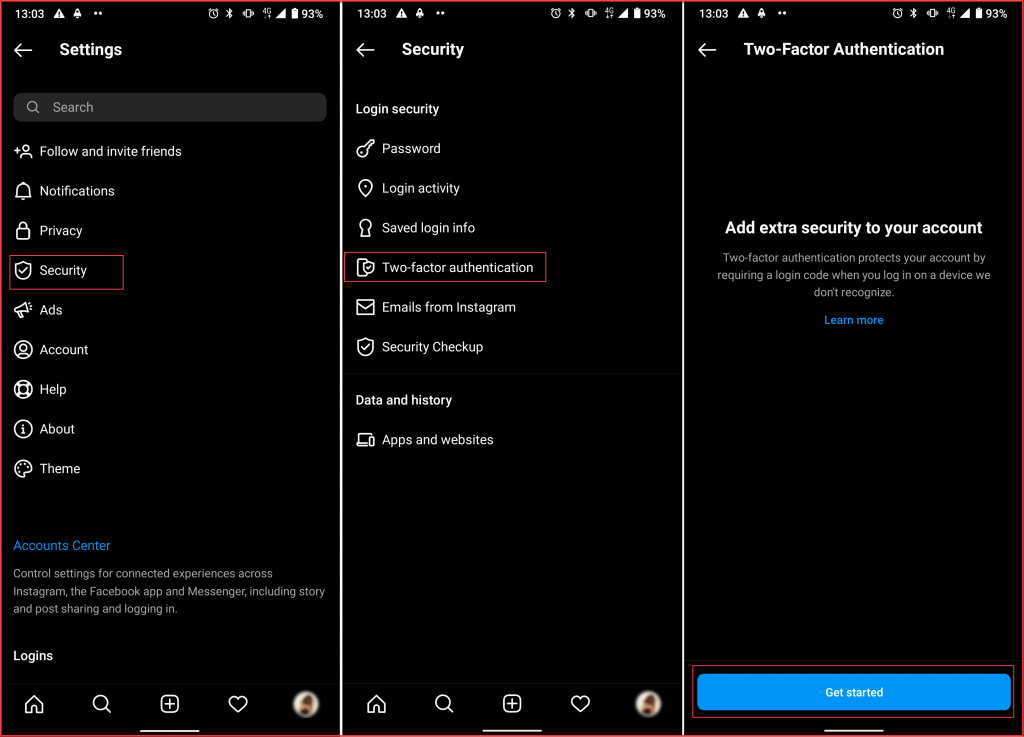
Instagram, similar to other major social media platforms, includes two-factor authentication to prevent Instagram hacked account issues. By activating its two-factor authentication, you need to enter an SMS code whenever you log in from an unknown device. To enable this feature, follow these steps:
- Go to your Instagram profile and open “Settings.”
- Tap “Security.”
- Scroll down and select Two–Factor Authentication.
- Select “Get Started.”
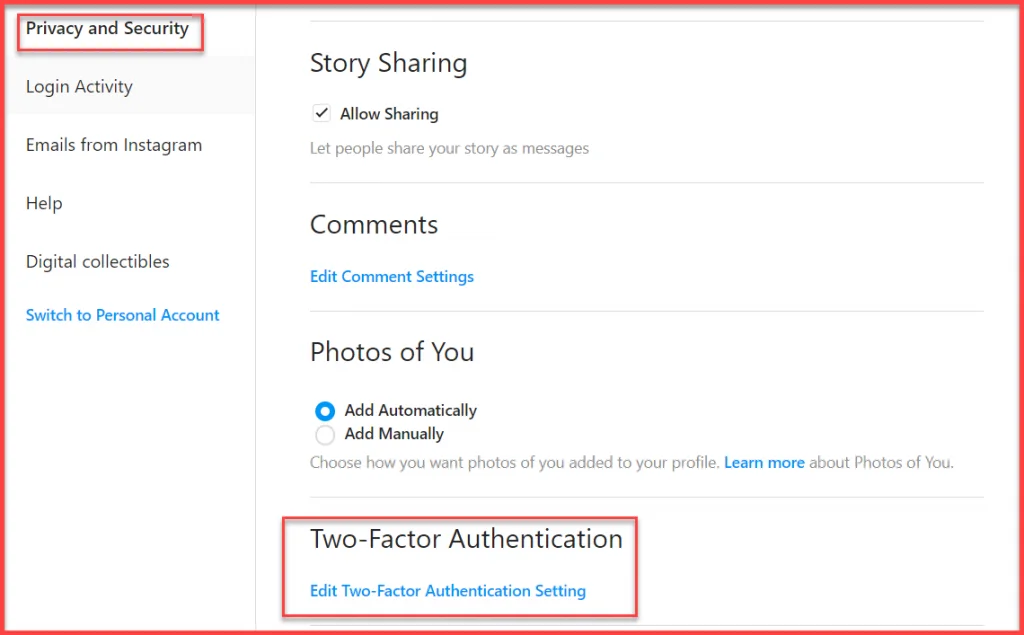
To active two-factor authentication from the browser:
- Sign in to your account and click on the profile icon on the top right of your screen.
- Go to Settings and select “Privacy and security.”
- Select “Edit two-factor authentication setting.”
- Click on the Text message box and enter your phone number.
Check Login Activities
One of the easiest solutions on how to know if someone hacked Instagram account or not is by checking your login activities.
To find out who is in your account and the last connection location, follow these steps:
- Go to your Instagram profile and open “Settings.”
- Select “Security.”
- Tap on “Login Activities.”
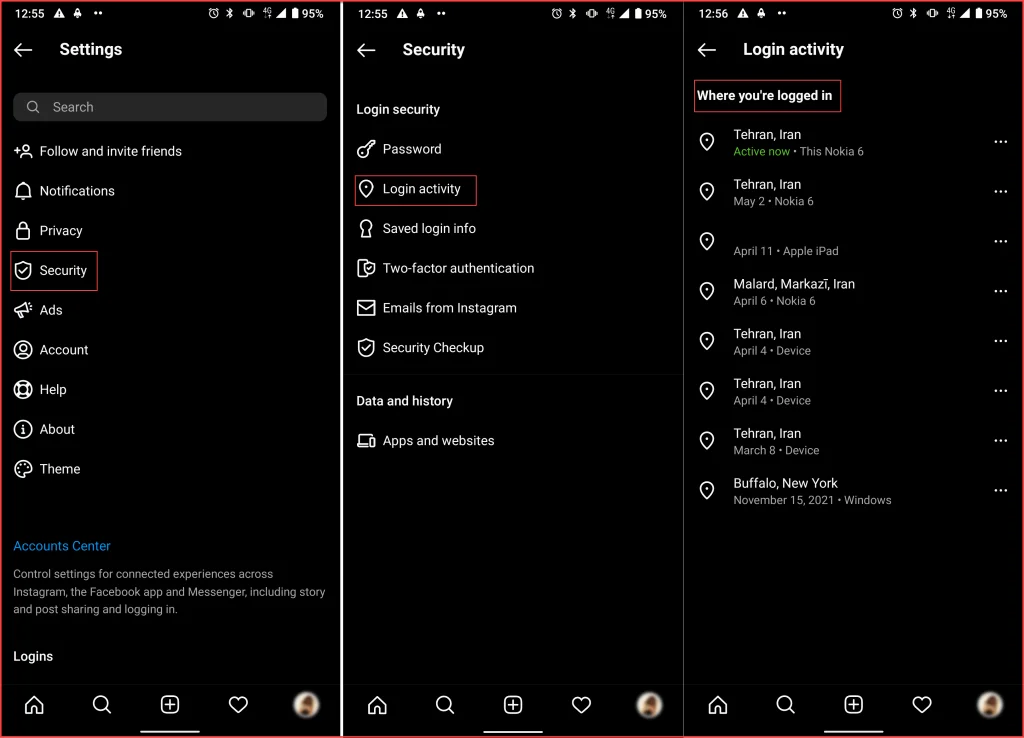
Here, you can see the list of connected devices, their location, and activity time. If you did not connect them, you can log them out of your Instagram account by tapping the three-dot icon> Log Out.
Avoid Using Unsecured Platforms.
One of the most common ways can Instagram be hacked is by using your password on unsecured platforms. Always be careful about giving access to third-party apps, especially if you use your Instagram and Facebook login details. To manage your third-party apps access:
- Log in to your account from a browser.
- Open “Settings.”
- Click “Apps And Websites.”
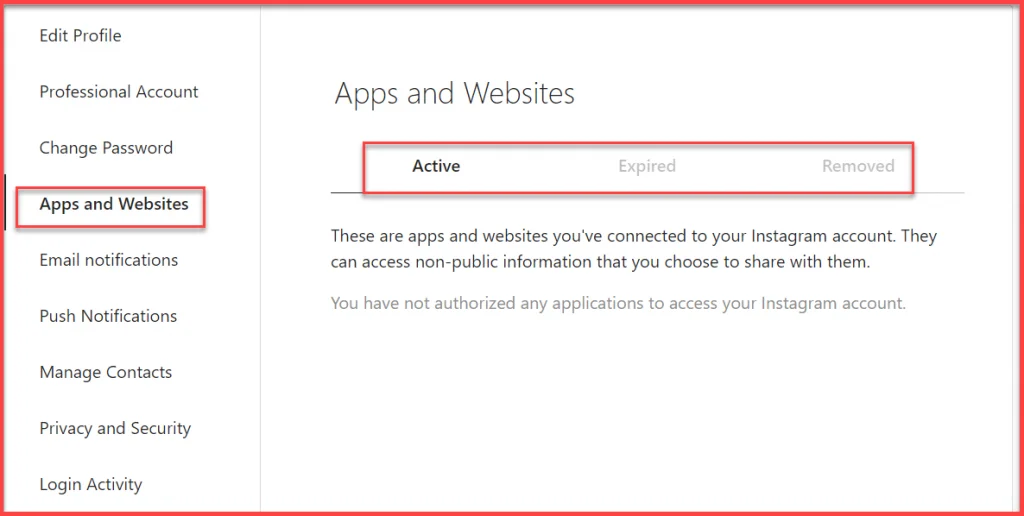
You can see a list of applications that have access to your profile information.
Many users use unsecured apps to schedule Instagram posts, gain followers, etc. We recommend you not to use them to protect your account from account hacked Instagram issues and alternatively use AIGrow which is 100%safe and secure.
AiGrow

AiGrow is an Instagram management and growth platform that helps you grow your page safely and securely. This platform has claimed its users’ trust during the past years due to the safe platform and website. This platform doesn’t use any automation, and with 24*7 support team guarantee’s your account’s safety. Some of its main features are:
- Dedicated account manager
- +300 new followers in a month
- Schedule posts and stories
- Repost content on Instagram
- Hashtag generator
- Account monitoring
Read more: Is there any application for hacking Instagram accounts?
What To Do When Your Instagram Gets Hacked?
Up to here, we talked about how do Instagram accounts get hacked and simple ways to prevent it. Not what to do if you get hacked on Instagram?
First, try not to panic and log in to your account. If you have activated two-factor authentication, you can recover your account with the security code that Instagram will send to your number.
If not, go to the Instagram login page and enter your username. When your account is hacked, your password will not work anymore. Press Forgot password and use the link sent to your email address. You can easily revoke access to the strange apps by clicking the Revoke Access button.
Note: Keep in mind, that AiGrow is an entirely safe platform that keeps your account information secure.
Read More: AiGrow’s Privacy Policy
How To Recover A Hacked Instagram Account?
If the hacker hasn’t changed the username yet, follow the previous steps to recover your account password. If your username is changed, report Instagram account hack to the Instagram help center for hacked accounts immediately to get a security code. Follow these easy steps:
- From the login page, select Get help logging in
- Enter your email address or phone number( If your Instagram account is hacked and your email is changed, enter the phone number)
- Wait for the security code on your phone.
- Enter the code( it’s Autofill)
- Log in to your account.
After logging in, change your password, email address, etc., as fast as you can. Also, check your login activity and cut the stranger out of your account. After doing a report hacked Instagram account, activate your two-factor verification to increase your security.
Conclusion
Instagram is one of the most popular social media platforms with many users; this brings hackers’ attention to this application. This article showed how do Instagram accounts get hacked and how to maximize your account security to prevent your Instagram account from being hacked. Also, we answered the question I have been hacked; how do I fix it? So if you have any problem with your account security, don’t miss this article.
If you have the password of an account and the two-factor verification is off, you can easily log into their account without them getting notified. Otherwise, they will receive a notification saying someone else is trying to log into their account.
If you are viewing suspicious activity on your account( posting content, following new users, sending DMs, etc), you are probably hacked. To view and remove active devices follow these steps:
Go to your Instagram profile and open “Settings.”
Select “Security.”
Tap on “Login Activities.”
Choose the device that is not yours and tap “Remove.”
If you have activated two-factor verification, you can use your phone number to change your password. Otherwise, if the hacker hasn’t changed your username, you can use your email inbox to reset your password. But if it’s changed, contact the Instagram support team and explain the situation.
