


Instagram, with more than one billion active users in a month, is one of the most popular social media platforms these days. As its popularity is increasing, Instagram is adding more tools and features to make it better for everyone. One of these features is the Instagram location tag which can help you increase your visibility on the platform. In this article, we will show you how to add location on Instagram and use it to boost your engagement rate.
Why Add A Location To Instagram?
Before talking about how to add a location on Instagram, let’s see what is it for and how to use it for your business. Instagram location tag is a great feature for those who want to increase their engagement rate on the platform. By adding a location to your photos and videos, you let your followers know where you are without telling it in the caption.
For brands, businesses, and those who use Instagram professionally, there are two main reasons to use location tags; You can share your business location with customers to increase your discoverability or use fun locations to show personality. In the next parts, we’ll show you how to use this feature and how to add your own location on Instagram.
How To Add Location On Instagram?
Want to know how to add location on Instagram for different content? In this part, we provide you with a step-by-step guide about locations for Instagram posts, stories, reels, and bios and how to set your Instagram location settings.
Curious about how to add a link to an Instagram post? Click the link.
Add Location To Instagram Posts
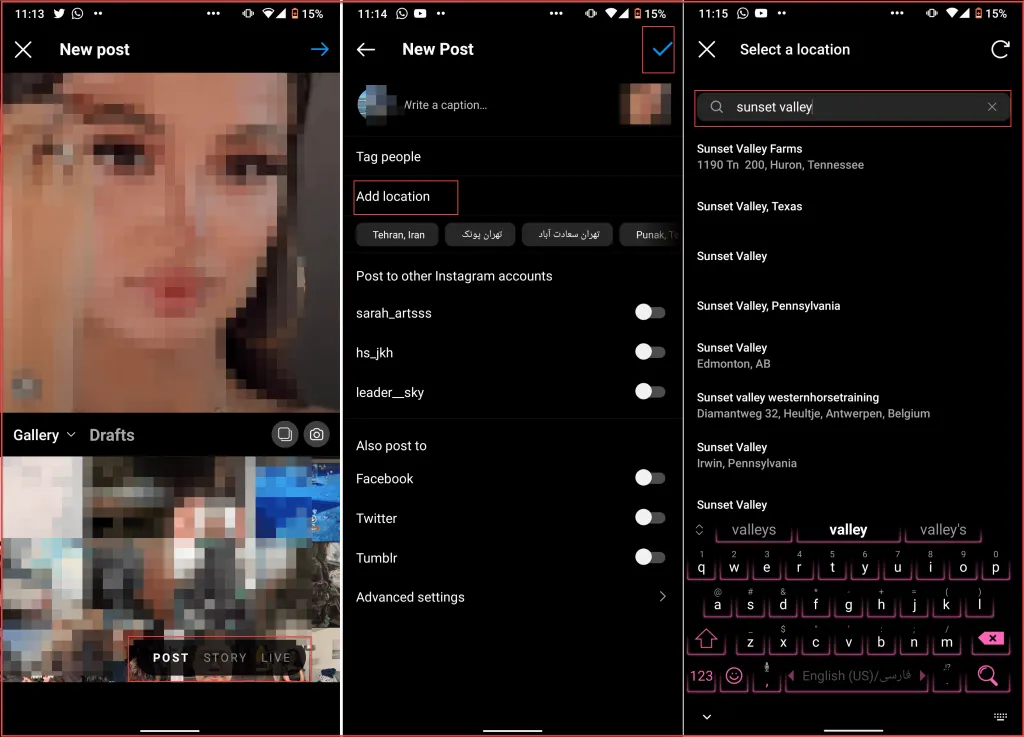
Let’s start with Instagram posts and show you how to add location on Instagram post manually. Follow these simple steps to add location to Instagram posts:
- Log into your Instagram account and go to your feed page.
- Tap the “+” button and choose “Post.”
- Select the photo from your gallery and tap the next button.
- Choose your filter and tap next.
- Write your caption and tag users.
- Tap “Add Location” and search for the location you want to tag.
Add Location To Instagram Stories
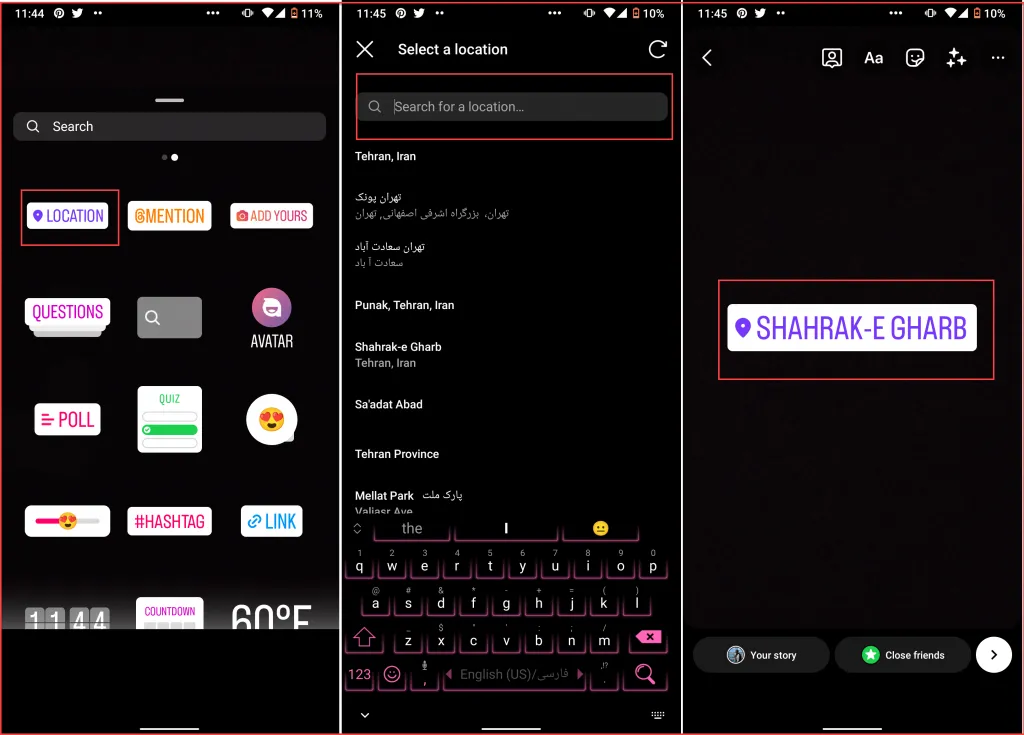
More than 500 million users use Instagram stories every day to share content, view photos of their friends, and contact them. This makes Stories a perfect place to increase your visibility and use Instagram location ideas. Here’s how to add location on Instagram stories:
- Log into your Instagram account and go to your feed page.
- Swipe left to open your stories.
- Scroll up to select the content from your gallery or capture one.
- After adding your filter, tap the stickers icon at top of your screen.
- Select the “Location” sticker and search for the address you want to include.
- Add music to your story and other stickers.
- Share your story as you normally do and you are done!
Read more: Instagram Story Viewer Order- what is it and how to use it?
Add Location To Instagram Reels
Instagram Reels is one of the latest features added to Instagram that allow users to create creative and fun videos. Let’s see how to add location tags to your reel videos in a few simple steps and use Instagram location ideas:
- Log into your Instagram account and go to your feed page.
- Tap the “+” icon and choose reels. Once the camera screen opens, choose a video from your gallery or record one.
- Edit the video by adding sound mixes, filters, stickers, and more.
- Find the “Add Location” section and tap on it.
- At the top of your screen, use the search bar to find your location.
Also Read: How to add a link to Instagram story on desktop in 2022
Add Location To Instagram Bio
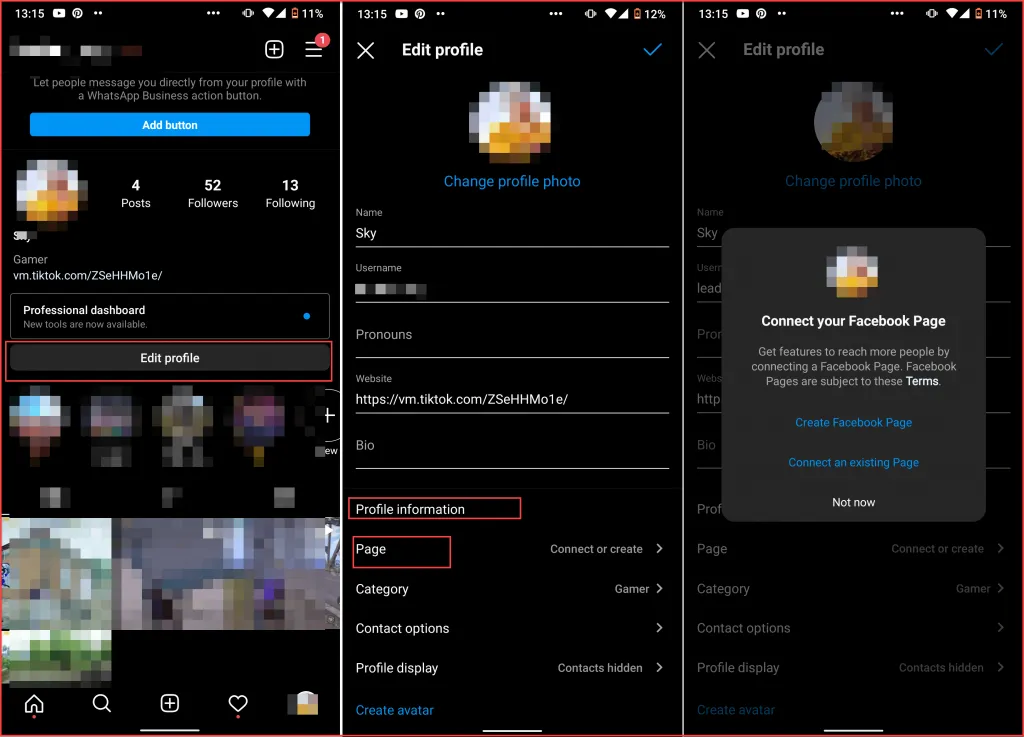
Up to here, we showed how to add location on Instagram content to increase Instagram engagement. But if you are a professional Instagrammer, you know the importance of adding your business location to your profile. Here’s how to do it:
- Log into your Instagram account and go to your profile.
- Make sure you are using a business account and select “Edit Profile.”
- From the given options under the “Profile Information category, select “Page.”
Make sure you have a connected Facebook business page to use these trending locations on Instagram.
Also Read: Easiest Ways To Share Links On Instagram
How To Share Location On Instagram DM?
In the last Instagram updates, you could search and send locations to your friends via your Instagram direct messages. Unfortunately, this feature is removed in the recent updates. But if you have older versions of Instagram here is how to send locations on your DMs.
- Log into your Instagram account and tap the magnify button to open the “Explore Page.”
- In the search bar, write a location and search for the address you want to send.
- Tap the location to view it on the map.
- Tap the send button at the top right corner of your screen.
- Search for the username and tap the “Send” button.
How To Edit The Location Of An Existing Post?
If you have added the wrong location to your Instagram post, you can edit your Instagram post anytime you want in a few simple steps. Here’s how to do it:
- Log into your Instagram account and go to your profile.
- Open the post you want and tap the three-dot button above your post.
- Choose Edit.
- Tap the location button and use the search bar to find the address you want.
- After finding and selecting it, tap “Done.”
How To Add Multiple Locations On Instagram Post?
Unfortunately, you can’t add more than one location to an Instagram post or story yet. In the last parts, we showed you how to add location on Instagram for posts, stories, reels, and IGTV videos.
How To Add A Fake Location On Instagram?
Using Instagram fake location without changing the GPS can put your account at risk since Facebook’s advanced AI can easily monitor the changes. Try using trusted VPN apps such as Nord VPN, Express VPN, and Proton VPN to change your Instagram location tag safely.
How Do I Create A Location On Instagram 2022?
Using your business location on your posts can help you increase your customers and build brand awareness. You can also reach your targeted audience using the customized location. In this part, we will show you how to add your own location on Instagram using your Facebook business profile.
How Do You Add A Location On Instagram That Is Not Listed?
Now that you know everything about how to add location on Instagram and use the ones that already exist, let’s show you how to add a new location on Instagram. For whatever reason you want your customized location, follow these easy steps to find out how to add your own location on Instagram.
- Since Instagram and Facebook are connected together, you need to use a Facebook account to create a new location. Log into your Facebook account and go to your homepage.
- Create a new post and select “Check In.”
- Allow Facebook to access your location in your Settings. Here is how to do it: Settings>Privacy>Location Services, and turn on Facebook.
- On the search bar, type your custom location name and click on the “+” button.
- Add your added location’s details and click on “Save Custom Place.”
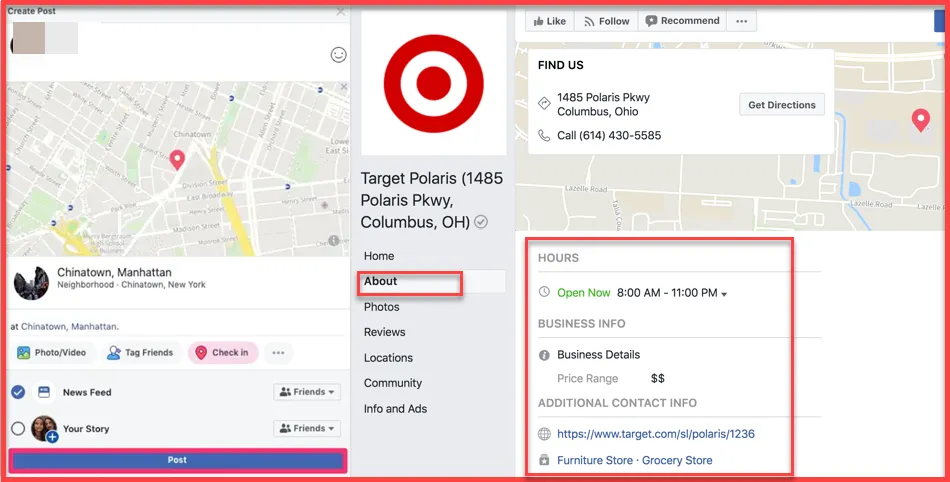
It might take a few hours for your location to appear on Instagram. But make sure to include details about your location so Facebook will approve it.
Also read: How to add text to images to gain more traffic?
How To Make A Location On Instagram Without Facebook?
If you don’t have a connected Facebook page to your Instagram account and want to know if you can still create your customized location, this is your answer. Unfortunately, there is no way to create new locations on Instagram without using Facebook yet. But you can still use the locations that already exist in the app.
So if your business location isn’t submitted, you need to either connect your Instagram page to a Facebook profile or use nearby locations.
Conclusion
Nowadays Instagram is not just a simple photo-sharing platform to share content with friends and family. Many brands and businesses use Instagram to increase their customers and attract new users. Instagram location tag is one of the helpful features that allow you to reach the potential and targeted audience. In this article, we showed you how to add location on Instagram and use this tool to increase visibility, reach, and engagement rate.
FAQs
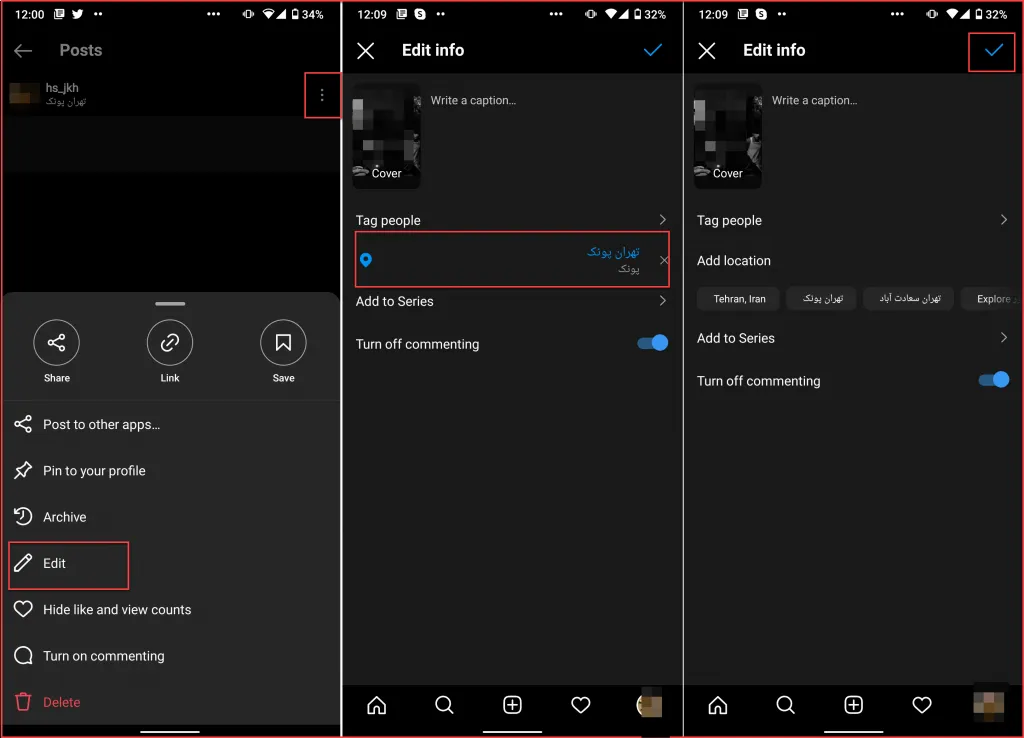
How to Remove Location From Instagram Reels?
If you don’t your location to appear on your reel video anymore, follow these simple steps to remove it.
- Log into your Instagram account and go to your profile.
- Open the reel video from your profile and tap the three-dot button at top of the post.
- Choose “Edit” from the opened menu.
- In the opened tap, you can view your location. remove it and tap “save.”
How to Add a Location on Instagram that Doesn’t Exist?
If you use a business profile on Instagram and have a connected Facebook business page, you can add custom locations and use it on both platforms.
Why Can’t I Add My Business Location on Instagram?
If your business address is already added to Instagram, you can use it on your posts, stories, and reel videos. Otherwise, you need to contact your page to a Facebook business account and submit your location from there.
Does Instagram Have Location Sharing?
In the last updates, you could share locations via your DMs on Instagram. Unfortunately, in the new update, this feature is removed and now you can’t share locations on Instagram anymore.
Which Location is Best for Likes on Instagram?
Adding your business location on Instagram helps your customers know more about your brand and contact you easily. But if you want to increase your reach and engagement rate, we recommend you use general locations.
