


After the new Instagram update, while scrolling your feed page you can notice new changes. Instagram has recently rolled out a new feature called suggested posts. Even though this feature can help creators grow their accounts and followers, many users are annoyed by this update and want to know how to turn off suggested posts on Instagram.
This article will tell you everything you need to know about this feature and how to block suggested posts on Instagram.
What Are Suggested Posts On Instagram?
On May 2022, Instagram changed the feed page and launched a new feature, suggested posts. As you know, your feed page has always consisted of content from users you follow or posts from hashtags you chose to follow.
But in the new update, after viewing all the posts from accounts that you follow, you will face the “Suggested Posts” section. Here you can view content from users you are not following based on users you interact with and the posts you like or save.
So in the short form, suggested posts are what Instagram thinks you might love but you might not have heard of yet.
If this new update is annoying you, keep reading to find out how to turn off suggested posts on Instagram.
How To View Suggested Posts On Instagram?

To access and view the suggested posts on Instagram, you need to scroll down your feed until the “You Are All Caught” message pops out. This means you have seen all posts from the accounts you follow. Underneath this message, suggested posts appear which are the content the Instagram algorithm believes you are interested in.
This new update can be annoying if you don’t care about what other users post or want to keep your feed page clean.
What’s The Use Of Suggested Posts?
Before showing you how to get rid of suggested posts on Instagram, let’s see what’s the use of them to decide whether you need them or not. These posts are to help you find interesting content based on your interests. Instagram suggested posts are based on:
- Your activity: Who you follow and what posts you’ve liked, saved, or commented on.
- Connections: History of connecting with that account or similar accounts on Instagram.
- Information about the post
- Information about the account: How many times users have interacted with that account in the past few weeks?
Are Suggested Posts Ads Or Sponsored Posts?
Before learning how to stop suggested posts on Instagram, let’s check if they are sponsored posts or not. Here’s what Instagram says about these posts: “Keep in mind that suggested posts you see in feed aren’t ads from businesses. If you see something that doesn’t follow our Community Guidelines, you can report it.”
So the answer is NO! Suggested posts are not ads and are the posts Instagram algorithms think you might like based on your previous interactions with similar content. Ads are different and labeled “Sponsored.” To find out how to remove sponsored posts from Instagram, you need to report these posts or unfollow the creators.
Can You Hide A Suggested Post On Instagram Feed?
Unfortunately, if you don’t like Instagram’s new suggested posts feature, there is no way on how to hide suggested posts on Instagram. However, you can teach Instagram AI and algorithms to show you the types of content you are more interested in. So while you can’t turn off or hide suggested posts from appearing on your feed page, you can tell Instagram that you are not interested in these suggestions.
Also read: How to Hide Followers on Instagram
This will not make the posts go away, but it will help Instagram AI for future suggested posts. In the next part, we’ll show you how to turn off suggested posts on Instagram 2022 this way.
How To Turn Off Suggested Posts On Instagram?
Many Instagrammers are annoyed by the latest Instagram update and the new suggested posts tool. If you are one of these users who want to know how to hide the suggested posts on Instagram, here is what you need to know. Follow these three easy steps to turn off suggested posts Instagram.
- Scroll down your feed till you reach the suggested posts.
- After finding one, tap the three-dot button at the top-right corner.
- Choose “Not Interested” from the pop-up menu.

How To Make Your Post As Suggested On Instagram?
Suggested posts are a perfect way to reach targeted users, increase followers, and boost your engagement. There is no absolute solution to make your content appear in the suggested posts section. But there are a few things you can try to increase your chance. Here is what you can do:
Use Related Hashtags
If you are a professional Instagram user, you are probably aware of the power of using Instagram hashtags for growing your account and finding interested users. Instagram monitors and uses the hashtags you mostly use to find out what your content is. Next, it shows your posts to interested users’ feeds and explores pages.
So the first and most important step to increasing your audience is finding the top and most related hashtags. But how to find them?
Find Top Hashtags With AiGrow
AiGrow is an Instagram management and growth service with all the essential features every professional Instagraamar needs. Some of the top AiGrow features are:
- Hashtag generator
- Organic followers
- Content scheduler
- Multiple links in the bio tool
- Contest and giveaway tool
With AiGrow’s hashtag generator tool, you can find your top niche hashtags in a blink and directly use them in your posts. Also, you can monitor their growth and view their top posts to get ideas for your posts. Here is how to use this tool:
- First signup on AiGrow’s website for free and log into your account.
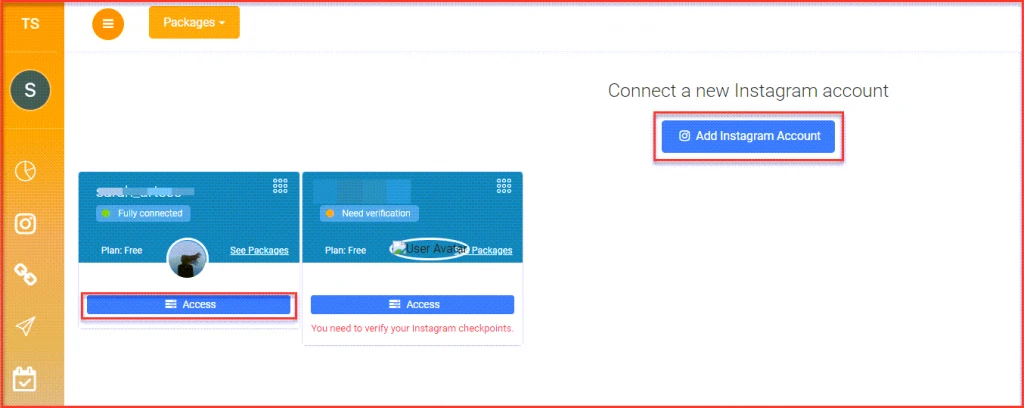
- Click “Add Instagram Account” to connect your Instagram page to AiGrow.
- Select “Access.”
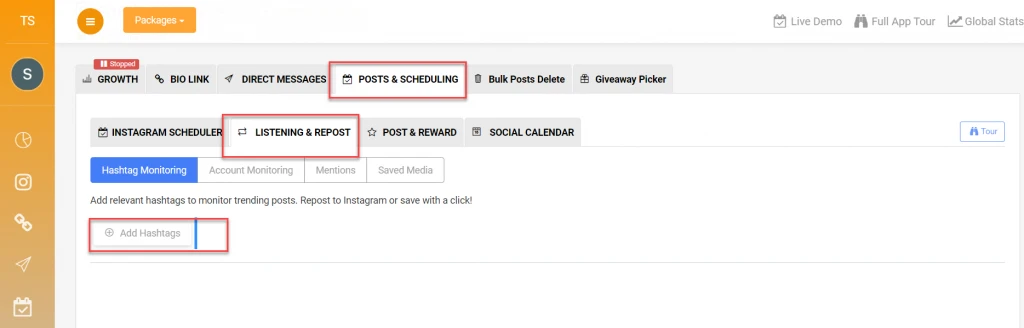
- From your dashboard, open the “Posts&Scheduling” tab and select “Listening&Repost.”
- Open the “Hashtag Monitoring” tab and click “Add Hashtags.
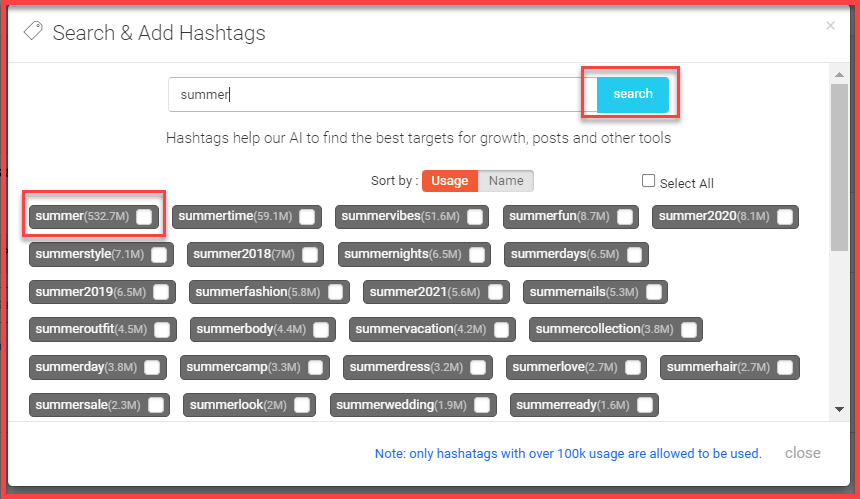
- Write a keyword related to your content in the opened window and click “Search Hashtags.”
- After a couple of seconds, the AI engine generates a list of the most used and top hashtags. Select the ones you want and use them in your captions.
Tag Similar Accounts
Another good way to let the Instagram algorithm figure out what your content is about is by tagging similar accounts. For example, if you are showcasing your artwork, you can find and tag top artists in your post. If you have enough followers, you can also ask other artists for collaborations and share posts with the “Paid Partnership” tags.
Also read: How to Reset Instagram Explore Page?
Conclusion
While Instagram suggested posts are perfect for content creators and brands to increase their reach and engagement rate, it’s annoying for users who want to keep their feed page simple with posts of users they follow. This article showed you how to turn off suggested posts on Instagram in three simple steps. Also, we showed some tips to help creators make their content suggested to other users by Instagram.
If you don’t follow too many users, your Instagram feed page is probably full of suggested posts. Unfortunately, there is no absolute way to get rid of them yet, but you can hide the ones you are not interested in.
Want to know how to turn off suggested posts on Instagram? Follow these three easy steps:
Scroll down your feed till you reach the suggested posts.
After finding one, tap the three-dot button at the top-right corner.
Choose “Not Interested” from the pop-up menu.
Unfortunately, if you don’t like Instagram’s new suggested posts feature, there is no way to stop them from appearing on your feed page. But you can tell Instagram that you are not interested in these suggestions.
