


Instagram tags not working can mean three different problems. You can’t tag someone, a tag you received never reaches your profile, or a hashtag sends your post nowhere. Each one has its own cause, and most sit in a setting you can check in a minute.
Start by ruling out the method. A tag only lands when you pick the account from the suggestion list, and the steps differ between formats, so confirm you know how to tag someone on an Instagram post, Story or Reel before you blame the app.
Below you will find the real causes, the fix for each one and the limits Instagram publishes. Every setting and limit comes from Instagram’s Help Center pages, read in November 2026.
Key Takeaways
- Most tag failures trace back to the other person’s Tags and mentions settings, not to your phone.
- If your own account is private, Instagram says you can tag only your followers.
- A tagged photo missing from a profile usually means Manually approve tags is on or the post was hidden. The person still gets a notification.
- Instagram’s Help Center now allows up to 5 hashtags per post, and a comment with more than 5 will not post.
- Story mentions stop at 20 people per photo or video. Instagram publishes no number for people tagged in a feed post.
Instagram Tags Not Working? Find Your Problem First
Three separate problems hide behind the same complaint, and each needs a different fix. Match what you see to its usual cause in the table before you change any setting.
| What You See | Usual Cause | Where the Fix Sits |
|---|---|---|
| A Can’t tag message, or no suggestion appears | The other person limits who can tag them, or a block is in place | Their Tags and mentions settings |
| A Story or comment mention will not link | They changed who can @mention them | Their mention setting |
| The tag worked, but it is missing from their profile | Manually approve tags is on, or they hid the post | Their Tagged tab and tag options |
| A hashtag is dead, or the caption will not post | More than 5 hashtags, or a space or symbol inside one | Your caption and comments |
| A hashtag page never shows your post | Your account is private, or the tag is restricted | Your privacy setting, or a different tag |
The first three rows are about people, so the fix usually lives on the other person’s account. The last two are about hashtags, and the fix lives in your own caption. The sections below follow that order.
Why You Can’t Tag Someone on Instagram
Every account chooses who can tag it, so the cause is often a decision the other person made. Work through the six reasons below in order.
The Other Person Limits Who Can Tag Them
An account can allow tags from everyone, from people it follows or from no one. Instagram’s page on tag and mention permissions says anyone outside the chosen audience sees a notice that the person does not allow tags from everyone.
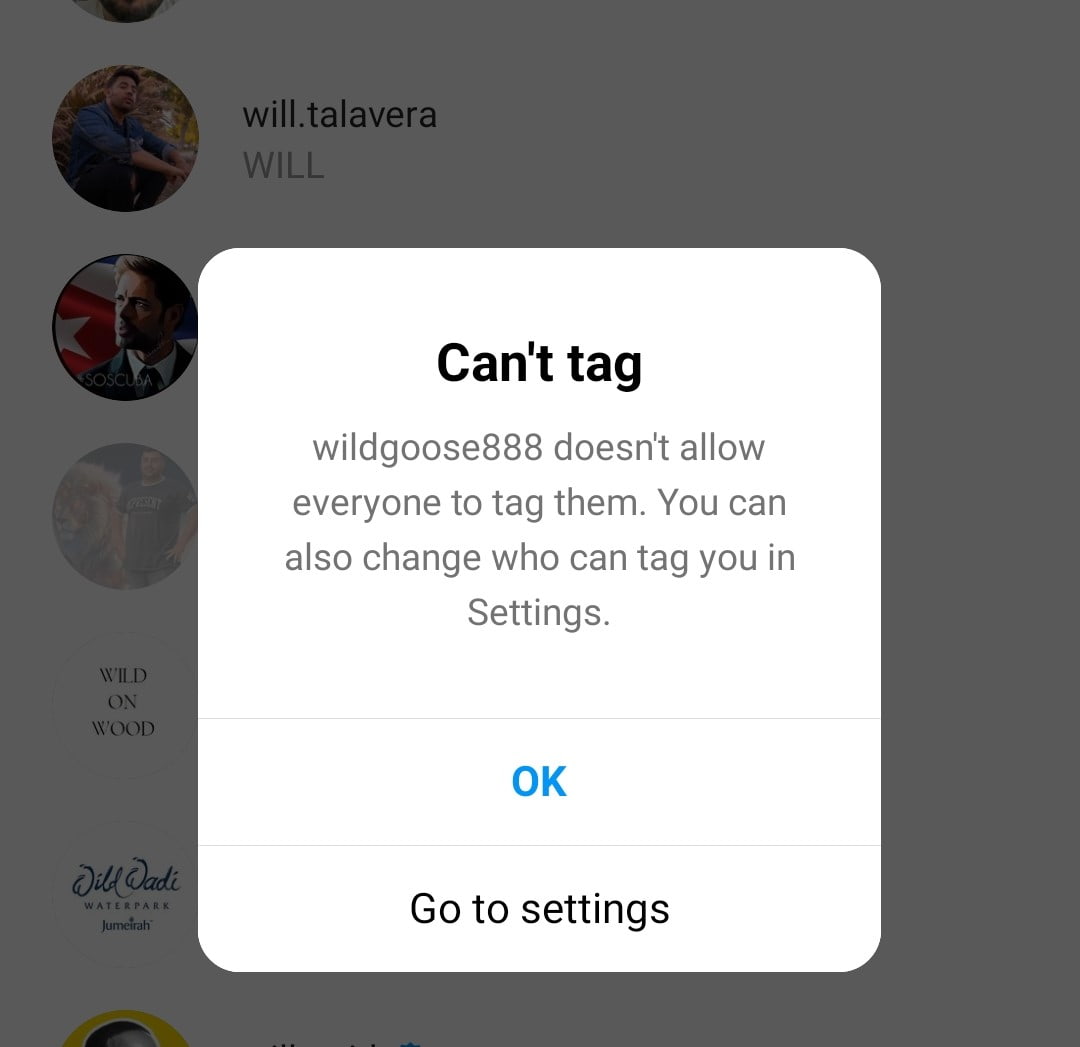
You cannot override this from your side. Ask the person to switch Who can tag you to Allow tags from everyone, then try again.
Your Own Account Is Private
A private account can tag only its own followers, which is easy to miss because many guides say the opposite. Instagram’s tagging page ties the rule to the account that does the tagging, and none of the Instagram pages checked for this article say a private person cannot be tagged.

Say you run a private shop account and try to tag a supplier who does not follow you. The tag fails, even though the supplier’s own tag settings are fine. Ask the supplier to follow you, or switch your account to public.
Blocks, Deleted Accounts and Wrong Usernames
Instagram says a blocked person cannot tag you or mention your username, so a block on either side belongs on your checklist. Search the username from a second account. If the profile loads there but not on yours, a block is likely, and there are more ways to tell if someone blocked you on Instagram.
A deleted or deactivated account has nothing to select, and a misspelled name finds the wrong person. Type @ and the first letters, then tap the account in the list.
Tag Limits and Format Rules
The one tag limit Instagram publishes applies to Stories. Instagram’s Story mention page says you can mention up to 20 people in each photo or video you share.
For feed posts, many guides repeat a cap of 20 tagged people, but Instagram’s tagging pages give no number, so treat it as unconfirmed. Two format rules are confirmed. You can tag people only in your own posts, and a post you already shared takes new tags through Edit.
A Story you already posted works differently. Tap the Story, tap Mention, and the person gets a notification, although their username will not appear on the Story.
Story, Comment and Bio Mentions
Mentions and tags run on two separate settings. Who can @mention you covers Stories, comments and captions, while Who can tag you covers photos and videos. A person can allow one and restrict the other.

Instagram’s mention page lists Stories, comments and captions, and it does not list bios. If a bio mention fails, retype the username and tap the account in the list.
Collab Invites That Will Not Send
Collabs follow stricter rules than tags. Instagram’s page on collaborative posts says a private account can invite only accounts that follow it, while a public account can invite public or private accounts.

A post takes up to 5 collaborators, and each one must accept before the name appears. If the message above shows, make your account public or ask the person to follow you. To add someone after the post is live, there is a separate route for how to add a collaborator on Instagram after posting.
How to Fix Instagram Tagging Step by Step
Run these steps in order and stop when the tag works. The first four sit on your side, and step 5 needs the other person.
- Read the message Instagram shows. A Can’t tag or Can’t invite notice names the cause, and its wording shows whether the setting is yours or theirs.
- Retype the @ and the first letters of the username, then tap the account in the list so Instagram links it.
- Check your own privacy. If your account is private, you can tag only your followers.
- Add the tag after posting. Open the post, tap Options in the top right, tap Edit, then tap Tag people and pick the person.
- Ask the person to open Tags and mentions. On a phone they tap Profile, then Menu, then Tags and mentions. Under Who can tag you, they choose Allow tags from everyone.
- Update the app and restart your phone. If tags still fail for every account you try, wait out an Instagram outage that affects everyone. If other people tag fine, reinstall the app.
The screenshots show the path for step 5.
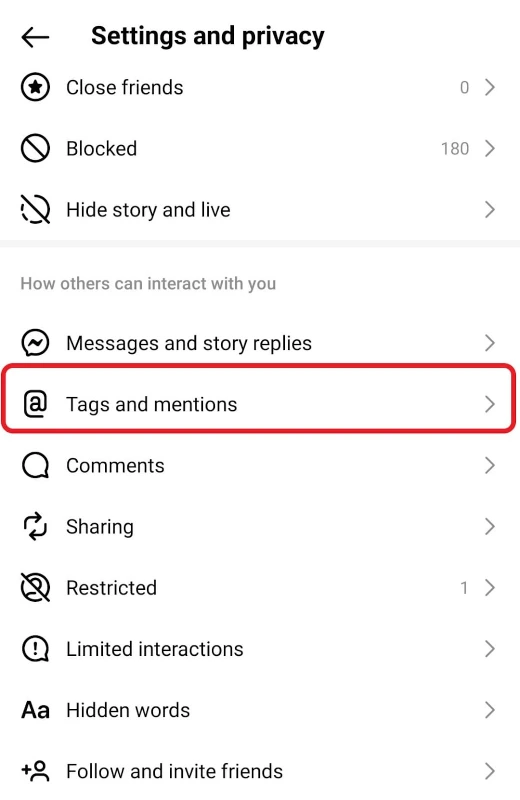

In the right screen, tags are open to everyone, yet mentions are limited to people the account follows. That split explains why a tag can work while a mention fails.
Instagram Tagged Photos Not Showing on Your Profile
A tag can work for the sender and still stay off your profile. By default, Instagram adds a tagged photo or video to your profile automatically, unless it detects potential spam.
Three things decide what you see. Manually approve tags keeps tagged posts off your profile until you accept them, though you still get a notification. Hide From My Profile removes one post from view without removing you from it. Remove Me From Post takes your tag off the post.
- Open your profile and tap Tagged. On a computer, click your profile picture, then click Tagged.
- If the post is missing, tap Menu, then Your activity, then Tags.
- Open the post, tap Options, tap Tag Options, then tap Show On My Profile.
- To stop approving tags by hand, open Tags and mentions and turn off Manually approve tags.
Who can see a tagged post on your profile follows your own privacy. Instagram’s page on tagged post visibility says public posts show to anyone, while private ones show only to confirmed followers.
If you would rather hide a post, there are more ways to hide tagged photos on Instagram without losing the tag.
Tag Notifications Not Arriving
A private account tags quietly. Instagram says the person tagged by a private account gets a notification only if they follow it. Story mentions arrive as a direct message with a preview that disappears after 24 hours.

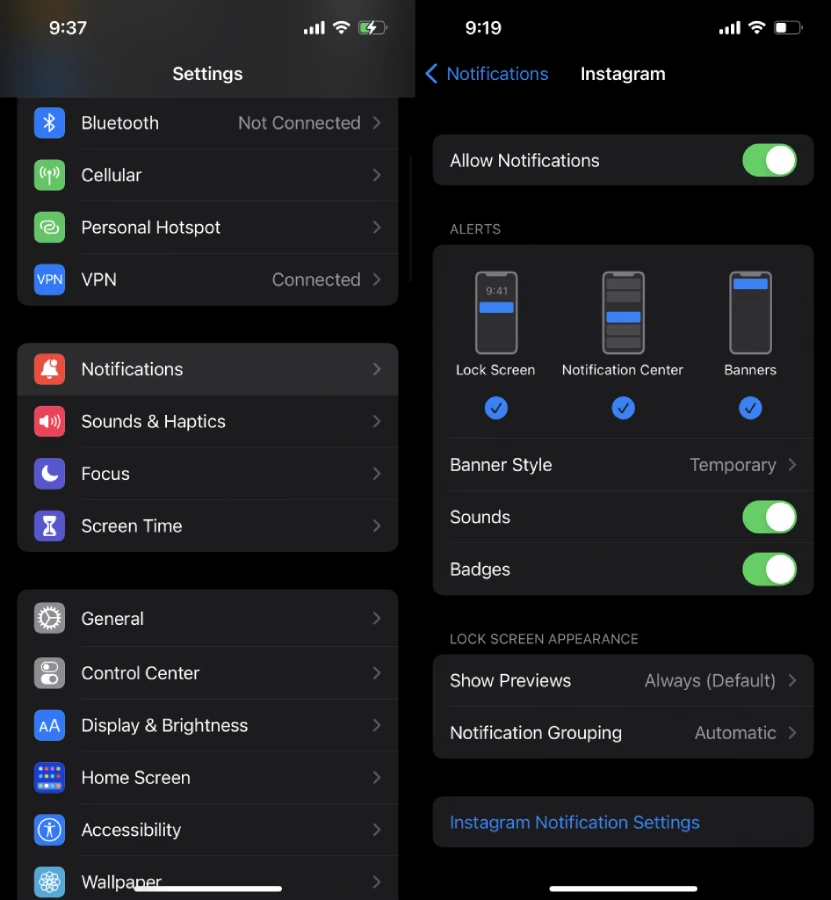
If nothing arrives from a public account either, check the notification permission for Instagram on your iPhone or Android, then the in-app options. Those two switches are the first place to look when Instagram notifications are not working at all.
Instagram Hashtags Not Working
The count is the usual culprit. Instagram’s hashtag page says you can use up to 5 hashtags on a post, and a comment with more than 5 will not post. The cap fell from 30 in December 2025, so a list copied from an older guide now fails. Spaces and symbols such as $ or % also break a tag.
Visibility is the second cause. A private account’s post never appears on a hashtag page, and Instagram says a hashtag may be unsearchable when its text or content consistently breaks the Terms of Use or Community Standards. If a tag goes quiet, swap it for a specific one.
Instagram Tag Limits at a Glance
The graphic lays every limit Instagram publishes along one ruler, with a flag planted where each cap stops.
Figure 8. Limits Instagram publishes for hashtags, Story mentions and collaborators (Instagram Help Center, November 2026).
Read it from the left. Hashtags and collaborators stop at 5, Story mentions stop at 20, and the old hashtag cap sat at 30. The dashed line below never ends because Instagram gives no feed post number, so a tag that fails at 20 people may have another cause, such as a person’s settings.
Final Thoughts
When Instagram tags not working shows up, sort the problem first: tagging, tagged photos or hashtags. Then open the one setting that belongs to it, which is usually Tags and mentions, a caption with too many hashtags or a choice the other person made.
If a tag fails after Instagram flags unusual activity, the fixes for the we restrict certain activity message on Instagram are worth trying next.
