


With over one billion active monthly users, Instagram has become one of the most popular social media platforms for brands and businesses looking to expand their audience. It also serves as an ideal platform for artists, musicians, and singers to enhance the reach of their albums and connect with listeners. In this article, we guide you on how to link Instagram music to artist profile, enabling you to monetize your presence on the platform while expanding your audience.
Also, we will introduce you to an Instagram management tool that will speed up your growth and save you considerable time.
So, are you ready? Let’s dive in.
How To Link Instagram Music To Artist Profile?
If you are an artist, singer, or musician using Instagram to increase your fans and awareness, you probably need to connect your songs to Instagram music. In order to do so, you need to know about DistroKid. In the following section, we’ll talk about DistroKid in more detail.
What Is DistroKid?
DistroKid is one of the most known and best digital music distributors. This platform allows artists and musicians to send their albums, singles, and cover art to various streaming platforms such as Apple Music, Spotify, TikTok, Instagram music, Amazon, Pandora, YouTube, and more.
By utilizing DistroKid, your music becomes accessible to users across these platforms, allowing them to discover, use, and listen to your music. So, if you are an artist seeking to know how to link Instagram music to your artist profile, DistroKid is the ideal solution for you.
Do you know how to add music to an Instagram story? Click the link to learn.
How To Use DistroKid?
How do I get my song linked to my Instagram profile using Distrokid? Before learning how to link Instagram music to artist profile, it’s important to release your song on DistroKid. To get started, sign up on their website and select the plan that suits your needs. The pricing details for their packages can be found in the image below.

Once you have logged into your DistroKid account, you will be prompted to complete your profile. This involves providing your social media information and categorizing yourself based on your expertise, such as being a songwriter, producer, or singer. You can also select your genre and specify your artist influences.
With your profile set up, you are now ready to release your single or album. Here’s how to do it:
1. From your homepage, click on the “Upload” button located at the top.
2. In the next stage, you will be able to choose the platforms where you want DistroKid to upload your music. Select the desired platforms from the available options.
3. Proceed by indicating the number of songs you intend to upload.
4. You will then be asked whether your music has been previously released or not. Select “yes” or “no” accordingly.
5. Enter your artist name as you would like it to appear on the platforms.
By following these steps, you can successfully release your single or album through DistroKid and have it distributed to the platforms you have selected.
Connect Instagram Account To DistroKid
After successfully uploading your music, it’s time to learn how to link Instagram music to your artist profile. Follow these steps:
After successfully uploading your music, it’s time to learn how to link Instagram music to your artist profile. Follow these steps:
1. Open the DistroKid app on your device and sign in to your account.
2. Locate the “Settings” icon and tap on it.
3. In the settings menu, find and select “Social Media.”
4. Look for the “Instagram” section and tap on it.
5. Within the Instagram section, you will see a “Connect” button. Tap on it to initiate the connection process.
6. Follow the provided instructions to connect DistroKid to your Instagram page.
7. Once you have successfully connected DistroKid to your Instagram page, you can submit a request to link your music on Instagram to your artist profile. Follow the instructions provided to complete this process.
By following these steps, you will be able to link your music on Instagram to your artist profile, allowing your followers and users to easily access and engage with your music directly from your Instagram artist profile.
How To Get Verified On Instagram?
To submit and use your song on Instagram music, you need a verified Instagram account as an artist. No matter how many followers you have, you can always request account verification if you have a public business account. Here is how to do it:
1. Open the Instagram app and go to your profile page and tap on the “Settings” option.
2. Scroll down and select “Account.”
3. Continue scrolling and look for the “Request verification” option.
4. You will be prompted to provide the requested information for verification purposes. This typically includes your full name, a clear photo of your identification (e.g., passport, driver’s license), and other relevant details.
5. Once you have provided the necessary information, click on “Submit” to send your verification request.
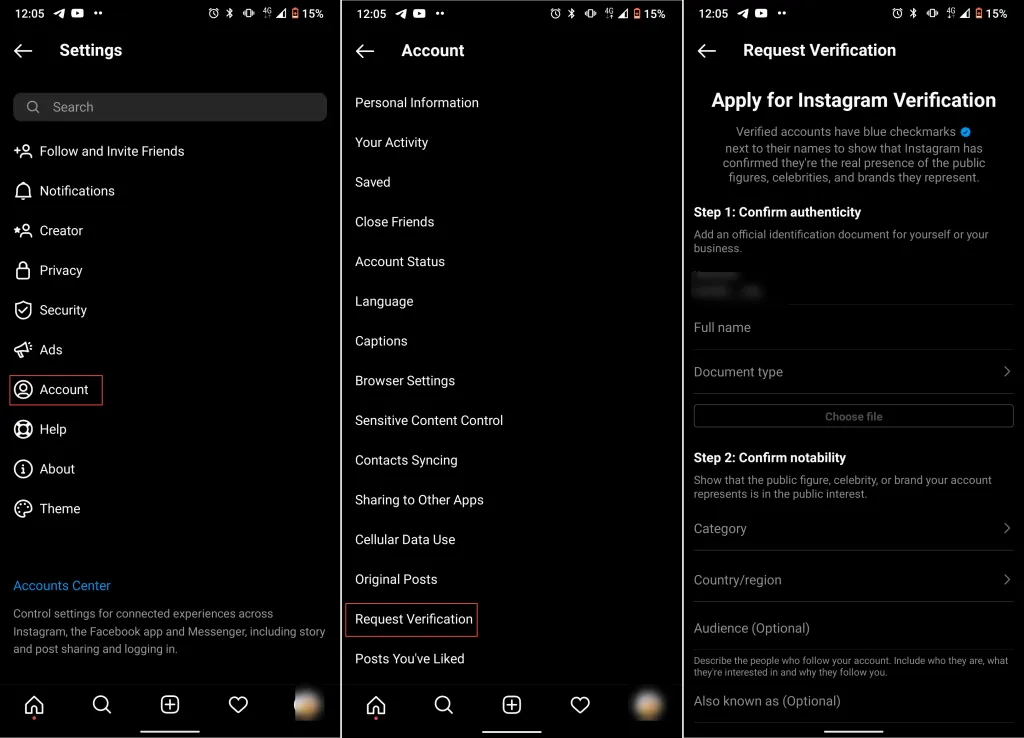
If you are unable to see the verification option in your Instagram settings, it means you haven’t switched your account from personal to business. To enable the verification option, follow these steps:
1. Log into your Instagram account and navigate to your profile page.
2. Tap the three-line icon located at the top right corner of the screen and click on “Settings” from the menu that appears.
3. In the settings menu, select “Account.”
4. Scroll down the account settings page and tap on “Switch to Professional Account.”
6. You will be asked to choose your category, such as Artist, Musician, Band, etc. Select the category that best describes your account.
7. Once you have chosen your category, tap on “Done” to complete the process.
By switchin g your account to a professional account and selecting the appropriate category, you will unlock additional features, including the ability to request verification for your account. This will enable you to link your songs to your artist profile on Instagram music.

How To Use Instagram Music?
Now that you have successfully linked your Instagram music to your artist profile, let’s see how to use it:
1. Log into your Instagram account and navigate to your homepage.
2. Scroll to the right to open the camera interface.
3. Capture a photo or video using the camera, or choose one from your gallery.
4. Proceed with editing your content and applying any desired filters.
5. Look for the Sticker icon located at the top of your screen and tap on it.
6. From the sticker options, select the “Music” sticker.
7. Use the search bar to enter the name of the song you want to add to your content.
8. Once you find the desired song, tap on it to add it to your post. You can choose to include the song’s lyrics or opt to omit them.
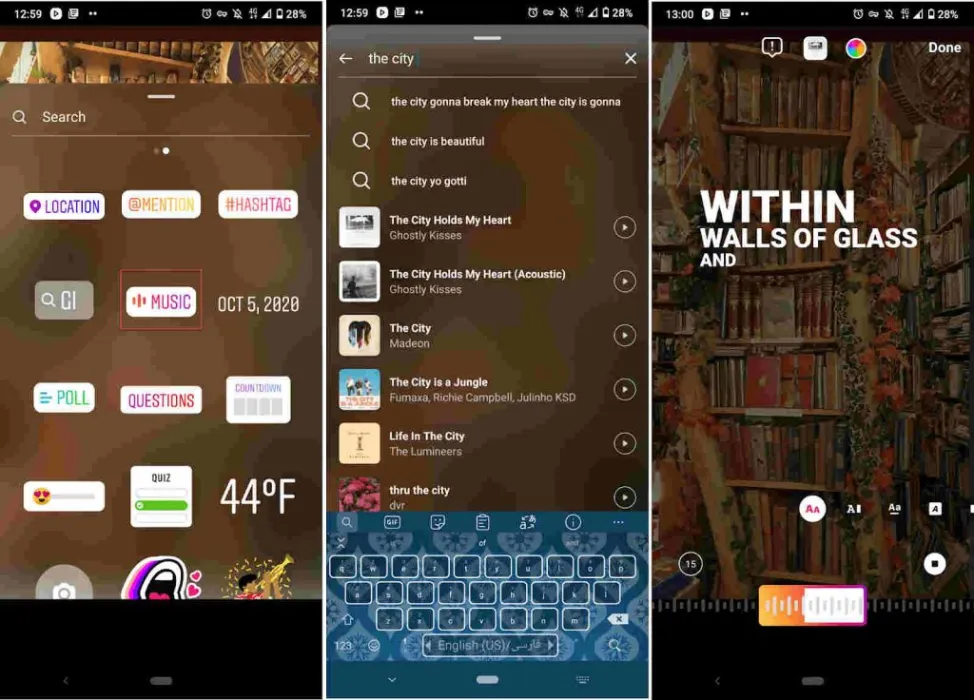
9. Add any additional details you wish, such as hashtags, user tags, location tags, etc.
10. When you are ready, share your Story as you usually do.
In addition to Stories, you can also utilize your linked song in Instagram Reels. Simply follow the steps above to add music sticker to your Reels content and create engaging videos with your music.
By using your linked Instagram profile song on IG Stories and Reels, you can showcase your music to your audience, drive engagement, and attract new listeners to your artist profile.
Add Your Album Link To Your Instagram Bio
Up to now, we have shown you how to link Instagram music to artist profile using DistroKid. However, what if you don’t have a verified Instagram account? How can you still use Instagram to increase your fans and boost the downloads of your album or singles? The answer lies in leveraging your Instagram bio.
Also read: How to Write an Artist Bio for Instagram Like a Pro in 2023
Your Instagram bio is the only place where you can add a clickable link to redirect your audience to other platforms and, in your case, enhance the reach of your albums. The only limitation is that you can share only one music link for your audience to listen to and download your songs. This means you have to choose between linking your Spotify, Amazon, Apple Music, website, and other platforms. However, there is a solution available called Bio-Link, provided by AiGrow.
With the Bio-Link tool, you can create and design your dedicated landing page, which includes multiple links and buttons. This enables you to share various links related to your music, merchandise, social media profiles, and more. The video below provides a step-by-step guide on how to create and design your landing page using Bio-Link.
By utilizing the Bio-Link tool, you can optimize your Instagram bio and make the most of the single clickable link, providing your audience with easy access to multiple platforms and resources related to your music. This can significantly help in boosting your album reach and attracting new listeners.
Grow Your Instagram Artist Account
So far, we have demonstrated how to link Instagram music to your artist profile and utilize it effectively.
However, simply linking your music is not enough to increase awareness about your artwork and grow your audience.
Also read: How To Get More Followers On Instagram As An Artist
Additionally, having a verified Instagram artist account is crucial for adding your songs to Instagram music. To address these challenges and help artists manage their Instagram presence more effectively, we want to introduce you to AiGrow’s Instagram management and growth tool.
AiGrow offers a comprehensive set of features designed to assist Instagrammers in increasing their audience and managing their content efficiently. Here are some of its main features:
- A powerful growth engine that can get you more than 200 new organic and potential followers in a month
- Dedicated account manager
- Content creation service
- Instagram post, Story, and IGTV scheduler
- Multiple links in the bio tool
- Giveaway and contest picker
- Mass delete Instagram posts
- Hashtag generator
If you find yourself lacking the time to grow your Instagram account, you can rely on AiGrow’s dedicated account manager. Simply provide them with information about your business, and they will work to organically grow your account on your behalf.
With AiGrow’s Instagram management and growth tool, you can effectively enhance your Instagram presence, attract a larger audience, and efficiently manage your artistic content.
Try AiGrow now to grow your Instagram account organically.
Conclusion
If you’re a professional musician or singer using Instagram to expand your audience, it’s crucial to learn how to link Instagram music to your artist profile and achieve greater reach. This article has provided you with a detailed guide on how to accomplish this and effectively increase your music listenership.
Additionally, we introduced AiGrow’s link-in-bio tool, which allows you to share multiple links on your Instagram bio, enabling faster growth for your account. By utilizing this tool, you can efficiently direct your audience to various platforms, resources, and opportunities related to your music.
By implementing these strategies, you can maximize the potential of Instagram as a powerful tool for increasing your audience, expanding your reach, and ultimately achieving greater success as a musician or singer.
Signup on AiGrow and use the Bio-Link service unlimited!
FAQs
Now, let’s take a look at some frequently asked questions regarding our topic, linking profile to artist Instagram music.
1. How to Link Artist Profile to Instagram Music Tracks?
To link your artist profile to Instagram Music tracks:
1. Ensure you have a verified Instagram artist account.
2. Log in to your DistroKid account.
3. Go to the settings or IG profile section.
4. Find the “Social Media” or “Instagram” option.
5. Click “Connect” or “Link” and follow the instructions.
6. Submit a request to link your music to your Instagram music profile.
7. Follow any additional instructions to complete the process.
By following these steps, you can link your artist profile to Instagram Music and make your music discoverable on the platform.
2. How Do You Add Artist Music to Instagram Profile?
To link your profile to artist Instagram music, follow these steps:
1. Ensure you have a verified Instagram artist account. If you don’t have one, you can request verification by going to your Instagram profile, tapping the three-line icon at the top right corner, selecting “Settings,” choosing “Account,” scrolling down, and tapping “Request Verification.” Provide the requested information and submit your request.
2. Make sure your music is available on a supported music distribution platform like DistroKid, TuneCore, or CD Baby.
3. Log in to your Instagram account on your mobile device.
4. Create a new post by tapping the plus (+) icon at the bottom center of the screen.
5. Select or capture a photo or video for your post.
6. Tap the Sticker icon (smiley face with a folded corner) at the top of the screen.
7. Choose the “Music” sticker option.
8. Search for the song you want to add by typing its name or scrolling through the available options.
9. Select the desired song from the search results.
10. Customize the appearance of the music sticker, such as choosing a specific section of the song or adding lyrics (if available).
11. Place and resize the sticker on your post.
12. Add any other desired elements, such as captions, art hashtags, or location tags.
13. Once you’re satisfied with the post, tap “Share” to publish it to your Instagram feed.
By following these steps, you can add your artist music to Instagram and make it available for your followers and other Instagram users to discover and listen to on the platform.
3. How Do Artists Use Instagram Music Without Copyright?
Artists can use Instagram Music without copyright issues by creating their own original music, using royalty-free music from dedicated libraries, obtaining proper licensing for copyrighted music, releasing their music through official distribution platforms, or collaborating with other musicians who have the rights to the music. It’s essential to respect copyright laws and obtain the necessary permissions to ensure legal use of music on Instagram.
4. How Can I Link My Music to My Instagram Account?
Wondering, ‘How to link music to Instagram profile?’
Follow the steps provided in the previous answers, such as having a verified Instagram artist account, using a music distribution platform like DistroKid, connecting your Instagram account to the platform, and submitting a request to link your music to your Instagram profile. By following these steps, you can successfully link your music to your Instagram account and make it accessible to your followers and other Instagram users.
5. How Can I Optimize My Instagram Music Bio to Promote My Music?
An essential step for artists looking to maximize their online presence is to establish an Instagram artist profile link, enabling them to showcase their music and connect with fans on one of the most popular social media platforms.
To optimize your Instagram Music bio and promote your music, you can utilize the Instagram Music tab on profile. By adding your music to this dedicated section, you can showcase your songs, albums, and playlists directly on your profile for your followers to explore and enjoy. This allows you to create a seamless experience for your audience, making it easier for them to discover and engage with your music on Instagram.
6. How Do I Turn My Instagram Into an Artist Account
To turn your Instagram into an artist account, follow these steps:
1. Open your Instagram app and go to your profile.
2. Tap the three-line icon at the top right corner to access the menu.
3. Select “Settings” at the bottom of the menu.
4. In the Settings menu, tap on “Account.”
5. Scroll down and choose “Switch to Professional Account.”
6. On the next screen, select “Artist” as your account type.
7. Follow the prompts to set up your artist account, including choosing your category, providing contact information, and connecting to a Facebook Page (if desired).
8. Review and adjust your privacy settings as per your preference.
9. Tap “Done” to complete the process.
By following these steps, you can convert your Instagram account into an artist account, unlocking additional features and tools tailored to artists, such as access to Instagram Music, insights, and the ability to promote your music and connect with your audience more effectively.
7. How to Link Instagram Music to Artist Profile Using TuneCore?
To link your TuneCore music to your artist profile on Instagram, follow these steps:
1. Make sure you have a TuneCore account with your music distributed through their platform.
2. Log in to your TuneCore account.
3. Navigate to the section where you manage your releases or artist profile information.
4. Look for an option related to linking or connecting your Instagram account.
5. Click on the option to link your Instagram account to your TuneCore artist profile.
6. Follow the provided instructions to authorize the connection between TuneCore and Instagram.
7. Once the linking process is complete, your music will be associated with your Instagram artist profile.
8. Does Instagram’s Music Profiles Feature Support Playlists?
Yes, playlists support is an Instagram music profile’s feature. Instagram music for artists allows them and users to create and share playlists on their profiles, providing an opportunity to curate and showcase a collection of songs that align with their musical preferences or themes. This feature enables artists to engage with their audience through customized playlists, enhancing their presence and promoting their music in a more versatile and comprehensive manner.
9. What Does ‘No Profile Has Been Linked to This Artist Instagram Music’ Mean?
The sentence “No profile has been linked to this artist Instagram music” indicates that the Instagram account associated with the artist’s music does not have a profile linked or connected to it. In other words, the artist’s Instagram account has not been set up or configured to be recognized as an official profile for their music on the platform.
This might mean that the artist has not completed the necessary steps to link their music to their Instagram account or they may not have an artist profile specifically designated for their music on Instagram.
