


“Why can’t I tag someone on Instagram?” – It’s a common question, and when you find yourself struggling to tag people, it can be frustrating. This issue can rear its head in various situations, from stories to posts and comments.
If you’re grappling with Instagram tagging problems, don’t fret – read this blog to get to the bottom of the issue. Let’s dive right in!
Why can’t I tag someone on Instagram?
To get to the bottom of this, let’s break it down into smaller issues and tackle each one step by step.
#1. Why can’t I tag someone on an Instagram post?
There are several reasons why you can’t tag people on Instagram posts:
#1. Tagging is disabled
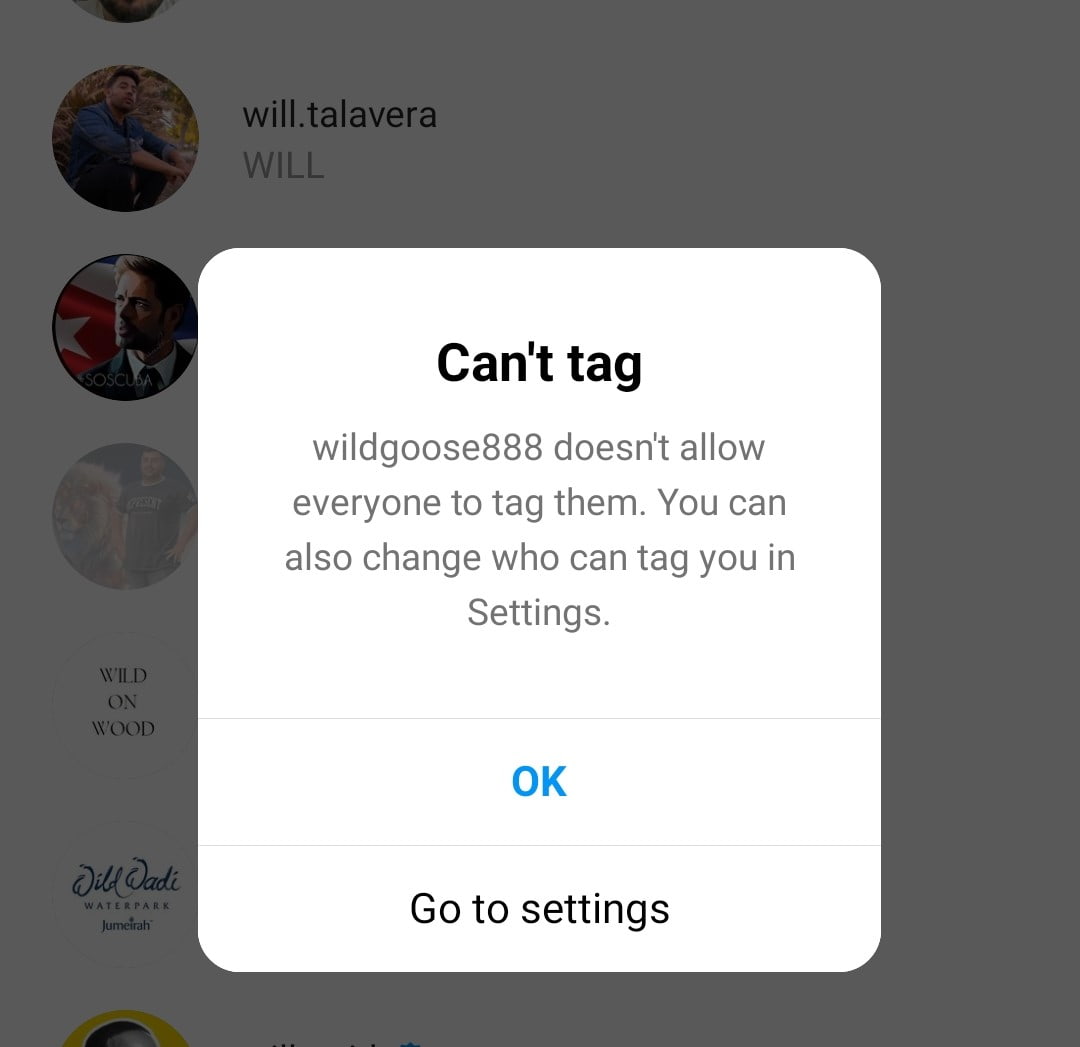
If someone has disabled tagging, it won’t be possible to tag them in a post or story.
#2. You’re tagging with a new account
Unfortunately, Instagram restricts new accounts just to take certain actions. For instance, the Instagram follow limit is 7,500. If you follow more than 7,500, you’ll face an error message, regardless of the number of your followers.
The same is true for Instagram likes. So if you want to get more likes on Instagram, pay attention to Instagram rules to avoid getting banned.
#3. You’ve reached tagging limits
Instagram enforces a limit tag of 20 users in a single post. If you reach this limit, you won’t be able to tag any more users. Keep it in mind to stay within the limit!
#4. You’re tagging a private account
Can you tag a private account on Instagram? Nope, unless you’re already following them. So, if you find you can’t tag someone, it might be because you’re not following them, and they have a private account.

#5. You’re using the wrong username
Another reason you can’t tag someone on Instagram is simply a case of mistyping their username. So, always double-check that spelling.
#6. You’ve Been Blocked By The Person
Make sure the person you want to tag in your post hasn’t blocked you on Instagram; otherwise, you won’t be able to tag them anymore. However, you can figure out who has blocked you on Instagram.
#7. The account you’re tagging is deleted or deactivated
If someone has deleted or deactivated their Instagram account or if their account has been banned by Instagram, you won’t be able to tag them.
#8. There’s an Instagram bug
Sometimes, it’s not your doing, but Instagram might be experiencing a temporary glitch. In such cases, the best approach is to wait it out, and the issue should go away itself.
#9. No Internet Connection
Yet, all those reasons aren’t related to your problem; maybe it’s better to check your connection status. Make sure you have a stable internet connection while tagging people in your post.
#10. Your app is outdated
Yes, having an outdated Instagram version can cause problems, like not being able to tag someone. So, keep that app updated for a smoother experience.
I can’t tag someone on Instagram. How to fix it?
Now that you know the reasons, it’s pretty straightforward to figure things out!
#1. Change Tagging Option Setting
You can ask the person to change their Instagram tagging setting. If they disable the “manually approve tags” option, you’ll be able to tag them in your post. To change tagging settings on Instagram, follow these steps:
- Go to your Instagram settings.
- Under “Settings and Privacy,” find “Tags and Mentions.”
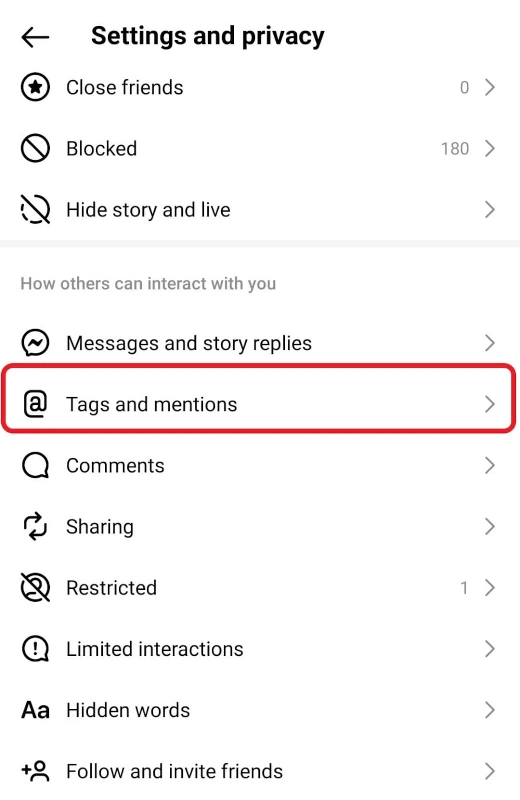
- Look for “Allow tags from everyone” and turn it on if it’s off.

- If you prefer more control, you can choose to manage your tags manually. When this option is turned on, you’ll receive requests to approve tags before they appear on your profile.
#2. New Accounts Should Wait For A Short Time.
If you’ve joined Instagram recently and your account is new, you need to wait for 1-3 weeks. After this time, Instagram will let you tag people easily.
#3. Keep The Number Of Tags Up To 20.
Ensure that the number of your tags won’t exceed 20 users; otherwise, you cannot share your post.
#4. Follow The Private Account.
If you haven’t followed each other on Instagram yet, you should send them a follow request. Then you can tag them in your post.
#5. Check Their Username.
Always double-check your spelling and use the correct username when tagging someone.
#6. Update Your App To The Latest Version.
Make sure you’re rocking the latest Instagram version, whether you’re on Android or iPhone. Just swing by the Google Play Store or the App Store and give that app an update.
#7. Report the problem
Here’s the final solution: If none of those methods do the trick for you, it might be best to reach out to the Instagram help center. Just shake your phone and simply follow the instructions.

#2. Why can’t I tag someone on an Instagram story?
When it comes to Instagram, the issues with story mentions not working and the inability to tag people are pretty similar. Let’s take a quick look at the reasons (we already mentioned above).
- 1. Disabled Mentions: If someone has disabled mentions, tagging them won’t work.
- 2. Private Accounts: You can’t tag a private account that you’re not following.
- 3. Deleted or Deactivated Accounts: Tags won’t function if the account you’re trying to tag is deleted or deactivated.
- 4. Typing Mistakes: Make sure you’re typing the correct username for tagging.
- 5. Instagram Downtime: Sometimes, Instagram experiences downtime, affecting tagging and mentions.
- 6. Tagging Limit: Instagram has a daily limit of 20 users you can tag. Going over this limit can lead to issues.
#3. Why can’t I tag someone on Instagram comments?
The most common reason you can’t tag someone in comments is that they’ve tweaked their settings and disabled mentions from others.
But, just like with stories and posts, there could be other reasons too, and guess what? The fixes are pretty similar.

#4. Why can’t I tag someone on Instagram after posting?
When you edit an Instagram post, adding tags is a key step. But if it’s not working, here’s why:
- Disabling Tags and Mentions: They might have turned off tags in their settings.
- Weak Internet: A shaky connection can mess with tagging.
- Tagging Limit: Instagram allows 20 tags a day.
- App Update: Keep the app up-to-date to avoid issues.
- Deactivated Accounts: You can’t tag deactivated or deleted accounts.
#5. Why can’t I tag someone as a collaborator on Instagram?
Instagram just rolled out a cool feature where you can invite others as collaborators when you post. If you’re having trouble with it, here’s why:
- They’re not following you.

- They haven’t approved your invitation yet.

- They don’t allow tags and mentions from others.
- You’re using an outdated version of the app.
Note: If you want to invite a collaborator who is not following you, you need to make your account public.
#6. Why can’t I mention someone on my Instagram bio?
Interestingly, Instagram allows clickable bio tags, similar to regular tagging. If you can’t tag someone in your bio, it might be due to their privacy settings, not following them, using an outdated app, or a glitch – in which case, try deleting and reinstalling the app.
#7. Why Is Instagram product tagging not working?
Instagram product tagging is limited to Professional accounts and comes with stricter rules. If you have a business account and still can’t tag your products, here are some possible reasons:
Location limitations: Product tagging is not available in all regions. Supported countries include:

Source: Instagram
Incomplete Setup: Double-check that you’ve correctly set up Instagram Shopping on your Professional account and linked it to your product catalog.
Catalog Issues: Verify that your product catalog is properly synced and contains the relevant products you want to tag.
Content Compliance: The products you’re trying to tag should comply with Instagram’s commerce policies and guidelines.
#8. Why are Instagram explore tags not working?
Instagram explore or search hashtags are those you can find on the explore page based on your interests. You can search multiple hashtags on the search bar and see the results.
If they don’t work, there could be a few reasons:
- Limited Activity: If you haven’t been very active on Instagram, the Explore Page might not have enough data to recommend content based on your interests.
- Privacy Settings: If your account is set to private, your Explore Page might have limited content because it can’t access posts from private accounts you don’t follow.
- Algorithm Learning: Sometimes, it takes Instagram a little time to learn your preferences and start showing you relevant content. Keep engaging with posts, and it should improve over time.
- Hashtag Quality: The quality and popularity of hashtags used in posts can affect what shows up on your Explore Page. If you’re using or following very niche or uncommon tags, you might see fewer results.
- Location: Your location can influence what content is recommended to you. If you’re in a place where not many people use Instagram, you might see less diversity on your Explore Page.
- App Issues: Occasionally, there might be app-related issues. Try updating the app or reinstalling it to see if that resolves the problem.
#9. When I tag someone on Instagram, it doesn’t show up on their page. Why?
When you tag someone on Instagram, they’ll receive a message saying “…tagged you in their posts or stories”. However, it won’t automatically show up on their profile until they decide to add it to their story.
Besides, If someone tags you in a comment, you’ll receive a notification about it.

#10. Why Location Tags are Not Working On Instagram Stories?
Instagram location problem is another common error that may occur. In this case, you should make a few setting changes to fix the problem. Make sure that your location is turned on. If it’s not, you should go to your settings and turn it on.
- Check all your allowed apps on your location settings.
- Ensure that your connection is stable.
- Restart your phone.
- Delete your Instagram application and reinstall it.
- If neither of them works, you can contact the Instagram help center and report your problem.
#11. Why Instagram Tag Notifications are Not Working?
Instagram will send users notifications after each action is performed. When someone mentions you in their story, you’ll get a notification, or when someone requests you, you’ll receive a message. So it may sound unpleasant when you don’t receive a notification. Let’s see what we can do to correct this problem.
Enable Your Instagram Notifications On Your Device
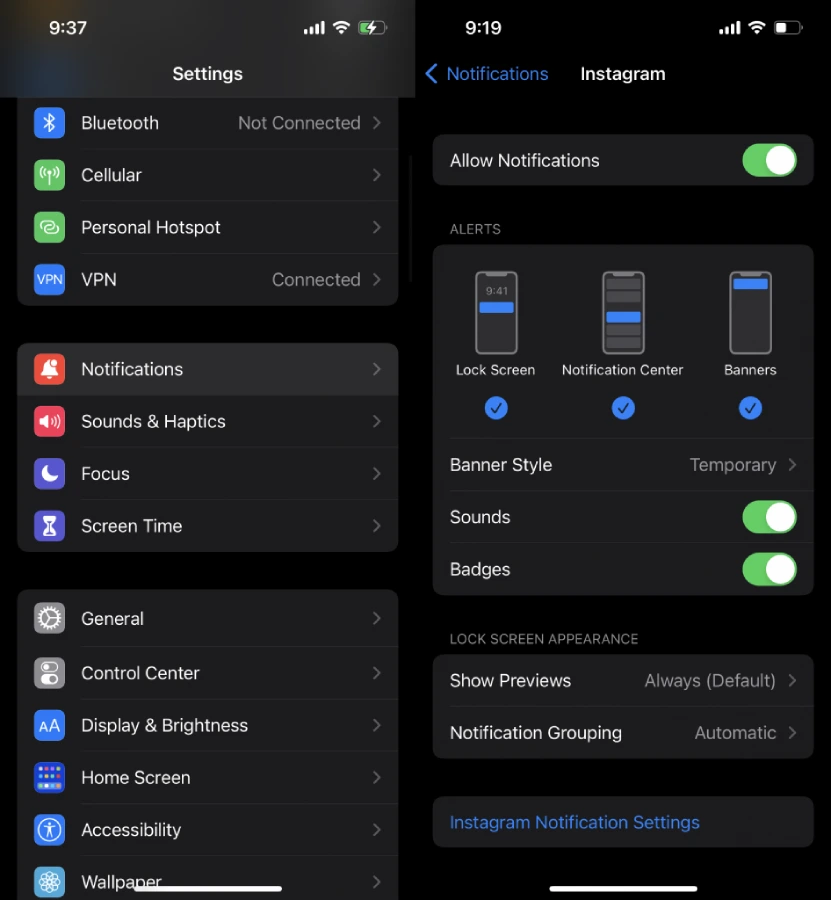
- Open your settings app and tap “Notifications.”
- On your current screen, find the Instagram app and click on it.
- Then enable the “Allow Notifications” option.
Enable Your Notifications On The Instagram App
- Open your Instagram and tap your profile.
- Tap the three-line icon in the top right.
- Click “Settings.”
- Tap “Notifications,” then tap on the different parts of notifications and enable each option.

Turn Off Airplane Mode Or Do Not Disturb
If you turn on airplane mode or do not disturb, you won’t get notifications from Instagram.
Check Your Internet Connection
Notification issues may occur because of your Internet connection status. Troubleshoot your internet connection and fix it.
Read why Instagram notifications don’t work and how to fix it.
Who Can See A Post When You Tag Someone In It On Instagram?
If your account is public, anyone can see whom you tagged in your post. But if your account is private, only your followers can see when you tag someone in your post. But, if you don’t want anyone to see when you tag someone, you can delete that post, or a better way is to archive your Instagram posts.
Still, you can make your Instagram public if you want to tag people and let anyone see your posts. While tagging someone in your post, you may face Instagram photo tags not working issue, we want to show you how
FAQ
Now that you’ve got the lowdown on why you can’t tag someone on Instagram, let’s dive into some FAQs.
Why Is Instagram Tagging Not Working On iPhone?
By following five steps, you can fix the Instagram tagging not working error. 1. update your IG application. 2. restart your iPhone. 3. reinstall the Instagram app. 4. Update your iPhone. 5. reset your network settings.
Why Is Shopify Instagram Product Tagging Not Working?
Check if your account is professional. If it’s not, convert it to a professional one. Another solution is to check that Instagram supports your country, and then you’ll be able to use this feature.
Why Can’t I tag my friends on Instagram?
If you can’t tag your friend on Instagram, it could be due to privacy settings, using an outdated app, Instagram glitches, or a typo in their username.
Why people can’t tag me on Facebook?
If you face this problem, you should try these ways. 1. relink your Facebook and Instagram. 2. Check both platforms’ links. 3. Remove Instagram from Facebook. If all these workarounds don’t work for you, contact the Instagram team to report your problem.
Can I Tag someone in an Instagram story after posting?
No, once you’ve shared an Instagram story, you can’t change it. If you want to make edits or add tags, you’ll need to delete it and create a new one.
Someone tagged me on Instagram but I can’t see it. Why?
If someone tags you in a post on Instagram, it typically means your privacy settings allow them to do so. However, if you can’t see the post on your profile, it’s possible that the post has been deleted by the owner or they’ve removed the tag.
Join AiGrow Now to make the most out of your Instagram account!
