


Ever posted that picture-perfect moment on the ‘gram and wondered, “Who’s spreading the love by sharing it?” I get it—there’s a certain thrill in knowing your content resonates enough to go beyond your followers. Want to know how to see who shared your Instagram post?
Well, I’ve searched for it and I’m going to share the results with you. Spoiler alert: you can’t. But don’t worry, there are other things you can do.
Whether you’re a grammer, a brand hustler, or just someone nosy about their digital fan club, let’s spill the beans on the sharers.
Why can’t I see who shared my post on instagram?
Well, that’s because Instagram’s privacy policy won’t allow users to see who has shared their posts, stories and reels.
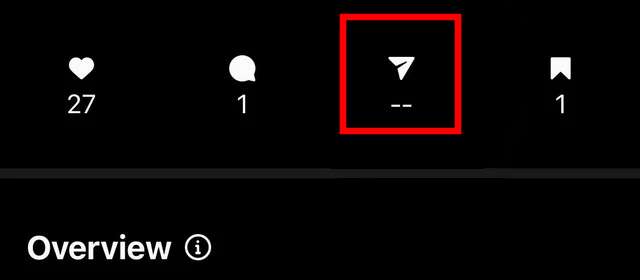
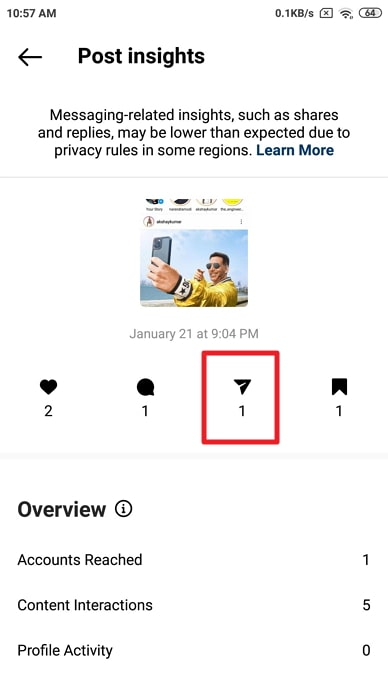
You can only see the number of people who have shared your post, through Instagram Insights.
This feature is only available for business accounts, because they need to know how users are reacting to their posts and whether they like it or not.
you cannot see who has shared your Instagram post on a personal account. Instagram does not currently offer this feature for personal accounts.
Read more: How to See Who Doesn’t Follow You Back on Instagram
How to Use Instagram Insights to see who shared your post on IG?
Here are general instructions on how to access Instagram Insights:
Switch to a Business or Creator Account
- Go to your profile on the Instagram app.
- Tap the three horizontal lines in the top-right corner to open the menu.
- Select “Settings” at the bottom.
- Tap “Account.”
- Choose “Switch to Professional Account” or “Switch to Creator Account.”
- Connect to a Facebook Page (Business Account Only):
Once your account is set up as a Business or Creator account, go back to your profile.
You should now see an “Insights” option on your profile page. It’s often represented by a graph icon or may be labeled “View Insights.”
You may also like: How to find an Instagram account by photo?
How to see who shared your post on instagram story?
Notifications: When someone shares your post to their Instagram story, you may receive a notification. Tap on the notification to view who shared your post in their story.
Story Insights (for Business Accounts): If you have a business or creator account on Instagram, you can access Insights for your stories. This may provide information about who shared your story.
- Open your Instagram app and go to your profile.
- Find the post you want to check for reshares.
- Tap on the three dots in the top right corner of the post.
- Select “View Story Reshares”.
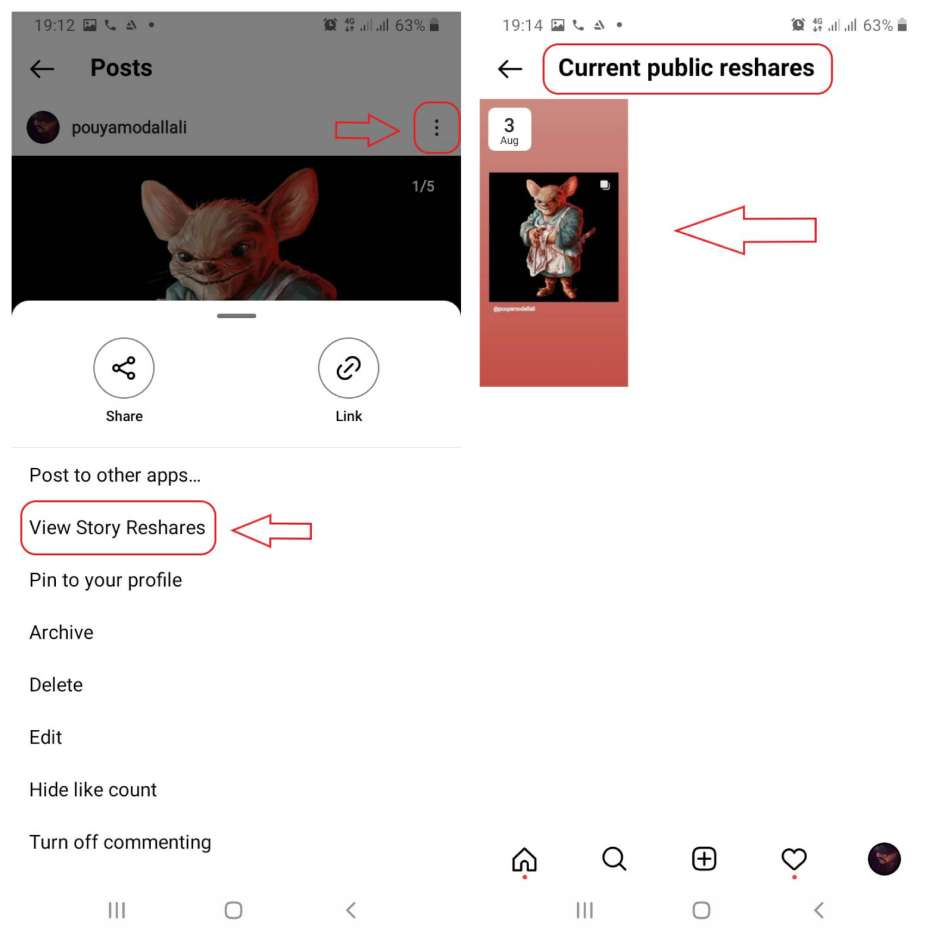
This will show you a list of users who have shared your post on their story in the past 24 hours. You can tap on a user’s name to see their story.
Please note that you can only see story reshares for posts that have been shared within the past 24 hours. If a post is more than 24 hours old, you will not be able to see who shared it.
Also, private accounts will not be shown in the list either.
Read more: How to See Who I Unfollowed on Instagram
FAQs
Now let’s answer some frequently asked questions on this subject:
how to see who shared your instagram post as a message?
Yes. When you share someone else’s Instagram post to your story, they will be notified that you have done so. They will also be able to see your story, including your username and profile picture.
Can someone see that you shared their Instagram post?
Yes, if you have a professional (Business or Creator) account, you can see who has shared your story. To do this, open your Instagram app, go to your profile, and select the story you want to check for reshares. Then, tap on the three dots in the top right corner of the story and select “View Story Reshares.”
Read more: How to know if someone blocked you on Instagram?
Can I see who shared my Instagram story?
If you have a professional (Business or Creator) account, you can see who has shared your post to their story by following the steps outlined above. For personal accounts, you cannot currently see who has shared your posts.
How can I know who shared my post on Instagram?
Currently, you cannot see who shared your Instagram post as a message. This feature is not yet available on Instagram.
Are there any third-party apps that can show me who has shared my post in Instagram direct messages?
Instagram does not provide an official way to see a comprehensive list of users who have shared your post in direct messages. Instagram is generally stringent about user privacy and limits the visibility of such information.
Be cautious when considering third-party apps that claim to offer this functionality, as using unauthorized apps may violate Instagram’s terms of service and compromise the security of your account. Additionally, third-party apps may not be reliable or secure, and some may even be designed to collect sensitive information.
Final thoughts
While Instagram does not allow users to see who has shared their posts directly, there are a few workarounds for business accounts.
By switching to a business account and accessing Insights, you can track the number of people who have shared your posts.
Additionally, you can receive notifications when someone shares your post to their story, and you can view a list of reshares in the Story Insights section.
However, you cannot see who shared your post as a direct message on Instagram at this time.
