


Someone asks for your Instagram page, you open the app and nothing says “copy.” Knowing how to copy Instagram profile link takes about ten seconds once you find the right screen, but some older guides still claim phones cannot do it at all.
The right route depends on where you are: the Instagram app, a computer browser, or nothing but your username. Each one ends with the same instagram.com/username address, ready for a link in bio tool, a DM or an email signature.
The app steps below come from Instagram’s own Help Center, which we read in November 2026, and anything taken from other sites is marked as second-hand. You also get the fix for a missing Copy link button, the way to copy a post link, and a look at the extra code that app links often carry.
Key Takeaways
- On iPhone and Android, tap Profile, then Share profile, then Copy link.
- On a computer, open your profile and copy the address bar. The Share profile screen exists only in the phone apps.
- Your link is instagram.com/ plus your username, so you can type it yourself when a button is missing.
- A post link comes from Send, then Copy Link, on iPhone, and from Options, then Copy link, on a computer.
- Change your username and your link changes with it, so update every bio that holds the old one.
How to Copy Instagram Profile Link on iPhone and Android
Instagram’s Help Center describes one route for both phones: open your profile, tap Share profile and pick Copy link. Copying your Instagram profile link from the app takes three taps, and the link lands on your clipboard.
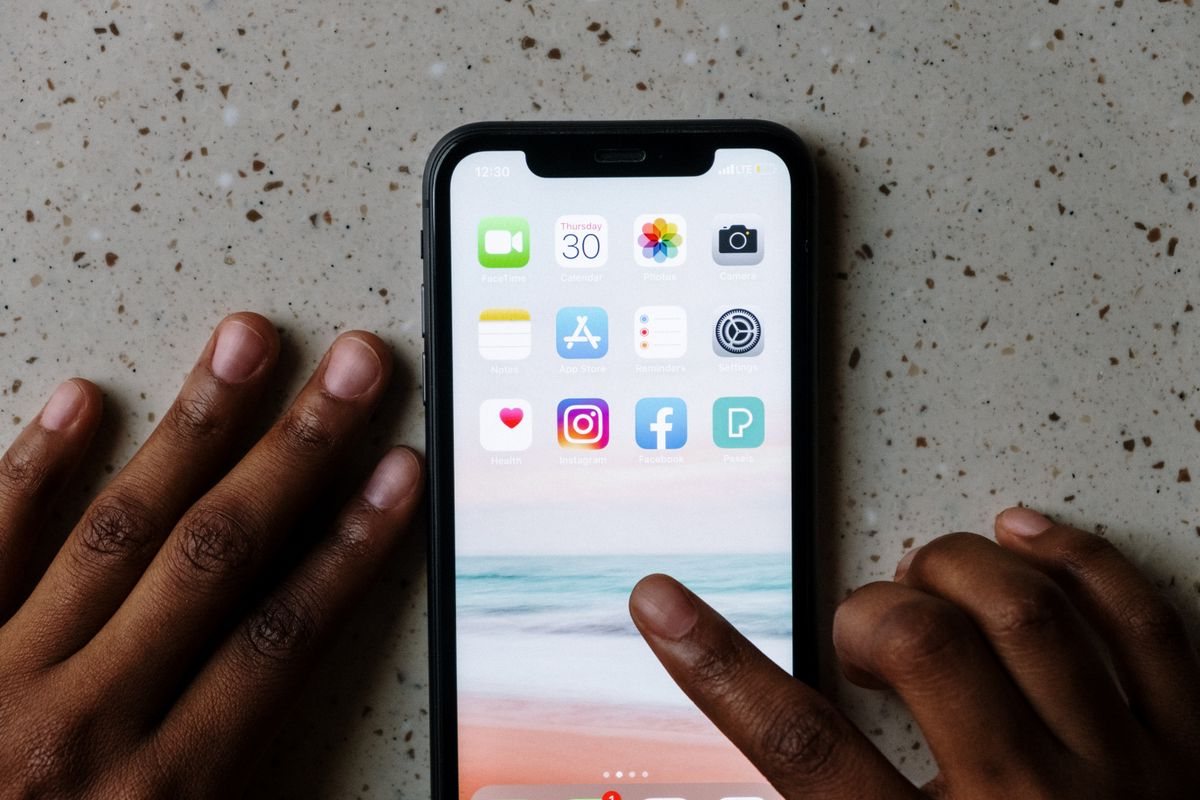
The Instagram app on an iPhone home screen, where the steps below begin.
- Open the Instagram app and tap Profile, or your profile picture, in the bottom right corner.
- Tap Share profile below your bio. Instagram shows your profile card with a QR code.
- Tap Copy link under the card. The link now sits on your clipboard.
- Open a message, a bio field or a note, press and hold, then tap Paste.
Figure 1 shows steps 2 and 3 in the iPhone app, with the buttons boxed in red.
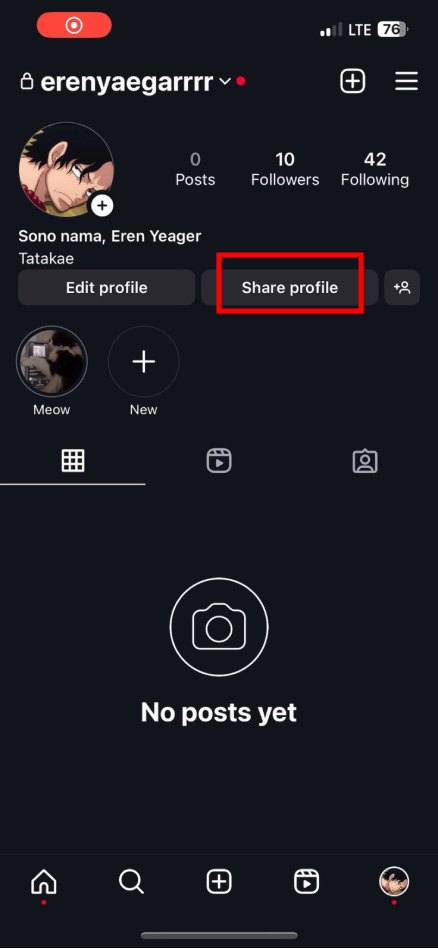
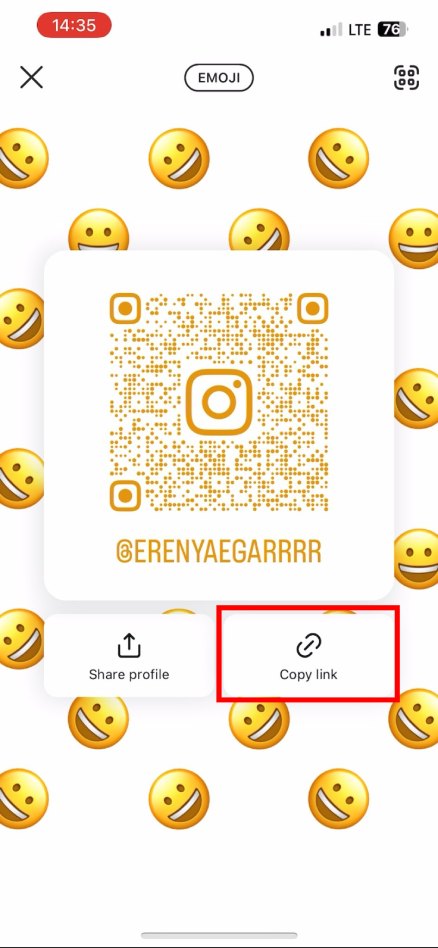
Figure 1. Step 2 (left) and step 3 (right) in the iPhone app. The red boxes mark Share profile and Copy link.
The card on the right is your profile card. Instagram says it carries your username, QR code and the details that are public on your profile, so anyone you share it with sees what any visitor would see. These screenshots come from an older app version, and your screen may also show Download and Add to story.
Button names differ a little by phone. On iPhone the sharing button reads Share to…, and on Android it reads Share. Both sit beside Copy link, Download and Add to story.
What to Do If Share Profile or Copy Link Is Missing
Instagram states that the profile card feature currently isn’t available to everyone, so some accounts do not see it yet. Update the app first, then reopen your profile. If the button still does not appear, skip it and type the link yourself.
Nothing is lost by doing that. The address is only instagram.com/ plus your username, and the format section below shows how to build it in under a minute.
How to Copy Your Instagram Profile Link on a Computer
The Share profile screen exists only in the iPhone and Android apps, so on a PC or a Mac you copy the web address instead. Every browser shows your page’s address at the top, and that address is your Instagram profile URL.
- Open instagram.com in any browser and sign in.
- Click Profile in the left menu. Your page opens.
- Click the address bar at the top of the browser. The whole address, such as instagram.com/your.username, highlights.
- Press Ctrl+C on Windows or Cmd+C on a Mac to copy the Instagram URL, then paste it with Ctrl+V or Cmd+V.
Figure 2 shows steps 2 and 3 in a desktop browser, with a red arrow on each target.
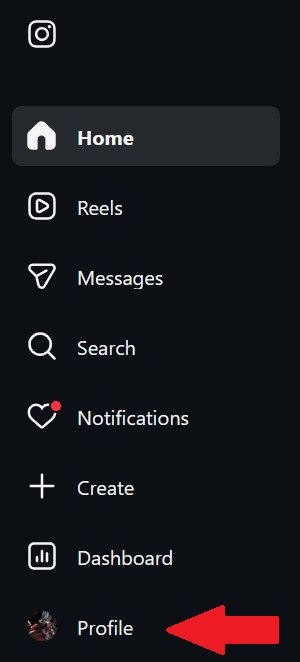

Figure 2. Step 2 (top) and step 3 (bottom) on the Instagram website. The arrows mark Profile in the left menu and the address bar.
The address bar in the second image holds your full link, the domain followed by your username. Copy it exactly as it appears, so nothing is cut off at either end.
A keyboard shortcut saves a click: press Ctrl+L on Windows or Cmd+L on a Mac to select the address bar, then copy as above. It works in Chrome, Edge, Firefox and Safari.
Prefer a right-click? How-To Geek described right-clicking the Profile link and choosing Copy Link Address in Chrome, or Copy Link in Firefox and Edge. That guide dates from 2022, so treat the menu positions as second-hand and use the address bar if they have moved.
A phone browser works the same way. Open instagram.com, go to your page and copy the address from the browser bar, which is useful when the app is not installed.
How to Get Your Instagram URL From Your Username
Every profile lives at https://www.instagram.com/ followed by the account’s username, so an account named your.username sits at instagram.com/your.username. That is the quickest way to get your Instagram link when no button helps. It follows the pattern of any web address: the domain names the site, and the path, here your username, names the page.
The link to your Instagram profile uses the username, which is the handle at the top of the page, and not the larger display name. Leave out the @ sign and any spaces. If you are unsure, open Edit profile and read the Username field, then add it after instagram.com/.
Figure 3 splits a profile link and a post link into parts and shows what each part does.
Figure 3. The parts of a profile link and of a post link.
The orange block is the only part that identifies you, which makes it the part to check before you send anything. Third-party reports say app-copied links often end in a short ?igsh= code, a sharing identifier that is safe to delete (second-hand, not tested by us).
A post link looks similar, but it points to one photo or reel. Send it as your profile link and people land on a single post instead of your page.
How to Copy a Link From Instagram for a Post or Someone Else’s Profile
Posts and videos have their own web address, separate from your profile link. On iPhone, tap Send below the post and tap Copy Link. On a computer, click Options next to the post and click Copy link, as Instagram’s instructions explain.
Instagram adds that links to content from a private account can be seen only by that account’s followers, so a copied link will not open the post for everyone. A pasted link in a caption also stays plain text, so DMs, Stories and bios are better homes for it, while adding a link to an Instagram post has its own limits.
Copy Someone Else’s Profile Link
In the app, open their profile, tap the three-dot icon at the top and choose Copy profile URL, as TechWiser described in 2023 (second-hand). Menu names change between app versions, so if that option is missing, type instagram.com/ and their username.
In a browser, open their profile and copy the address bar, exactly as you did for your own page. The same two routes work for any public account.
Which Way to Copy an Instagram Link Fits Your Situation
Table 1 matches each situation to its quickest route and shows which kind of link you end up with.
| Your Situation | Quickest Route | Link You Get |
|---|---|---|
| iPhone or Android app | Profile, Share profile, Copy link | Your profile |
| Computer browser | Open your profile, copy the address bar | Your profile |
| Phone browser | Open instagram.com, go to your page, copy the address bar | Your profile |
| Only your username | Type instagram.com/ and the username | Your profile |
| A photo or reel | Send, then Copy Link on a phone. Options, then Copy link on a computer | One post |
| Another account | Three-dot menu, then Copy profile URL (second-hand), or the address bar | Their profile |
Use the first four rows when you want people to find you. Use the last two when you want to point at one post or at someone else’s account.
If you are unsure which row fits, start with the app route. It is the only one that also gives you the profile card and a QR code to share alongside the link.
How to Share Your Instagram Profile Link
Once the link sits on your clipboard, pasting it into a DM or an email works like pasting any other text. The Share profile screen also does some of the sending for you.
Under the card, Instagram lists four buttons: share to another app, Copy link, Download, and Add to story. Download saves the card as a profile card video or as a QR code you can send by email or text.
People now scan QR codes with care, and the FTC warns that scammers hide harmful links in them (FTC, 2023), so check the address a code opens before you act on it.
Add to story posts the profile card itself. If you want a tappable link in a Story, the link sticker does that, and adding a link to an Instagram Story takes only a few taps.
On other platforms, paste the copied link into the website or social field of your profile. Adding Instagram to TikTok works that way, and the same habit covers YouTube and email signatures.
Why Your Instagram Link Does Not Work or Looks Wrong
Most failed links trace back to one of three causes, and each takes a minute to fix.
A Post Link Went Out Instead of Your Profile
Check the pasted address. A profile link ends with your username, while a post or reel link carries reel/ or p/ before a code (Replug, 2026). Go back to Share profile and copy again.
The Link Has Extra Code on the End
Delete everything from the question mark onward. Reports say the ?igsh= tail is a sharing identifier and that the link opens without it (second-hand), so open the shortened link once before you publish it.
The Link Opens the Wrong Account
Instagram’s Help Center notes that you can switch back to an old username only if nobody else has taken it. That means a link built on an old username can end up pointing at a different account, so replace old links as soon as you rename.
Final Thoughts
Instagram gives phones one clear route and computers the address bar, so nobody needs a workaround. Once you know how to copy Instagram profile link steps for each device, you can also copy post links, build the address by hand and spot a wrong link before it goes out.
Paste your link where people will look for you, such as your TikTok, YouTube and email profiles. If the Copy link button is missing, type instagram.com/ and your username, then test the result in a private browser window.
