


How do you feel when the follow button on Instagram goes white and someone accepts your request? You might be over the moon! But the story of colors on Instagram doesn’t end up here. Green following on Instagram is almost the same but there’s an extra thing!
In this blog, we’ll go deep into what it means if following is green on Instagram, why it’s important, and how to use it to improve your Instagram account. Let’s get started.
Before we go to the green following button, take some time and sign up for a handy tool to grow your Instagram followers list.
What Does Green Following Mean on Instagram?
Green following on Instagram means you’ve added a person to your “close friends list”. When you start following someone on Instagram, the follow button goes white. If you don’t follow a person on Instagram, the follow button remains blue.

And what is a Close Friends List on Instagram?
Close Friends list on Instagram is a feature allows you to share your stories and posts selectively with specific people.
In other words, this list includes your closest and trusted friends on Instagram even though they might not be your intimate friends in the real world.
How Can I Do Green Following on Instagram?
Turning your Instagram following button to green is a simple process. All you need to do is:
- Open your Instagram account and go to your profile;
- Next, tap the three-line icon at the top right corner;
- Scroll down to the “Close Friends” option and tap it;

- Run through the list to choose the person you want to add to your close friends list, select them, and click “Done”.
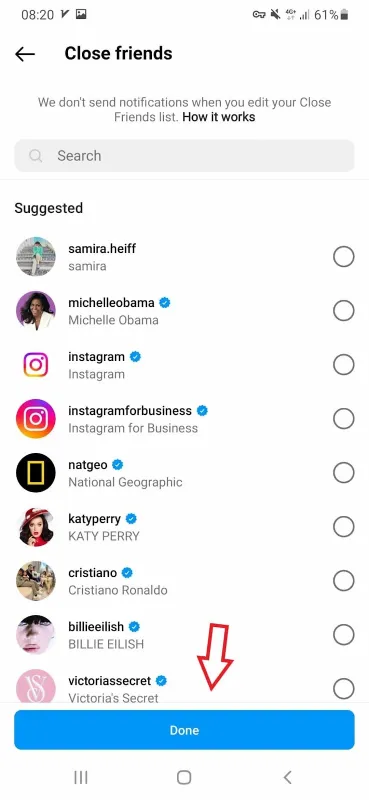
Keep in mind that when you change the following button on Instagram and add someone to your close friends list, they won’t get notified.
What Happens When You Add Someone to Your Close Friends List on Instagram?
Being in Instagram’s close friends list doesn’t necessarily involve a close relationship in the real world. Once you put someone on this list, several things happen:
- A green badge or green following button shows up. When someone views your story as a close friend, a green circle around their profile picture will appear.
- Green following on Instagram allows you to show your stories to a limited list. Remember that it only includes your stories and not other content like your posts.
- Following green on Instagram will enhance your privacy. Simply put, you’ll have more control over who views your stories.
Why Is Following Green on Instagram Important?
Green following on Instagram as the sign of a close friends list could have several advantages for your account.
- First, this feature allows you to manage your privacy in the best way. You’ll share your personal moments with a smaller group of people. Then, it would be easy to find who is viewing your story.
- In addition, when the “following” is green on Instagram, you can share more specific content with your friends such as funny moments or behind-the-scenes.
- Green following sign on Instagram helps you build a stronger connection with your followers.
- This feature is also the best way to keep your followers updated about special events or experiences.
- And to sum up, all these could result in more meaningful engagement and interactions. Because responding to likes or comments of a smaller group will be more time-saving and easier.
How to Use Green Following on Instagram to Grow Your Account?
Every Instagram feature could be a great opportunity to improve your Instagram account. If you have a business account, you need to know how to make use of the green color following Instagram option. Here, we unveil some useful methods to make the most of the green following button on Instagram.
Connect with influencers
Influencer marketing is increasingly getting popular. So, it’s important how to connect and collaborate with them. Green following on IG could help you make a list of all influencers you are currently working with.
Once you gather them together in close friends list, you can share specific content like offering discounts, more details about your products, and how to promote your brand.
Show your customers behind the scenes
Followers are willing to find out what is going on behind the scenes. So, it’s a fantastic idea to share special moments like spoilers, funny interactions, or whatever may improve your relationship with customers.
When people are added to your close friends list, they feel close to your brand. This intimacy encourages them to stay loyal customers.
Though, green following on Instagram may not be a precious privilege to your customers. That’s why it’s recommended to offer them a bonus so that other followers get inspired to join your list.
Say thank you to your loyal customers
Turning the following button green is an opportunity to show your gratitude to your customers. It’s pretty simple. The only thing you need to do is make a list of your loyal followers and say to them “thank you” with an appealing text or picture.
Offer valuable rewards
Faithful followers deserve the best rewards, Don’t they? You could make use of close friends list on Instagram to do so. Identify the most engaged followers who keep liking, commenting, and sharing your posts. Add them to your selective list and offer coupons, discounts, or easy access to products.
Notify your customers of launching a product
Using green following on Instagram is one of the most captivating story ideas to drive engagement. You could grab the opportunity and add buzz to your story before launching a product.
Use the story to announce your upcoming product. Take a further step and ask your followers to join your close friend list. This way, you’ll extend the close friends list and add more interested followers.
Get your customer’s feedback
Instagram stories offer a wide range of options, from polling to asking a question. Thanks to story stickers, you can collect your customers’ ideas about a special product or service. This way, you can make a list of your most active customers and let the following button go green on Instagram.
Whether you want to make a poll or assess their feeling about a certain topic, it’ll be easier to gather the information from a smaller group of people.

Don’t ignore your collaborators and partners
Clearly, your partners are as important as your customers. Use the green following feature as a communication channel with your business partners. For example, you can share private business information or just make suggestions about daily issues.
FAQs about Green Following on Instagram
Now, you know what does it mean when following on Instagram is green. Before we wrap up the blog, let’s discover what frequent questions people ask regarding the topic:
Q1: How to know If someone has added you in close friends list Instagram?
There is no direct way to see if someone has added you to the close friends list. However, you’ll notice just the time people share their stories. if the circle around their profile goes green, you are part of their list.
Q2: What does follow mean on Instagram?
To understand the difference between green following and following, it’s good to learn following meaning in Instagram.
Following on Instagram is the action of subscribing to another users’ account to see their posts, stories, and updates in your feed. The same happens when someone follows you back.
On the other hand, following written in green on Instagram is the sign showing you are added to someone’s close friend list. Then, you can view people’s certain stories.
Q3: How do you know if someone is following you back on Instagram?

Thanks to various apps and tools, it’s easier than ever to track who is not following you back on Instagram, who are inactive followers, and who you need to unfollow.
While it’s also possible by manual methods, it would be timely and ineffective. So, you’d better choose a reliable Instagram follower tracker that doesn’t use any bots to manage your account.
Sign up on AiGrow to take advantage of its various services including mass unfollow, get organic and real followers, a dedicated account manager, and more.
Ready to get started? Create an account now!
Q4: What is the difference between green dot and green following on Instagram?
Green dot is a feature on Instagram that shows how long you’ve been online. It’s located right next to your profile when you go to the DMs. However, the green following button is visible from the users’ profiles. Similar to changing the following button to green, you can turn your activity status on or off.
Q5: Can I remove someone from my close friends list on Instagram?
Yes, you can edit your close friends list in different ways. One is to open your profile and tap the three-line icon at the top right corner.
Just navigate to the bottom and choose “Close Friends”. Once it’s open, you can clear the whole list or select the ones you want to remove. It’s worth noting that your followers won’t be notified when you edit the list.
Q6: Can I send requests for the following in green on Instagram?
No, it’s not possible to ask users to put you on their close friends list.
Q7: Is the close friends list private?
Yes, your close friends list is only visible to you. none of your followers or following can see your list.
Q8: Do the business accounts have close friends list?
Yes. The feature is available for both personal and business accounts.
Wrapping up
In summary, green following on Instagram could have benefits for both personal and business accounts. People will gain more control over who’s viewing their account. On the other hand, business accounts can make use of this feature to grow their relationships with their customers as well as their partners.
It all depends on how you make most of the close friends list on Instagram. That said, using an effective Instagram management tool like AiGrow is an all-in-one solution to boost your engagement rate.
