

Social media has revolutionized the way we interact with one another and share our experiences online. In particular, Instagram has become a popular platform for sharing photos, videos, and stories with your followers. One feature that makes Instagram so engaging is the use of stickers, which can help you express yourself, engage with your audience, and even promote your brand.
In this article, we’ll explore the different types of Instagram stickers and how you can use them to enhance your social media presence.
What Are Instagram Stickers?
Instagram stickers are digital graphics that can be added to Stories, Reels, and posts. These stickers come in different shapes, sizes, and colors, and they can be used to enhance your content. \You can use Instagram stickers to add context to your posts, make your Stories more engaging, and even drive engagement.
How To Use Instagram Stickers?
Using Instagram stickers is easy. To add a sticker to your Story or Instagram reels, follow these steps:
- Open your story camera by swiping your feed page to the right.
- Take a photo or video, then tap on the sticker icon (The smiley face icon at the top of your screen).
- This will bring up a list of available stickers.
- You can select a sticker by tapping on it,
- Drag it to wherever you want it to appear in your Story. You can also resize the sticker by pinching it with two fingers.
Types of Instagram Stickers
Instagram stickers come in different types, each with a unique purpose. With these stickers, you can make your content fun, increase your story viewers, and boost engagement. Here are some popular types of Instagram stickers:
Location Stickers
Instagram Location stickers allow you to add your current location to your stories. They can help you reach a new audience and increase engagement with people who are interested in your location.
Also Read: Instagram location ideas you need to try in 2023
Hashtag Stickers
Hashtag stickers (similar to Instagram hashtags) are a great way to increase your post’s visibility by making it more discoverable. You can add up to 10 hashtags to each story, and they will appear as clickable links that will take your audience to the hashtag’s explore page.
Note: You can add up to 10 hashtags on each story or Reels video.
Mention Stickers
Mention stickers allow you to tag other Instagram users in your stories. This can help you give a shoutout to other users, collaborate with other brands, or feature a customer or influencer.
GIF Stickers
GIF stickers are a great way to add humor and fun to your stories. Instagram offers a large library of GIF stickers to choose from, or you can search for a specific GIF using keywords.
Poll Stickers
Poll stickers allow you to ask your audience a question with two answer options. This is a great way to engage your audience, get feedback, or conduct market research.

Countdown Stickers
Countdown stickers are a great way to build excitement and anticipation for an upcoming event, product launch, or promotion. You can customize the countdown timer, and your followers can opt-in to receive reminders when the countdown is complete.

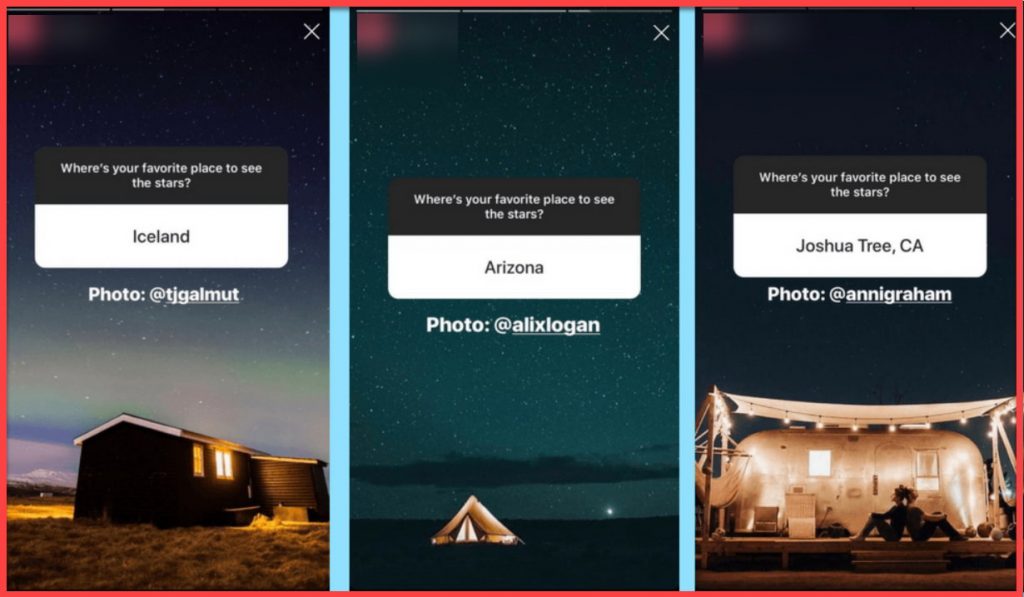
Question Stickers
Question stickers allow you to ask your audience an open-ended question. This is a great way to engage your followers and encourage them to share their thoughts and opinions.
In the new Instagram update, you can add up to 4 responses for each question.
Quiz Stickers
Quiz stickers are a fun and interactive way to educate your followers about your brand or product. You can create multiple-choice questions and provide the correct answer for each option.
Music Stickers
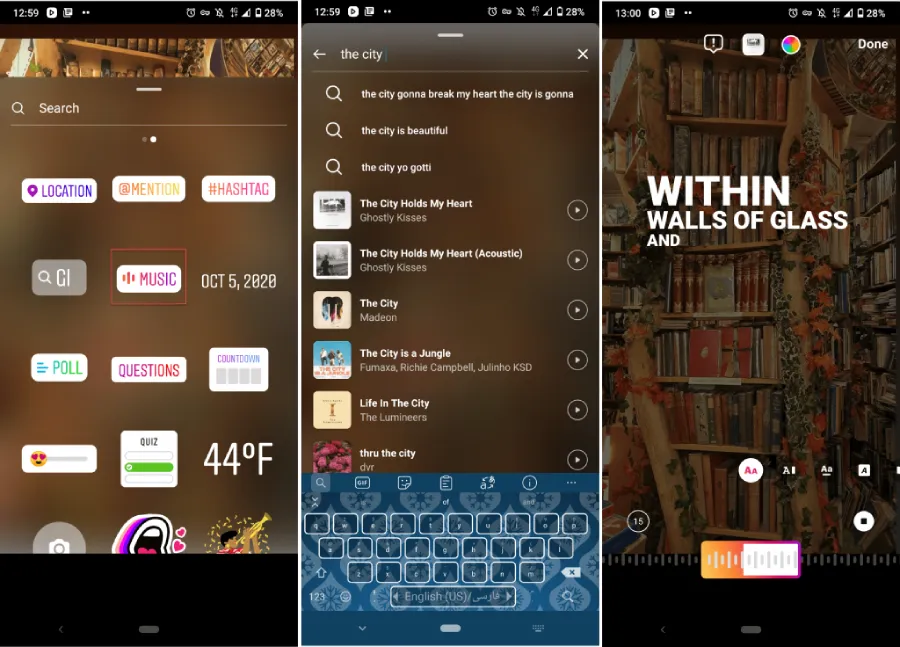
Music stickers allow you to add a soundtrack to your story. You can search for a specific song, browse popular songs, or select from Instagram’s library of music. To add music to Instagram story follow these steps:
- Go to your Instagram feed page and open the story camera.
- Tap the smiley face icon at the top of your screen to access stickers.
- Choose the “Music” sticker.
- Search for the song you want in the Instagram music gallery.
- You can decide whether to add lyrics or not.
- Add your filters and share the story normally.
Tips for Using Instagram Stickers Effectively
While Instagram stickers are a great way to make your stories pop, there are some tips you should keep in mind to use them effectively:
- Be Creative and Fun: Instagram is a visual platform, and your stories should reflect your brand’s personality and tone. Use stickers to add humor, emotion, or a unique touch to your stories.
- Use Relevant Stickers: While it can be tempting to use every sticker available, it’s essential to use cute Instagram stickers that are relevant to your brand and message. Choose stickers that align with your brand values, tone, and audience.
- Use Stickers to Engage Your Audience: Instagram stickers are a great way to engage your audience and encourage them to interact with your content. Use poll or question stickers to gather feedback or countdown stickers to build excitement for an upcoming event.
- Promote Your Brand with Stickers: You can also use stickers to promote your brand or product. Use your brand’s colors, fonts, and imagery to create custom stickers that are unique to your brand.
- Don’t Overdo It with Stickers: While stickers can make your stories more engaging, it’s essential not to overdo it. Too many stickers can distract from your message and make your stories look cluttered.
- Create a Theme: Instagram stickers can help you create a theme or aesthetic for your profile. For instance, you can use GIF stickers to add a playful touch to your stories or color-coordinated stickers to create a cohesive look for your posts.
- Add Value: Instagram stickers can help you add value to your posts and stories. For instance, you can use music stickers to create a mood or atmosphere or quiz stickers to educate your audience on a topic.
How to Create Custom Instagram Stickers
If you want to create custom Instagram stickers, you can use a tool like Canva. Here’s how:
- Open Canva and select the “Instagram Story” template.
- Add your desired design elements, such as text, images, or graphics.
- Download your design as a PNG file.
- Open Instagram and create a new story.
- Tap the sticker icon and select the “Create” option.
- Select the PNG file you just created.
- Add the sticker to your story and resize or rotate it as needed.
Best Practices for Using Instagram Stickers
Here are some best practices for using Instagram stickers to enhance your Instagram Stories:
Use Hashtag Stickers to Increase Visibility
Hashtag stickers can help increase the visibility of your Instagram Stories. When you add a hashtag sticker, your story will be included in the hashtag’s story, making it visible to a broader audience. Make sure to use relevant and popular hashtags to maximize visibility.
Use Poll Stickers to Engage Your Audience
Poll stickers are a great way to engage your audience and gather their opinions. Use poll stickers to ask questions about your brand or industry, and encourage your audience to participate.
Use Location Stickers to Showcase Your Brand
Location stickers are a great way to showcase your brand and give your followers a glimpse of where you are or your business. Use location stickers to promote local events or share exciting news about your business.
Use Music Stickers to Set the Mood
Music stickers can help set the mood for your Instagram Stories. Use music stickers to add a fun or upbeat vibe to your content, or use them to complement the theme of your story.
Use Countdown Stickers to Build Excitement
Countdown stickers are great for building excitement around an upcoming event or product launch. Use countdown stickers to create anticipation and encourage your audience to stay tuned for your big reveal.
Conclusion
Instagram stickers are a fun and interactive way to make your stories pop. Using stickers effectively can engage your audience, promote your brand, and create visually appealing stories. Remember these tips to make the most of Instagram stickers and take your stories to the next level.
FAQs
How Many Stickers Can I Add To A Story?
You can add as many stickers as you like to a Story, but it’s important to keep it simple and use only a few stickers that enhance your content. Adding too many stickers can make your Story look cluttered and distract from the main message. Choosing stickers that are relevant and add value to your content is best.
2. Can I Create My Own Stickers?
Yes, you can create your own stickers using third-party apps or by using the built-in Instagram sticker creator. There are many apps available that allow you to create custom stickers from your photos or designs. You can also create your own stickers using Instagram’s built-in creator, which allows you to draw, add text, and use images to create your own unique stickers.
3. Can I Use Stickers In My Instagram Posts?
Yes, you can use stickers in your Instagram posts by adding them to the photo or video before you post it. Stickers can add some extra context or humor to your posts, and they can help increase engagement by encouraging your followers to interact with your content. Just remember to use stickers that are relevant to your content and brand.
4. Can I See Who Has Interacted With My Stickers?
Yes, you can see who has interacted with your stickers by tapping on the sticker and viewing the insights. Instagram provides insights on the number of views, taps, and replies for each sticker you use in your Story. This can help you track engagement and see which stickers are resonating with your audience.
5. Are There Any Restrictions On The Use Of Stickers?
Yes, Instagram has guidelines on the use of stickers, and they prohibit the use of stickers that promote hate speech, violence, or illegal activities. Be sure to read and follow the guidelines to avoid any issues. Additionally, some stickers may be copyrighted or have usage restrictions, so be sure to check the terms of use before using them in your content.
