

If you are a business owner or marketing manager that uses Instagram, then this article is for you. If you have been wondering about the best way to measure your success on Instagram, then this guide will help answer those questions.
In this article, we will go over all the different types of Instagram analytics and helpful information that one can get from their Instagram page. We will also talk about some of the top Instagram analytics apps that can help measure your success and give you some tips on how to best use them in order to reach your goals.
What Is Instagram Analytics
Instagram analytics are tools that allow you to understand how your posts are performing and how your account is doing overall.
While Instagram analytics provide insight into your Instagram account, Instagram metrics give you details about individual posts.
For example, the number of followers you have is a metric, while the rate at which your follower count is growing over time is analytic data.
The Importance of Instagram Analytics
Instagram analytics is a good way to understand your audience, their preferences, and how they engage with your content.
It’s crucial to understand the impact of your content on a brand or business in order to create a successful strategy—without this knowledge, you’re essentially working in the dark.
But finding the right metrics to track, as well as knowing how to interpret them, can be quite challenging.
When you have a clear understanding of your Instagram goals, you can get so much more from your Instagram Analytics — as you’ll now have specific metrics to monitor in your social media reporting.
If you’re trying to reach certain goals for your Instagram account and wondering what KPIs Instagram tracks, there are some good KPIs to keep track of.
Note: Analyzing Instagram KPIs can help you make sure that your efforts on Instagram are not wasted, and that they are directly linked to your business goals. Among the top Instagram KPIs to track are Reach, Story views, real engagement, sales, followers growth, mentions, and profile visits.
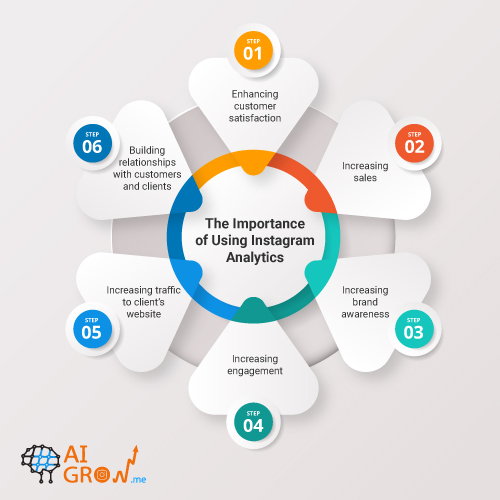
Here are some examples of goals that may be achieved by using Instagram analytics:
- Enhancing customer satisfaction
- Increasing sales
- Increasing brand awareness
- Increasing Instagram engagement
- Increasing traffic to the client’s website
- Building relationships with customers and clients
What is Instagram Insights

The Instagram Insights feature is a great way for you to see analytics about your account, posts, and followers.
It shows you a variety of different data, from how many users visited your profile in the last week to when your followers are typically online.
Instagram insights are only available to business profiles or accounts that receive a lot of engagement. To create a business profile, go to the profile settings and click “Switch to Business Account.”
The biggest drawback to Instagram’s native analytics feature is its limited date ranges. For most metrics, you can only see how your performance during the current week has changed compared to last week.
If you want better or more in-depth analytics, you may need to switch to an Instagram analytics app or platform.
How to See Post Insights on Instagram (Android-iPhone)
Once you have a business profile, getting to your Instagram Insights is easy.
Follow these steps once you’ve opened the app:
- Tap your profile picture in the bottom-right corner to access your profile.
- From the upper-left corner, select “Professional dashboard.”

- At the top of the menu, click “Account Insights.”

- Instagram analytics and insights are now available to you. Using the Accounts reached, Accounts engaged, or Total followers filters you can find more specific data.

How Do I View Insights on An Instagram Post
Here are the steps you need to take to view insights on your posts:
- Go to your Instagram profile.
- Click on a post to view insights.
- Tap View Insights below the image.

Now you’ll be able to see how many people have liked, commented on, saved, and shared your post. You’ll also see other engagement metrics such as accounts reached.

What Does Instagram Analytics Show
What analytics can you see in Instagram Insights? This feature is divided into three sections: Accounts reached, Accounts engaged, and Total followers.
Accounts Reached
You can see how many people have viewed your content, along with basic information about them (top towns, countries, age ranges, gender, etc.), in the Analytics section. The main metrics are:
- Top locations
- Reach by followed and non-followed accounts
- Top content
- Profile activity, such as profile visits and button taps
Accounts Engaged
This shows the number of accounts that have interacted with your content, along with some demographic information on your audience. The primary metrics are:
- Top locations
- Engagements by followed and non-followed accounts
- Post interactions breakdown
- Top content
Total Followers
It shows you how many people are following you, as well as some information on the kinds of people who follow you. These are the main metrics:
- Follower growth
- Top locations
- Age range
- Gender
- Most active times
The Downsides of Using Instagram’s Insight Feature
- Only five countries are included in the demographics.
- It is only available on the phone.
- It is impossible to establish a broader view of your performance and metrics;
- Marketing agencies can’t access other profiles, which means you have to sign into each account separately.
- There is a need to perform manual analysis.
How to See Instagram Story Analytics
To check your Instagram Stories analytics, make sure you have an Instagram business or creator account. To view your Instagram Stories analytics:
- To access your profile, tap your profile picture in the bottom-right corner.
- Select “Professional dashboard” from the upper-left corner.”
- At the top of the menu, click “Account Insights.”
- Select See All then Stories to see the last 30 days’ stories

- To see an overview of all the actions taken across your Stories, select an interaction such as Reach or Impressions.

How to View Instagram Reels Analytics:
- Go to the Reels tab on your Instagram profile.
- Choose the reel you wish to view metrics for.
- Below the Reel, tap View Insights.
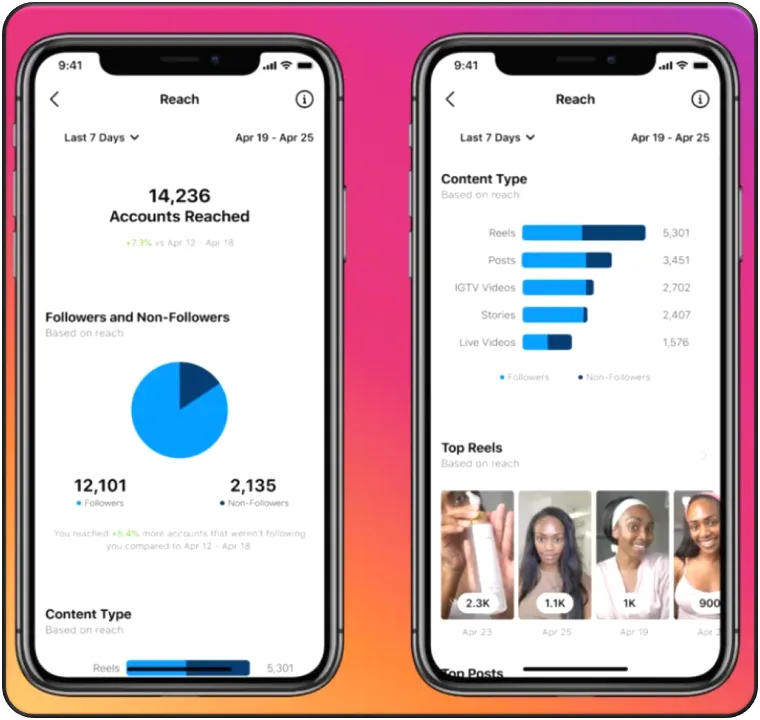
Now you can see your post’s likes, comments, saves, and shares. You’ll also see other metrics like:
- Accounts Reached: The number of accounts that have seen your reel on screen at least once, whether or not they watched the full video.
- Plays: The number of times a video starts to play automatically or because someone clicked on it.
Note: You can also view insights on your Reels under your overall account insights. To access these insights, tap Insights under the three-line icon in your profile.
Instagram Analytics on Desktop
Can you view Instagram analytics on a desktop? Yes, If you want to track your Instagram performance from a desktop device, there are 3 ways to do so:
- Connect your Instagram business page to Facebook
First, you need to connect your Instagram Business Profile (or Creator Profile) to a Facebook Page. Go to Creator Studio, choose Instagram at the top of the page, and then click the Insights tab from the menu on the left.

You’ll see all the same data that you see on the mobile app. The only difference is that it will be presented in a slightly different view. You can also select a specific time period for which you want to see your insights.
- Click on a post to view its insight when you’re logged into your Instagram account on your desktop.

- Using an Instagram analytics tool is the third option, which we’ll discuss next.
Also read: Maximize Your Business Impact with Instagram Creator Studio
How to See Post Insights on Instagram Personal Account
Even though insights are only available on the posts, Stories, videos, and Reels you’ve published since you converted to a business or creator account, you still can see Instagram Insights without a business profile using Instagram analytics apps such as the below ones.
How to Track and Report on Instagram Analytics
To track your Instagram business account growth, there are many effective ways to do so. You can use Instagram Insights – a tool provided within the platform itself – or you can use one of many Instagram analytics reports tools.
Tools For Instagram Analytics
If you’re interested in digging deeper into your Instagram performance, here are some of the most useful Instagram analytics apps on the market.
- Whatagraph

Whatagraph is a reporting tool that helps marketers monitor and analyzes their social media accounts. You can use its Instagram analytics tracker to track, analyze, and report on engagement, followers, Reach, Stories, Reels data, and more.
Whatagraph Instagram Analytics App Features
- Whatagraph allows you to see all the data in-depth, without limitations. The different reports can be viewed from 30+ countries.
- Reports are customizable, so you can see the data you want and remove any parts that aren’t relevant.
- Agencies can white-label reports, meaning they can alter logos, colors, fonts, or any other detail to match their branding and style.
- You can send automated Instagram reports to clients at set intervals.
- You can create a cross-channel report and compare Instagram’s performance to other channels, such as Facebook, Twitter, YouTube, Pinterest, etc. Whatagraph integrates with 40+ platforms.
- You can view real-time data by creating a dashboard, and view historical data by creating a report.
- You can find a gallery of more than 90 templates ready to use.
Pricing

Whatagraph’s current pricing packages consist of a Professional, Premium, and Custom plan. You can purchase Whatagraph annually and get a 30-day money-back guarantee.
- Iconosquare

Iconosquare is a social media analytics tool that allows you to schedule and manage posts, as well as track their performance.
Iconosquare Features
- Facebook, Instagram, Twitter, TikTok, and LinkedIn are among the platforms it connects to.
- In XSL format, you can download Instagram data.
- Keeps track of each post.
- It is possible to see the benchmark for specific markets.
- Automated reports are available.
- It is possible to track competitor performance data with the tool.
Iconosquare Pricing

There are three pricing plans offered by Iconosquare, and a free 14-day trial is available.
Also Read: 30 best Instagram growth services in 2022+ users ratings
- Keyhole

Keyhole is another tool for Instagram account analytics that allows you to track your and your competitors’ growth strategies. You can set up feeds to track specific competitor accounts, share your dashboard with team members or clients, and see your social media monitoring over time.
Keyhole Features
- You can export reports to .pdf, .csv, and .xsl formats.
- Analyzes competitor information.
- Provides detailed information about the audience.
- Hashtag analytics for Instagram.
- Monitors and tracks the number of followers.
- Automated dashboards and reports are possible.
Keyhole Pricing

Keyhole offers 3 pricing packages on its Instagram analytics website to suit different needs.
- Minter.io

Minter.io is an Instagram analytics tool that helps businesses monitor multiple Instagram accounts from a single dashboard. For example, if your business has several Instagram accounts or relies heavily on Instagram for marketing, Minter.io can help you keep track of your competitors’ posts and other key metrics for each account.
Minter.io Features
- Updates Instagram data hourly.
- Provides Instagram benchmarks.
- You can export reports as .csv, .pdf, .xls, or .ppt.
- Automates the process.
- Ad reports.
- Keeps track of Instagram stories.
- Customizable reports.
- Offers competitor analytics.
Minter.io Pricing

The company offers three different pricing packages, each one suitable for a particular need.
- Sproutsocial

Sproutsocial’s Instagram Analytics tools help brands collect and distribute useful data faster, so they can focus on the KPIs that matter and prove ROI.
Sproutsocial Feature
- Tag report
- Profile performance report
- Post-performance report
- Competitor reports
- Team and task reports
- Paid performance report
Sproutsocial Pricing

What Are Instagram Hashtags Analytics Tools
Instagram Hashtag Analytics (hashtag traking tools) lets you monitor the effectiveness of the hashtags you use in your posts. You can find out which hashtags reach more people and accounts, and which ones don’t.

Finding hashtags that resonate better with people is much easier with these tools. Brand 24, Influencer Marketing Hub, and Later are among the platforms offering a hashtag Instagram analytics tool to analyze the performance of your hashtags.
How Do You Analyze Instagram Metrics
Before you can begin analyzing your Instagram analytics data, you should have a clear understanding of what you want to accomplish on the platform.
Some posts might be designed to generate awareness, while others are designed to drive sales. You need to know what you’re looking for in order to analyze and use Instagram analytics effectively.
In the following, we’ll discuss the most important metrics and Instagram insights symbols meanings you can find in your Instagram insight section and how to use these Instagram analytics for businesses:
What Does From Profile Mean on Instagram Insights
This number represents the number of people who clicked through to your profile after reading your post. The higher the number, the more compelling and interesting your post was.
It’s also a good indicator of what kind of content is attracting new viewers to learn more about you.

Also Read: How to calculate Instagram engagement rate?
What Does Forward Mean on Instagram Insights
Forwarding is the number of times your post has been shared by another user. This is a good metric to pay attention to because it shows how often your content is shared by others.
The higher the number, the more exposure you’re getting and the more people are engaged with your content.
What Is Forward In Instagram Story Insights?
In Instagram story insights, there are three main types of forward: direct, indirect, and mention.
Direct forward is when someone clicks on the direct message icon in your story, types out a message, and sends it to someone else. When someone takes a screenshot of your story and sends it to someone else, that’s an indirect forward.
When someone clicks on the Mention icon in your story and sends it to someone else, that’s called Mention Forward.
What Does Forward Mean In Instagram Impressions?
When you see the word “forward” under your photo or video impressions, it means that the image has been shared by someone with a lot of followers and is getting good exposure.
What Does ‘Forward’ Mean In Terms Of Navigation?
The number of times someone has tapped the right side of the screen to move to the next story is known as ‘forward’ movement.
When it comes to video stories, many people watch an entire video; therefore, if your story is long, some viewers may skip to the end.

What Does Other Mean on Instagram Insights
You can see impressions in the “Other” category when someone views your post, saves it or tags a friend, mentions you, or gets notified about your post.
“From other” can be interpreted as a quality index of your posts. When you save a post or video, it means that you are providing valuable content to your audience.
To be mentioned and tagged in other users’ posts often means that you are respected and well-known in your niche because of your high-quality content.
What Does Replies Mean on Instagram Insights
It shows the total number of replies to a video or picture on your story. This is another great way to evaluate the activity of your community.
If people are commenting on your stories, it’s a good sign they’re engaging with you and your content.
What Does Reach Mean on Instagram Insights
Reach tells you how many unique users are viewing your content. This is a good metric to track when trying to increase brand awareness.
What Does Impressions Mean on Instagram Insights
Instagram Impressions count the number of times your Instagram content is shown to users. Impressions are the total number of times your content could have been seen, which can be greater than your reach.
What Does From Explore Mean on Instagram Insights
Impressions from Explore is the number of times your post was viewed from the Explore page.
To help you discover new accounts, Instagram created the Explore page. Every user will see different content on their Explore page, and this is based on the posts they like, and the people they follow.

What Does Navigation Mean on Instagram Insights
The Navigation feature on Instagram Stories shows how users have clicked through your stories. This includes the number of people who clicked “Back,” “Forward” and “Next Story” or “Exit.”
A good indicator of a good Instagram Story is usually when people click “Back,” as this means they enjoyed your story before it and want to see more from you.
What Does the Arrow Mean on Instagram Insights
The arrow on the insights is a paper airplane, showing how many people have sent your post to someone else. The more of the arrow there is, the more people have spread the post.
What Does the Flag Mean on Instagram Insights
The flag that appears under Instagram posts means you can save the photo or video to your profile or to your albums.
How to Use Instagram Analytics
Once you’ve gathered your Instagram metrics and learned about your audience, you’re ready to improve your marketing. Here are a few ideas on how to use Instagram analytics to achieve better results.
Change the Time & Date of Your Posting
There isn’t a magic formula for the best time to post on Instagram. Instead, you should consider your target audience and look at your Instagram Analytics to find your own perfect time.

Instagram Insights, available in the Instagram app, help you know when your followers are most active and the average times they’re on Instagram.
Adjust Content Based on Performance & Instagram Demographics
With Instagram Insights, you can easily find your most-liked Instagram stories and posts based on impressions, reach, and engagement. Any trends?
If you want to know what kinds of content your Instagram followers like, you can dig into the demographics of your audience.
Improve Your Instagram Stories
Instagram Insights gives you data on how many people have seen your posts, and how many have clicked on them. You can use this information to make sure the stories you’re creating are compatible with the Instagram algorithm and get the most traction possible!
For example, some audiences prefer videos over photos or might enjoy captions that accompany audio. Try different formats and keep an eye on your analytics to see what your followers like best.
Take Advantage of Instagram Reels, Instagram Live & Instagram Reels
Even though Instagram Live and Instagram Reels don’t provide direct analytics, they’re still valuable assets for an Instagram marketing strategy.
Reels gives you a place to upload long-form videos that will always be visible to your followers, so you can keep track of views, interactions, reach, and shares.
Instagram does not provide analytics for Instagram Live videos after they end, but you can use Instagram Stories to gauge how many of your followers are watching. You can also take screenshots of the total viewers during a broadcast to preserve the data.
Instagram Reels is not included in Instagram Insights, but you can view likes and comments. The main benefit of this feature is that it’s discoverable via Instagram Explore and featured Reels, giving you a chance to reach new viewers.
Google Analytics for Instagram

If you can use Google Analytics for Instagram to keep track of your traffic, you’ll be able to compare it with other channels in one place, making it easier to focus your marketing budget on the right channels.
You can track the general traffic that comes from your Instagram business profile on Google Analytics. And you can use UTM tags to measure the influence of different promoted links.
There are three types of links you can track within your account using UTM tags:
- Profile like: If your Instagram bio includes a link, like your website URL, you can check to see how many people click on the link.
- Post link: If you add a link to one of your Instagram posts, you’ll be able to track how many people purchased a particular product after clicking on your link.
- The Campaign Link: When using Instagram to promote a brand, you should add a campaign-specific UTM to get a better understanding of your visitors.
Conclusion
If you want to build a successful Instagram profile, it’s important to understand your audience and how they interact with your content. The best way to do this is by analyzing your Instagram analytics.
You can use these insights to improve your content strategy, engage with customers and grow your brand. In this blog post, we’ve highlighted some of the best analytics apps available on the market today and offered tips on how they can help you grow on Instagram!
FAQs
1. How Do You See Someone’s Instagram Analytics?
Instagram API doesn’t allow you to view all the insights of another account. You need to ask the owner of this account for details.
However, some tools provide you with overall statistics about an Instagram account, such as the number of followers, the number of posts and likes, comments, and engagements based on those data.
One of these tools is Social Blade Instagram stats (an Instagram analytics for other accounts), for tracking user statistics for the world’s biggest social media platforms.
If you enter someone’s Instagram username in this tool it gives you this information on that account:
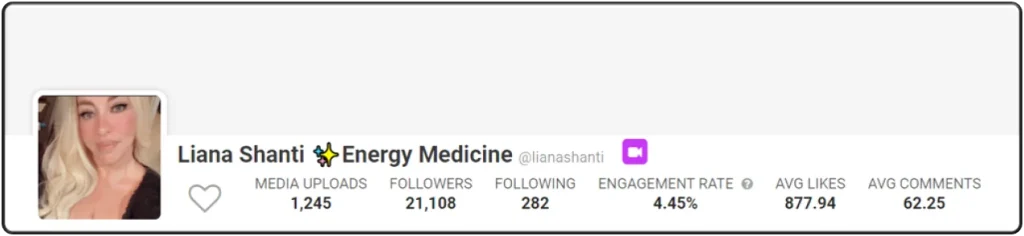
And some other stats and graphs as below:

Also Read: Why am i losing followers on Instagram?
2. Why Can’t I See Insights on Instagram?
Instagram Insights are available to business and creator accounts. If you switch back to a personal account from your business or creator account, you’ll lose access to insights.
3. Can You Export Instagram Analytics?
Unfortunately, Instagram does not make it easy to download your Instagram analytics. You can view the data on a computer or mobile device, but you cannot export the full report.
To have a chance of exporting and reporting data on your Instagram performance, you’d need to use third-party analytical apps.
4. How to Save Instagram Insights?
If you want to save your Instagram analytics, you’ll have to screenshot the results and compile the data together. You can’t export it as an Excel sheet or a PDF—that’s the only way to save it if you’re on a budget.
5. What Time Zone is Instagram Insights?
Instagram Insights uses your smartphone’s date and time set. If you change the time zone on your phone, the insights will change accordingly.
6. What is the Best Free Instagram Analytics App?
Is there a free Instagram analyzer? Yes, there are some free Instagram analytics apps available in the market that you can use to your advantage; including Union Metrics, Pixlee, Crowdfire and Squarelovin.
