


Instagram is the most popular social network people join daily with billions of users. From the day it started working, Instagram has added many new and amazing features that help attract more people worldwide. Instagram’s direct messages are one of the best features of Instagram. Sometimes you may find an Instagram direct message disappeared without knowing the specific reason. In this article, we want to find out the potential reasons for disappearing direct messages.
If you want just a tool to save all your chats to your email inbox, AiGrow has this feature for you.
Instagram Direct Message Disappeared, why?
Think that you are chatting with an Instagram user and leave the chat for a while. Then when you reopen the app to see whether you have new messages or not, you’ll find your messages disappeared. This may happen to all Instagram users. But the question is why an Instagram direct message disappeared? Actually, this may have so many reasons that we will review in the following.
1. Blocked by an Instagram user

One of the main reasons that Instagram direct message disappeared is that the other recipient that you were chatting with, has blocked you. Actually, this is one of Instagram’s privacy policies that help users protect their privacy whenever they want. When a user blocks another user, Instagram prevents both sides from accessing messages and chats. Therefore, when you are blocked or even you have blocked a person, you cannot see the conversation in your direct messages inbox.
To block someone’s Instagram, click here.
2. Unsending the Instagram messages
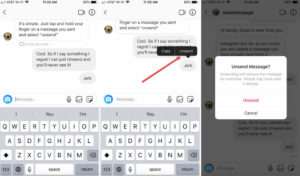
If you noticed that one or some of the messages you have received (and not sent) has disappeared, there is a probability that the sender of the messages has unsent them.
This Instagram feature is really useful because you may have sent a DM by mistake. So you can easily delete it before seeing it. But you can use this feature differently. Imagine that you have sent some messages that you regret sending, and you don’t want to block that person or deactivate your account. Therefore, you can simply unsend your messages to keep your privacy. Moreover, it can be good to mention that you can unsend messages at all times, but there is no way to delete all of them at once.
So, if you notice that all the messages from a person have disappeared and your own messages are still there, and the other person has not blocked you, probably the messages have been unsent by the other user.
3. Received a disappearing Instagram message-vanish mode
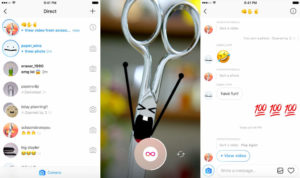
An amazing Instagram feature is disappearing messages (also known as vanish mode on Instagram). Disappearing messages are messages that include Texas, photos, or videoes. As we can understand from its name, Instagram messages disappear after reading.
Actually, when Instagram vanish mode is on, everything in chat automatically disappears and you can not open the image or video anymore. But remember that you can see that you have received one of them before.
If you want to know more about the vanish mode feature( how to turn on/off vanish mode), click here.
4. Deactivated Instagram app
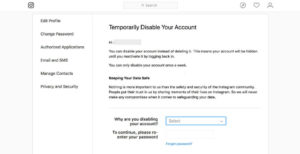
Another reason for Instagram direct message disappeared is that the person that you have chatted with, has deactivated the account permanently. When you delete your Instagram account, all the data will be stored in your account. But they will be deleted permanently for other users. By deactivating, people cannot see your profile, follow or unfollow you, or sent messages to you. But, You can still see Instagram deleted account messages. You will not be able to see the profile name, but you can find the conversation with the “Instagrammer” id. Therefore, if your friend has deactivated their account, you can access their messages but not with their id. So, this means that the messages have not disappeared, and you can still see them.
If you want to have all your direct messages always archived and access them easily, Sign Up here to access them forever!
If you want to delete your Instagram account permanently, follow this link.
5. Your Internet Connection may have a problem

Weak Internet connections have always been the reason behind unexplainable events.
You may have experienced times when you see a message notification, but there is nothing new in your chatbox.
You can solve this problem by refreshing your page or even changing your location.
If none of these two works, try using a VPN, this is a common problem in some countries.
why do Instagram messages disappear after refreshing?
Instagram chats are not permanently stored on your device. When you refresh your Instagram inbox, the app retrieves the latest messages from the server and displays them on your device. Any previous messages that were not saved locally on your device may be removed from the screen.
Additionally, Instagram has a feature called “Vanish Mode” which allows you to send disappearing messages that disappear after they have been seen by the recipient or when you leave the chat. This feature is optional and can be turned on and off for individual chats. If you have enabled Vanish Mode for a chat, then the messages in that chat will disappear after refreshing, as part of the feature’s functionality.
how to fix instagram message disappears?
How do you stop Instagram messages from disappearing? here are some steps you can try to fix the issue:
Check your internet connection: Make sure you have a stable internet connection as a poor connection can cause Instagram to act up.
Update the app: Check if there is an update available for the Instagram app, and if so, update it. This can help fix any bugs that may be causing the issue.
Clear the cache: Clear the cache of the Instagram app, this will help clear any temporary files and may help fix the issue.
Close the app and open it again: Log out of your Instagram account and log back in. This can help refresh the app and may fix the issue.
Restart your device: Restart your phone or tablet as this can help clear any issues with the device.
If none of these steps work, contact Instagram support for further assistance.
Update 2023
We decided to update this article with some of the most common questions you guys had.
why instagram messages disappear after 24 hours?
Instagram messages do not typically disappear after 24 hours unless they are part of the “Vanish Mode”
Do Instagram DMS get deleted for me if I temporarily deactivate and then reactivate my account?
The answer is no, your DM messages won’t be deleted, although you can’t have access to them unless you reactivate your account.
In other words: Your DM’s are safe and will be back as soon as you reactivate your account.
Are Instagram messages deleted forever?
Believe it or not, Instagram keeps your data for a very long time. This means that even if you delete your DM messages on Instagram, there is still hope to bring them back.
You can retrieve Instagram messages in no longer than 48 hours.
Instagram message request disappeared? here is why
If you are asking yourself ”why did my message request disappear?” there are very few answers for you:
The other party has unsent their message
You have been blocked by the other party
The other party has deactivated his/her account
You have followed/accepted his/her dm message request and so it has moved to your primary folder
What happens to disappearing messages if you report a conversation?
If you report an Instagram chat then the disappearing messages will be included up to one hour after they disappear.
Also read: How to View a Photo on Instagram DM Again?
instagram chat disappeared but was not blocked
If your Instagram chat has disappeared but you have not been blocked by the other person, there are a few possible reasons why this might have happened:
- Technical issues: Instagram can sometimes experience technical glitches that can cause chats to disappear. Try logging out of your account and then logging back in to see if the chat reappears.
- Deletion: If the other person has deleted the chat, it will no longer be visible in your inbox.
- Archiving: If you have accidentally archived the chat, it will not appear in your inbox but can be found by going to your archived messages.
- Privacy settings: If the other person has changed their privacy settings to not allow messages from non-followers or non-mutuals, your chat may no longer be visible to them.
Conclusion
In conclusion, if you find Instagram direct message disappeared, you can check the potential reasons to know what exactly happened. If you can see the conversation and just some of the DMs you have received are disappeared, the other recipient in the chat has deleted messages using the unsending feature. On the other hand, if you cannot access the conversation and you can’t find the person by searching, maybe you are blocked from following them. And finally, if you can see the conversation with the “Instagrammer” id, the person you were chatting with has deactivated their account.
If you want just a tool to save your all chats to your email inbox, AiGrow has this feature for you.
