

Frustrated by the recurring “we limit how often Instagram” message? Wondering why it keeps popping up and what you’ve done wrong? Don’t get mad, get informed! In this guide, we’ll uncover the reasons behind this message and equip you with powerful tips to make it disappear for good. Stay tuned and let’s find a solution together!
Want to Know “We limit how often Instagram meaning”?
Every social media has some set of rules and when it comes to Instagram, it gets stricter. If you go against these guidelines, you might encounter this message:
“Try again later. We limit how often you can do certain things on Instagram to protect your community. Tell us if you think we made a mistake”.
In other words, you have violated community guidelines or your account has been flagged for suspicious activity. Then, you have no other choice but to wait 24 to 48 hours to get back to normal.
Why Does Instagram Say We Limit How Often?
As mentioned earlier, Instagram wants to prevent spammers, scammers, and rule breakers from ruining the party. If you engage in the following actions, Instagram limit message keeps popping up on your screen.
Getting Like and Unlike Crazy
Imagine you are scrolling through your Instagram feed and double-tapping on posts left and right! Sure, you want to spread love, but you don’t need to overdo it.
When it comes to liking or unliking, IG has its own rules. For example, you can give up to 1000 likes per day, though we recommend keeping it around 600-700.
Commenting Frenzy
Have you ever got engaged with a content and started leaving a flurry of comments to it? Slow down, Instagram allows you to write only 180-200 comments every day. If you can’t stop the words, you’ll get “we limit how often Instagram error” on your account.
Furthermore, the same limitation goes for captions, as well. Since Instagram is a medium for visual content, you don’t need to overflow the captions. Then, around 2200 words could be enough to describe your picture or video.
Follow and Unfollow Spree
You may let the follow/unfollow button run wild and suddenly; Instagram we limit glitch hits you. Don’t panic. It simply means you’ve crossed one of Instagram’s borders. Because according to the rules, Instagram’s follow and unfollow limit is up to 200 users per day or 10 users per hour. However, if you are a newbie, try 150.
Direct Message Overkill
Love sliding into people’s DMs? Well, be cautious! Instagram wants to ensure you do it responsibly. When you bombard others with an overload of messages, you make them concerned. Sending about 50 to 80 new chats a day can keep your account safe.
Overriding Character Limit
Your personal account, your rules, right? Well, not exactly. Instagram sets limits on the number of characters you can use in your bio and captions. So, you can add up to 150 characters to your bio and 2200 characters to captions.
Keep in mind that only 125 characters will be visible. To see the rest, you need to tap “more”.
Surpassing the Length of videos and IGTV
Sharing videos can be fun, but watch the clock. IG has time limits for videos like:
- Feed posts and Live streams: 60 minutes max.
- Reels: up to 90 seconds.
- Stories: keep it under 15 seconds.
Forbidden Content Creation
Too many likes or comments aren’t the only reasons that can get you in trouble. Creating content that violates the rules is another way to land in Instagram jail. Therefore, watch out to avoid:
- Any sexually explicit content including nude shots
- Spreading hate speech targeting race, ethnicity, social status, sexual orientation, disability, or disease
- Promoting violence in any way
- Harassing or threatening
- Online Gambling
Also read: “We Restrict Certain Activity to Protect Our Community” [6 ways to fix it]
How to Fix We Limit How Often Instagram: Powerful Tips
The “try again later we limit how often Instagram” message is frustrating, but worry not! Here are some useful ways to fix it:
- Refresh the App
Sometimes, a simple app refresh can work wonders. So, close and reopen the Instagram app to resolve temporary bugs and glitches that trigger this message. It’s a quick and straightforward step worth trying before moving on to other solutions.
- Change Your Password
If the above solution didn’t work, go to the next step and change the password. In some cases, the restrictions might be triggered by suspicious activities or unauthorized access attempts. Changing your Instagram password will boost your account’s security.
- Utilize Automation Tools
Trying to streamline your Instagram experience and avoid running into barriers? Consider using automation tools!
Instagram automation refers to the use of specific tools and software to automate actions including liking, following, commenting, and scheduling posts. These handy tools often work with bots.
Discover the Most Effective Instagram Automation Tool
AiGrow
As a highly-ranked company, AiGrow offers a range of cutting-edge features that make managing your Instagram posts a breeze. To do this, AiGrow gets help from AI technology.
So, sign up now to get started with Instagram automation tools!
4. Set up a Backup Account
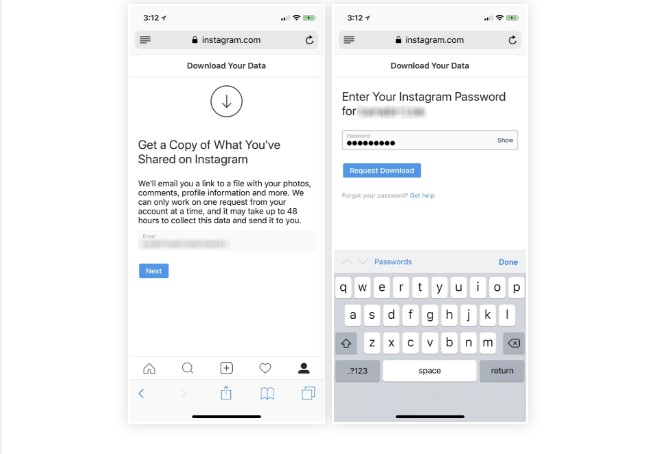
Some Instagrammers are dedicated content creators with a lot of posts. Well, this may sound tempting, but not always. Because you might get in trouble and keep seeing this on Instagram” we limit how often you can post…”. To save yourself from this hassle, consider creating a backup account.
- Log into your account
- At the top right of the page, tap the three-line icon
- Now click on settings
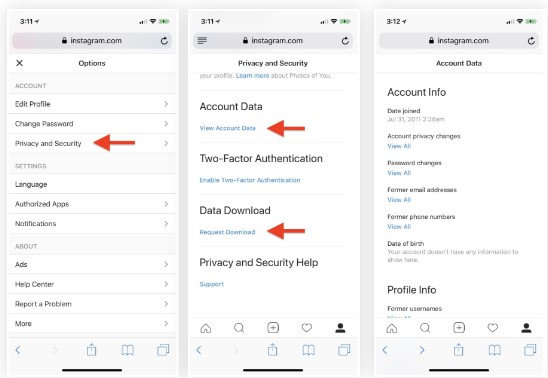
- Go to privacy and security
- Select Data Download
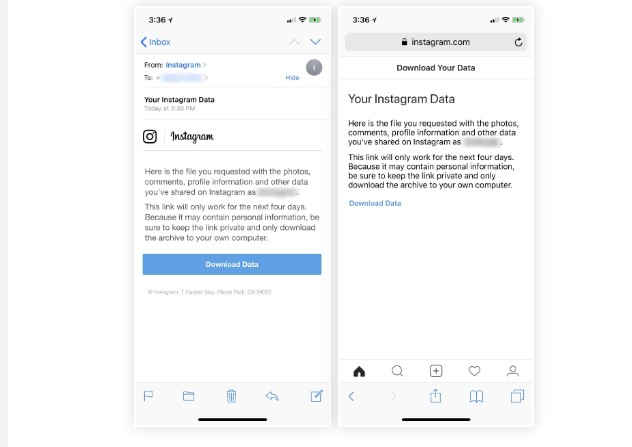
- Enter your email address and click on request download
- Enter your password. It will take 24-48 hours for Instagram to send your information.
5. Simply Remove Posts or Stories
As we mentioned before, if you post stuff that’s not allowed, Instagram can limit you. So, it’s a good idea to double-check your posts and stories and make sure there’s no inappropriate content. If you find any, just delete it without hesitation.
6. Report the Issue
If you believe the “try again later we Limit How Often you can do certain things on Instagram” is a mistake or a system error, make sure to report it to Instagram.
You can use the in-app reporting feature or contact Instagram support for help. By reporting the issue, you help Instagram look into it and get guidance on fixing the limitation.
How can I prevent the “Instagram we limit how often glitch” from occurring?
Prevention is the key! To avoid getting caught in this daunting trap, it’s important to be cautious about your actions on the platform. By following a few simple guidelines, you can stay clear of any limitations.
Follow Instagram’s guidelines: Ensure that you adhere to Instagram’s community guidelines and terms of service. Avoid engaging in spammy or suspicious activities that could trigger the glitch.
Pace your actions: Be mindful of the frequency of your likes, comments, follows, and other interactions on Instagram. Instead of performing a large number of actions within a short period, spread them out over time.
Monitor your account activity: Keep an eye on any unusual or suspicious account activity. If you notice any unauthorized access attempts or suspicious actions, take immediate steps to secure your account, such as changing your password and enabling two-factor authentication.
Stay updated with Instagram’s changes: Instagram’s algorithms and limitations may change over time. Stay informed about any updates or changes in their policies to adjust your actions accordingly.
FAQs on We Limit How Often Instagram
Here are some commonly asked questions about this topic:
Q1. How Long Does Instagram Limit Last?
When your IG account slaps on a limit, it usually sticks around for about 24 to 48 hours. During this time, you have some restrictions on liking, posting, commenting, and following. However, after the specified duration has passed, you’ll regain full access to those features.
Q2. How can I report the ” try again later we limit how often Instagram ” problem to its support?
To report the issue, you need to follow these steps:
- Open the Instagram app and go to your profile
- Tap the menu icon (three horizontal lines) and select “Settings.”
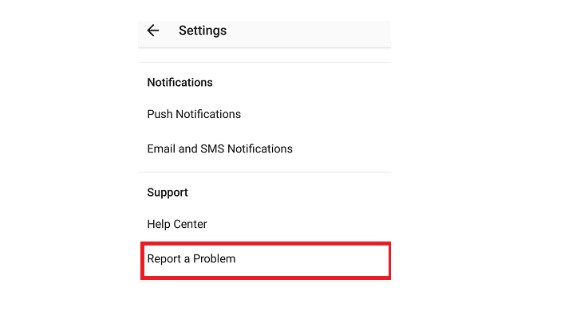
- Choose “Help” or “Help Center” from the options
- Search for “reporting a problem” or find the relevant category
- Follow the provided instructions to report the issue
- Include any necessary details or screenshots
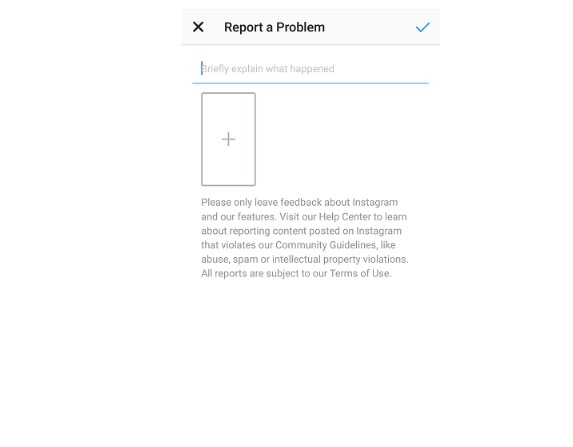
- Submit the report and wait for a response from Instagram support
Conclusion
In conclusion, by mastering Instagram’s “We Limit How Often” challenge, you can take control of your Instagram experience. If you follow the tips and tricks in this post, you’ll be equipped to overcome these limitations and achieve your Instagram goals.
So, get ready to embrace the challenge, implement the strategies shared, and rock your Instagram journey!
