

Used by hundreds of millions every day, Instagrammers are outraged by facing the “this Story is no longer available” error.
So, if you keep getting this strange message, don’t worry – you’re NOT alone!
In this article, We’ll show you why Instagram says this story is unavailable and how to fix the error.
Instagram Users Report ‘Story No Longer Available’ Error
Today, hundreds of complaints are swarming cyberspace that why does it say this Story is no longer available? For example, this Reddit user says:
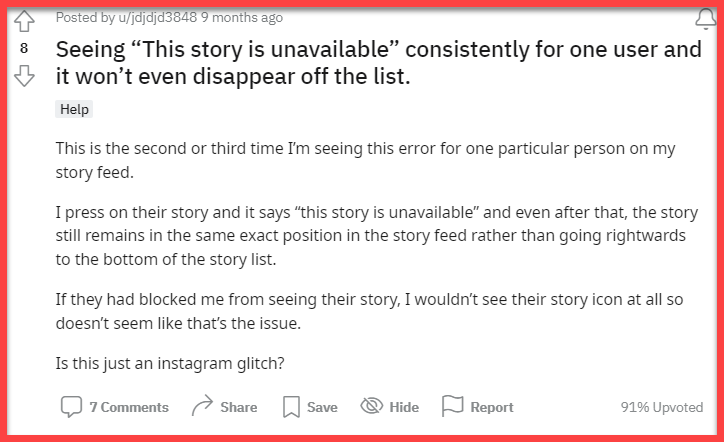
“I press on their story and it says “this story is unavailable” and even after that, the story still remains in the same exact position in the story feed.”
It’s not only on Reddit that users report seeing errors while viewing Stories. Here’s a user that reported having an issue with Instagram stories on Twitter:
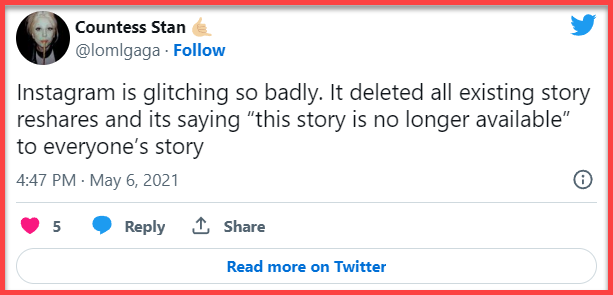
“Instagram is glitching! It deleted all existing story reshares, and it is saying “this story is no longer available” to everyone’s account”
If you are also facing Instagram this Story is no longer available error, don’t worry. You are not the only one, and we are going to show you how to fix it.
What Does “This Story Is No Longer Available” Mean on Instagram?
You can see many users saying they are facing this Story is no longer available Instagram bug all over the Internet. Until this moment, Instagram hasn’t revealed why this story is unavailable error happens whether it is a technical glitch or it means something else. Some users suggested that the unavailable error happens when a story is removed. It can happen for three reasons:
- The content has been up for 24 hours
- The user decided to delete the Story.
- The content has been taken down for violating Instagram’s guidelines.
But there are more reasons to it.
How To Get Rid Of This Story Is Unavailable Instagram error?
As we mentioned in the last part, we told you there is more than one reason Why Instagram says this story is unavailable. In fact, we collected 12 reasons they may cause this glitch.
Each reason has its own solution. So first of all, you need to understand the various cases of the error. This way you can make a wild guess on how to fix the issue.
12 Reasons Why This Story Is No Longer Available On Instagram
1. This Story Has Been Deleted
In most cases, they see that this Story is unavailable Instagram 2023 error happens when the creator deletes the story. Another probable reason is that the story has completed its 24-hour time limit and got deleted. Usually, after a story disappears (whether the owner deletes it or it disappears after 24 hours), it will be removed from the followers’ feed page. But in case of a bug, you can still see the creator’s name on the story section, and yet. the content is gone.
In order to fix it, restart the app and view stories normally.
2. This Story Is No Longer Available Instagram Blocked
Sometimes you can see the story update of a user on your feed page but when you tap to view it, you see this Story is unavailable Instagram error. A possible reason that this glitch happens is that the user has been blocked within the time of story loading.
To make sure you are blocked, search for their username and view their profile. If you are able to view their profile, it means that they haven’t blocked you. But if it says “User not found”, you are probably blocked. To confirm your doubts, check your DM inbox with that user; In case of getting blocked their username is changed to “Instagram user.”
3. They’ve Removed You As A Follower
Similar to blocking someone on Instagram, if you get removed as a follower, you will also see this Story is unavailable Instagram 2023 message. To make sure you are removed, check the user’s profile, if you are not able to see their posts and instead see the “This Account Is private” message, it means you are removed.
You can send them a friend request again to see their posts and stories again.
4. Public Account Shifted To Private Account
If you are viewing a public account’s Stories and all of a sudden you face the error and want to know if this Story is no longer available on Instagram meaning, it’s probably because the owner has switched the account from public to private.
In case you refresh your feed and search for the username again, you can find out whether the account is shifted to private or not. If so, you can send them a request to be able to watch their content again.
You can also read:
Top 11 Anonymous Instagram Story Viewers + Best Hacks
Best Instagram viewers – View Profiles, Followers, Reels & Posts
How to View a Private Instagram Account
Instagram Story Viewer Order – What is it & How to Use it
5. Instagram Hidden Story
Another major reason you face this Story is no longer available Instagram error is that the owner has hidden you from their stories. If you are not familiar with this feature, it enables Instagram users to limit their story reach to certain users. Once they enable this feature, you are not able to view their stories and highlights anymore.
Note: There is also an option to create a list of trusted followers and only share a story with them, named “Close Friends.”
In some cases, users decide to hide you after they shared the content; That’s why you can still see the blue ring around their profile but not the content.
You can also read:
How to Hide Followers & Stories on Instagram
6. This Story Is No Longer Available Instagram Bug
Every application can have some bugs and Instagram is no different. Sometimes after a user uploads a story it disappears for no reason before completing the 24-hour time limit. This bug can cause an Instagram Stories glitch such as this Story is unavailable Instagram error.
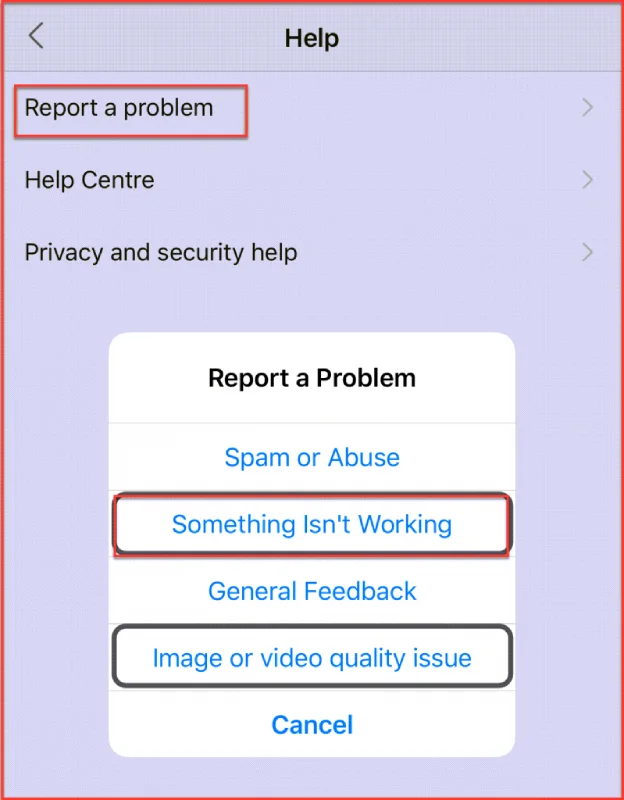
To fix this glitch, you can try refreshing your feed, logging out of your account and re-login. If it didn’t work, try reporting the issue to the Instagram support team by following the steps below:
- Log into your Instagram account and go to your profile.
- Tap the three-line icon at the upper-right corner and choose “Settings.”
- Tap “Help.”
- Select “Report a problem.”
7. Instagram Is Down
The next reason can be popped into your mind as well – are Instagram servers down?
It can be nothing wrong with the story itself, instead, there is an error in the Instagram app because its servers are down. This can be because of routine maintenance, overloaded servers or technical issue. So, in this case, Instagram doesn’t work normally, it kind of malfunctions, and all sorts of things can happen such as unavailable messages.
If you can see the Story unavailable Instagram notification, so can your friends, and Instagram servers are the issue. To fix this problem, all you can do is wait for the servers to come back up which can take a few hours.
Another way to make sure the servers are down is by using a website named “Downdetector.” You can search for every website’s URL and check if there is something wrong with the servers or not.
8. Instagram Removed The Story
Instagram has strict privacy and policy guidelines for sharing unauthorized content on posts and stories. There are a couple of reasons that Instagram’s AI engine detects your content and deletes it for violating its terms:
- A violation of the story; According to Instagram’s terms of service some content should not be on the platform (e.g. nudity, violence, copyright)
- Users report a story: If many users report an Instagram story, the AI engine will take it down till they check it.
In this case, when you tap on the green ring around users’ profiles, you will see this Story is unavailable instagram blocked messages.
9. Cache
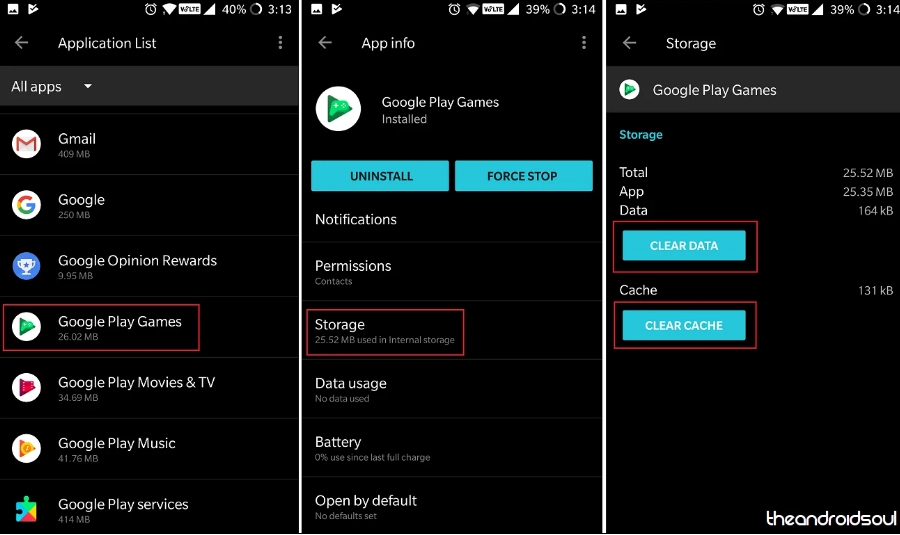
Not clearing and removing the cache from your device, especially when the storage is full, can cause issues with running apps. If you have a low-memory device, make sure to clear some space rapidly to make the apps work properly.
Similar to other apps, Instagram can have some glitches and make you face this Story is no longer available error. Here is how to Instagram cache on android and ios devices.
Android:
- Open the setting on your Android device.
- Find the “Apps” section to view all the installed applications on your device.
- In the apps list, find the Instagram App and tap on it.
- You can see two options on the detail page.
- Tap “Clear Data” and “Clear Cache.”
Ios:
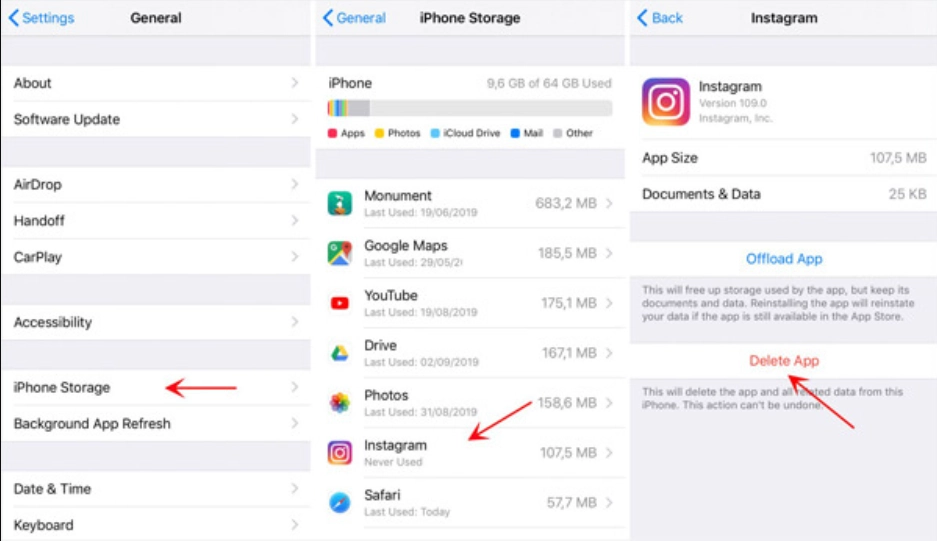
There’s no option on iPhone for only deleting an app’s cache, But you can Instagram and all cache and data together.
- Open your Settings on your ios device.
- Click on the General section.
- Choose “iPhone Storage.”
- Search for the Instagram app and delete iy. This way you will delete all the locally stored data.
10. Poor Internet Connection
A weak internet connection is one of the most common reasons Instagram glitches including unavailable issue happens. To load and process the feed page and stories perfectly, Instagram needs a strong internet connection.
You can switch to mobile data or stronger wifi and try loading your feed page again. When Instagram’s servers are down, you also get a poor internet connection error. In this case, you need to wait for the Instagram networking team to solve the problem.
11. You’re Using An Outdated Version Of The Application
Sometimes, using an outdated version of the Instagram app can cause glitches such as the “This Story Is No Longer Available” error. To fix this glitch, you must update your app from Google Play or the App store.
12. Check The Date & Time
Usually, the phone’s operating systems update automatically by connecting to the internet. But if the automatic update for date and time is turned off and switched to manual, you might face numerous issues with different apps and Instagram. Make sure your phone’s date and time are set with your location’s time zone. Then restart the app and start viewing your stories.
Conclusion
Did you recently come across an error on Instagram saying “this Story is no longer available”? In fact, many users around the globe are facing such an error and want to know what it means. This article showed you 12 common reasons that can cause this error and how to fix it.
FAQs:
How Do You Know If You Are Blocked From Someone’s Story On Instagram?
In case you are not able to see someone’s stories anymore and want to find out if you are blocked or not, here’s what to do. Search their username to view their profile; if it says “User not found” means either they have blocked you or disabled their account. Try searching with another Instagram account to confirm your doubts.
How Do I Fix This Story Is No Longer Available?
There are numerous reasons you face this error and each one has its own solution. But the most common reason this Instagram Story glitch happens is when a story gets removed.
What Does This Story Is Unavailable Mean?
If you are facing a new error on Instagram and want to know what it means when it says this Story is unavailable on Instagram, here are the reasons.
- The story has been deleted
- The creator has blocked you
- You are removed as a follower
- The user has changed the account from public to private
- You are hidden from their stories
- Instagram servers are down
