


A Story gets only a few seconds of attention, and a badly sized one wastes them. Text slides under the reply bar, a face is cut off at the forehead, or the whole picture turns soft. Each of these problems usually traces back to Instagram story dimensions that do not match what the app expects.
The right canvas is 1080 x 1920 pixels at a 9:16 ratio. Anything else gets cropped, shrunk or recompressed, which is how most blurry Instagram Stories start.
Below you get a spec table, a safe zone diagram drawn to scale and the size in cm and inches. You also get a way to fit a full picture on an Instagram Story, plus Reel and post sizes. Where Instagram publishes a number, we say so. Where only common guidance exists, we label it.
Key Takeaways
- Build every Story on a 1080 x 1920 pixel canvas at 9:16. Smaller files look softer, and larger ones add weight without a clear gain.
- Keep text and logos inside the middle 1080 x 1330 pixels. That leaves 250 pixels free at the top and 340 at the bottom.
- A 3:4 phone photo covers only 75% of a Story screen, and a 16:9 video covers 32%. A color background fixes the gap without cropping.
- Instagram says a video up to 60 seconds posts as one clip (2026). Reels share the 9:16 canvas but run far longer.
- Instagram sizes in pixels only. At 300 ppi a Story prints at 9.14 x 16.26 cm, or 3.6 x 6.4 inches.
Instagram Story Dimensions and Size in 2026
Design every Story on a 1080 x 1920 pixel canvas. That covers the size of Instagram story photos and videos alike, and it is what people look up as ig story dimensions or ig story size. It is also the Instagram story resolution to aim for. The table lists each spec and says who published it.
| Spec | Value | Source |
|---|---|---|
| Canvas size | 1080 x 1920 px | Common published size |
| Aspect ratio | 9:16 | Common published size |
| Photo formats | JPG or PNG | Common spec, not stated by Instagram |
| Video formats | MP4 or MOV | Common spec, not stated by Instagram |
| Maximum file size | 30 MB for photos, 4 GB for video | Common spec, not stated by Instagram |
| Video length | Up to 60 seconds as one clip | Instagram (2026) |
| Time on your profile | 24 hours | Instagram (2026) |
| Viewer list | Available for up to 48 hours | Instagram (2026) |
The Instagram story aspect ratio, 9:16, means nine units of width for every sixteen of height. Any file with that ratio scales cleanly, so the pixel count matters more than the exact figures.
Instagram’s own pages settle the length question. A video up to 60 seconds long posts to your Story as one clip, and longer videos are cut into several clips. The old 15-second limit is gone, so plan your edit around the first few seconds instead.
The viewer row matters too: the Instagram story viewer list stays open for up to 48 hours, even though the Story itself leaves your profile after 24.
Smaller 9:16 files, such as 720 x 1280, still upload but look softer. Larger ones, such as 1440 x 2560, add file weight without a clear gain on Stories, so 1080 x 1920 is the practical target.
Instagram Story Safe Zone: Where Text and Stickers Stay Visible
Instagram draws its own interface over your artwork, with the profile name and progress bar at the top and the reply box and send button at the bottom. Anything you place under them is hidden or hard to tap. The diagram shows those zones on a canvas drawn to scale.
Figure 1. The Story canvas with its top zone, bottom zone, safe area and side margin.
A link sticker needs the same care, because viewers must tap it. Park it above the bottom zone, whichever method you use for adding a link to an Instagram Story.
Highlight Cover Size
Highlight covers use the same 1080 x 1920 canvas, but your profile shows them as a small circle. Only the center survives, so keep the icon or logo inside the middle 1080 x 1080 pixels with generous padding (our rule of thumb, not an Instagram figure).
A consistent cover set also helps a profile look planned, which is a big part of using Story Highlights for personal branding.
Instagram Story Size in Pixels, CM and Inches
Instagram measures Stories in pixels only, so no official size in centimeters or inches exists. A search for the Instagram story size in cm turns up conversions, which depend on the pixels per inch (ppi) a design or print tool uses. The table converts a 1080 x 1920 canvas.
| Resolution | Inches | Centimeters |
|---|---|---|
| 72 ppi | 15 x 26.67 | 38.1 x 67.73 |
| 96 ppi | 11.25 x 20 | 28.58 x 50.8 |
| 150 ppi | 7.2 x 12.8 | 18.29 x 32.51 |
| 300 ppi | 3.6 x 6.4 | 9.14 x 16.26 |
The ppi setting changes only the printed size. It never changes how sharp a Story looks on a phone, because the pixel count decides that. So when a tool asks for an Instagram story template size, type 1080 x 1920 px and ignore the inches. Canva, Figma and Photoshop all accept pixel artboards.
How to Fit a Full Picture on an Instagram Story
Place the whole photo on a background of your own, shrink it until its edges show, and fill the empty space with a color. Without a background, Instagram fills the screen and crops whatever does not match 9:16.
The chart shows how much that crop costs. It compares common shapes with the 9:16 canvas, so you can see which photos need a background and which are close enough.
Figure 2. How much of a Story screen each common photo shape covers.
Shapes close to 9:16 lose little. A 3:4 phone photo keeps 75%, which means a quarter of its width disappears if Instagram crops to fill. A 16:9 video is the extreme case: at 1080 pixels wide it is only 608 pixels tall, so it fills about a third of the screen. Those are the pictures that need a background.
Method 1: Photo Sticker on a Color
- Swipe right in Feed to open the Story camera, then take or pick any photo.
- Tap Draw, choose a color, then press and hold anywhere on the screen. The color floods the canvas.
- Tap Sticker, choose the Photo sticker and pick your picture.
- Pinch to size the picture, drag it into place and add text inside the safe area.
- Tap Your Story to share.
Menus move between app versions, and we did not tap through these steps in the app for this guide. If your version has no Photo sticker, use Method 2. A solid color is the quick option. For a gradient or a tint, there are several ways to change the Instagram Story background color before you add the photo.
Method 2: Resize Before You Upload
Open a design tool, create a 1080 x 1920 px canvas and place the photo inside. Extend the background with a matching color, or with an enlarged, blurred copy of the same photo. Export as JPG or PNG and upload the file. You control the safe area, and the method works for any photo shape.
Save that canvas as a template with guides at 250 pixels from the top, 340 from the bottom and 60 from each side. Every new Story then starts inside the safe area, and you stop re-checking the margins by eye. A team posting daily saves the most time, because everyone shares one file.
Instagram Reel Dimensions: Size, Ratio and Length
Reels use the same 1080 x 1920 pixel canvas and 9:16 ratio as Stories, so one vertical file can serve both. Length is where they split. Instagram says you can record and edit a Reel up to 20 minutes, yet reels over 3 minutes are not recommended to new audiences (Instagram, 2026), so aim shorter to reach strangers.
The safe zone is tighter than on Stories, because captions, the audio name and the action buttons sit along the bottom and right edge. Keep faces and text near the center. Profile thumbnails crop the cover too, which the post section below explains.
Longer runtime and recommendation to strangers are the main difference between a Reel and a Story.
Instagram Post Dimensions: Square, Portrait and Wide
Feed posts accept more shapes than Stories, so pick the one that matches your picture. Every size keeps the same 1080 pixel width.
| Format | Ratio | Size in Pixels |
|---|---|---|
| Square | 1:1 | 1080 x 1080 |
| Portrait | 4:5 | 1080 x 1350 |
| Tall portrait | 3:4 | 1080 x 1440 |
| Wide | 1.91:1 | 1080 x 566 |
The 3:4 row is recent. In May 2025, Instagram head Adam Mosseri said 3:4 photos now show exactly as shot, as PetaPixel reported on his Threads announcement. Before then, 4:5 was the tallest photo, so tall phone shots lost their edges.
Profile thumbnails changed too. In January 2025 the grid switched to tall rectangles instead of squares, and most reports put them at 3:4, a ratio Instagram does not document. Keep key details near the center. Portrait takes the most room in a feed, and the 1080 pixel width rule applies to every Instagram post size.
Why Your Story Looks Blurry or Cropped
A blurry Story is usually a quality problem, and a cropped Story is a ratio problem. Check these first for blur:
- Export at exactly 1080 x 1920 px, because small files get stretched.
- Upload on Wi-Fi, and switch off any data-saving or lower-quality upload option in Instagram’s settings. Names change between app versions.
- Update Instagram, then restart it before you retry.
- Keep lettering large. Thin or tiny text breaks up first when Instagram compresses a file, so use bold type of roughly 60 pixels or more (our rule of thumb).
For a cropped Story, re-fit the picture with the steps above instead of re-uploading the same file.
Best Instagram Story Examples from Brands
Three brands show how the 9:16 canvas works in practice. One fills it edge to edge, and two place a creator’s video or photo inside it. The screenshots show Stories as they appeared when captured, so the posts may have changed or expired since.
YouTube Music: One Image and One Link
YouTube Music promoted a new song in a single frame. Full-screen album art fills the red canvas, the artists and song title sit in a short line near the top, and a link sticker invites listeners to open the track.
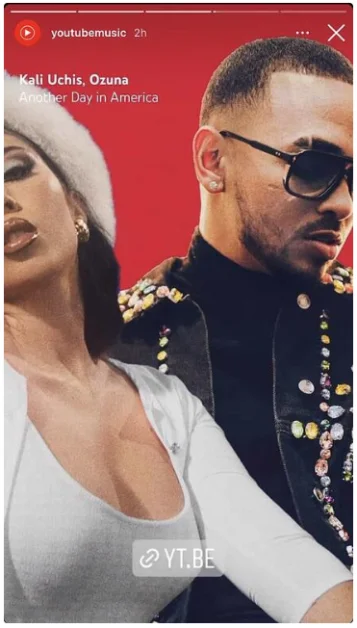
The lesson is restraint. One strong picture and one tappable sticker leave nothing to crop and nothing to misread.
Lime Crime: A Creator Video on a Color Background
Lime Crime reshared a creator’s hair-color tutorial across two frames. The vertical video sits inside the Story on a soft pink and gray background, with step-by-step lettering such as the numbered first step and a short product line for the hair oil.
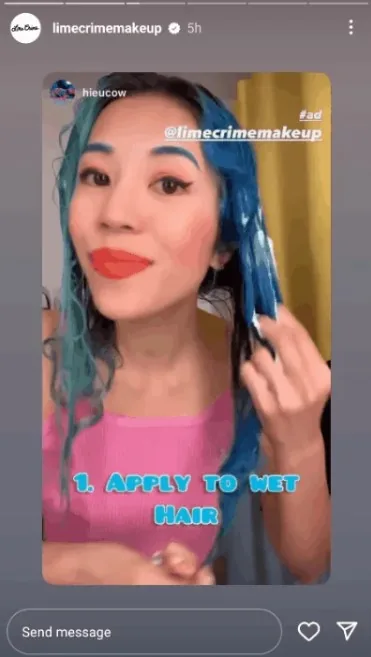
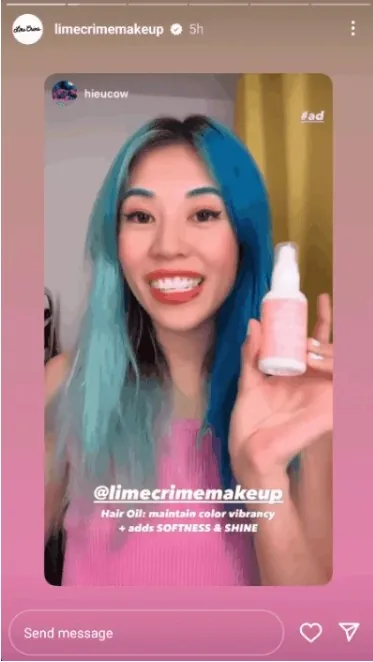
The video keeps its own shape, and the background fills the rest of the 9:16 screen. That is the fit-a-full-picture idea from earlier, used by a brand. Text stays in the middle, clear of the profile bar at the top and the message bar at the bottom, and the #ad tag and brand handle stay visible.
Nalgene: Customer Photos on a Dark Background
Nalgene bottles star in a pair of Stories that the Everyday account reshared from customers who tagged @nalgene. The first photo sits inset on a dark blue gradient under a headline banner, while the second runs full screen. Both credit the photographer at the top and tag the brand at the bottom.
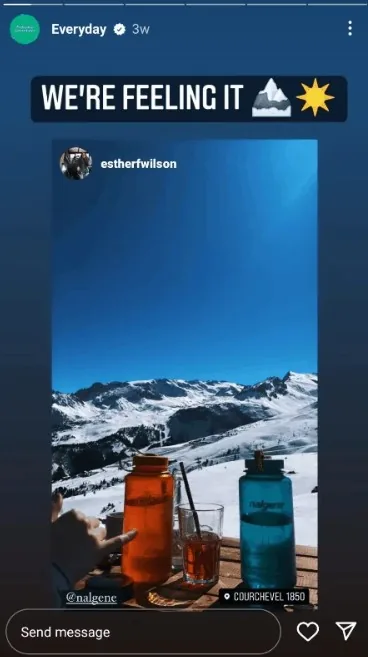
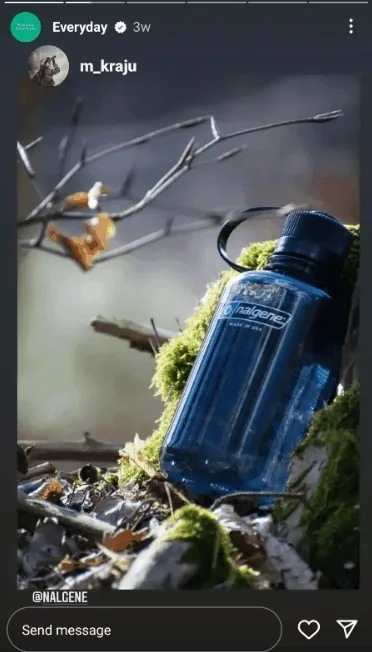
Reposting customer photos costs little and builds trust, because the pictures come from real use. Whether a photo is inset or full screen, the credit and the brand tag stay visible and clear of the edges.
Final Thoughts
Instagram story dimensions come down to one canvas: 1080 x 1920 pixels at 9:16, with text kept inside the middle 1330 pixels.
Put odd-shaped pictures on a color background instead of letting Instagram crop them. Reuse the same canvas for Reels, and build feed posts at 1080 pixels wide in 4:5 or 3:4.
