

Encountering “Instagram action blocked” is a common hiccup that many users face, usually triggered by going a bit too heavy on activities like liking, commenting, following, or unfollowing.
But fear not! It might be frustrating, but it’s not the end of the world. Understanding the rules to steer clear of it and having solutions to fix it are the keys.
In this blog, we’ll dive into the reasons why Instagram blocked your account, the different types of Instagram action blocks, and the savvy ways to avoid and resolve them. Stick around!
What Does Instagram Action Blocked Mean?
An Instagram action block, true to its name, is when Instagram puts the brakes on specific actions like liking, commenting, sending DMs, following, unfollowing, or even posting.
It’s Instagram’s way of responding to activities that trigger its anti-spam radar due to spammy or automated behavior.
What Are the Different Types of Instagram Action Blocked?
Instagram action blocks come in various types, each with its own characteristics:
Temporary Block: This is the most common type of block. If you encounter a temporary block, it typically gets lifted in a Few Hours.

Expiring Block: An expiring block comes with a specific expiry date, usually ranging from 24 hours to one month. Once the duration passes, the block is automatically lifted.
Block Without Expiry: This type of block is a bit more complicated as it doesn’t have an expiration date. Resolving it may require additional actions or waiting for Instagram’s review.
Permanent Block: The worst-case scenario is a permanent Instagram action block, indicating repeated violations of Instagram’s rules. Unfortunately, there’s no fix for this, and the block remains indefinitely.
Why Did Instagram Block My Account?
If you’re wondering why your Instagram account is blocked, explore the following reasons:
#1. Going over Instagram limits
You’ve crossed the platform’s daily or hourly limits for certain activities. For instance, if you like more than 120 posts per hour, Instagram will block you from liking.
It’s not just about likes; this limitation extends to various activities like the number of hashtags used, tags, comments, as well as follows and unfollows.

How can I check if I’ve exceeded Instagram’s limits?
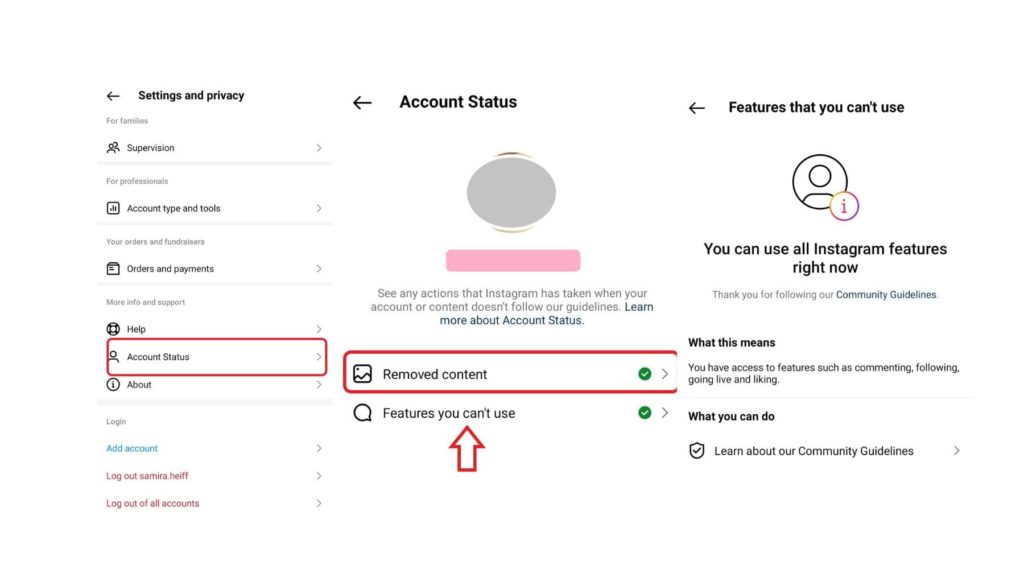
Great news! In the latest Instagram updates, a handy feature has been added to help you keep tabs on your account status. To check if you’ve exceeded action limits or posted forbidden content, follow these steps:
- Navigate to your profile, tap the three-line icon, and access Settings and Privacy.
- Scroll down to open Account Status.
- Tap to open Removed Content or Features you can’t use.
You may also like: We restrict certain activity errors on Instagram.
#2. Using bots or automation tools
If you’ve dabbled in Instagram automation apps or bots—those promising to boost your followers, likes, and views—it could be a reason behind an action block. In the past, using bots was a bit of a norm, but Instagram has since tightened the screws to protect the community.
The message you get when this block happens is: “Sharing your account with a service that helps you get more likes or followers is against our community guidelines”.

Source: Reddit
#3. Posting inappropriate content
You know Instagram rules, don’t you? If you post stuff that’s a no-go—like explicit content, hate speech, fake news, or threats—your account might get blocked.
#4. Leaving spam comments or sending spam DMs
Those sketchy unrelated comments or DMs that pop up, asking you to follow an account or click some link, are most likely sent by bots. Using bots for this stuff is another risk for your account.

#5. Violating Instagram copyright policies
Another Instagram rule you definitely don’t want to mess with is copyright. Sharing someone else’s video or image without their permission can lead to an Instagram action blocked.
#6. Connecting to IG from different IPs
Some experts believe that logging into your account from various IPs might lead to Instagram action blocks. Personally, I’m not 100% sure—I use a VPN with different IPs daily to connect to my Instagram account, and so far, no issues have popped up!
How to remove action blocked on Instagram?
No matter why it’s happening, you’ll want to fix the problem quickly. But how you go about it depends on what exactly is causing the hiccup (we’ll get into that in the next part). For now, let’s check out what you can do to shake off this issue.
#1. Take a break
It’s a straightforward fix. Just exit the app and take a break from any actions like liking, commenting, following, or posting for a couple of hours.
#2. Give up bots or automation tools
We’ve hammered this point home a thousand times: those third-party apps promising overnight followers or likes are using bots. If you’re still using them, it’s time to hit the brakes and drop them fast.
#3. Change your connection
That might not cut it! If you’re on WiFi, switch over to your mobile data!
Also, read: Why can’t I follow people on Instagram?
#4. Report to Instagram
Well, in some cases, when you get an action block message, there’s an option that says ‘Tell Us.’ This is a direct way to seek help from Instagram. But if you don’t see the ‘Tell Us’ option, just give your phone a shake and report the problem with the attached screenshots.
And don’t forget to give this a shot, only if you believe you haven’t done anything wrong!

#5. Uninstall the app
This is a quick fix that might do the trick—uninstall the app and then reinstall it.
#6. Change your Instagram password
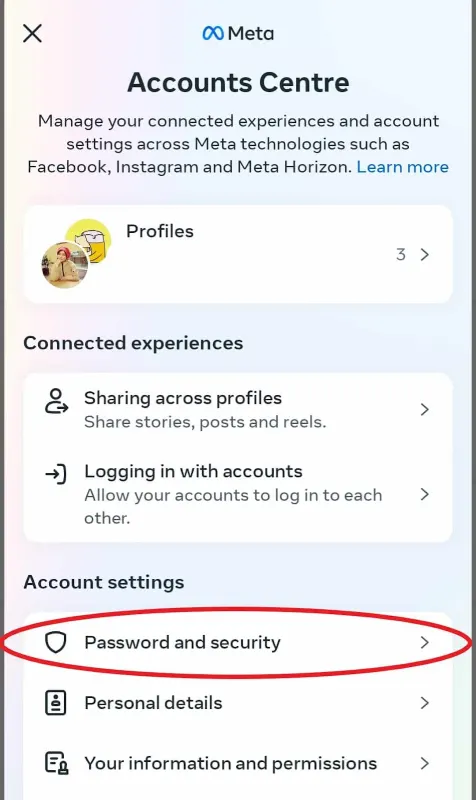
Here’s another solution that has worked for some users and might do the trick for you too. Simply log into your account from a browser, navigate to settings and privacy, then go to Account Centre, Password and Security, and change your password. To kick it up a notch, try changing your password, profile pic, and bio.
#7. Log out and Log in again
If the action block isn’t too serious, a quick fix could be as simple as logging out and then logging back in.
How to Avoid Instagram action blocked?
Well, they say prevention is always better than the cure. Stick to some principles, and you might never face this problem:
- Always follow Instagram rules, especially avoiding excessive actions like likes, comments, follows, or unfollows in a short time—especially on posts from accounts not following you.
- Steer clear of Instagram bots and automation apps.
- Complete your profile and bio for a more authentic look.
- Exercise caution with actions if you’re a new Instagram user; new accounts often have more limitations.
- Say no to the follow/unfollow method for growing your account.
- Avoid spamming comments or sending spam DMs.
- Don’t excessively log into your account from different IPs.
- Link your Instagram account to your Facebook account for more control over your activities.
- Stay active and engage on Instagram to present a more real and authentic vibe.
What increases or decreases the likelihood of an Instagram action block?
The likelihood of getting blocked depends on the following factors:
- The level of your activity on IG: If you’re usually inactive with minimal engagement and then suddenly flood the app with likes, posts, etc., Instagram might get suspicious.
- Your account size: If you have a large following, staying active with more engagement is key, and Instagram understands this, giving you more freedom.
- Your account type: The follow/unfollow and like limits for Professional accounts are lower compared to personal ones.
- Your account age: New accounts have more restrictions than old ones.
- Your Instagram record: If you’re a professional with multiple violations, Instagram keeps a close eye on you.
- The type of action: Excessive liking, commenting, and posting make Instagram algorithms more suspicious.
FAQs
Let’s dive into some frequently asked questions (FAQs) about this:
1. How long does the Instagram action block last?
The duration depends on the type of action you’ve taken. Typically, it ranges from a few hours to one month.
2. Why Instagram blocked me from liking?
If you go over Instagram’s liking limits for the hour or day, they won’t let you like anything.
3. Is Instagram action blocked permanently?
In 90% of cases, it’s usually temporary and clears up within a few hours to days.
4. Why am I still action-blocked on Instagram after the date?
If you’re still stuck with an action block on Instagram even after the expected date, give it a bit more time, watch out for any notifications, and double-check your recent activity. It might be hanging around because of some ongoing issues or delays. If things aren’t sorting out, hit up Instagram support—they might have the fix you need.
