


Have you ever been tagged in a post or comment that you didn’t want to be tagged in? Maybe it was a photo that wasn’t very flattering, or maybe it was a comment that you didn’t agree with.
Whatever the reason, it’s understandable if you want to know how to untag yourself on Instagram.
In this blog post, we’ll show you how to untag yourself from posts and comments on both mobile and PC.
We’ll also answer some common questions about untagging, such as whether the person who tagged you will be notified when you untag yourself.
So stay tuned, and we’ll get you untagged in no time!
How to untag yourself on instagram post
to untag yourself on Instagram, follow these steps:
- Tap on the photo or video that you are tagged in.
- Tap on your username.

- Tap on Remove Me From Post.

- Tap on Remove to confirm.
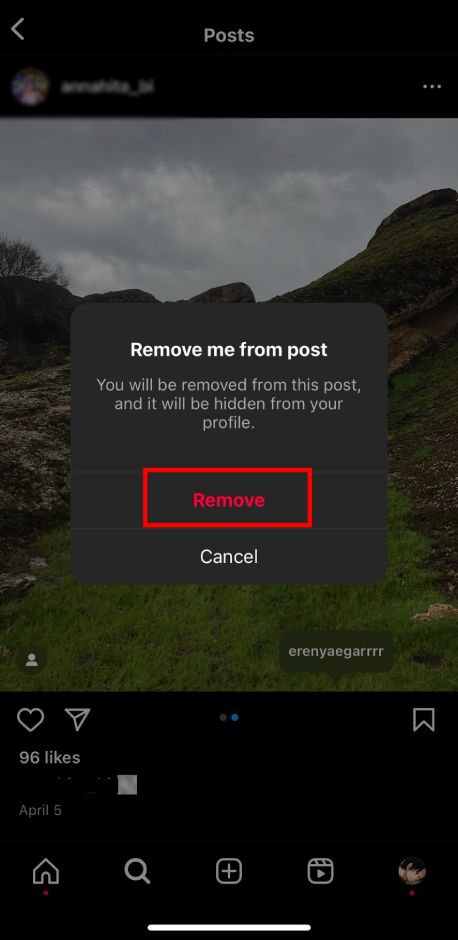
You can also untag yourself from multiple posts at once by following these steps:
- Go to your profile and tap on the Tagged tab.
- Tap on the three dots in the top right corner of the screen.
- Tap on Select Multiple.
- Tap on the posts that you want to untag yourself from.
- Tap on the three dots in the top right corner of the screen.
- Tap on Remove Tags.
- Tap on Remove to confirm.
If someone tags you in a post that you do not like, you can also ask the person who posted it to remove the tag.
To do this, tap on the three dots in the top right corner of the post and select Report. Then, select Something else and explain that you would like to be removed from the post. You can also hide your tagged photos on Instagram from your followers, so they won’t be able to see what posts you’re tagged in.

how to untag yourself on instagram comment
To untag yourself on an Instagram comment, follow these steps:
- Tap on the comment that you are tagged in.
- Tap on your username.
- Tap on Remove Me From Comment.
- Tap on Remove to confirm.
You cannot untag yourself from multiple comments at once. You must untag yourself from each comment individually.
If someone tags you in a comment that you do not like, you can also ask the person who posted it to remove the tag.
To do this: 1- tap on the three dots next to the comment and select Report.
2- Tap on the options “Something else” and explain that you would like to be removed from the comment.
Read more: Why Can’t I Tag Someone on Instagram Posts, Stories, Comments, and More
FAQs
Now let’s answer some frequently asked questions on this subject:
how to untag yourself on instagram story
There is no way to untag yourself from an Instagram story. If someone tags you in their story, you can ask them to remove the tag, but it is up to them to do so.
how to untag yourself on instagram pc
To untag yourself from a post or comment on Instagram PC, follow these steps:
- Go to the post or comment that you are tagged in.
- Click on your username.
- Click on Remove Me From Post or Remove Me From Comment.
- Click on Remove to confirm.
when you remove yourself from a tag on instagram will the person know
No, the person who tagged you will not be notified when you remove yourself from the tag.
Why can’t I untag myself on Instagram?
There are a few reasons why you might not be able to untag yourself on Instagram:
- You may not have permission to untag yourself from the post or comment.
- The post or comment may have been deleted.
- You may have been blocked by the person who tagged you.
- There may be a technical glitch with Instagram.
If you are unable to untag yourself from a post or comment, you can try contacting Instagram support for assistance.
Final Thoughts
In this blog post, we’ve discussed how to untag yourself on Instagram on both mobile and PC.
We’ve also answered some common questions about untagging, such as whether the person who tagged you will be notified when you untag yourself and why you might not be able to untag yourself from a post or comment.
We hope this information has been helpful. If you have any other questions about untagging on Instagram, please leave a comment below or contact Instagram support.
