

Threads, the new app from Meta, made an explosive entrance on July 5th, boasting a staggering 44 million active users just two days later on July 7th. With an average daily time spent on the app of 19 minutes, it’s clear that Threads has captured the attention of millions. (Source: Sensor Tower)
Although the numbers have settled since its launch, it remains the fastest-growing app, attracting up to 100 million active users in an astonishingly short span of 5 days.
Whether Threads can claim the title of “Twitter Killer” or not, one thing is certain—it has amassed a massive following in key regions such as India, Brazil, and the U.S.
If you’ve just joined the platform and are wondering how to transfer Instagram followers to Threads or add friends on Threads, you’re in the right place. Let’s learn how to grow your Threads circle friends!
Why Transfer Instagram Followers to Threads
As an Instagram business account, transferring your followers on the Threads app could offer several advantages.
- It can extend engagement with your followers on a new platform, deepening the connection and increasing overall interaction.
- You can explore new features not available on Instagram, allowing you to use different content formats to improve your engagement.
- Threads allows you to create a targeted audience. So, you can make sure that your content will reach those who are interested in your niche.
- Threads is still new and there’s probably less content saturation compared to Instagram. This gives your posts more chances of being exposed to more users.
- Using new platforms early can provide a competitive advantage. You will position yourself as an early adopter within your industry.
How to Transfer Instagram Followers to Threads
While Threads allows you to invite your friends, it’s not possible to transfer a large number of followers. You can invite and add friends on Threads through the following:

Follow accounts from Instagram
This is the most straightforward way to grow Threads circle friends. All you need to do is to tap the first option. if you want to follow the same accounts you follow on Instagram, just scroll down and tap “Follow all”.
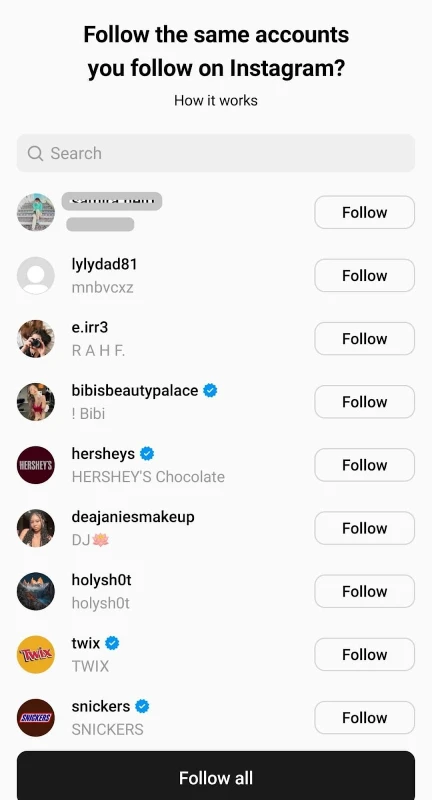
If not, you can run through the list, choose the accounts you’d like to follow one by one and tap the “Follow” button.
You can also take back your follow request by tapping the follow button again.
Note that once you follow someone on Threads, they will be added to your list automatically when they join Threads.
Invite friends by WhatsApp
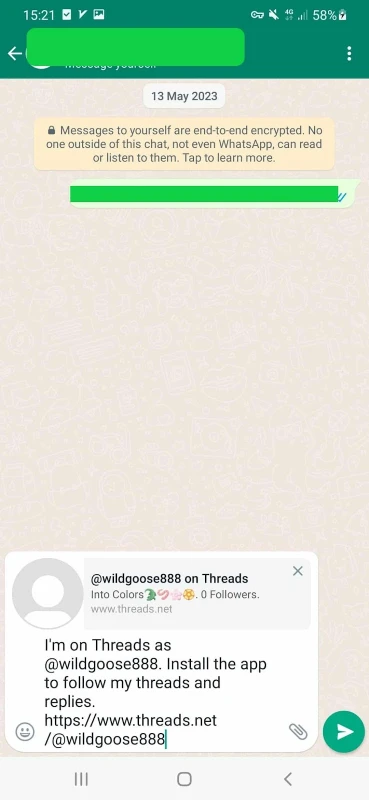
You may like to invite your friends to join you on Threads via WhatsApp.
- Go to your Threads profile and tap the two-line icon at the top right corner.
- Now, click “Follow and invite friends” and select “Invite friends by WhatsApp”.

- Send your profile to your contacts or share it in your “Status”.
Invite friends by SMS and Email
In addition to WhatsApp, Threads allows you to use messages and email to share your Threads profile.

How to Invite Instagram Followers on Threads Using AiGrow
As discussed above, you can import your IG followers to your Threads if you own a personal account. For public accounts with large followers, it’s a bit different as they may not even get to know you’re on Threads.
The most efficient and time-saving way is to use AiGrow’s mass DMs service.

It would be timely to send hundreds of direct messages to your followers manually. But AiGrow lets you send hundreds of DMs in a shorter time and invite your followers to follow your Threads account. Here’s how to make use of this service:
- first, create an account on AiGrow for free and log in;
- Now, add your Instagram account and provide your account information including your target audience, and your competitors;
- It’s time to choose your preferred plan and buy it;
- After that, connect your Instagram account to the AiGrow platform;
- Set up an online session with your dedicated manager to discuss further details;
- AiGrow will personalize your direct messages to your target audience;
- And finally, it will provide you with data-driven reports to measure its performance.
Sign up now to use AiGrow’s mass DM service!
How to Grow Your Followers on Threads
We’ve got a whole post on how to increase Threads followers. but, in short, you can follow these steps to get more followers:
#1. Create an attractive profile
Having a captivating bio with call-to-actions and a link can go a long way to draw people to your Threads account. if looking for more ideas, read 16 bio examples to get inspired.
#2. Stick to a consistent posting schedule
Threads is fresh and the best time to make a habit of posting continuously, at least in the first months of launching!
#3. Post diverse content on Threads
Although Threads is in the early stages, it allows users to share different content. So, grab the chance and post images, videos, gifs, and memes. Visual content turn to catch more followers on Threads.
#4. Engagement is the key to business accounts
You know how to transfer Instagram followers to Threads, but that’s not enough. Threads doesn’t care as much about the followers’ count as Instagram does.”
So, it’s better to find other creators in your niche to build a network. Moreover, make sure to engage with your followers by responding to their replies, or even liking their Threads.
#5. Take advantage of AiGrow’s Instagram growth tool
As long as Instagram is linked to Threads, any increase in your IG followers will lead to growth in your Threads followers.
Let’s see how a top-notch Instagram management tool like AiGrow can help you improve your Threads followers.
- AiGrow offers a Mass DMs service that allows you to send as many as DMs to your followers to inform them you’re on Threads;
- It also helps you increase your followers organically without using any bots;
- In AiGrow, a dedicated account manager is responsible for engaging with your followers (no automation tools);
- AiGrow lets you mass unfollow those accounts that don’t follow you back.
Get started with AiGrow and boost your Instagram account now!
Conclusion
Now, you know how to transfer Instagram followers to Threads as well as add friends on Threads. If you have a business account with hundreds of followers, it’d be wise to use an efficient way to invite them on Threads. Using Aigrow mass DM service will provide you with a quick and reliable option.
