


The Instagram story option is a new in-app feature that allows users to post their photos and videos temporarily. This feature which was well received, had been launched in August 2016. The images you upload will disappear after 24 hours, and people can no longer see your story after that specified time. However, the owner can see old Instagram Stories and re-story them anytime. This feature is widely popular among people for its usability. You should use the Instagram story option whenever you want to upload a photo or video temporarily. In addition, you can choose who can view your story, mention you in their story, reply to your story, and so on. In other words, like hiding your posts without deleting them, you can hide anyone from your stories.
In this article, we will show you how to see old Instagram Stories quickly.
How To See Instagram Stories?
When you upload a photo or video in your story, it will appear on your feed only for 24 hours until you delete it. During this time, people can see your stories, and you’re able to see who has viewed your story. Instagram lets users see their viewers within a 48-hour period.
Instagram stories are at the top of the feed. Whenever the circle is colorful, it means the new story is available for you to check. So the only thing you need to do is to click on the colored circle icon to check out the story.
According to seeing someone’s story, you don’t need to trouble yourself when there’s an alternative way to see and share someone’s story. By using some trustable third-party apps like Aigrow, you can easily repost someone’s story on Instagram or download it. Which means you don’t need to view stories anonymously but remember, it doesn’t work for private accounts.
However, you cannot do the same with old stories.
Can You See Old Stories on Instagram?
Instagram story increased its popularity. People use stories to drive sales and advertise their products to get more attractions. Therefore it’s essential to increase their story views and get more audience.
But you may wonder how to see old Instagram Stories when they disappear after 24 hours.
Instagram old stories are located in a separate section which means you can access them.
You can find all your old stories with the exact time in the stories archive. But the viewers are no longer visible after 48 hours from your last story.
How To See Old Instagram Stories?
As we mentioned above, Instagram dedicated a separate section for old stories. If you want to know how to see your old Instagram Stories, follow the below instruction.
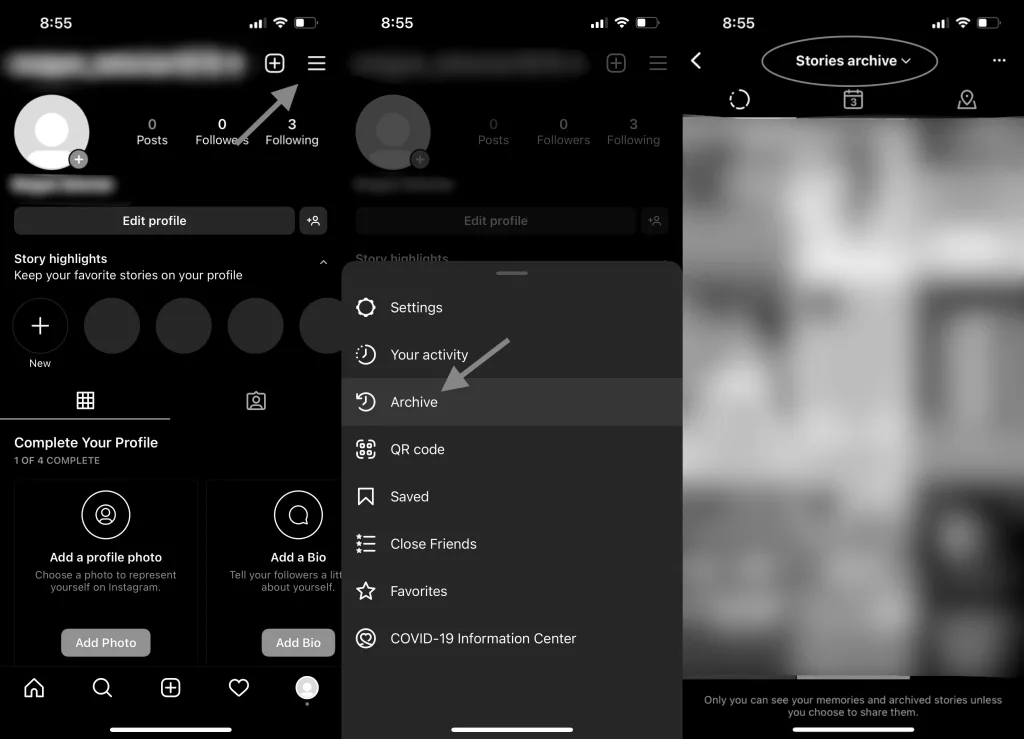
- First, open Instagram and tap your profile picture in the bottom right.
- Then tap the “three lines” in the top-right
- Tap “Archive” and set the option above to “Stories archive.”
- Now you can see all your previously uploaded stories on Instagram.
How to Find and Download Old Stories on Instagram?
Instagram, all uploaded stories are located in a different folder called the archive. Besides, you can find your archive posts in this folder and choose whether to bring them back or not.
Literally, there is another great option that Instagram offers its users, which is re-story.
For instance, you’ve already uploaded those expired stories and now want to share them as part of your memories.
You probably want to know if there is a way to save your old stories? Fortunately yes. A download icon letting users save their stories is at the bottom of your screen. Here we’ll show you how to save your archived and unarchived stories.
How to Find Your Old Instagram Stories?
This is the first step. Before you download your archived stories, you first need to find them.
As we’ve already explained the instruction, the only thing you need to do is navigate to your Instagram profile. Then click on the three lines icon and select archive to get into Instagram.
How to Download Your Old Instagram Stories?
Although there are many ways to download someone’s stories on Instagram, we’ll mention functional methods here. One of the easiest ways with less trouble could be a screenshot and screen record that we recommend.
Anyway, there are two ways to download someone’s stories; the first one is a screenshot or screen record, and the second one is to use third-party apps.
Honestly, there’s no way to download stories from private pages unless you follow them on Instagram. All in all, both ways that we’ve said also work for private pages, but only when you follow them.
How to View Someone’s Old Instagram Stories?
In this case, we should say the only way to check someone’s old Instagram is to refer to their highlights. If they have no highlights, maybe it’s better to ask them to send their old stories. But whenever they make highlights and add their old stories, it’s your golden opportunity to see them easily without notifying them.
How to view Old Instagram Stories in Short?
Here we want to tell you briefly. When it comes to seeing old Instagram stories, first and foremost, you should make sure that you’ve not deleted your stories before 24 hours. Then you can easily go to your profile and select archive by clicking on the three lines icon in the top-right. Another great option is that you can now see your old Instagram stories sorted by date and location.
How To See Your Old Stories On Instagram?
We explained its instruction in the previous paragraph, and this is the only way to see old Instagram Stories on Instagram. You should know this method is the same for iPhone, Android, and PC.
Can You View Someone’s Old Instagram Stories?
Yes, but it depends on the current situation. If they have already made a list of story highlights, it’s possible to see their old stories. But you’re able to see those stories that they’ve selected.
However, they can send their archived and unarchived stories to you. Follow the next part to learn how to send your old stories to someone.
- Open your Instagram and navigate to your profile.
- Click on the three lines and tap archive.
- Choose the story you want to send and tap “More.”
- Then tap “Send to…” and mark the account you want to send your story to them.
- Tap “Send.”
Can you rewatch someone’s Instagram Stories?
Absolutely yes. There is no limitation in rewatching someone’s stories unless they hide you from their story instantly. And you should consider during 24 hours; you can rewatch their stories as long as you want. In private accounts, there is no way to find out who has seen your stories more than once. But in business accounts, you can see how many times your story has been rewatched.
How To See Someone’s Old Stories On Instagram?
However it’s quite simple to find and see your old stories, but it’s impossible to see someone’s old stories on Instagram unless they highlight them. In terms of seeing stories that have disappeared, posting stories as highlights by the owner is the only way to see expired stories.
Besides, you can ask them to share their old stories, and then you can save them to your media. Posting your stories as highlights would let others reply, like, share, and see your previous stories. But you can customize the story settings and let a few people see your stories.
How to make highlight stories on Instagram?
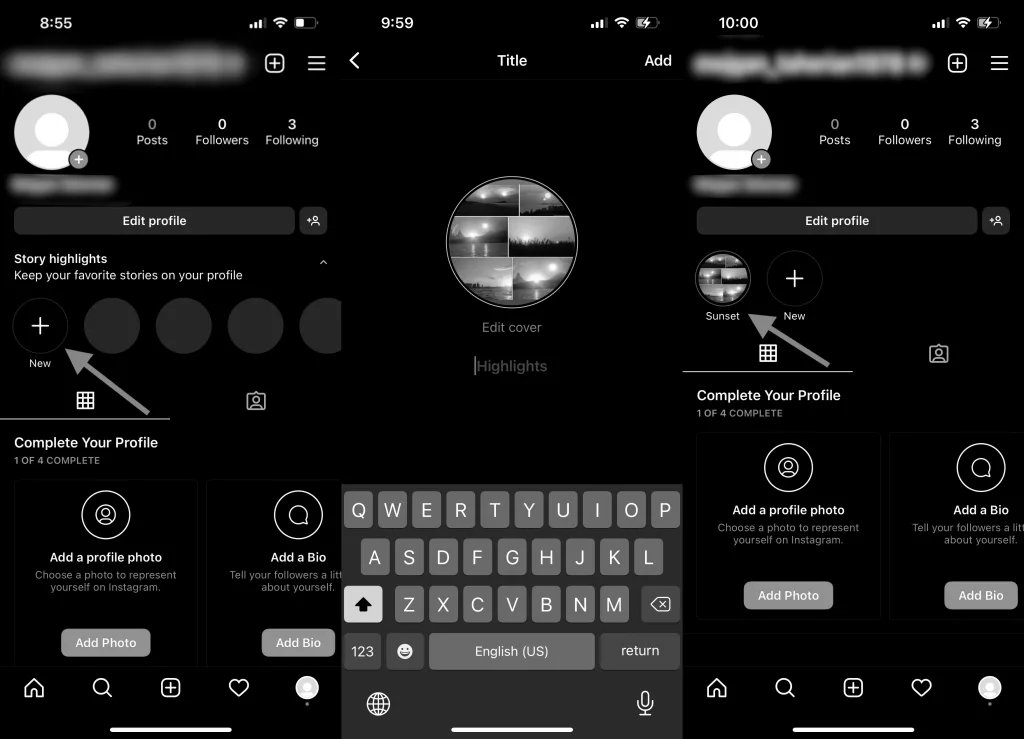
Instagram highlights are located in your Instagram profile below your profile and bio. Here you can find everything you need to know about the Instagram story highlight. But follow these steps if you want to learn how to create Instagram story highlights.
- Go to your profile and tap “Story highlights.”
- Then tap “New” to add your archive stories.
- Select the stories you want to post as highlights.
- Write a title or name for your highlight and tap “Add.”
How can I see celebrities’ old Instagram stories?
Till here, you got the point, and you know how to see old Instagram stories. But if you want to know how to see celebrities’ old Instagram stories, read the next part.
As it was simple to see old Instagram stories, you should know to see even celebrities’ previous stories; you need to check their highlights. That’s the only way to watch the stories that they’ve once added.
How To Download Old Instagram Stories?
As Instagram stories last 24 hours, if you want to save someone’s story, you should hurry; otherwise, you lose will it. But here, we want to show you how to download old Instagram stories before you lose them. Remember, as we discussed, to access old stories, you need to ask people to share their stories or download their stories from their highlights.
Screen record or screenshot the story.
If you want to save someone’s story, you can take a screenshot or screen record their stories.
Using some reliable third-party apps or websites.
Another way to download stories is using some available websites like Save Instagram. But here, it’s necessary to know that it works for public accounts, not private ones.
And you can use reliable third-party apps like Aigrow that allows users to download and save stories quickly.
How to see old Instagram stories once they’ve been deleted?
Sometimes you need to delete your content for some reason so that it could be the post, story, and so on that you have uploaded to your account.
When you delete your story before 24 hours, it will be removed from your page temporarily, but Instagram will transfer them to another folder. These removed stories that are not in your story archive will remain for 30 days in a separate folder that is called recently deleted. After this time, the deleted story will be removed permanently.
But during 30 days, you can see or even restore them immediately, but before doing this, update your Instagram to the latest version.
If you want to know how to access your deleted stories, read the next instruction.
- Tap your profile picture to be redirected to your profile.
- Tap the three lines icon in the top-right and then click on “Your activity.”
- Scroll down and tap “Recently deleted.”
Can I re-publish an old Instagram Story?
A great thing that you should know is that you can restore your old stories on Instagram.
It’s not difficult at all. As you can access your archived or deleted stories, you can easily bring them back or even re-story them. So, you can re-publish your old Instagram story by following these methods.
- Go to your profile and tap the three lines icon.
- Click the “Archive” option.
- Choose one of your stories and tap “Share.”
- Then, click on “Your story” to re-publish your archived story.
How to see mentions on Instagram stories?
Instagram mention option is a very popular feature that people use to notify others. Mentioned accounts only receive a notification from those who mentioned them. By all means, you can change your settings and choose who can mention you. The notifications will appear on your screen, but if you don’t get them, you should check your direct message.
To see mentions on Instagram, follow this way.
- Open your Instagram.
- Click on the “Direct message” icon.
- Open the newest message, which shows the “mentioned you in their story” message.
Why Can’t I Tag Someone on Instagram Story?
When someone mentions you in their story, it notifies you, and you’ll receive a notification for being mentioned in their story. Also, your username is visible to other people, and by clicking on it, they will be redirected to your account. The stories that you’re mentioned in won’t appear on your profile, and you can only watch them or share them in your profile. Sometimes, you may encounter frustrating issues, like an error during mentioning someone on Instagram. When It seems impossible to mention someone in your story, you should look for the solution. Here we want to explore a few solutions.
Update your application to the latest version.
Well, it’s very important to make sure that you’re using the latest version because of some unwanted errors and bugs. So if you’re using the old version of Instagram, update it immediately to remove these errors.
Check the person’s account.
The second way is to check the person’s account to make sure they have blocked you or not.
When someone blocks you on Instagram, there is no way to access their account. For instance, you cannot tag, mention, message, or even search their username on Instagram.
The privacy settings.
The last reason could be that they might have changed their privacy settings. If you want to mention someone in your story but fail, maybe they’ve changed the “who can mention you” in their privacy settings.
How to see old story mentions on Instagram?
As we explained, you’ll get a notification when someone mentions you in their story. But this was for new stories. The question is, how about expired stories?
Recording to see old Instagram stories in the archive folder, you can see the old story mention message, but the problem is you cannot see the content. Let us put it this way: the story will disappear after 24 hours, so you can see it only for 24 hours when someone mentions you in their story unless they add that story to their highlights.
You can also see the message of the old story mentions.
How Do I Archive Instagram Stories?
Like archiving your posts on Instagram, your stories can be archived. But the difference is that your stories will be archived automatically without any effort. You need to download them, save them or do something to keep them for a long. Your archived stories are in another section which is the archived folder. However, if you don’t want to archive your stories, you can turn off the option anytime. To turn on or off your archive stories, you should try this.
- Tap your profile and tap the three lines icon.
- Then tap “Settings.”
- Select the “Story” option in privacy.
- Now enable/disable the “Save story to archive” option.
How to See Old Notifications on Instagram?
Before explaining how to see your old notifications on Instagram, we should say that this matter needs further clarification. You can check your old notifications, but you should know that Instagram notifications have limits too. Unfortunately, you cannot check older notifications more than a week later, and there is no satisfactory answer. But here, we show two different ways to check your old notifications.
Check your notifications from your Instagram.
- First, open the app and click on the heart icon at the bottom.
- Then scroll down and see your old notifications.
Check your notifications from your email or Gmail.
- You can open the app if your account is connected to your email/Gmail.
- Go to the sidebar and click on the three lines at the top.
- Then tap “Social” to see all your notifications from any connected social media.
What is an Alternative Way to See Old Stories on Instagram?
You may have heard of third-party apps allowing users to watch others’ stories. As you probably know, it’s hard to recognize a legit third-party app from a scam. Some of them claim that by using their service, you’re able to watch private account stories or download them. But we’ve been told that it is impossible to have access to private stories. So be aware of such these tempting offers. If you’re looking for an alternative way to see old Instagram stories, we should say except for those methods we mentioned; there is no alternative way to see old stories.
What is the Best Old Instagram Story Viewer?
Over time, some apps add new features which let users enjoy using social media. For instance, some Instagram story viewers let you see old Instagram stories from highlights and the new stories that people share. Besides, you can download each story you want.
We will introduce a list of top Instagram story viewers.
- Aigrow
- Qoob Stories
- Cocospy
- mSpy
- Hoverwatch
- Glassagram
- eyeZy
- Instalkr
- SmiHub
- Ingramer
- InstaDP
- Stories IG
- StoriesDown
Conclusion
You should check your story archive in a different section to see old Instagram stories. As you see, Instagram stories are available for others for only 24 hours, but the owner can check them anytime. However, if the owner deletes the new story immediately, Instagram will keep it in another folder for up to 24 hours. And for archived stories, if you delete them, you can restore them for 30 days; otherwise, they will be deleted permanently.
If you want to keep your old stories available for others, you should make highlights and add your stories to them. You add both unarchived and archived stories to your highlights.
FAQ
How to see my old Stories on Instagram?
You should try this if you’re stuck trying to see old Instagram stories. First, go to your profile, click on settings, and tap archive to access all your expired stories.
How to View Your Old Instagram Stories?
To view old stories on Instagram, tap three lines in your profile and select archive. Now you can see all your old stories.
How to download old Instagram Stories?
You can screenshot or screen record someone’s story, but it’s necessary to have their permission first. Another way is using third-party apps or websites to download the stories.
How to see my old Instagram Stories on Instagram?
Old Instagram stories are located in the archive section. To access them, you should tap three lines in the top-right, then tap archive to see your old stories.
Can I hide someone from my old stories?
Yes indeed. When you hide someone from your story on Instagram, they can no longer see your stories, even your old stories in your highlights.
Can you see someone’s old stories on Instagram?
If they add their old stories to the highlights, you will be able to see their old stories.
How to see who has viewed your Instagram highlights after 48 hours?
Instagram story viewers are visible only for 48 hours; after this time, there is no way to figure out who has viewed your stories.
How Can I See a Story on Instagram After 24 Hours?
Instagram stories will be automatically saved in your archive folder. To see your stories after 24 hours, you need to go to the story archive folder.
How do you see old Instagram stories answers?
If you mean old story replies, you can check your old Instagram story replies anytime in your direct message. To go to your direct message, you need to click on the paper icon in the top-right.
How can I see my old Instagram stories on chrome?
In this case, you need to open your browser and log in to your Instagram account. After that, click on the three lines icon and tap archive to access your previous stories. Here you can easily see old Instagram stories.
Is there a way of seeing old Instagram stories?
Yes, of course. You can always see old Instagram stories only by referring to your story archive folder.
Can you see who viewed an old Instagram story?
Yes, but it’s visible only for 48 hours. After this time, you’ll no longer be able to check who has viewed your stories.
How long do story mentions last on Instagram?
Like other stories on Instagram, the story mentions will last 24 hours.
How can I see old story responses?
You can see your old story response through your direct message on Instagram.
Is there an archive for Instagram stories?
Yes, indeed. There is another folder for your archived stories that is located in the archive section.
How long are Instagram stories kept in archive?
It depends on you. They remain as long as you want unless you remove them from your archive folder. By removing them from your story archive, you won’t be able to bring them back.
Does Instagram delete old stories from archive?
Not at all. Instagram won’t delete any of your stories from the archive section. After 24 hours, your stories will only transfer to the story archive folder. It means that they’re no longer visible in your profile.
Why are my Instagram story archives missing?
If you cannot find your archived story, it means you may have deleted it unwantedly. Yet there is no way to bring them back.
How far back does the Instagram stories archive go?
According to the latest research, it only goes back to early 2018.
