


As an Instagram user, you might have come across the question of how to hide posts on Instagram. However, this was not possible quite some time ago.
If you are willing to lose the posts along with the likes, views, and comments, you can easily mass delete all those not-so-evergreen posts for good; otherwise, Instagram has recently offered a functional feature that has been very welcomed.
This feature allows you to keep your posts instead of deleting them while you have full access to them. It means you can hide your posts from your followers so they can no longer see them.
The archive is this valuable feature to show you how to hide posts on Instagram.
So you can archive your posts anytime and bring them back whenever you decide to.
Therefore you’re not going to lose the likes and comments you already have.
Another way to keep your posts hidden from those not following you is to make your account private.
In this article, we will learn how to hide posts on Instagram without deleting a single post.
How to hide posts on Instagram without deleting them?
Archiving your posts could be the easiest way that you can try. Here are just a few steps to show you how to hide posts on Instagram without deleting them.
Before following the steps, make sure that you’ve already updated your Instagram to the latest version. It would help you get rid of frustrating bugs.
How to hide a post from your feed?
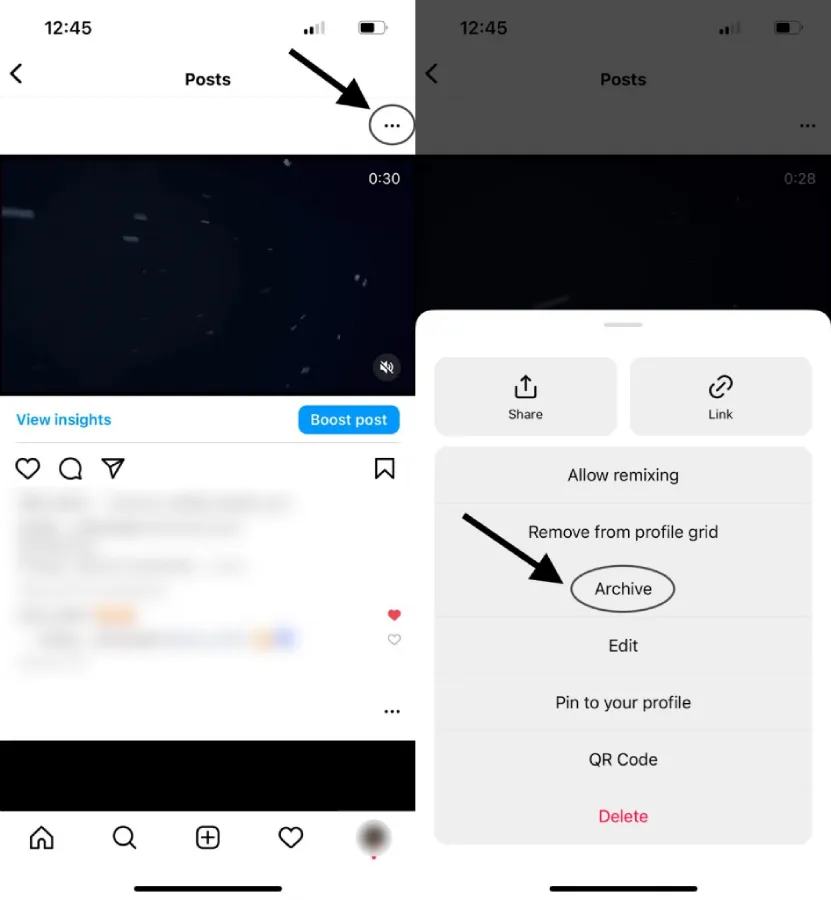
- First, open Instagram and go to your profile in the bottom right.
- Then click on the post you want to hide; it could be a photo or video.
- After that, open the post and click on the three dots icon in the top-right.
- Select the “archive” option.
Can you hide a post from someone on Instagram?
Yes, indeed. You can learn how to hide posts on Instagram from someone specific. There are two ways that you can use them. Besides, you don’t need to worry about losing them. However, this method does not teach you how to hide posts on Instagram from someone specific.
1. Make your account private.
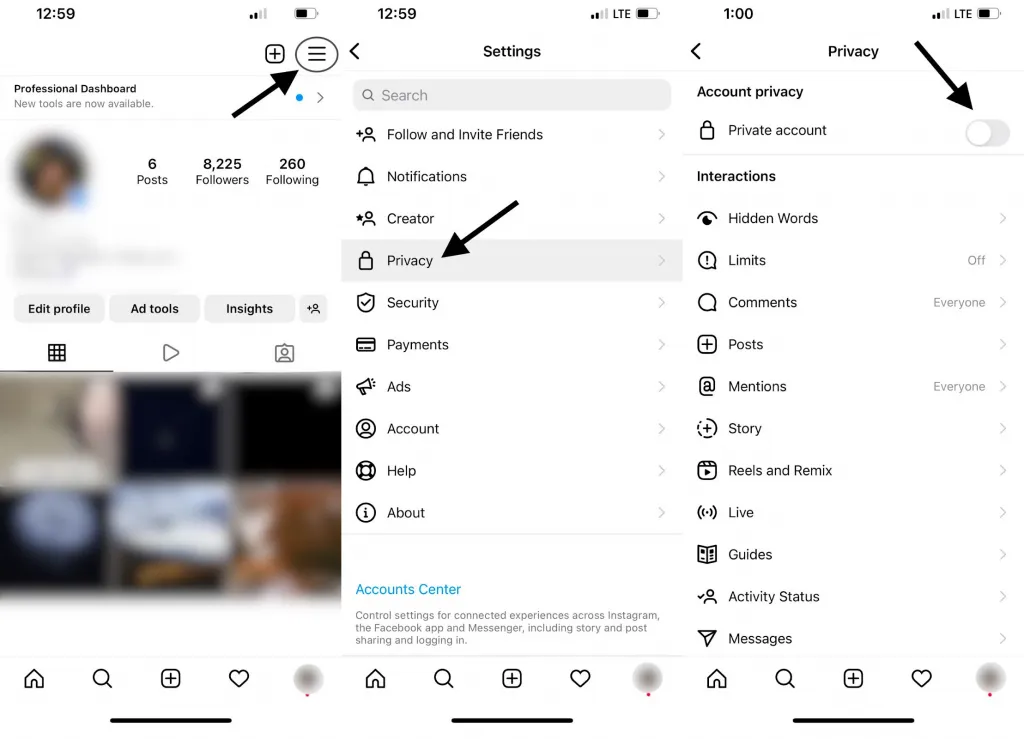
- First, open the Instagram app and go to your profile in the bottom right.
- Then click on the three lines in the top right corner of the screen and open settings.
- Tap privacy to open a new screen.
- Turning the “privacy account option” on will make your account private.
2. Archive your posts.
- You should click on your profile picture
- Choose the post you want to hide.
- Then click on the three dots icon
- Finally, select the “archive” option. Do you want to know how to hide posts on Instagram from someone specific? This is the way!
How to hide Instagram posts from someone?
To know the answer to how to hide posts from someone on Instagram without blocking, follow the further steps.
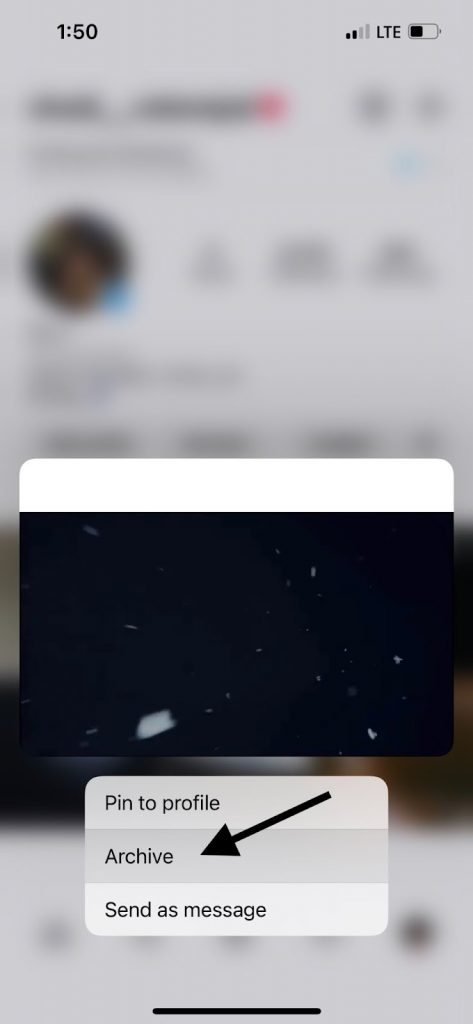
- Choose your post on Instagram.
- Click on the three dots icon.
- Select the “archive” option to hide your post.
How do you hide someone from your story quickly?
Learning how to hide posts on Instagram is not the only thing that matters. You may wonder how to hide Instagram posts from certain followers quickly.
Follow these steps if you want to hide your stories from a specific person.
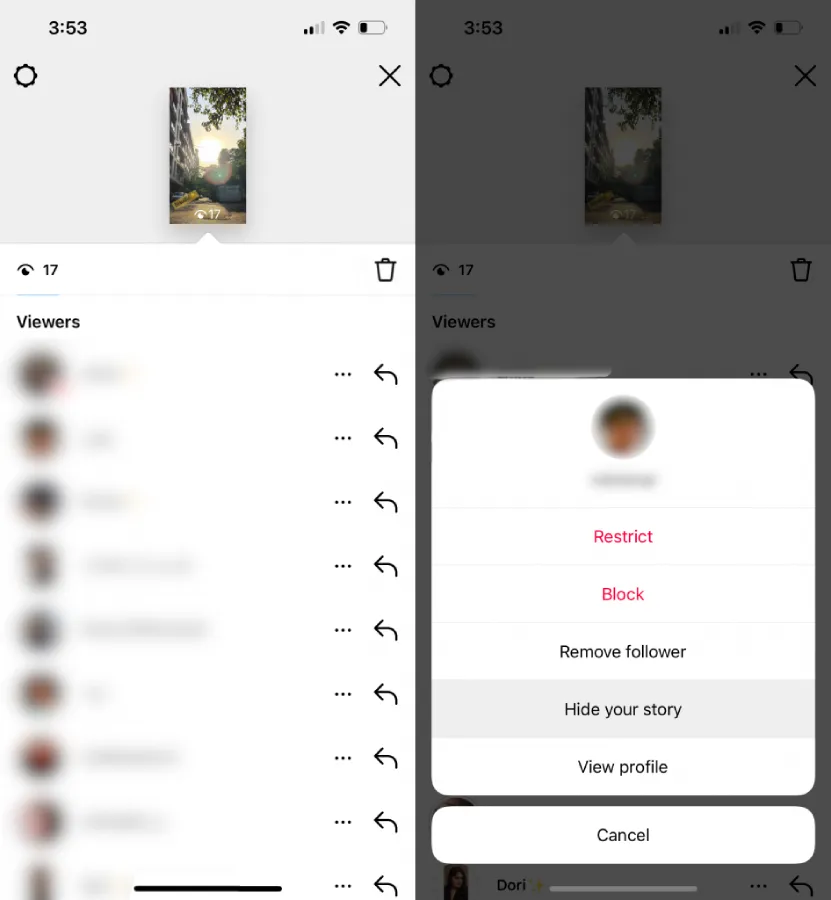
- Tap your story if you have a new story that’s available.
- Swipe your story up to see viewers.
- Click on the three dots icon right beside each account.
- Then select the “hide your story” option to hide your story from them.
How to hide someone’s Instagram Posts without unfollowing them?
Till here, you’ve realized how to hide posts on Instagram from someone. Here is another topic to discuss. You may want to keep someone as your follower, but you don’t want to see their posts or stories.
The best way to hide their posts without notifying them is to mute their account.
Therefore you can replace mute instead of unfollowing their account. Here are the following steps.
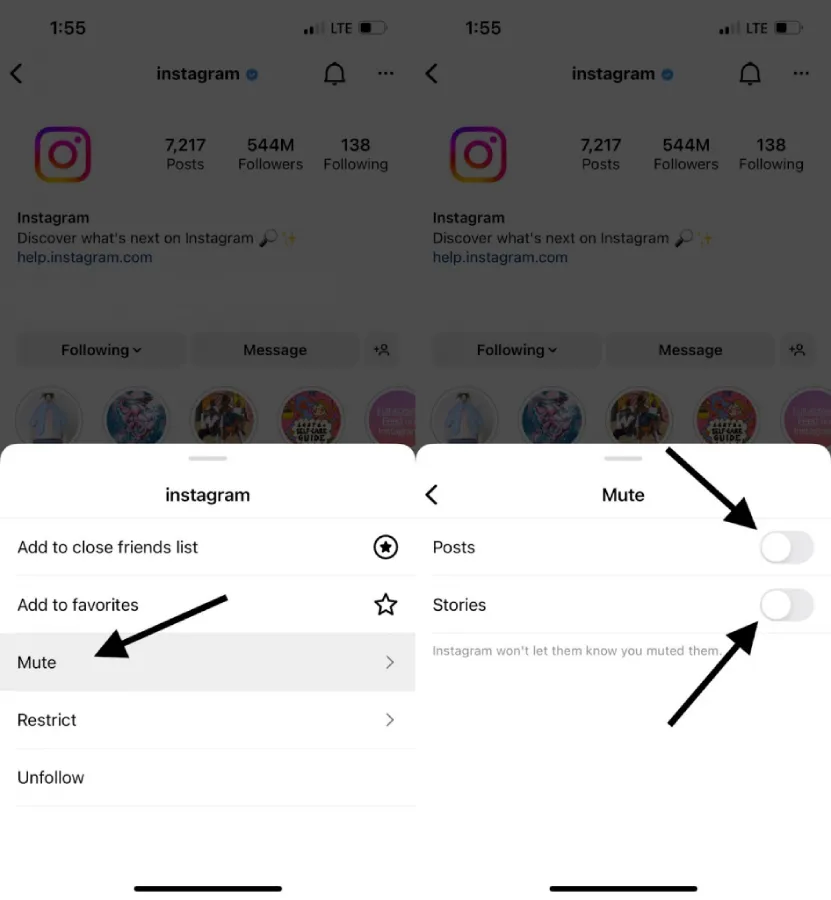
1. How to mute an Instagram account.
- First, open Instagram and go to someone’s profile whom you want to mute their account.
- Click on the following.
- Then tap mute from the list of options available.
- You can enable each of their post or story options or both of them.
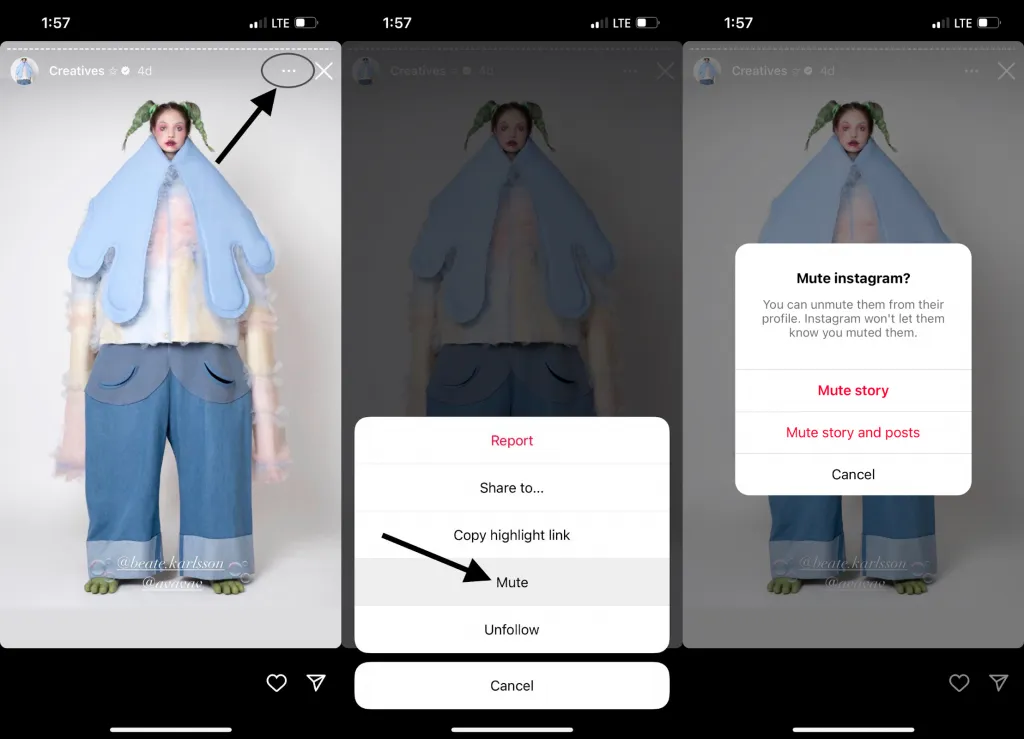
2. Mute the account in someone’s story.
- Open Instagram and tap their stories. You can do it through their highlights if they have no current story.
- Click on the three dots icon.
- Tap mute.
- There are two options for you: You can just mute their story or both story and posts.
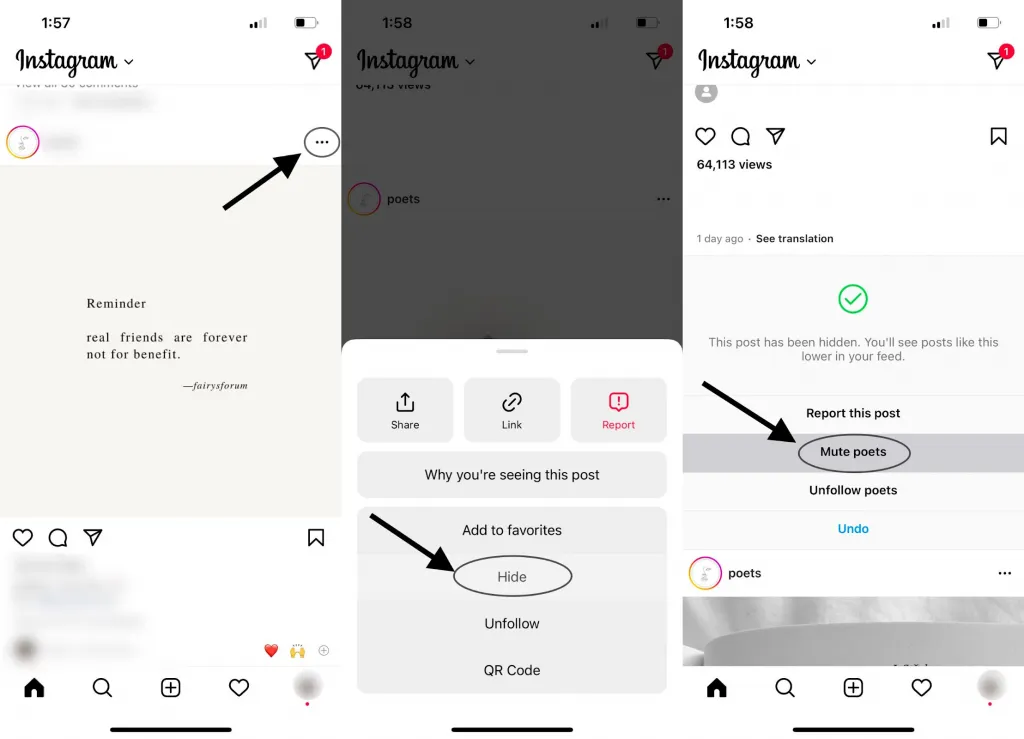
3. Mute the account from your Instagram feed.
- Open Instagram, and go to your Instagram feed.
- Click on the three dots icon button.
- Select hide, then tap mute.
- A new screen appears so that you can mute their story or both story and posts.
How do you hide yourself from someone’s story?
In addition to learning how to hide posts on Instagram, you might want to know more tricks about Instagram. For example, you may have accidentally seen someone’s story on Instagram, but you don’t want them to figure it out.
In this situation, you’re looking for a way to unsee an Instagram story you’ve already viewed. The thing is, you can hide your view, no matter if the owner’s account has a public page or private page. These steps are the same for both iOS and Android devices.
1. Block the account
- Open Instagram, and go to someone’s profile whom you want to hide your view in their stories.
- Click on the three dots icon in the top-right.
- Tap the block option and confirm your decision.
- You must wait 24 hours to ensure their story is no longer available.
- Then you can unblock them.
2. Deactivate your account temporarily.
- First, go to the Instagram.com browser and log in to your account.
- Tap your profile and click on edit profile.
- Afterward, scroll down and click on temporarily deactivate my account in the bottom right.
- A new option shows up and asks you why you want to deactivate your account.
- Then re-enter your password in the next field.
- Tap temporarily deactivate account. Tap yes to confirm it.
How to set your privacy on Instagram? (controlling your visibility)
Another discussion after how to hide posts on Instagram is how to control your visibility.
You can control your visibility and also put a limitation on your account for others.
For instance, you can control who can view your story or see your posts, comments, and likes.
There are a few ways to do it.
1. Set your Instagram account private.
By making your account private, you only let people who followed have access to your account.
As we mentioned above, you can make your account private by going to settings and enabling the private option. This enables you to learn how to hide posts on Instagram from people who do not follow you.
2. Hide your comments and likes.
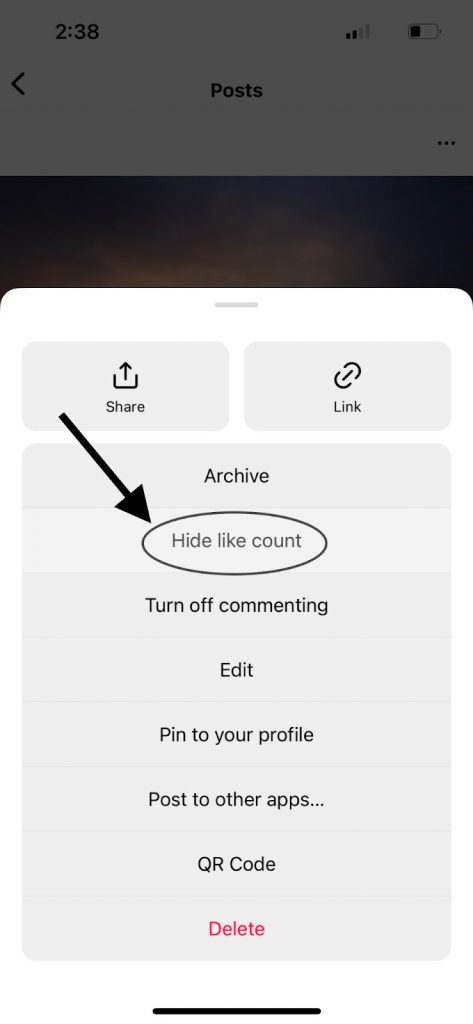
If you want to know how to hide like count on all Instagram posts or even hide your comments
in a specific post, you should try this. Click on the three dots icon in the corner of the screen. Then choose hide like count and turn off commenting options. They will no longer be visible to others until you return them.
3. Hide your stories from anyone.
You can limit your stories and decide who views your story and even who can reply to your stories. All you need to do is to open the settings and go to the “privacy” option. Tap the story option. Then you can hide your stories from anyone and unhide them whenever you want.

How to hide a post from your feed?
You see how to hide posts on Instagram without deleting them. But how to hide Instagram posts? You should click on the three dots icon and select the hide option. Now tap mute to hide the account. You can also unmute their account by going to their profile and clicking on the following. Then tap mute and disable the options.
How to hide Instagram posts from someone without blocking?
As we discussed above, you can archive your posts. Thus your followers can’t see your posts anymore until you bring them back. Here is a straightforward answer to the question of how to hide posts from someone on Instagram without blocking.
Just choose the post you want to hide, click on the three dots icon, and select archive.
How to hide posts you’re tagged in on Instagram?
Tap the post you’re tagged in, and click on the three dots icon in the top-right. Tap post options and select hide from my profile. These steps are the same for both Android and iOS devices.
Also read: How to Hide Followers on Instagram
Conclusion
Many people want to know how to hide posts on Instagram quickly or, in other words, how to hide pictures on Instagram. And they may not want to delete their posts. You could use some tricks that we mentioned a few of them above. Since the number of Instagram users increases every day, you see more practical options that Instagram offers its users.
If you ever decide to deactivate your Instagram account, you should know that you can do it once a week.
FAQ
How to hide my posts on Instagram without unfollowing?
Two options are available: make your account private or archive your posts.
How to hide your posts on Instagram?
If you want to hide your posts on Instagram but don’t want to delete them, you should archive your posts. So no need to worry about losing your likes and comments.
How to hide who likes my posts on Instagram?
You must click on the three dots icon in the top-right right and choose the hide “like count” option. So it won’t be visible to anyone.
How to hide all pictures on Instagram?
Like the previous instruction, you should archive each post one after another. Click on the three dots icon and select archive to hide your posts.
