


How should we know we’ve been stretched to the Instagram DM limit and why is there a limit in the first place?
To begin with, Instagram DMs are a great way to reach your friends, chat, and video call with them.
Also, brands, businesses, and online shops can use this feature to grow their customers.
But you need to know that Instagram has considered some limits to keep this platform a safe place.
The Instagram DM limit shows the number of DMs a user can send daily without getting action blocked.
In this article, we’ll show you everything you need to know about Instagram DM limits, how to beat them, and automate your messages safely!
What Is Instagram DM?
The first question that might come to a new user’s mind is, what is DM? DM stands for direct message and is a private conversation between one user and another or a group of users.
Like any other social media platforms, you can use this feature to communicate with friends and family. However, if you are using Instagram professionally to grow your business or brand, you can use this feature for digital marketing.
Now that you know what DM is, let’s see how you can send one to a user.
Instagram Character Count
Before starting to send messages on Instagram, you need to know how long can Instagram DMs be. Here are Instagram character counts for different texts you might use on Instagram.
Caption character Limit: Instagram caption character limit is 1200 characters, but after 125 characters, the rest will be hidden.
Hashtag Limit: You can add up to 30 hashtags to your caption. However, you can use your comments to add more.
Instagram DM Limit: The Instagram message limit is 1000 characters.
Bio Character Limit: The Instagram bio character count is 150 characters.
Username Limit on Instagram: You can use 30 characters for your username.
How To Send DMs On Instagram?
Now, let’s see how you can access your DM inbox and send and read messages through the Instagram app. There are three ways you can do this:
- Posts on your feed page: Tap the paper-letter icon under a post you see, search the username and send it to a user. See your chat from your Instagram Inbox.
- Replying to stories: Stories are disappearing photos and videos a user shares, which you can see from the top of your homepage. Answer a story and a conversation with that user appears in your Inbox.
- Instagram profiles: Another way is from the user’s profile. On the main page of the user’s profile, you can see the Message button below their bio.
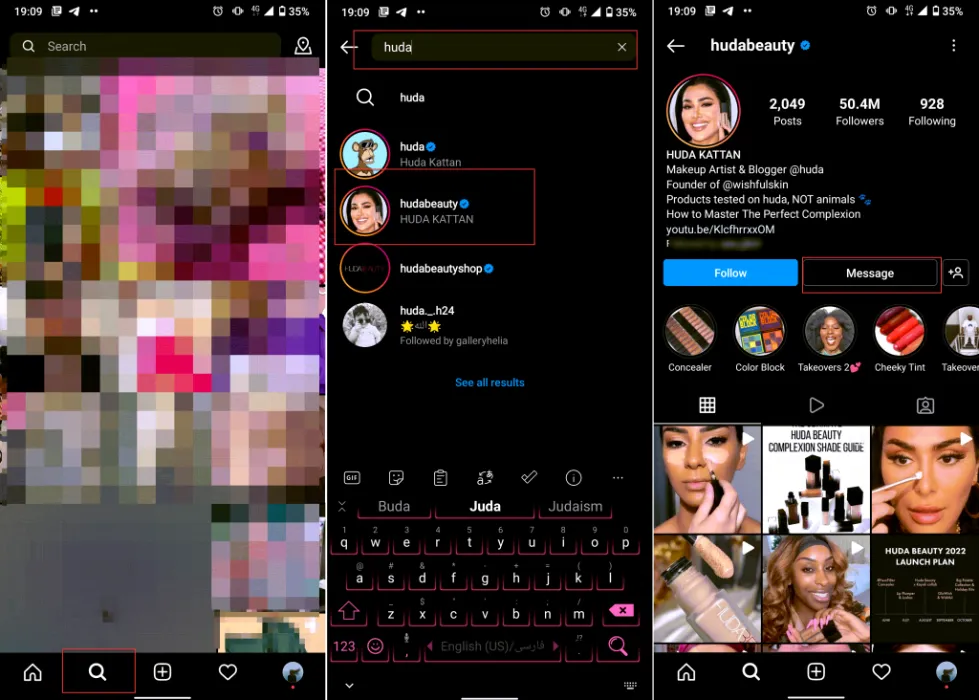
To access your DM inbox through the app, follow these steps:
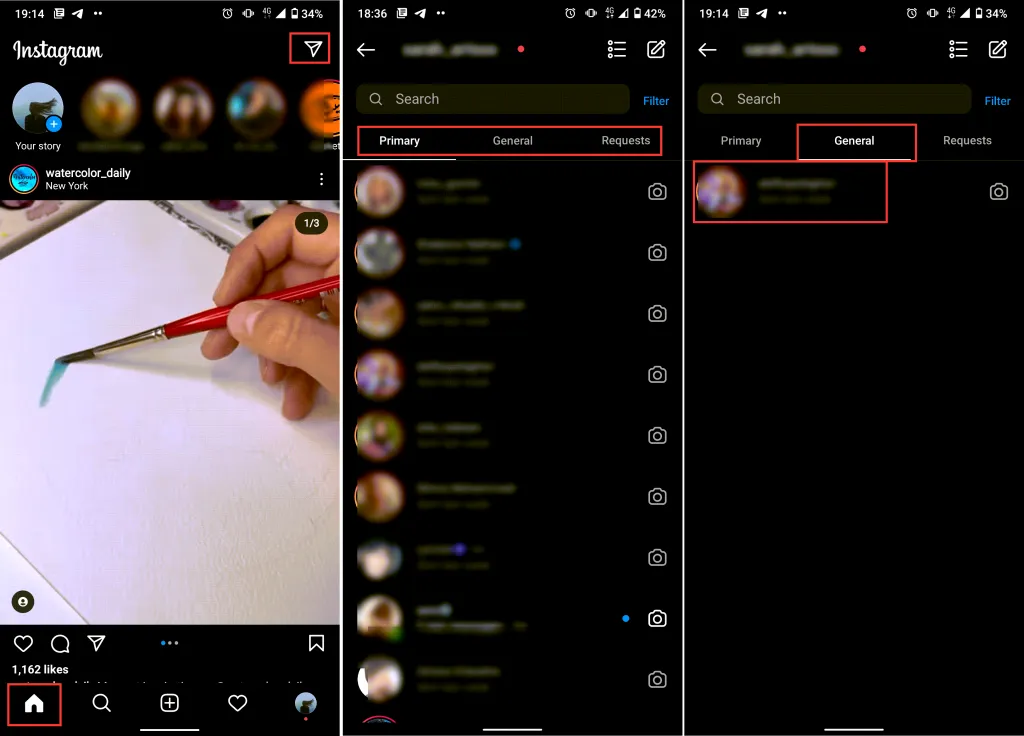
- Log into your Instagram account and go to your feed page.
- From the top right corner, tap the paper-letter icon.
- You can view all the messages you’ve sent and received in the opened tab.
- Tap the conversation and start chatting.
Access DMs On A Business Account
If you are using a professional account on Instagram, you’ve noticed that your DM inbox has changed in 2022. After opening your DM inbox, you’ll see that it’s divided into three parts.
Primary: This tab is for messages you want to see. All Instagram DMs will appear in the Primary box, but you can swipe them into the General. Notifications for unread messages are on for the Primary tab, but you can turn them off in Settings.
General: The General tab is for messages you’d like to return to later. Notifications for unread messages are off for the General tab, but you can turn them on in Settings.
Requests: Messages you have received from users that you don’t follow. To answer them, first, you need to accept their message request. If you decline or ignore it, they can’t see whether you’ve read it or not.
Send Instagram DMs From The PC
If you want to check your DMs from a PC, you can do it through the official Instagram website.
- Open the Instagram website using your browser and log into your account.
- Open the Inbox from the top of your Screen and start messaging.
As you can see, there is no option to send photos and videos this way or call on Instagram on a PC.
Now you can easily access your DM on your desktop from the Instagram website but is that the only way?
The answer is No!
There are better and more creative ways to access DMs on your desktop and even read and send messages through your email. AiGrow is a brilliant solution to all your DM needs with cool features that allow you to use your DMs like a pro.
Use a Third-Party DM Tool
As we said, you can access your DM inbox from the official Instagram website, but the problem is that you can’t send voice messages, photos, and videos.
So we recommend you use a trusted third-party tool to access all features and even try professional tools to get most of your DMs.
AiGrow is an Instagram management and growth tool with multiple features every Instagrammer need to increase their followers and grow their business. Its main features are a powerful Instagram growth engine, content scheduler, automated DMs, link in bio tool, etc. AiGrow’s DM tool provides four different features:
- Automated DMs: Send automated DM to invite users to your campaign, greet new audiences, etc.
- Auto reply: Answer DMs when you are not online to let your followers know you’ll get back to them ASAP, get their order, etc.
- DM to email: Recieve your messages through your email.
- DM inbox: View, Read, and answer your Instagram DMs from your PC.
Let’s see how to use the DM inbox tool:
- First, signup on AiGrow’s website for free using your email address and log into your account.
- Click “Add Instagram Accounts” to connect your Instagram page to AiGrow.
- Select “Access”.
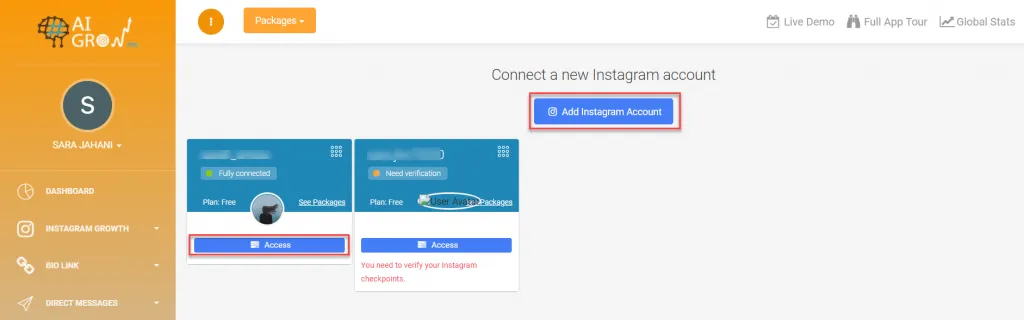
- Open the “Direct Message” tab and choose ” DM Inbox.”
Here you can view all your conversations and sort them by read, unread, and sent. To send a message, open the chat and start responding.

Instagram DM Limits
If you think Instagram DM is just for chatting and talking with your friends, you are missing a lot. For those using Instagram professionally to grow their business, increase brand awareness, and get more customers, Instagram DMs are a perfect tool you need to try.
Share clickable links: Many users think the only place they can share a clickable link on Instagram is their bio, But they forget about their DMs. You can send external links using your Instagram messages to convert your account traffic to other platforms.
Sell products: If you are running your business on Instagram to sell a service or products but are not eligible for an Instagram shop, use your DMs to receive orders and interact with buyers.
Invite users to your campaign: Running Instagram or other social media campaigns? Share the details with your followers using your DMs.
So you can use your DMs for many professional purposes, but before that, you need to know you can’t send unlimited messages every day. Instagram has an Instagram DM limit, detecting spam actions if you send and answer too many messages in a day. The number of how many DMs can you send on Instagram per day is different from one account to another, depending on how old your page is.
But to sum it up, you can send between 50 to 100 DMs to different users daily. The older your accounts is, the more DMs you can send.
But that’s not all! If you send about 50 messages a couple of days in a row, it’s also detected as spammy action! So be careful cause your account might get banned forever.
Note: Make sure you are not sending the same message to more than 10 users daily and change them a bit.
Send Unlimited DMs Every Day
As you see, you can’t send more than 50 DMs per day for a long time since your account might get banned, shadowbanned, or action blocked. But what if your campaign is in two days and you need to invite hundreds of your followers? Or do you get too many customers after your campaign to whom you need to reply? Or after working with an Influencer you need to reply 100 DMs on Instagram? Here is how to send unlimited DMs on Instagram without passing Instagram DM limits and getting an Instagram DM ban.
AiGrow’s bulk DM tool is intelligent for professionals, allowing you to send more messages than the Instagram dm limit daily. The smart engine protects your account and doesn’t let Instagram notices bulk actions made on your page. Let’s see how to use this tool:
- Log into your AiGrow account and select “Manage.”
- Select the “Direct Messages” tab and open the “DM” box.
- Write the message in the “Direct Message” box. The engine will personalize the message and insert each user’s username to make it look unique. Also, it will change the formats, so Instagram doesn’t detect them as spam.
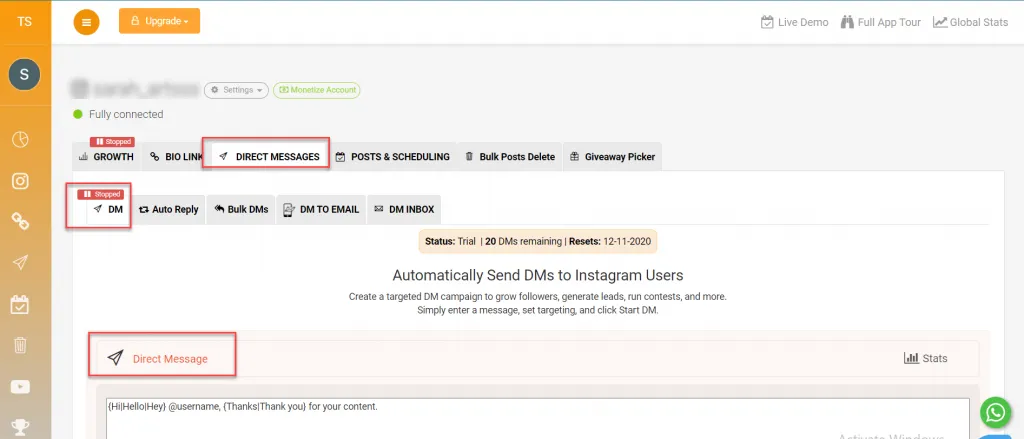
- Scroll to the “Targeting” box and choose your recipients by “Current Followers,” “New Followers,” Followers Of An Influencer,” “Hashtag Users,” or import your excel list.
- Click the “DM” button.

Now your message will be sent to your targeted users safely without passing Instagram DM limits and based on how many DMs can you send on Instagram per hour.
Instagram DMs Character Limit
Before writing your campaign message, you need to know what is the character limit on Instagram dm to write your text based on that. The Instagram dm character limit is 1000 characters, so consider it to write an optimized message. Other text limits on Instagram are:
- Instagram caption character limit: 2,200 characters
- Instagram hashtag limit: Up to 30 hashtags
- The character limit for your bio: 150 characters
- Instagram comment character limit: 2,200
Conclusion
Instagram direct messages, known as DMs, are one of the best and most essential tools every professional Instagrammer needs to use and pay attention to it. This article showed you how to use your DMs to boost your growth, increase brand awareness, and get more customers. After that, we told you everything you need to know about Instagram DM limits to use this feature safely and interact with your audience.
Looking for an Instagram DM tool to automate your messages? AiGrow is what you need.
There is no definite answer to how many DMs can you send a day. But to keep your account safe, keep it between 20-50 DMs.
If you got action blocked on your Instagram and can’t send more messages, it’s because you’ve passed the Instagram DM limits.
If you send messages more than the Instagram DM limit daily, you will get action blocked or even banned.
