


Do you regret posting that video on TikTok? It’s okay, it happens to all of us. All you need to know is how to delete a TikTok video and then you’ll get rid of it in seconds.
Plus, you can always create new videos and get more views on TikTok, so let’s start learning to delete that video and replace it with fresh content. When you are ready to upload a replacement, see our guide on how to post on TikTok.
What Happens When You Delete a Video on TikTok?
When you delete a video on TikTok several things happen:
- The video will be removed from your profile and anyone who had access to the link can no longer view it.
- Likes, comments, shares, and views associated with the video will also be deleted.
- The video will no longer appear in search results or on any user’s FYP.
- You won’t be able to recover the deleted video on TikTok.
How to Delete TikTok Videos on iPhone and Android
Here’s how to remove a video from your TikTok:
- Open the video you want to delete on TikTok.
- Tap the three-dot icon (…) on the right side of the video.
- Select ‘Delete’ from the menu. A confirmation box will appear.
- Confirm ‘Delete’ to permanently remove the video from your profile.

How to Delete a TikTok Video Without the Three Dots
If the three dots are missing, you can still take down your TikTok video by following these steps:
- Open the video you want to delete on TikTok.
- Tap the ‘Share button’ on the right side of the screen.
- In the pop-up menu, slide to the left until you find the ‘Delete’ option.
- Tap ‘Delete’ and confirm your action.
How to Delete a TikTok Video You Reposted
So far, we’ve only talked about taking down the videos that you’ve posted. Now let’s see how to delete a TikTok video you reposted:
- Open the video you reposted.
- Tap and hold on to the screen.
- In the menu that appears, tap ‘Remove Post’.

If you repost a video on tiktok and you can’t find it, you can check your TikTok watch history:
- Go to your profile and tap the three lines in the upper-right corner.
- Select settings and privacy.
- Scroll down and tap ‘Comment and Watch History’.
- Tap ‘Watch History’ and find your video.
Now that we know how to delete one video from your TikTok, let’s see if it’s possible to delete all of your videos at once.
How to Delete TikTok Videos at Once
TikTok doesn’t currently offer a way to delete all your videos at once. There are a couple of options though:
- Delete Videos Individually
- Contact TikTok Support
- Use Third-Party Apps: There are a lot of third-party apps that offer mass deletion of TikTok videos. You can get help from these tools and apps. But you also need to know that using these tools comes with risks. Make sure you understand the potential risks and only use famous extensions with good reviews.
How to Delete a Video from Your TikTok Story?
So far, we’ve learned how to remove a TikTok video from your posts, now what if you want to delete a video from your TikTok stories? Let’s see how to do it:
- Open your story.
- Tap the share sign in the bottom right corner of the video you selected.
- A small menu will appear. Choose ‘Delete’.
- A confirmation pop-up will appear. Tap ‘Delete’ again to confirm deletion.

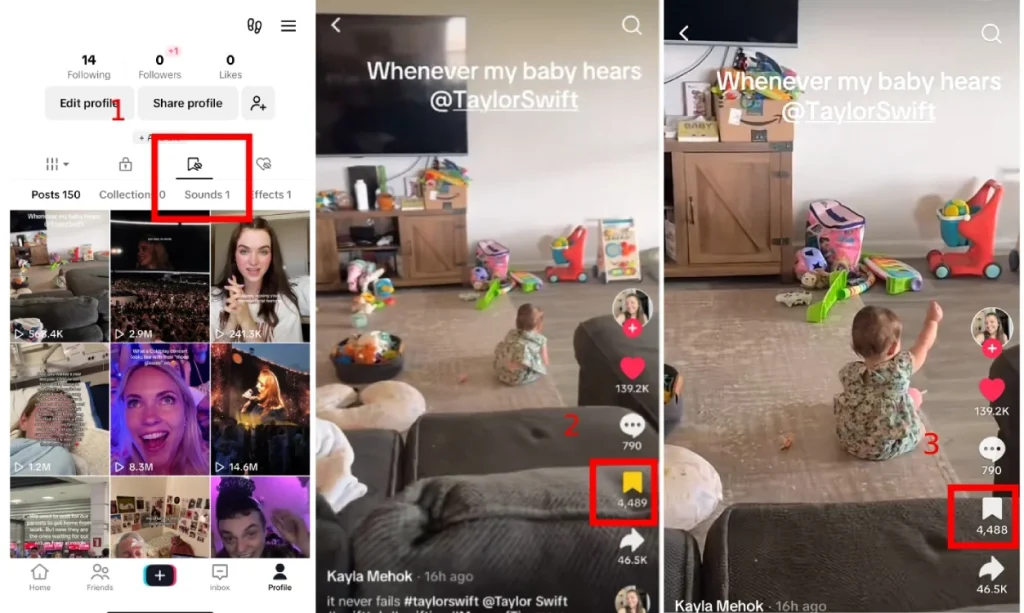
How to Delete a Saved Video on TikTok?
Now that you know how to remove videos from your posts and stories, let’s see how you can remove a tiktok video that you saved, but don’t want it anymore:
- Open the TikTok app and switch to your profile tab.
- Tap on the bookmark icon above your posts.
- Find the video you want to remove from your saved collection.
- Tap on the video to open it.
- Tap on the saved icon (Bookmark) to remove it from your saved videos.
How to Delete a TikTok Video from a Desktop?
So far, all the instructions I’ve brought work on your phone. Now, let’s talk about your PC. You can remove a TikTok video from your desktop by following these steps:
- Open a web browser on your computer and go to TikTok.
- Sign in to your TikTok account if you aren’t already logged in.
- In the top-right corner of the screen, click on your profile picture.
- Select ‘View Profile’ from the dropdown menu.
- This will take you to your profile page. Here, under the ‘Videos’ tab, you’ll see all the videos you’ve uploaded.
- Find the video you want to delete and click on it. The video will start playing.
- On the right side of the video player, you’ll see three dots (…) vertically arranged. Click on those three dots.
- A small menu will appear. Select ‘Delete’ from the menu options.
- A confirmation pop-up will appear asking you to confirm the deletion. Click ‘Delete’ again to permanently remove the video.
Wrapping up
To wrap things up, to delete a TikTok video, find the video you want to delete, tap the three-dot icon (…) on the right side of the video, and select ‘Delete’ from the menu.
If you want to remove a TikTok video you reposted, tap and hold on to the screen, in the menu that appears, tap ‘Remove Post’.
Delete vs Make Private vs Edit: Which Should You Choose?
| Option | What happens | Best when |
|---|---|---|
| Delete | The video is removed from your profile and cannot be restored | You never want it online |
| Set to private (Only me) | Only you can see it and you can make it public again | You are unsure or want to keep a copy |
| Edit caption or settings | The video stays, with updated text or privacy settings | Only the caption or settings were wrong |
| Report (for others’ videos) | You cannot delete other people’s videos, only report them | A video violates TikTok’s rules |
Tip: to keep a copy before deleting, see our guide to TikTok video downloaders, or read how to post on TikTok again.
More TikTok guides are collected in our TikTok guide.
FAQs
Now let’s answer some frequently asked questions on this subject:
Q1. Why Is There No Option to Delete TikTok Videos for Me?
There are a couple of reasons why you might not see the delete option for a video:
- It’s not your video: You can only delete videos you uploaded yourself. If you’re on someone else’s profile, you can’t delete their content.
- Temporary glitch: Sometimes apps experience bugs. Try closing and reopening the app or restarting your device.
Q2. How Many Reports Does it Take to Delete a TikTok Video?
The number of reports required to take down a video depends on the severity of the violation. TikTok reviews each report individually. If a video goes against their Community Guidelines, it will likely be removed even with a single report.
Q3. Is There a Way to Recover a Deleted TikTok Video?
Unfortunately, you can’t recover a deleted TikTok. Once you delete a video from TikTok, it’s gone for good.
Q4. What Happens to the Likes and Comments When I Delete a Video?
When you delete a video on TikTok, all the associated likes and comments disappear along with it. There’s no way to save those separately.
Q5. Can I Delete a TikTok Video from My Watch History?
You can’t delete a single video from your watch history on TikTok, but you can delete your whole watch history. Here’s how:
- Go to your profile tab.
- Tap on the three lines (…) in the top right corner.
- Select ‘Settings and privacy’.
- Tap on ‘Watch history’.
- Choose ‘Clear Watch History’.
