

Instagram is not just a platform for sharing photos and connecting with friends; it’s also a community that thrives on active engagement.
So many people from all around the world communicate with each other through Instagram daily.
But there are always fake accounts that will scam, leave rude comments, and cyberbully other users of Instagram.
This is where the power of reporting accounts steps in as a valuable tool for preserving the platform’s integrity and nurturing a welcoming and genuine space.
If you want to know how to report a fake instagram account, or simply put, how to make Instagram safer, stay with me through this blog to find out!
How to Report an Inactive Instagram Account
Inactive accounts not only clutter your feed but can potentially pose risks to the community. One personal opinion of mine is that they take a lot of usernames! Anyway, let’s see how to report these accounts to Instagram:
Steps to Report an Inactive Account
Reporting an inactive account is a straightforward process. Follow these steps to request instagram to delete inactive accounts:
- Visit the Profile: Go to the profile of the account you want to report.
- Click on the Three Dots: On the top right corner of the profile, click on the three dots.
- Select “Report”: Choose the “Report” option from the menu.

- Select why you’re reporting the account: select between three options

- Choose between options: Select the option that mentions the reason you’re reporting the account.

- Provide Additional Details: Instagram may prompt you to provide additional details or feedback. Be concise and specific about why you believe the account is inactive.
Why Report Inactive Accounts
Ghost accounts, also known as inactive or abandoned accounts, can significantly diminish the quality of your Instagram feed.
They often appear as random profiles with no profile picture, bio, or recent activity. Signs of an inactive account include:
- No recent posts: Check for a lack of recent activity, such as no new posts or engagement.
- Low follower activity: Observe if the account has low follower engagement or if followers are decreasing.
- Outdated profile information: Look for outdated profile details, such as an old bio or profile picture

These accounts often contribute to the following issues:
- Reduced Engagement: Ghost accounts rarely interact with your posts, making it harder for your content to gain visibility and reach a wider audience.
- Disrupted Flow: Ghost accounts disrupt the natural flow of your feed, making it challenging to follow the content of accounts you care about.
- Overwhelming Presence: A large number of ghost accounts can make your feed appear cluttered and unappealing, reducing overall engagement.
If you’re too busy to go through all of your followers, identify your ghost followers, and then remove them one by one, there is a safe and secure solution for you that can save you time and bring you excellent result:
Aigrow’s Ghost Removal Solution
Aigrow’s Insta ghost followers app addresses these problems by identifying and removing ghost accounts from your Instagram followers.
Benefits of Aigrow’s Ghost Removal
It’s manual and risk-free: There will be no bots or automation tools involved in removing inactive accounts on Instagram. That guarantees your account’s security.
24/7 customer support: Since you’re working with real humans, you can access customer support, if any issues happen.
14-day money-back guarantee: This feature allows you to use the plan without any worries.
Benefits of Removing ghost followers in general
- Enhanced Engagement: Removing ghost accounts increases the visibility of active accounts, leading to higher engagement rates and improved content reach.
- Streamlined Feed: A clutter-free feed makes it easier to navigate and enjoy the content you’re interested in, enhancing the overall user experience.
- Increased Authenticity: A clean and engaging feed reflects your brand’s authenticity and professionalism, making a positive impression on potential followers and customers.

How to Use Aigrow’s Ghost Removal
Integrating Aigrow’s ghost removal feature into your Instagram strategy is straightforward:
- Create an Aigrow Account: Sign up for an Aigrow account and connect your Instagram profile to the dashboard.
- Activate Ghost Removal: View Packages and Prices and select Remove ghost followers.
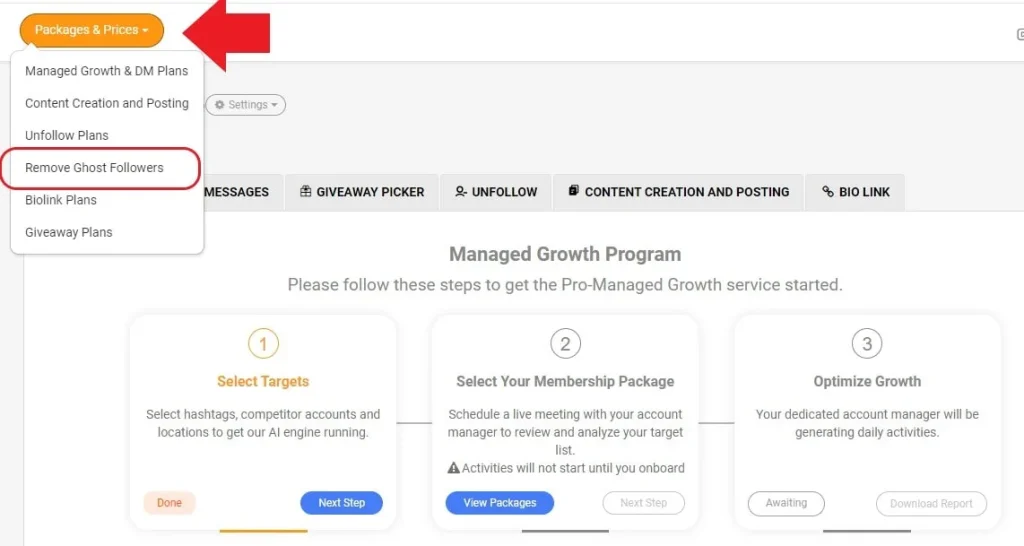
- Meet Your Account Manager: Once you check out, you’ll have an onboarding session with AiGrow’s team members.
- Right after the meeting, they will start removing ghost followers. You can contact your manager via WhatsApp.
How to Report a Fake Instagram Account
Fake accounts often engage in deceptive practices, ranging from scams to Impersonating you or others. They can leave inappropriate comments and cyberbullying.
In this section, I’ll guide you through what to do when someone creates a fake profile of you on instagram and how to report them.
The Dangers of Fake Accounts
Understanding the potential dangers associated with fake accounts is crucial for every Instagram user. These dangers include:
Scams: Fake accounts may attempt to deceive users through phishing scams or fraudulent activities.
Misinformation: Some fake accounts spread false information, impacting the credibility of content on the platform.
Privacy Risks: Interacting with fake accounts can expose users to privacy risks, such as data theft or identity fraud.
Read more: How to Unfollow Everyone on Instagram
Identifying a Fake Account
Recognizing a fake account involves being vigilant and looking out for red flags. Common signs of a fake Instagram account include:
Unusual Profile Details: Check for suspicious usernames, incomplete profiles, or generic profile pictures.
Irregular Activity: Rapid and excessive following, liking, or commenting can indicate automated or fake behavior.
Inconsistent Content: Look for inconsistencies in the content posted, such as mismatched captions and images.
Being aware of these signs empowers you to spot fake accounts and take action to protect the Instagram community. Apart from that, you can also use free people search sites to verify the details of the Instagram account owner.
Steps to Report a Fake Account
Knowing what to do if someone makes a fake account of you on instagram is very important, you have to report them as soon as possible before they can violate Instagram’s terms of service any more.
Reporting a fake Instagram account has the same process that we explained above:
- Visit the Profile: Navigate to the profile of the fake account you want to report.
- Click on the Three Dots: On the top right corner of the profile, click on the three dots.
- Select “Report”: Choose the “Report” option from the menu that appears.
- Choose “It’s Inappropriate”: Select the option that mentions the account is inappropriate.
- Select “Fake Account”: Choose the category that specifies the account is fake.
- Provide Additional Details: Instagram may prompt you to provide additional information. Be concise and specific about why you believe the account is fake.
Read more: How to Tag Someone on Instagram?
FAQs
Now let’s answer some frequently asked questions on this subject:
How many reports does it take to ban a fake Instagram account?
Instagram doesn’t have a set number of reports required to ban an account. They review each report individually and consider the severity of the violation and the account’s history.
Can you trace a fake Instagram account?
Yes, Instagram has tools to track down fake accounts. They use a variety of methods, including IP addresses, device IDs, and account behavior.
How long does it take Instagram to review a fake account report?
Instagram typically reviews reports within 24-48 hours. However, it may take longer for them to review reports for inactive accounts or those that don’t violate their Community Guidelines.
Do fake Instagram accounts get banned?
Yes, Instagram bans fake accounts that violate their Community Guidelines. They also ban accounts that are repeatedly reported for impersonation or other violations.
What to do if someone impersonates my Instagram account?
You can report them to Instagram and their account will be taken down. To do so, follow the steps we mentioned in the sections above.
Final Thoughts
When it comes to fake accounts, your vigilance and willingness to report play a crucial role in creating a secure online space.
By identifying and reporting fake accounts, you help protect not only yourself but the entire Instagram community from scams, misinformation, and potential privacy risks.
So, the next time you come across an account that raises eyebrows, don’t hesitate to hit that report button.
Your actions contribute to a safer, more vibrant Instagram community, where users can continue sharing, connecting, and exploring with confidence.
