


Billions of Instagrammers use Instagram stories to share content, contact each other, etc. It’s a perfect place for brands and businesses to contact each other and attract new customers. But the key to your success is knowing the right Instagram Story dimensions to share high-quality content. In the following, we will tell you everything you need to know about the best Instagram Story size to help you with your content strategy.
How to Create a Story on Instagram?
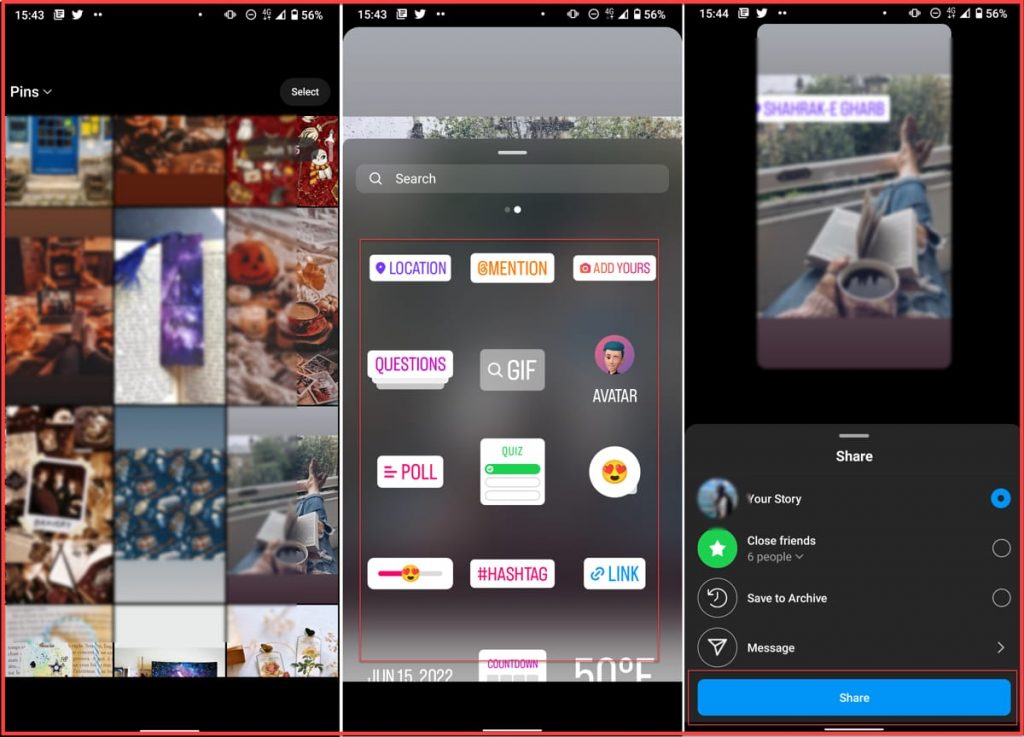
Let’s start this guide by showing you how to create your first story before talking about Instagram Story dimensions. If you are an Instagram dummy and beginner, follow these steps to upload your first story:
- Log into your Instagram account and go to your feed page.
- Scroll your screen from left to right. This will open the story camera. Or you can tap the “+” icon to open the posting section and choose the story option from the bottom bar.
- Here you can capture and record stories or scroll the screen up to access your gallery.
- Choose the photo/video and tap next.
- Here you can add your filters and text. Next, tap the smiley face icon at the top of your screen to access Story stickers.
- When you are done with details, tap “Add To Stories.”
Why are Instagram Stories Dimensions Important?
When it comes to IG Story dimensions, the platform is really strict. If the photo or video you upload on the stories does not fit the required Instagram Story dims, it will automatically be cropped or zoomed in. You should maintain your content quality or some of the important details. Especially if you are an Instagram artist, it can harm your essential visual elements.
- You don’t lose critical details and information.
- Your content looks professional and eye-catching.
- Your content remains its quality.
- There is no redundant pixelation.
Now that you know the importance of sticking to the Instagram story dimensions, let’s know the best dimensions and what is the Instagram Story safe zone.
What Are the Instagram Story Dimensions?
The Instagram Story dimensions are 1080*1920 pixels which is a 9:16 aspect ratio. So before uploading your content, make sure to crop it to 1080 pixels in width and 1920 pixels in height. This is the recommended size for full-screen photos and videos.
Time length: Photos will display for five seconds, and videos can be up to 15 seconds long. Video length limits have changed more than once, so always check in-app before assuming a fixed number.
Format: Instagram supports PNG and JPG files for images and for videos; the format should be MP4 or MOV.
Instagram Story size: The IG Story size for photos is under 30MBs and under 4GBs for videos.
Instagram Story Safe Zone
When talking about Instagram Story dimensions, there is another factor to consider, and that’s the safe zone. This Instagram Story dims refers to the space you can add your text, gifs, and stickers without the risk of getting cropped on different devices. The Instagram aspect ratio for the safe zone is 1080 px * 1420 px, which is about leaving 250pxs from the top and bottom of your content.
You don’t need to measure this yourself; Instagram will show you the safe zone with blue lines. After adding your sticker and gif, move it around the screen. If you can see two blue lines, it means you are in the best IG Story areas, but if it doesn’t show you the lines, you better move it upper/downer.
Tips for IG Story Dimensions
You know the best Instagram post Size to share your content on the platform. These simple tips can help you with sharing your stories easier with the right dimension.
Try Other IG Story Dimensions
If you don’t want your story to be in full size, you can use other Instagram dimensions, but you should keep the aspect ratio 9:16. Here are some other resolutions with the same aspect ratio you can try:
- 720px * 1280px
- 1440px * 2560px
- 2160px * 3840px
Use Photo Editing Apps
With the help of photo editing tools, you can control your content quality and ensure you are using the right Instagram Story dimensions. You don’t need to be a pro editor to use these tools; most of these tools offer free post and story templates with the right Instagram Story dims to help you design your post easily. Some of them also mark the Instagram Story safe zone, so you know where to add your text, stickers, etc.
Read more: 7 simple ways to save and download Instagram stories
How to Fix Your Instagram Story Quality?
The best way to keep your content quality high, sticking to the Instagram post dimensions is the best way. Other than that, you need a strong network connection to upload your photo/video.
If you are using mobile data, Instagram app has a feature that lowers the quality of your photos and videos when you are not connected to a Wifi. To upload high-quality photos and videos, follow these steps:
- Log into your Instagram account and go to your profile.
- Tap the three-line button at the upper-right corner and select “Settings.”
- Select “Account.”
- Tap “Data Usage” and turn off “Use less mobile data.”
Why is My Instagram Story Blurry?
If you have a strong connection and your content is in the right Instagram Story size but your content is still blurry, here is what you can do to fix it:
- Reset your network settings.
- Update and reset the Instagram app.
- Turn on high-quality uploads: Follow these steps – Instagram Profile> Settings > Account > Data Usage, and turn the High-quality uploads option on
- Check your camera settings.
- Upload your content through the Instagram desktop.
Instagram Story Tips and Tricks to Get More Engagement
Call-to-Actions by Adding a Link
One of the most fantastic tools on Instagram Stories is adding clickable and external links using Stickers. You have probably seen swipe-up links before, but in recent updates, links are available as stickers.
Link stickers are available to every account now, regardless of follower count. The old requirement of 10,000 followers or a verified badge was removed years ago.
You can connect each story to one link and convert your Instagram traffic to other social media profiles, product pages, or your website.
Read more: How to get more Instagram story views
Polls for Instagram Story
The poll sticker on Instagram is a recent feature that allows you to engage and interact with your audience by asking them questions. It’s a great way to know your audience and learn something from them. You can ask them questions and receive their answers (it will show you precisely who answered what).
How to Add Multiple Polls to Instagram Story?
To add a poll to your stories, follow these steps:
- Open the story tab from your feed page and upload your content.
- Tap the smiley face icon at the top of your screen to open the stickers collection and search for “Poll.”
- Write a question and tap done.
- In the latest update, you are not limited to only two answers; You can write up to four responses.
- Tap done.
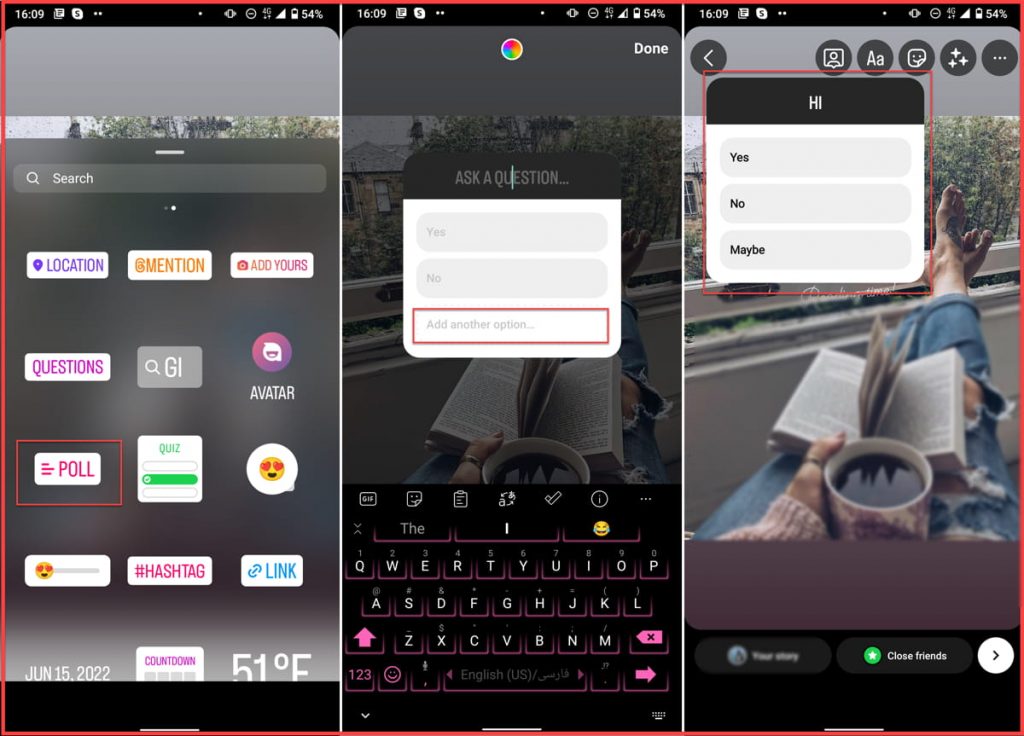
Unfortunately, there is no way to add more than one poll to each story. So to ask multiple questions, you need to upload and share multiple photos and add the sticker to each.
Sneak Peeks and Behind-the-Scenes
Another perfect Story idea you can try is sharing behind-the-scenes of your works and sneak of your room, office, workspace, etc. This content can connect you deeply to your audience and build brand trust.
You can also show upcoming products on stories with a reminder sticker to make engaging content.
Instagram Story Prompts to Generate UGC
If you are looking for new content ideas, user-generated content is perfect. Running Instagram giveaways and campaigns and creating branded hashtags can encourage your audience to create and gather content.
But many professional Instagrammers have certain templates and looks for their feed page posts. So you can pick the high-quality ones and share UGCs on your stories to build trust for your brand and boost your customers’ loyalty.
6 Common Instagram Story Mistakes to avoid
Too Much Promotion
Similar to other social media content, you must avoid over-promoting your service on the stories. Instead of sharing multiple photos with promotions or call-to-actions, start your series by providing some information and value.
Long and Redundant Stories
Even though Instagram stories for a personal account can be 15 seconds long, you can add as many as you want. But make sure to keep them short; otherwise, share them as a post.
Excessive Text
In the last part, we told you how long is an Instagram Story; you can have 5 seconds for photos or 15 seconds for videos. This means your viewers only have a little time to read long texts. So remember to write short texts with a large font to attract attention.
Ignoring Interactive Stickers
Polls, questions, quizzes and sliders exist specifically to turn a passive view into an interaction. A Story with no sticker at all is easy to swipe past; even one well-placed poll gives viewers a reason to stop and tap instead.
Using Irrelevant Hashtags
Like Instagram posts, you can add hashtags to your stories to increase your reach and visibility. On Instagram posts, you can use a combination of trend and niche hashtags to help users across the platform discover your content. But is stories, we recommend you only use niche and relevant ones.
Too Many Hashtags
On Instagram posts, you can add up to 30 hashtags in the caption, but the stories have no limits. However, using too many hashtags can make you look unprofessional and spammy. Try to use one or a maximum of two hashtags on each story.
Best Insta Story Examples
More than 200 million businesses use Instagram to increase their customers and boost their sales. These accounts manage their stories and share high-quality content like a pro. So let’s view Insta Story shared by these accounts.
1. YouTube Music

This a perfect example for musicians and artists that shows what type of story works. In this example, YouTube music shared the album’s cover photo paired with a song snippet. It also includes a link to the creator’s YouTube channel to listen to the full song.
2. Starbucks
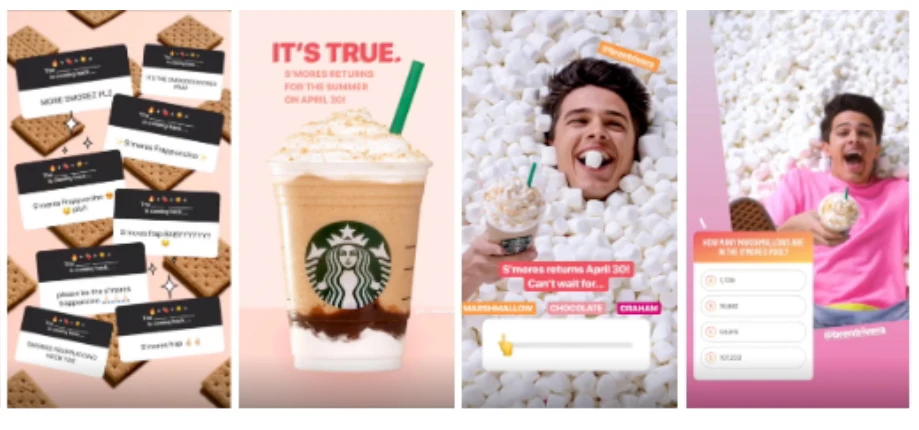
Starbucks always shares excellent stories that can give you ideas of what to post. They try to engage users with eye-catching colors and ask questions from their audience. In the example below, this brand asks followers to guess which drink is coming back using the question box sticker. Then shared the correct answers.
3. Sephora
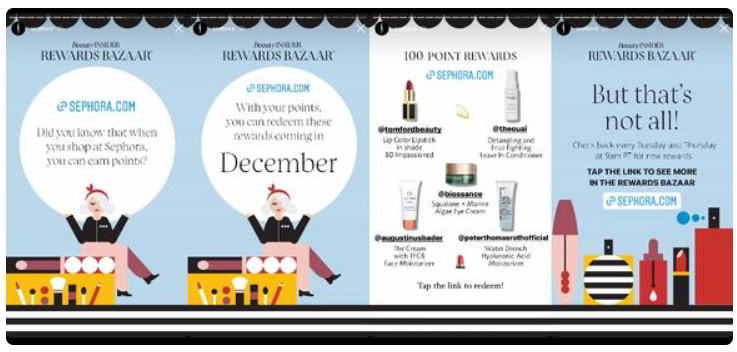
Sephora is a famous international retailer of makeup and skincare items. They give their customers points for each purchase they make, and after a while, they can exchange points for new products. Evy month they announce new items you can exchange for points on their Instagram stories
Conclusion
By sharing your content in the right Instagram Story dimensions, you can keep the quality of your photos and videos. In this article, we told you everything you need to know about Instagram Story dimensions and Instagram story size. We complete this guide with some of the best examples to look at and learn how to share yours.
