

Have you ever accidentally deleted one of your Instagram posts that you personally like and have a good engagement? This can even become worse if you have already deleted it from your phone. The only thing you can think of at that moment is finding the answer to the question, “how to recover recently deleted Instagram posts?”
There are some ways to check your Instagram archive feature, search some folders on your phone, use recovery tools (software), recover your photos using a Google account, etc.
All the above-mentioned ways are time-consuming, and some of them may not bring you back the exact content with all likes/comments.
Don’t worry!
This is not the end. The good news is that Instagram has recently rolled out a feature called Recently Deleted. Using this feature, you can recover deleted Instagram posts as easily as pie.
Grow your Instagram account with AiGrow.
How To Recover Deleted Instagram Posts?
There are three ways to access and recover deleted Instagram posts. In the following, we’ll show you all of them step by step and also will show you how to go to recently deleted on Instagram.
Want to get rid of your Instagram posts in less than a minute? Try AiGrow’s mass delete tool.
1. How To Recover Recently Deleted Instagram Posts?
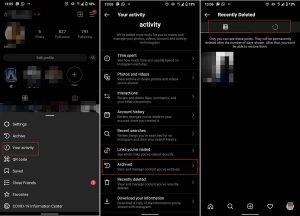
How to recover deleted Instagram posts is a question that almost every Instagrammer has asked themselves once. Fortunately, recent Instagram updates have made it so much easy to access and recover deleted Instagram posts. Follow these simple steps to find out where is recently deleted on Instagram:
- Log into your Instagram account and go to your profile.
- Tap on the three-line icon at the top right corner and select “Your Activity.”
- Choose “Recently Deleted.”
- Choose the photo and select “Restore.”
Read more: How to recover an Instagram account in less than a day?
What Is Recently Deleted Instagram Feature?
In February 2021, Instagram rolled out a new feature that everyone had been waiting for it for a long time, a recently deleted Instagram feature. With this feature, you review and restore deleted posts in the last 30 days in the Instagram app. Now, if you delete photos, videos, IGTVs, and reels videos they’ll be moved to a recently deleted folder immediately.
Then, you have 30 days to recover them. After that, the content will delete permanently, and you can’t access it anymore. According to Instagram, “This feature can add protections to help prevent hackers from compromising your account and deleting posts you shared.”
2. Check Your Instagram Archive
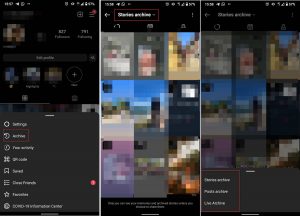
The deleted photos can be kept in your Instagram archive for a limited period. Also, you can view all the stories you have shared during the past years that have disappeared using the Instagram archive feature. Follow these steps to access Instagram’s recently deleted content in your archive:
- Log into your Instagram account and go to your profile.
- Tap the three-line icon at the top right corner of your screen and select “Archive.”
- Here you can switch between posts and stories and view all the archived content.
3. Recover Deleted Instagram Posts Through Your Phone Gallery
Instagram photos are automatically backed up in a folder named Instagram in the photo gallery of your smartphone. You can usually find this content in one of the following folders, depending on the version of Instagram and your smartphone operating system. But generally could be the photo gallery, photo albums, downloads, or other folders.
On Android
To access recently deleted Instagram photos, check your phone’s gallery first. If you can’t find the folders in the photo gallery, a file manager could also come in handy. Then look for the Instagram folder and try to find the deleted photo.
On iOS
If you are an iOS user, this procedure is slightly different. Here’s how it works: open the photos app, look for albums, open the album, and click the recently deleted folder. And at the end, look for any lost pics/videos inside. Then, all you have to do to restore the photo is tap on the photo and click recover.
Note: Bear in mind that the recently deleted folder stores them for a time span of no longer than 30 days.
Conclusion
Sometimes, people may need to get their deleted Instagram posts back on their feed, no matter what the reason is. In this article, we introduced you to one of the most recently rolled out features of Instagram called Recently Deleted to be able to restore your unintentionally deleted posts with ease. This feature keeps your recently deleted Instagram posts for 30 days, and you can recover them in a couple of seconds during that time.
You may also be interested in “How to Recover Your Instagram Account in Less Than a Day”.
FAQs
What happened to recently deleted on Instagram?
If you can’t find recently deleted on Instagram, that’s because Instagram has changed its location from Settings to “Your Activity”. Here is how to access this feature:
- Tap on the three-line icon at the top right corner of your Instagram profile and select “Your Activity.”
- Choose “Recently Deleted.”
- Choose the photo and select “Restore.”
Can you find a deleted Instagram?
After deleting a post, story, IGTV, or reels on Instagram, you can access it on your “Recently Deleted” within 30 days.
Did Instagram remove recently deleted?
No! Instagram has changed the location of this feature to the “Your Activity” tab, but it’s still available.
How to go to your recently deleted messages on Instagram?
If you delete a message/entire conversation, there is no definite solution to recover them. However, there are platforms such as AiGrow that allow you to back up your chats in your emails and view them anytime you want.
