


Ever wanted to tag a friend on Instagram but didn’t know how? Don’t worry; I’ve got you covered. In this article, I’m about to show you how to tag someone on Instagram in stories, comments, posts, and more.
Ready to know more? Let’s get started.
How to Tag Someone on Instagram?
The process of tagging a user on Instagram is pretty straightforward. To cut a long story short, you simply need to type an ‘@’ before the username of the user whom you want to tag.
For instance: @shadow_m1304
Please remember that you should not insert a space between the username and the ‘@’ sign.
By doing so, the user who’s been tagged will receive a notification in their feed.
How to Tag Someone on Instagram Posts?
There are different ways of tagging someone on a post, depending on whether you’re tagging them on your own posts or other users’.
So, Let’s start with tagging users in your own posts:
1. The first method is as follows:
#1 Click the photo before sharing the post.
#2 Input their name or username, and then select their name from the menu.
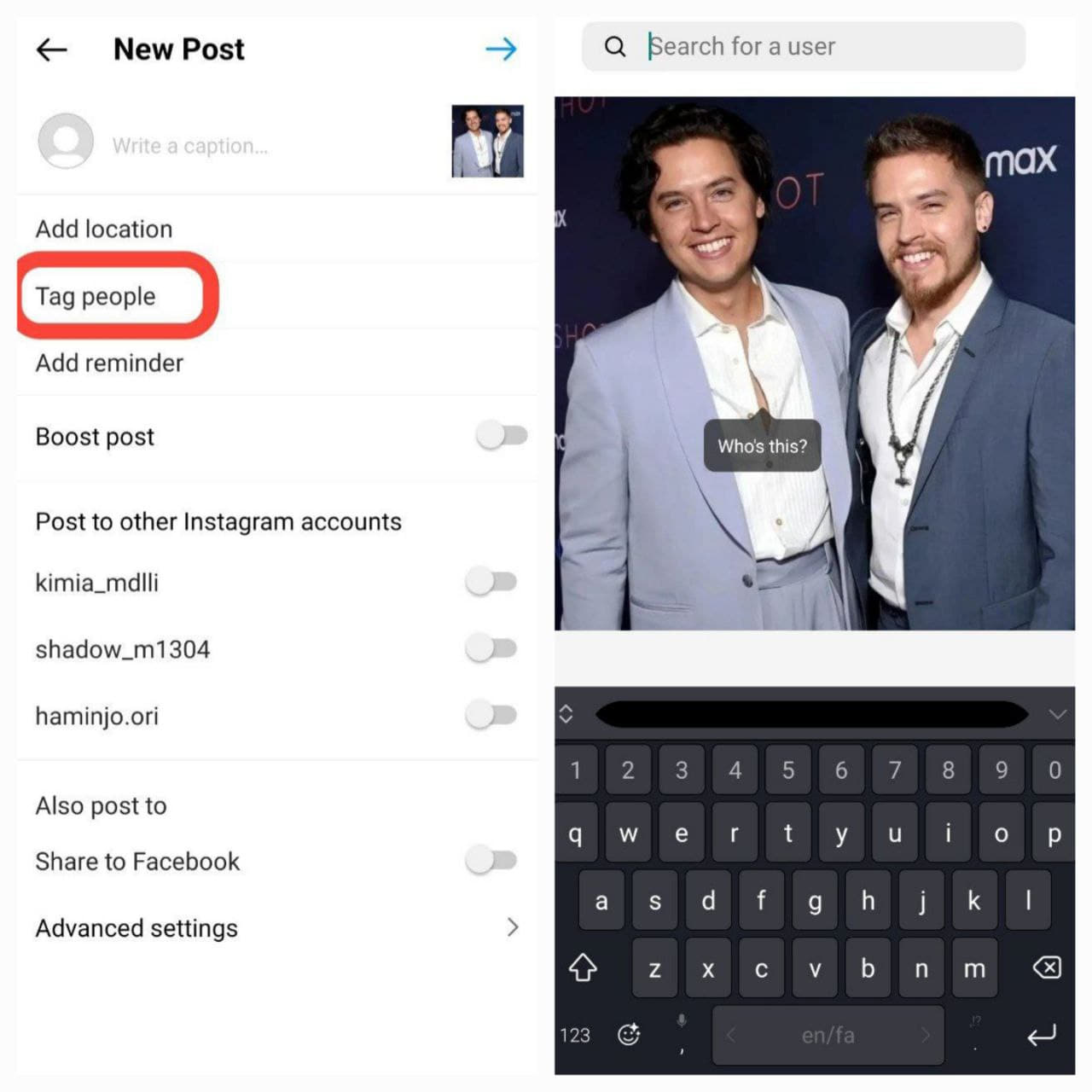
2. Another method is to tag them in the caption of your post or in the comment section.
But what if you want to tag someone in another user’s post?
Well, it’s pretty simple. Just tag them in the comment section using a ‘@’ sign and type their username without any spaces.
Also Read: Why Can’t I Tag Someone on Instagram?
How to Tag Someone on Instagram After Posting?
Ever happened to share a post on Instagram and suddenly realized that you forgot to mention the users you wanted? That happens to me a lot. However, fortunately, Instagram gives you the option to mention users even after sharing a post on your feed and that’s only possible by using the ‘Edit’ option.
To do so, follow the steps below:
1. Select your profile picture on the right to navigate to your profile.
2. Visit the post and click the three horizontal dots in the top right.
3. Choose “Edit.”
4. Click on a person featured in the post.
5. Input their name or username, and then select their name from the menu.
6. Complete the process by clicking “Done” in the top right.
Note: If your account is set to private, you can only mention or tag your followers and not any other users who do not follow you.
How to Tag Someone on Instagram Stories?
After you choose the photo or video to post on your story, you can click ‘Aa’ and type the username with an ‘@’ sign at the beginning. Simple, right? And you’re done.
How to Tag Someone on an Instagram Story Without It Showing?
There are various ways to hide or not show a tag on an Instagram story:
1. After typing the username, swipe it off the edges of your phone.
2. Use a GIF or sticker to cover the username.
3. Shrink the username to make it too small to see.
4. Place it in the background where it can’t be seen.
5. You can also tag a user after sharing a story. Post your story, tap on it, choose ‘More,’ and tap ‘Add Mention.’ Here, search for the username of the user you want to tag and tap ‘Add.’

Also Read: How to Repost Instagram Story You’re Not Tagged in
How to Tag Someone on Instagram Comment?
As already mentioned, just type the username with the @ and tap on enter in the comment section.
How to Tag Someone on Instagram Reels?
Before sharing a photo, reel, or carousel and posting it, click on the post. Type in their name or username, and then select their name from the menu.
Tagging Limits and Common Issues
Instagram caps how many people you can tag in a single photo or video post, generally up to 20 accounts per post. If tagging isn’t working at all, it’s almost always one of these:
- You typed the username wrong. Tagging only works with the exact handle, not a display name.
- Their privacy settings block it. Some accounts restrict who can tag or mention them in Settings and Privacy, which stops the tag from resolving.
- You’re tagging a private account you don’t follow. On your own posts you can generally only tag people who follow you if your account is private, and tagging strangers on public accounts can still be limited by their own mention settings.
- You hit the per-post limit. Beyond around 20 tags on one post, additional ones won’t save.
Conclusion
In conclusion, tagging on Instagram adds a vibrant touch to your social connections. Now that you’ve learned the ropes of tagging in stories, comments, and posts, feel free to express yourself and engage with your friends in new and exciting ways.
FAQs
Now that you know how to tag someone on Instagram, it’s time to answer some frequently asked questions.
1. If You Tag Someone on Instagram Will Their Followers See It?
Yes, for sure. Tagged people are visible to anyone who follows you. Plus, if you have a public account, even your non-followers can see who has been mentioned in your posts for instance.
2. Where to See Instagram Posts You’ve Been Tagged in?
You can simply check such posts in the ‘Tagged’ section on your profile. Just simply go to your profile and tap on the ‘Tagged’ icon as shown in the picture below.

3. Can a Blocked User Still Mention or Tag You?
Blocking someone on Instagram prevents them from mentioning your username. If you block someone and subsequently change your username, they won’t be able to mention you unless they are aware of your updated username.
Also Read: How to Untag Yourself on Instagram Post and Comment?
4. Who Can See the Posts You’re Tagged in on Your Instagram?
Depending on the status of your account and theirs (being private or public), users are able to see some posts that you’ve been tagged in. For instance:
- If you have a public account and the user who has tagged you also has a public account, everyone can see who has tagged you, including your non-followers.
- If you have a private account and the user who’s tagged you has a private account as well, only the users who follow both of you can see the posts you’ve been tagged in.
5. How to Hide a Post You’ve Been Tagged in?
To hide a post in which you’ve been tagged:
- Select the post.
- Click on additional options located in the top right corner, then select Tag Options.
- Choose Hide From My Profile.
[To restore a post to your profile, follow steps 1-2 again and select Show On My Profile.]
6. How to Manually Approve Instagram Posts that You’ve Been Tagged in?
By default, Instagram displays posts in which you’re tagged on your profile. To manually control which Instagram posts appear on your profile, follow these steps:
1. Click the hamburger menu at the top right of your profile, then select Settings and privacy.
2. Choose Tags and mentions under How others can interact with you.
3. Opt for Manually approve tags and toggle on the Manually approve tags option.
7. How to Manage Who Can Mention or Tag You?
The process is pretty simple. To do so:
1. Go to your profile and choose the hamburger menu at the top right, then select Settings and privacy.
2. Choose Tags and mentions under How others can interact with you.
3. Here, you can manage who can tag or mention you in their accounts.
