


Instagram is one of the most popular social media platforms, with over a billion users worldwide. It offers a range of features, including messaging, that allows users to connect with friends and family, share photos and videos, and follow their favorite brands and influencers. But with so many features on Instagram, it can be overwhelming to navigate the platform, especially when checking messages. In this article, we will guide you on how to check messages on Instagram like a pro, whether you are using the app on your phone or the desktop version on your computer.
How To Check Instagram Messages On App?
Checking Instagram messages can be done on various devices, including iPhones, Androids, and laptops. Let’s explore how to check messages on Instagram on each of these devices.
How to Check Instagram Messages on iPhone
To check your Instagram messages on your iPhone, open the Instagram app and tap on the airplane icon in the top right corner. This will show you all your messages, including DMs and group messages.
How to Check Instagram Messages on Android
Checking Instagram messages on Android is similar to checking on iPhone. Open the Instagram app and tap on the airplane icon in the top right corner to access your messages.
How to Check Message Requests on Instagram on Laptop
If you prefer to use Instagram on your computer, you can access your direct messages through the desktop version of the platform. Follow these steps to know how to check messages on Instagram on your computer:
- Open your web browser and go to www.instagram.com.
- Enter your login details and click on the “Log In” button. If you have previously logged in to your Instagram account on your computer, you will be automatically logged in.
- Click on the “inbox” icon at your screen’s top right corner. This will take you to your Instagram direct messages.
- If you have received any message requests from users not following you, you will see a blue bar at the top of your inbox. Click on the “message requests” option to view the messages.
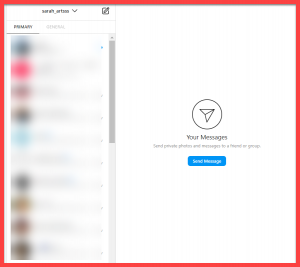
- To reply to a message, click on the message thread that you want to reply to. Type your response in the text box at the bottom of the screen and click the send button.
How to check messages on Instagram without seen?
In the last parts, we showed you how to check messages on Instagram but is it possible to do it without the seen mark?
If you want to check your Instagram messages without the sender knowing that you have seen them, there are a few tricks you can use. Here’s the best trick to read Instagram messages without being seen.
Use Airplane Mode
The most common way to check your Instagram messages without being seen is by using Airplane mode. First, turn on Airplane mode on your device. Then, open your Instagram app and read your messages. After you have finished reading, close the app and turn off Airplane mode. The sender will not receive a read receipt, and they will not know that you have read their message. This is a safe solution to how to check messages on Instagram without being seen.
How To Find Old Messages On Instagram?
If you are looking for an old conversation on Instagram, you can easily find it by using the search function. To do this, go to your Instagram inbox and tap on the search bar. Type in a keyword or phrase related to the conversation you are looking for, and Instagram will show you all relevant messages. This way, you can see old direct messages on Instagram in a few seconds.
How to see messages on Instagram from non followers
By default, Instagram only shows messages from people you follow in your inbox. However, if you receive a message from a non-follower or Instagram messages from strangers, it will appear in your “Message Requests” folder. To access this folder, go to your Instagram inbox, and tap on the “Message Requests” tab at the top of the screen. Here, you can see all messages from people you do not follow.
How to Check Who Unsent a Message on Instagram
Instagram allows users to unsent a message that they have sent previously. This feature is helpful when you have sent a message by mistake or you don’t want the recipient to see it anymore. However, if you are curious about who unsent a message they sent you, there is no direct way to find out. Instagram does not provide any notifications or alerts when someone unsends a message. The only way to know is by keeping track of the messages yourself. You can take a screenshot of the chat before and after the message was unsent, and then compare the two screenshots to see who unsent the message.
How to Check Blocked Messages on Instagram
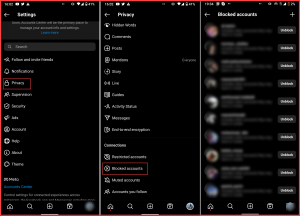
If someone has blocked you on Instagram, you won’t be able to send them messages or see their posts. However, if you have blocked someone, you may still receive their messages. To check your blocked messages, follow these steps:
- Open the Instagram app and go to your inbox.
- Tap on the three horizontal lines in the top right corner of your screen.
- Select “Settings” from the pop-up menu.
- Scroll down and select “Privacy” > “Blocked Accounts.”
- Find the person you have blocked and tap on their name.
- If there are any messages from them, they will be displayed on the screen.
How to Check General Messages on Instagram
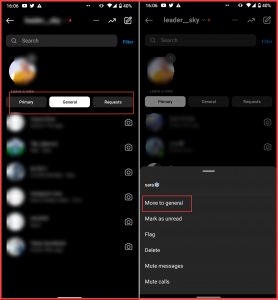
To check your general messages on Instagram, open your Instagram app, and tap on the message icon at the top right corner of your screen. Here, you’ll see all your message threads with your followers and the people you follow. If you want to start a new conversation, tap on the plus sign icon at the top right corner of your screen and then search for the person you want to message.
How to Check Hidden Messages on Instagram
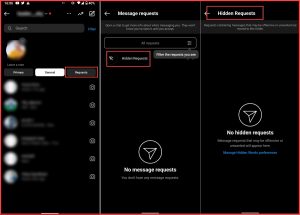
Instagram has a feature that allows you to hide messages from specific people. If you want to check your hidden messages, go to your message requests folder, and then tap on “See Filtered Requests” at the bottom of the screen. Here, you’ll be able to see all the messages from people whose messages you’ve hidden.
How to Check If Someone Read Your Message on Instagram
If you want to know if someone has read your message on Instagram, simply open the message thread and look for a small eye icon next to the message you sent. If the eye icon is filled in, it means the person has seen your message. If the eye icon is empty, the person hasn’t seen your message yet.
How to Check Last Seen on Instagram without Messaging
Instagram last seen feature lets you know when someone was last active on Instagram. However, sometimes you may want to check someone’s last seen without messaging them. To do this, you can follow these steps:
- Open Instagram and go to the search bar.
- Search for the person you want to check the last seen for.
- Once you find the profile, open it, and check if their last seen is visible under their username. If it is not visible, they have disabled the last seen feature.
How to Check Recently Deleted Messages on Instagram
Instagram recently introduced a new feature that allows you to recover deleted photos and videos. There are no options to check recently deleted messages on Instagram; once you delete them, there is no way to recover them.
To access deleted posts and stories, follow these simple steps:
- Open Instagram and go to your inbox.
- Click on the three horizontal lines in the top right corner.
- Select “Settings,” then “Account,” and then “Recently Deleted.”
- You will see all the content that were deleted in the past 30 days. You can select the photo/video you want to recover and restore it.
How To check Unread Messages On Instagram?
If you have any unread messages on Instagram, they will appear in bold and have a blue dot next to them. You can check them by opening your inbox; the unread messages will be at the top of the list.
How To Check Vanished Messages On Instagram?
Instagram introduced the “Vanish Mode” feature that allows you to send disappearing messages that vanish once viewed. To check vanished messages, swipe up on the chat where you sent the message, and you’ll see a message that says, “You turned on vanish mode.” You can then turn off Vanish Mode to view the chat history.
Why Are Instagram Messages Not Showing?
There could be various reasons why your Instagram messages are not showing. If you can’t see a message someone sent you, try refreshing your app or logging out and back in. It’s also possible that the message has been deleted, or the sender might have blocked you. If you’re having trouble finding a specific message, you can use the search bar to look for keywords or try sorting your messages by date.
If you want to search for Instagram messages by date, you can use the search bar and enter the date in the format “month/day/year.” To download your Instagram chat history, you can use third-party tools like Instagram Message Downloader or DigiSaver. If someone sent you a message on Instagram, but you can’t see it, try refreshing the app, logging out and logging back in, or checking your message requests. Sometimes, there can be glitches with Instagram’s DM seen feature, and messages might not show as read even though they have been opened.
Why Can’t I Send Messages On Instagram To Anyone?
If you’re unable to send messages on Instagram, it could be due to various reasons. Your account has been temporarily or permanently banned, or you may have reached the limit for sending messages. It could also be due to technical issues or glitches with the app. If you’re having trouble sending messages, try updating your app, clearing the cache and cookies, or contacting Instagram support for assistance.
FAQs
1. How Can I See Who My Wife Is Messaging On Instagram?
It’s inappropriate to invade someone’s privacy and spy on their messages without their knowledge and consent. Trust is essential in any relationship; if you have doubts or concerns, it’s better to have an open and honest conversation with your partner.
2. Why Is My Message Sent But Not Seen On Instagram?
There could be various reasons why your message is sent but not seen on Instagram. The recipient might not have opened the app, or their internet connection could be weak or unstable. It’s also possible that they have turned off their notifications or have blocked you. If your message has been sent for an extended period without being seen, it might be worth reaching out to the recipient through another platform to ensure everything is okay.
3. How Can I Read Someone’s Instagram Messages Without Them Knowing?
It’s not ethical or legal to read someone’s private messages without their knowledge or consent. Respect other people’s privacy and boundaries, and refrain from invading their personal space or engaging in unethical behavior.
4. How Do I See Instagram Messages From The Beginning Without Scrolling Up?
Unfortunately, no feature on Instagram allows you to jump to the beginning of your message history without scrolling up. However, you can try the search bar feature to look for specific messages or keywords you remember from the conversation.
5. Can You Tell Who Someone Interacts With Most On Instagram?
Instagram doesn’t have a specific feature that shows who a user interacts with the most. However, you can see their recent activity under the “Following” tab, where you can see their recent likes, comments, and follows.
6. How Can I See my Full Message History On Instagram?
You can access your full message history on Instagram by scrolling up through the conversation until you reach the beginning of the chat. Unfortunately, no feature allows you to jump to the start of the conversation.
7. How Do You Make A Message Unread On Instagram?
Yes, this is actually possible. Go to your inbox, press and hold (or swipe left) on the conversation you want to change, and select “Mark as Unread” from the menu that appears. The thread moves back to bold with a blue dot, exactly as if you’d never opened it.
