


Instagram stories are one of the tools on this platform that more than 500 Instagrammers use daily. With this feature, you can share different types of photos and videos that will disappear after 24 hours. It’s perfect for sharing tips and tricks about your products/services, behind-the-scenes content, and showcasing your work.
This article will show you how to save Instagram stories on your phone or PC.
How To Save Instagram Stories?
There are different methods of how to save Instagram stories. Let’s dive into each one to help you choose the best solution.
Take Screenshots/Screen Records
The first and most straightforward solution how to save someone’s Instagram story is by taking screenshots from the stories. This method works only for public accounts or users that you follow. So if you want to spy on someone, you should skip this step. Here’s how to save stories on Instagram manually:
Use the Screenshot feature on your device to save photo stories:
- Screenshot on iPhone: Press the side button and the Home button simultaneously.
- Screenshot on Android: Hold down the power and volume-down buttons for a couple of seconds.
If the story you want to save is a video, here’s how to save Instagram video with music by screen recording it:
- Screen Record on iPhone: Go to Settings > Control Center, then tap the Add button next to Screen Recording. Next, tap the gray Record button and wait for the three-second countdown.
- Screen Record on Android: Download a recorder app from Google Play and use it.
Use Third-Party Apps
Recording and cropping recorded videos can take time and energy from you. Instead, some third-party apps and tools such as SnapInsta allow you to download and save stories directly without losing quality. Story Saver is one of the most popular apps for both android and ios devices. With this app, you can save content from public accounts without them knowing. Let’s see how to save Instagram stories on different devices with Story Saver:
Android:
- Open Google Chrome, go to StorySaver or download the app from Google Play.
- Go to Instagram and select the public video; Then, tap on the “three dots” in the top right corner to copy the video URL;
- Go back to Chrome to Storysaver app and enter the Instagram video URL in the search box,
- Hit Download;
- Scroll down to see the video and hit “Save as video”;
iPhone:
- Download the Story Saver app from the App Store or open the website on safari.
- Go to Instagram and choose a public video.
- Tap on the “three dots” icon at the top right corner to copy the video URL;
- Go back to the Story Saver app and enter the Instagram video URL in the search box,
- Tap Download;
- Scroll down to see the video and hit “Save as video”.
Access Content On Your PC
Another good way to access users’s stories in a high-quality frame is from your desktop. By going to Instagram website and logging into your account on a PC, you can browse users’ profiles and stories and save them. Similar to the screenshot/recording steps, you can view stories and capture them on your laptop. But since you have a bigger screen, you will view posts in better quality.
Use Instagram Profile Viewing Apps
The above methods showed you how to download Instagram stories from public accounts. But what about private accounts that you don’t follow? How to download Instagram stories from them without following them?
Many apps and tools are claiming to help you view private Instagram profiles and stories anonymously and for free. Most of the free tools stopped working after the recent security restrictions from Instagram. But still, there are some working tools you can try for their private profile viewing option.
However, we don’t recommend using these tools at all! Most of these apps do not work anymore and are just a waste of money. The ones that work can put your account in danger of getting banned by Instagram.
So all you can do is respect users’ privacy and send them a follow request to view their content.
How To Save And Download Your Instagram Stories?
Now that you know all the tips and tricks about how to save someone’s Instagram story, let’s see how to save and download yours.
Save An Active Story
You can download and save an active story (it’s still visible on your profile and top-left of your feed as easily as pie. Here’s how to save Instagram story with music in gallery while they are still active:
- Log into your Instagram account and go to your feed page.
- Tap on your profile photo at the top-left of your feed page to access your current stories.
- Tap the More button at the bottom-right of the screen.
- Select Save.
- Choose Save Story.
Also, read why you can’t add music to an Instagram story
How To Save Instagram Stories To Camera Roll Automatically?
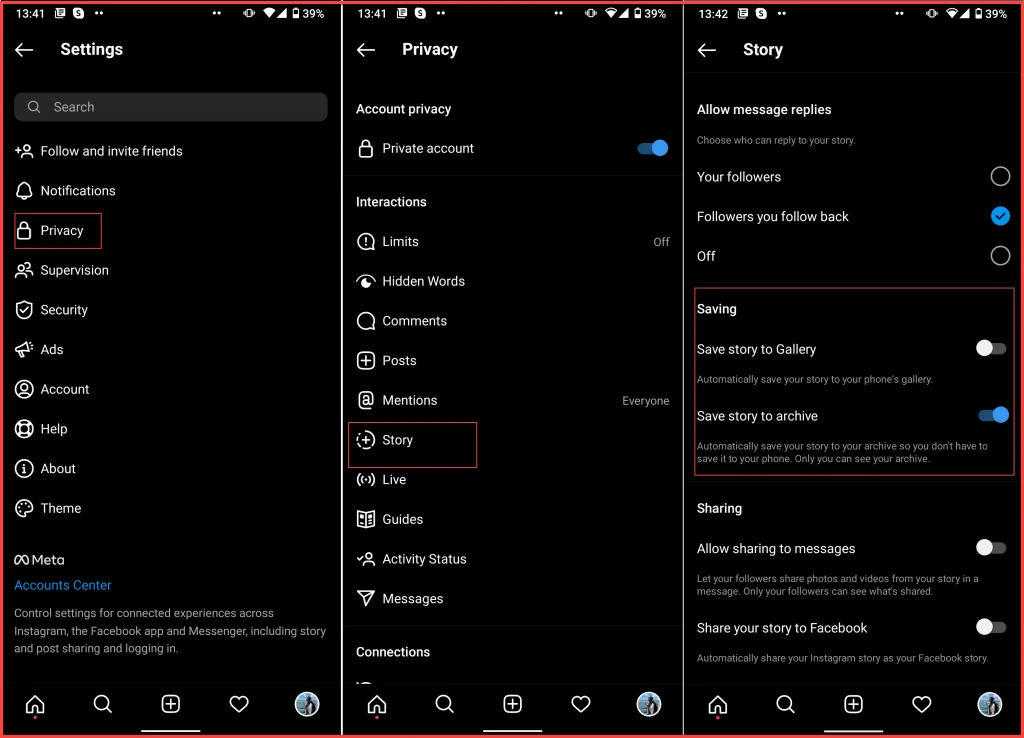
You don’t need to save a story while it’s still active. Instagram has a feature that automatically saves stories in your camera roll. Here’s how to download story from Instagram automatically by using this feature:
- Log into your Instagram account and go to your profile.
- Tap the three-line icon at the top-right corner of your screen and open “Settings.”
- Choose “Privacy.”
- Select “Story.”
- Scroll down to the “Saving” section and turn on the “Save story to gallery” option.
Save Stories From Your Archive
Stories you create and share on Instagram are automatically saved on
your app archive. You can view them anytime you want, reshare them, highlight, save, or delete them. To access and save your stories from the archive, follow the below steps:
- Log into your Instagram account and go to your profile.
- Tap the three-line icon at the upper right corner and select “Settings.”
- Tap on “Archive”
- The Archive screen will pop up, where you will find all stories categorized by date.
If you are looking for an old video/photo, you can find it here and save it by tapping the three-dot button under the story and choosing “Save”
How To Turn On The Archive Feature For Stories?
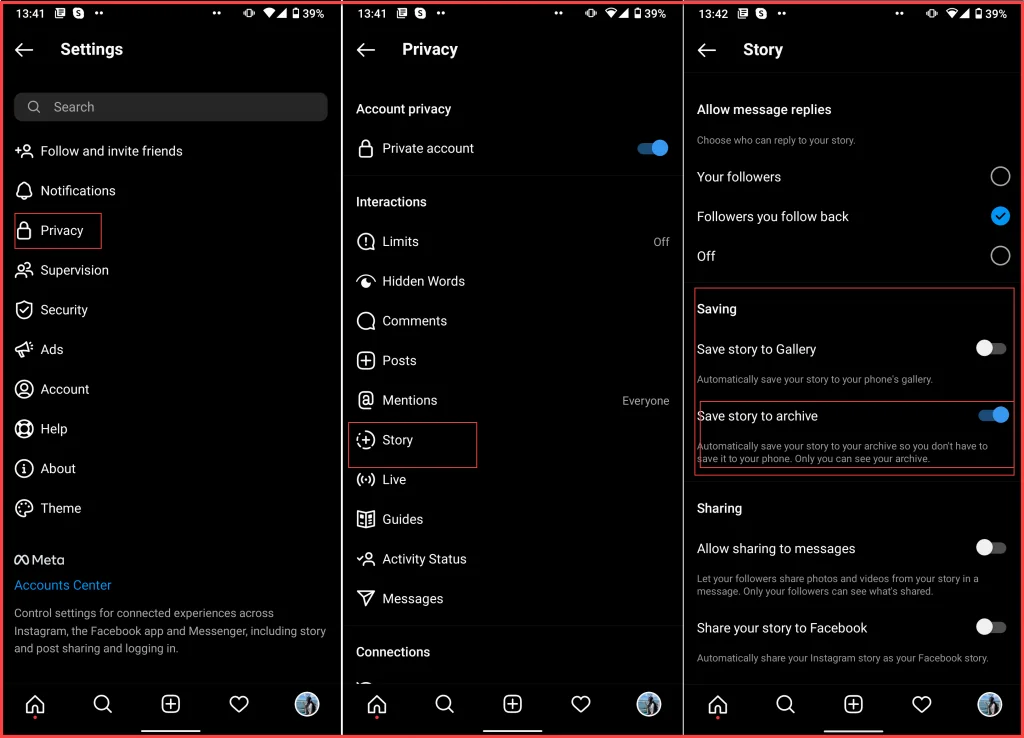
If after navigating to your Stories archive you couldn’t see any content there, this feature is probably not enabled on your account. Follow the below steps to ensure all of your stories will be automatically saved to your archive after their 24-hour lifetime. Here’s how to save a story on Instagram archive:
- Open the Instagram app and log into your account.
- Go to your profile and tap the three-line icon at the upper right corner.
- Open “Settings” and tap “Privacy.”
- Select “Story.”
- Scroll down to the Saving section.
- Turn on the “Save To Archive” option.
Highlight Instagram Stories
Instagram Stories are only visible for 24 hours and will disappear automatically after that. But if your content drives a high engagement and you want it to be on your page, you can highlight it on your profile. There are no limits on the number of posts you can highlight and you can try this feature for multiple uses:
- Categorize your content
- Highlight the most frequently asked questions
- Highlight your campaign story
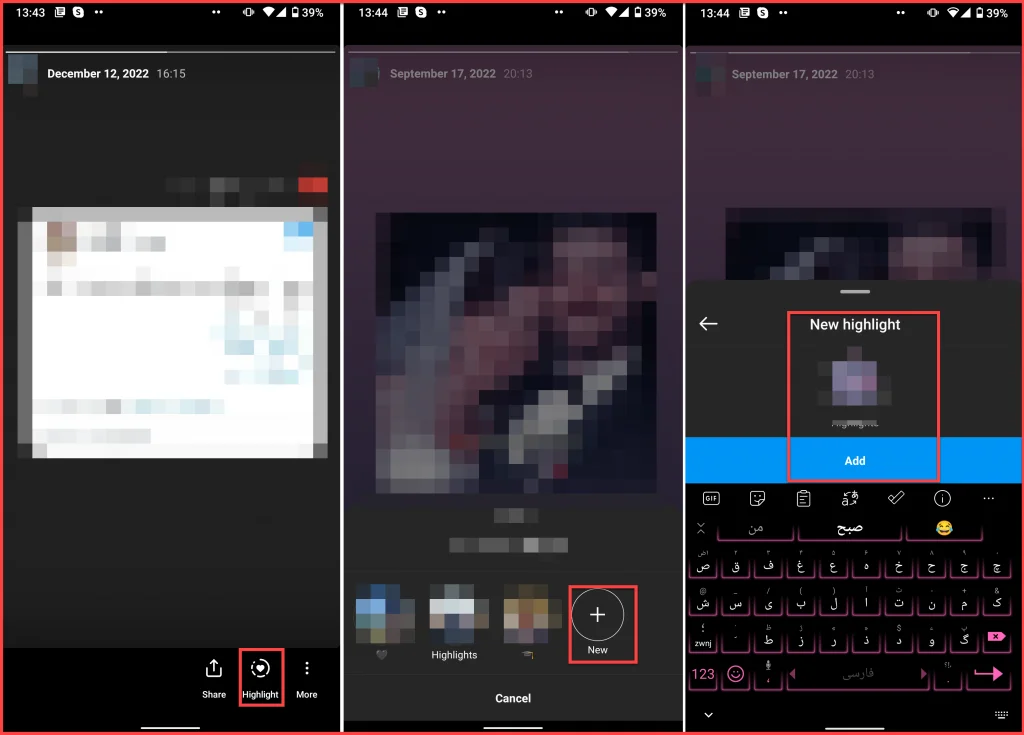
Now let’s see how to save Instagram story with music to your highlight:
You can either highlight an active story or one from your archive.
- After opening the story, tap on the Highlight icon at the bottom of your story screen.
- Choose a Highlight category or select “Add New” to create a new one.
Now the story appears on your profile under the bio section.
Conclusion
Instagram Stories have a 24-hour lifetime limit and if you decide to save them, you should do it before they disappear. This article showed you everything you need to know about how to save Instagram stories and different methods of how to download Instagram Highlight stories with music.
FAQs:
How Do You Save Other People’s Instagram Stories?
There are different ways and solutions to how to save others Instagram stories, But the simplest way is by taking screenshots from photo stories and screen recording the videos.
How To Download Insta Story?
There are no tools on the Instagram app to download others’ stories on the app. But if you liked someone’s stories, there are other ways to save them. Here’s how to download an Instagram story:
- Take screenshots/ screen records
- Use third-party apps
- View stories on your PC
- Use Instagram profile viewing apps to spy on private accounts
How Do You Save Instagram Stories To Your Camera Roll?
You can save your own stories to the camera roll while they are still active. Follow these simple steps:
- Open the active story from your feed page.
- Tap the More button (three-dot icon) at the bottom of your screen.
- Select “Save.”
- Tap “Save Story.”
You can also set in your story settings that all the stories you share to be automatically saved to your camera roll.
Can You Save Instagram Stories After 24 Hours?
If you have turned on the archive feature, all the photos/videos you share on stories will be saved into your app archive. By opening your Instagram archive, you can view all the stories you share sorted by date and save them.
How To Save Instagram Videos To Gallery Without Any App?
If you don’t want to use any third-party tools to save others’ stories, you can screen-record the videos.
