


Instagram spam comments are usually made by bots and automations, commenting on a big number of posts everyday.
If you’re reading this blog, then you already know that they are not good for your page at all.
But worry not, there are so many ways to get rid of them, and I am here today to teach you every single one of them.
Most of them are available on the Instagram app itself, so it’s easy. Let’s start and see how to get rid of spam comments!
Instagram spam comments example
Spam comments aren’t just annoying; they can really mess up the Instagram experience for users. Let’s see how these unwanted messages can cause trouble:
- Messing Up Real Conversations: Spam comments make it hard to have genuine conversations because they are not real people talking.
- Confusing the System: Instagram’s computer system likes real conversations. Spam comments mess with this system, making it harder for people’s posts to be seen by others.
- Making Users Unhappy: Too many spam comments can make people upset and not enjoy using Instagram.
Here are some examples of spam comments:
1. Comments that Don’t Make Sense: Comments like “Nice pic!” or “Great content!” that has nothing to do with the post. These are usually written by computer programs, not real people.
2. Tricky Website Links: Some comments have links to websites that are not safe. They want to trick users into clicking on them, which can be risky.
3. Fake Contests or Giveaways: Some comments lie about users winning a prize. They want people to give personal information or do things that are not safe.

How to get rid of Instagram Spam Comments
Now let’s see how to get rid of spam comments on instagram
Use hidden words to stop spam comments on instagram
Hidden words is a sweet feature of Instagram, you can make a list of words, and then Instagram won’t show you content that involves those words. Also, it allows you to filter out comments containing specific keywords or phrases.
Instagram Hidden words act like a shield, detecting and deflecting spam comments before they even appear on your post. Automated bots often look for specific cues, and hidden words disrupt their spammy plans.
Select words that are relevant to your content but unlikely to be used by spammers. Think creatively – these words should blend seamlessly with your post’s theme.
Follow these steps to activate this feature:
- Open the Instagram app and tap on your profile picture in the bottom right corner.
- Select the “Settings” gear icon in the top right corner.

- tap on “Hidden Words.”
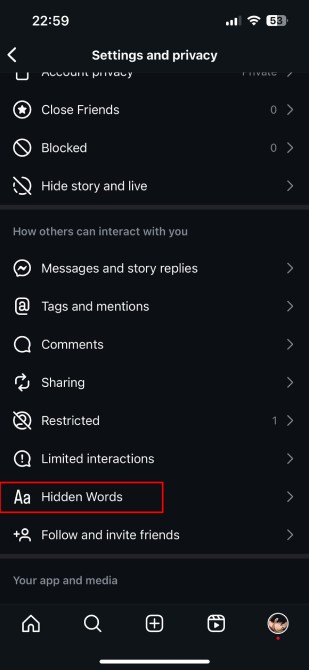
- Toggle the switch next to “Hide comments containing words” to turn on this feature.

- Tap on “Manage list” and start adding keywords and phrases that are commonly used in spam comments. You can also add emojis.

- Once you’ve added the desired keywords, tap on “Done” to save your changes.
Delete and block individual comments
If spam comments have already appeared on your posts, you can manually delete them one by one.To delete a comment, simply swipe left on the comment (iOS) or tap and hold the comment (Android). Select the trash bin icon that appears. This action removes the comment from your post.
If a particular user consistently posts spam, consider blocking them. To do this, go to their profile, tap the three dots in the top right corner, and select “Block.” This prevents them from interacting with your posts in the future.
Read more: how to get email addresses from Instagram followers
Filtering Comments
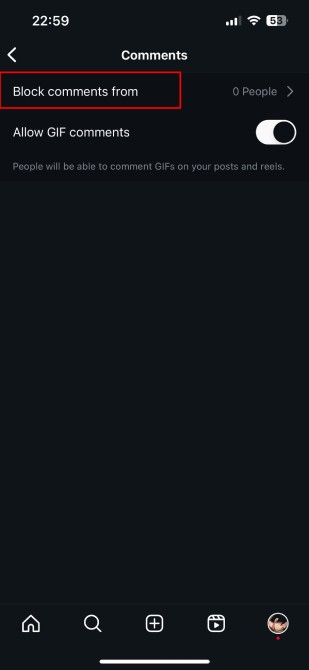
Instagram allows users to filter comments containing specific words. Access the Comment Controls in your settings to add keywords you want to filter. Comments with those words will be hidden from your posts.
Enabling Manual Comment Approval
Take a proactive approach by enabling manual comment approval. This way, you have control over which comments appear on your posts. Activate this feature in your settings under “Privacy.”
Use third-party tools for spam detection
If you’re dealing with a lot of spam comments on Instagram, you can use special tools to help. These tools have extra powers to filter out and stop spam accounts automatically. Some tools that many people like are Combin, Jarvee, and Instazood. They work alongside Instagram to make sure your experience is free from annoying spam.
Turn off account suggestions
Instagram often suggests accounts for you to follow, but sometimes these suggestions can lead to unwanted spam accounts infiltrating your space. But you can turn off account suggestions.
Follow these simple steps to turn off account suggestions:
- Go to your Instagram profile.
- Tap on the three lines in the top right corner to open the menu.
- Select “Settings.”
- Scroll down and tap on “Account.”
- Find and disable the “Similar Account Suggestions” option
This might also have a negative effect on your engagement, after all, Instagram suggests your account to users who are already searching in your field of activity.
Report to Instagram
The last solution is to report spam comments to Instagram to handle them professionally.
- Reporting spam is a straightforward process:
- Find the comment or account you want to report.
- Tap on the three dots next to the comment or on the spam account’s profile.
- Choose “Report.”
- Follow the on-screen prompts to specify the issue and submit your report.
FAQs
Now let’s answer some frequently asked questions on this subject:
should i delete spam comments on instagram
Yes, it is important to delete spam comments on Instagram. Spam comments can make your Instagram feed look cluttered and unprofessional. They can also deter other users from interacting with your posts.
Is it okay if I ignore spam comments?
No, it is not okay to ignore spam comments. Ignoring spam comments will not make them go away. Spam comments can continue to appear on your posts unless you take action to remove them.
Does spam comments affect my engagement?
Yes, spam comments can affect your engagement. When your Instagram feed is filled with spam comments, it can make it difficult for real users to find and interact with your posts. This can lead to a decrease in engagement, which can hurt your overall reach and visibility.
how to block spam comments on instagram
There are a couple ways to block spam comments on Instagram. You can use Instagram’s built-in “Hidden Words” feature to filter out comments containing specific keywords or phrases. You can also report spam comments to Instagram, which will help the platform identify and remove the accounts that are posting them.
Final thoughts
Dealing with Instagram spam comments can be a bother, but it doesn’t have to spoil your time. You can easily manage your comments and keep them tidy and free from spam.
Just use the features that Instagram already has and some extra tools.
This way, you can control spam, keep a friendly and interesting online space, and concentrate on making good connections with your followers.
