


Instagram Quick Reply is a feature that enables users to create predefined responses to common messages they receive on the platform. Instead of typing the same response repeatedly, you can create a quick reply and use it to respond to messages quickly and efficiently. This feature is handy for businesses and influencers who receive many messages and comments.
Using Instagram Quick Reply, you can improve your response time and increase engagement with your audience. This can lead to a stronger relationship with your followers, which can help you grow your brand and increase your reach on the platform. Additionally, quick replies can save you time and help you maintain consistency in your responses, which is crucial for building a professional and trustworthy image on Instagram.
In this article, we provide a complete guide to Instagram quick replies, how to set them up, and even a better alternative for those receiving daily DMs.
What is Instagram Quick Reply?
Instagram Quick Reply is a feature that allows you to create and save responses to common messages, which you can then use to respond quickly and efficiently to incoming messages. This can save you time and improve engagement by allowing you to respond to messages faster and more efficiently.
How Does Instagram Quick Reply Work?
Instagram Quick Reply allows you to create and save pre-written responses to common messages. Once you have created your responses, you can use them to respond quickly to incoming messages. When you receive a message, you can tap on the Quick Reply icon, select the pre-written response you want to use, and send it.
Benefits of Using Instagram Quick Reply
There are several benefits to using Instagram Quick Reply, including:
- Saving time: With Instagram Quick Reply, you can quickly respond to common messages without typing out a response each time.
- Improving engagement: Quick replies can help you respond to messages improving engagement and encouraging encourage more conversations with your audience.
- Consistency: Quick replies allow you to provide consistent responses to common messages, which can help build trust and loyalty with your audience.
- Improve response time: With Instagram Quick Reply, you can respond to messages quickly and efficiently, improving your response time and helping you build stronger relationships with your audience.
- Increase engagement: By using quick replies to respond to messages promptly, you can increase engagement on your Instagram account. This can help you build a larger following and increase your overall reach on the platform.
- Save time: Quick replies can save time by allowing you to respond to messages more efficiently. This can free up time for other tasks, such as creating content or engaging with your audience.
- Consistency: Quick replies ensure that you respond to messages in a consistent manner. This can help you build a professional and trustworthy image on the platform.
- Improve customer support: Quick replies can be an effective tool for providing customer support on Instagram. By providing quick and efficient responses to support inquiries, you can improve your customer’s experience with your brand and increase customer loyalty.
How to Set Up Instagram Quick Reply
Setting up Instagram Quick Reply is easy. Here’s how to do it:
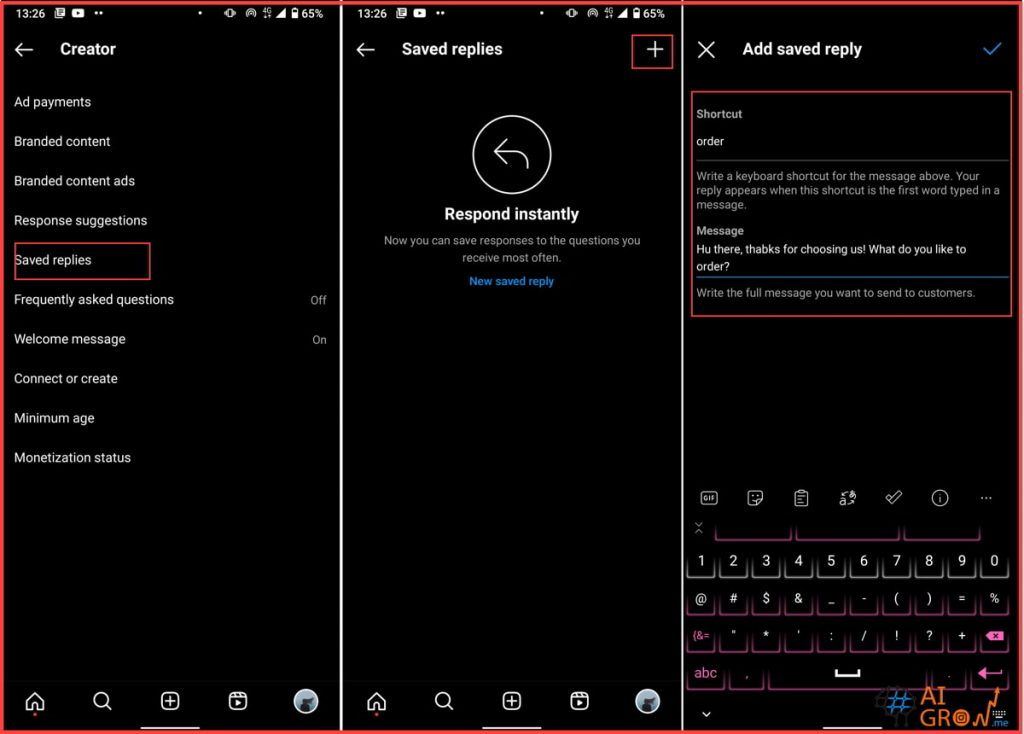
- Open the Instagram app and go to your profile.
- Tap on the three horizontal lines in the top right corner to access the menu.
- Select “Settings” from the menu.
- Scroll down and select “Creator”
- Select “Saved Replies.”
- Tap on the “+” icon in the top right corner to create a new Quick Reply.
- Type in your message and tap “Save.”
How to Use Instagram Quick Reply
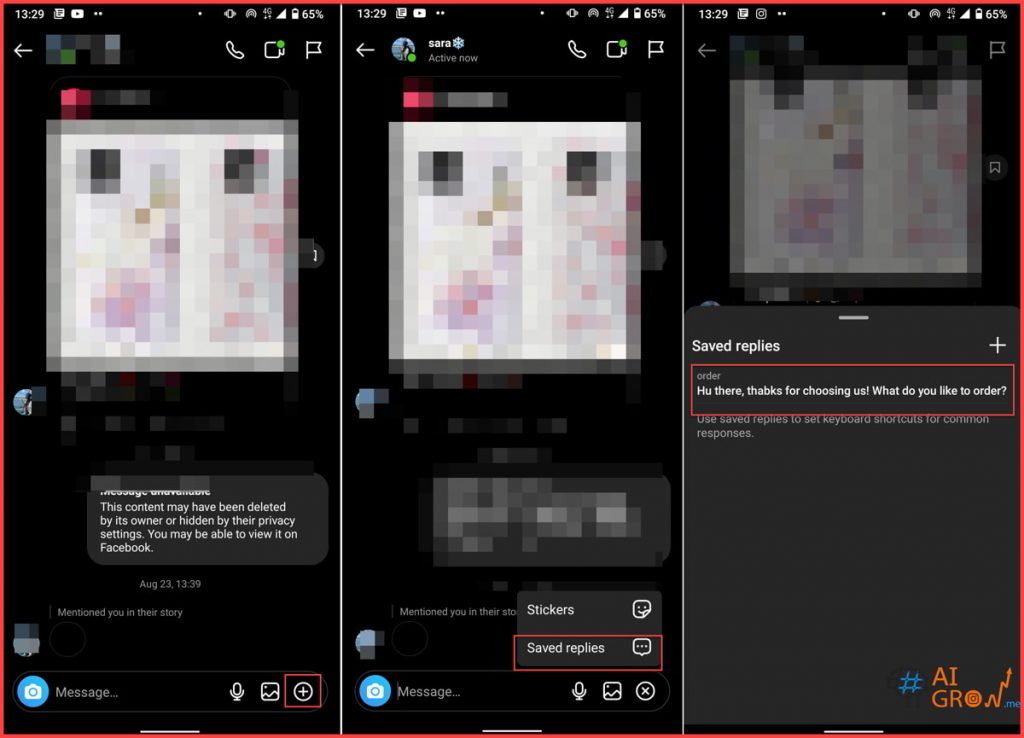
Using Instagram Quick Reply is also easy. Here’s how to do it:
- Open the Instagram app and go to your direct messages.
- Tap on the message you want to respond to.
- Tap on the Quick Reply icon.
- Select the pre-written response you want to use.
- Send the message.
Tips for Using Instagram Quick Reply Effectively
While Instagram Quick Reply can be a great tool for saving time and improving engagement, it’s important to use it effectively. Here are some tips to help you get the most out of this feature:
- Customize your responses: While pre-written responses can save time, they should still be customized to fit the specific message you are responding to.
- Be Personal: Even though you are using pre-written responses, it’s important to personalize them as much as possible. Use the recipient’s name or reference something specific to their message to show that you are paying attention and care about their message.
- Try using emojis: Emojis can add personality and emotion to your responses. Use them sparingly and appropriately, but don’t be afraid to use them to add a personal touch to your messages.
- Don’t rely too heavily on quick replies: While quick replies can save time, it’s important not to rely too heavily on them. Take the time to craft personalized responses when necessary to show your audience that you value their messages and are invested in their engagement.
- Keep it professional: While you want to add a personal touch to your responses, it’s important to maintain a professional tone. Avoid using slang or inappropriate language, and always respond in a timely and respectful manner.
AiGrow, A Better Alternative To Instagram’s Quick Reply Feature

In the last parts, we showed you how to set and create your Instagram quick reply messages to save time. But similar to other actions, you have to be careful about sending the same response to multiple users since you might get banned, shadowbanned, or action blocked.
But with AiGrow‘s DM plans, you can personalize messages with the help of your dedicated account manager. Here are some of the main AiGrow features:
- 14 Day money-back guarantee
- Cancel anytime
- Dedicated Growth Team
- Live Strategy & Onboarding Meeting
- Organic and Real Followers – Hashtags, Competitors, Locations, Gender Targeting
- Analytical Report
- Score Card and Growth hacks
- Premium Direct Message Marketing
- Premium Bio Link
- Advanced Influencer/Brand Promotion
- One of the best Instagram content creation services – Advanced Content Creation
- Instagram posting service – schedule posts, stories, and IGTVs
- Safe and Secure (Risk-Free)
- Priority 24/7 Support
Also read: How to remove Instagram action blocked?
Conclusion
Instagram Quick Reply is a powerful feature that can save time and improve engagement for businesses and individuals on the platform. By setting up and using quick replies effectively, you can improve your response times, provide consistent responses, and build stronger relationships with your audience.
Can I Edit My Quick Replies After I’ve Created Them?
Yes, you can edit or delete your quick replies anytime by going to the Quick Replies section in your Instagram settings. Here is how to find the Instagram quick reply feature:
- Log into your Instagram account and go to your profile.
- Open your settings by tapping the three-dot icon at the top right corner.
- Choose “Creator.”
- Tap “Saved Messages.”
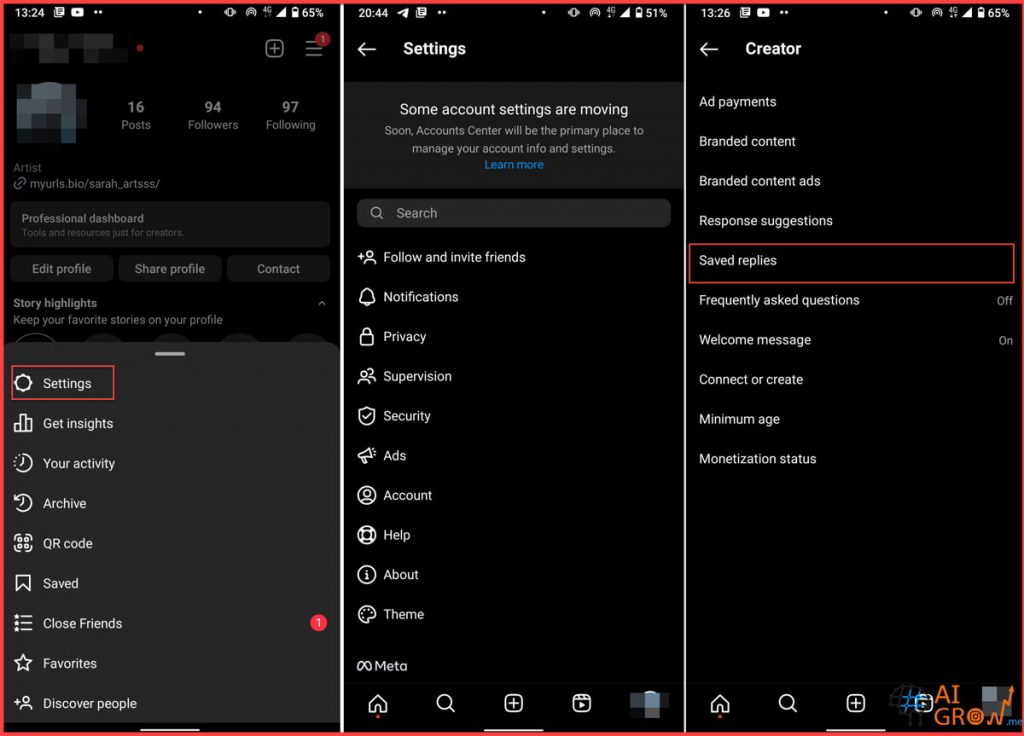
In this tab, you can create as many as you need quick responses with shortcuts to speed up contacting your audience.
How Many Quick Replies Can I Create?
On Instagram, the number of quick replies you can create is limited to 50 responses. Quick replies are a feature available for Instagram Business accounts that allow you to create pre-defined responses to frequently asked questions or common inquiries from your followers. These quick replies can save time and make it easier to respond to messages promptly and efficiently.
