


With over one billion monthly active users, Instagram remains one of the most popular social media platforms today. It offers a wide range of cool tools and features that brands and businesses can leverage to create engaging content and expand their customer base. One such option is Instagram Memories. In this article, we will guide you on how to access Instagram Memories and effectively share them on your page.
What Are Instagram Memories?
Like many other social media platforms, Instagram constantly introduces new tools and features to enhance user engagement. One of these features is “Instagram Memories.” This feature showcases a post or Story that you shared on the same day a year or more ago, allowing you to reminisce about your past moments on the platform.
Instagram automatically sends you a notification in your activity box titled “On This Day” to announce the memory.
By adding captions and editing the photo, you can make creative Memorial Day Instagram posts celebrating your brand’s growth.
Additionally, these posts provide an opportunity to showcase your brand’s progress and highlight the significance of Memorial Day.
How To Find Memories On Instagram?
Instagram Memories allows users to revisit their past posts and stories, providing a nostalgic journey down memory lane.
By accessing the Memories feature on Instagram, users can easily relive moments and reminisce about their personal experiences shared on the platform. Whether it’s browsing through old posts or revisiting stories from specific dates, Instagram Memories offers a convenient way to reconnect with cherished moments and reflect on one’s digital journey.
But, how to view memories on Instagram? Let’s find out in the following section.
How to See Memories on Instagram?
Instagram automatically sends you memories Instagram notifications in your activity box (The heart-shaped tab next to your profile). Other than that, there are two more places to see everything you shared. Here’s how to see memories on Instagram:
1. How to See ‘On This Day’ on Instagram: Access From Your Stories
The first and most common answer to how to see Instagram memories is via your Stories tab. If you have been an Instagrammer for a while, you are familiar with Stories and how to access them.
However, if you’re just a beginner, all you need to do to open the Story tab is to scroll your feed page to the right. This will open your device camera to record/capture a Story. Now, let’s see how to find memories on Instagram, including the “On This Day” Instagram story feature, from this tab.
- Open the Story tab, and from the left menu choose “Create.” If you can’t see it, tap the Aa button.
- At the bottom of your screen, you can see a new menu of different Story formats. Scroll to the right till you see the “On This Day” option. (It’s the icon with the clock and counterclockwise arrow.)
- Here, Instagram will show you something you posted on the same day as the current date but from years before. It can be even more than one post/Story.
- If you haven’t shared any content on a specific day, Instagram’s “On This Day” feature may report a different activity instead, such as following a friend.
- Tap the dice button at the top of your screen to switch between different memories on Instagram.
Once you find the post/activity, add your editings, memorial day Instagram captions, top Instagram filters, stickers, etc, and share the Story as you normally do.

Also Read: Easiest Ways To Share A Link On Instagram
2. Instagram On This Day: Access From Your Instagram Archive
To have a better look at what you have shared on your Instagram account over the past years, you can open your Instagram archive.
There you can see all the Stories you have shared till now, posts you decided to hide, and live videos you had in the last 30 days. At the bottom of these Stories, you can see the memories on Instagram for the date. Here’s how to access Instagram memories on your archive:
- Log into your Instagram account and go to your profile.
- Tap the three-line icon at the top of your screen and tap “Archive.”
- At the top of your screen, you have the option to choose between posts archive, Stories archive, and live archive.
- By selecting “Story,” you can view all of your content sorted by date.

3. How To Turn On Instagram Story Memories Feature?
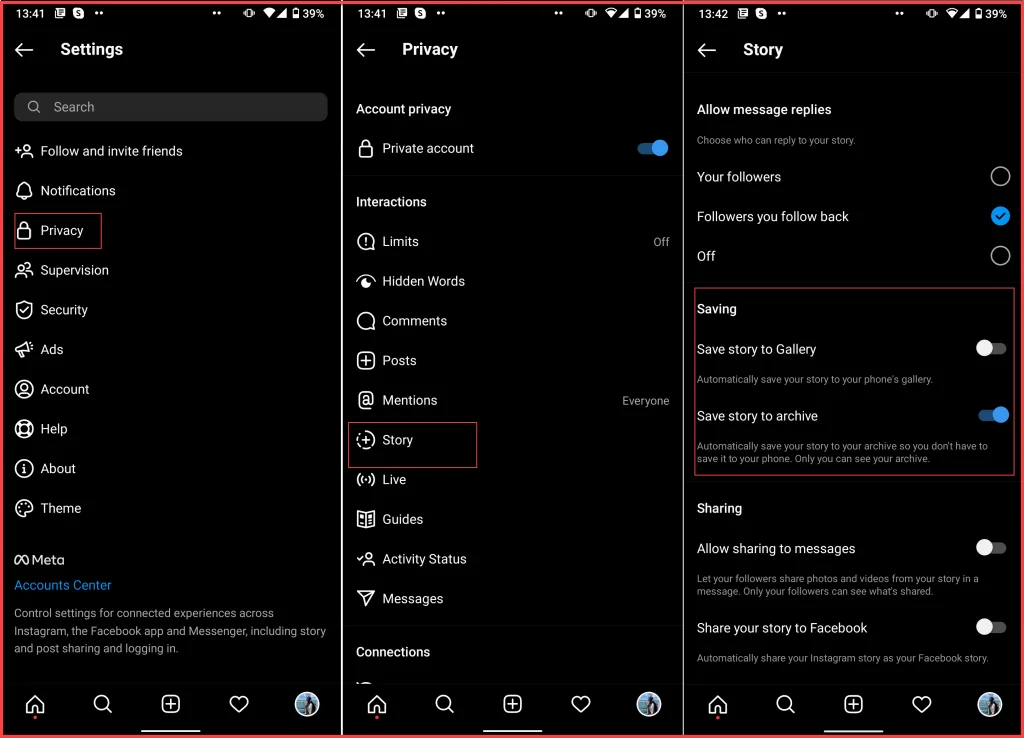
If you still need to turn on the archive feature for your Stories, you can’t view Instagram ‘On This Day’ highlights. In order to activate this feature and be able to use the on-this-day IG tool, follow these steps:
- Log into your Instagram account and go to your profile.
- Tap the three-line button at the top-right corner of your screen and choose “Settings.”
- From the opened tab. select “Privacy.”
- Tap “Story.”
- Scroll down to the “Saving” section and toggle on the “Save To Archive” option.
Now, everything you share on Stories (photo/video/reel) will be automatically saved to your archive. You will receive an “On This Day Instagram” notification every year on the same day.
How To Post Memories?
If you’re looking for the answer to ‘How do you repost old Instagram memories?’, you’re in the right place. You can also learn how to repost on Instagram for rainy days!
After finding memories Instagram photos/videos, you can share them as a post or Story. Let’s see different ways of sharing memories.
1. Post Memories As A Story
Have you ever asked anyone, ‘How do you post a throwback on Instagram Stories?’ You can share Instagram memories as a Story with your followers to celebrate events. As we mentioned, you have two options for accessing the memories; So there are two different ways how to post memories on Instagram Stories. Let’s see how to do it from your archive first:
- Open your Instagram archive from your profile.
- Select the “Stories Archive” option from the upper menu.
- You can see a collection of your previous Stories. Select the photo/video you wish to reshare.
- Tap the “Share” button and publish it on your Stories.
And if you want to use the “On This Day” feature on your Stories to share the video with its special theme, follow these steps:
- Open the Story tab and choose the “Create| option from the left menu.
- Scroll to the right till you see the “On this day” option.
- Find the event and tap the capture button.
- Add your filters, stickers, etc, and share the Story as you always do. You can also use the close friend Instagram feature to share it with your trusted friends.
Also Read: How To Repost A Story On Instagram?
2. Post Memories As A Post
Unfortunately, there is no option to share Instagram memories as a post directly. But you can save the Story before sharing, change the dimensions, and share it as a post. In the last steps, we showed you how to see memories on Instagram on your archive or Stories tab. Access the photo and follow these steps:
- After choosing the memory, tap the save button at the top of your screen.
- After a few seconds, the post will be shared with your gallery.
- Go to your feed page and tap the “+” icon to open the posting section.
- Choose the photo from your gallery, crop it, tag users on Instagram, and share it with your Instagram viewers.
3. Memories Caption For Instagram
After finding old posts/Stories, you can share them with fun and creative memories captions for Instagram. Here are some examples:
- Collect moments, not things. Here are a few examples of short captions for memories on Instagram:
- What day is it again?
- Is this what you call ‘old normal’ now?
- Feels like this was taken centuries ago
- I live for the nights that I can’t remember with the people that I won’t forget.
- I wish somebody would have told me, babe, someday these will be the good old days.
- My God, this reminds me of when we were young.
- Who needs Timehop, when Instagram is forever?
- We had no idea what we were doing.
- Just trying to avoid the future, by trying to live in the past.
- These are the days we try to recreate.
Also read: How to Change Background Color on Instagram Story?
Conclusion
One of the best post ideas for professional Instagram accounts is showing how you get here with flashback posts and Stories. Luckily, with the Instagram memories feature, it’s easier than any time before to access older content and share them again with the “On This Day” Instagram Tag. This article showed you everything you need to know about memories on IG and how to use it for Instagram memorial day posts.
FAQs
Now that you know how to use ‘On This Day’ Instagram feature, it’s time to take a look at some of the most frequently asked questions regarding our topic.
1. How Do You Find Memories On Instagram?
To access and view everything you’ve shared on Instagram, take a look at your app archive. Here’s how to find Instagram memories using Archive:
- Open the Instagram app and go to your profile.
- Tap the three-line icon at the top of your screen and select “Archive.”
- In the opened tab, you can see all the posts, Stories, and live videos you shared on your account.
2. How Do You Add Memories To Instagram Stories?
Instagram allows you to re-share Instagram memories on your Stories under the “On This Day” section. Here’s how to check memories on Instagram:
- Open the Instagram app and go to your feed page
- Scroll your screen to the right; This will open your camera.
- Tap the “Aa” or “Create” button from the left menu.
- From the bottom bar, choose the “On This Day” option.
- Here, you can view the posts/Story you shared years ago on the same day. Use the dice button at the top of your screen to switch between different memories.
3. Does Instagram Have A Memory Feature?
Instagram automatically saves everything you share on posts and Stories on the app archive. You can view, save, and delete archived content from your profile. Instagram will automatically send you a memory notification for the posts/Stories you shared on the same day as years before.
4. How Do You Find Old Pictures On Instagram?
Instagram keeps the deleted posts in the “Recently Deleted” box for 30 days. So if you have accidentally removed a feed post/Story, here is how to find it:
- Log into your Instagram account and go to your profile.
- Tap the three-line icon at the top of your screen and select “Your Activity.”
- Select “Recently Deleted.”
5. How To Write Happy Moments Captions For Instagram?
Looking for happy captions to share your old memories? Here are some examples to copy and paste on your Instagram posts:
- Celebrating life like it’s a lifelong party.
- I choose to be happy. Be happy always.
- If you spend your whole life waiting for the storm, you’ll never enjoy the sunshine.
- Bringing the sun wherever I go.
- Happy people are always beautiful.
- Happiness is the richest thing we will ever own.
- Keep the smile on!
- Be thankful for the little things, the gigantic things, and everything in between.
- Oh, happy day.
6. How To Memorialize An Instagram Account?
If you have recently lost a friend or family member, you can preserve their memory by memorializing their Instagram account. For reporting an account to be memorialized, you need to provide information about yourself and your loved one. They ask for proof of death, such as a link to an obituary or news article, to memorialize an account. Follow this reporting link on your web browser to request memorialization.
Note: keep in mind that they can’t provide login information for Instagram memorialized accounts.
7. How to Share Instagram Memories to Facebook?
To share Instagram memories on Facebook:
1. Open the Instagram app and go to your profile.
2. Tap the three horizontal lines and select “Settings.”
3. Tap “Account” and then “Linked Accounts.”
4. Link your Facebook account and log in.
5. Go back to your profile and find the memory you want to share.
6. Tap on the memory and then tap the “Share” button.
7. Choose the Facebook option.
8. Customize the post if needed and tap “Share” to post it on Facebook.
That’s it! Your Instagram memory will now be shared on Facebook for your friends to see.
8. How Do You Archive Memories on Instagram?
To archive memories on Instagram, follow these steps:
1. Open the Instagram app on your smartphone or tablet and log in to your personal account.
2. Tap on the profile icon, typically located at the bottom right corner of the screen, to access your user profile.
3. Find the post or story that you want to archive.
4. For posts: Tap on the three dots (…) located at the top right corner of the post. A menu will appear.
5. For stories: Tap on the three horizontal lines at the top right corner of your profile. This will open the menu.
6. In the menu, select “Archive” or “Archive Post” for posts, and “Archive Story” for stories.
7. The post or story will be moved to your archive, which can be accessed later by going to your profile and tapping on the clock-like “Archive” icon.
By archiving memories, you can keep your posts and stories private while still being able to revisit and view them personally.
9. How to Turn on Memories on Instagram?
Instagram does have an “Archive” feature that allows you to store and revisit your past posts and stories. Here is how to get memories on Instagram by enabling the Archive feature:
1. Open the Instagram app on your smartphone or tablet and log in to your personal account.
2. Tap on the profile icon, typically located at the bottom right corner of the screen, to access your user profile.
3. Tap on the three horizontal lines icon at the top right corner to open the menu options.
4. In the menu, tap on “Settings.”
5. Under Settings, scroll down and find the “Privacy” section. Tap on it.
6. Within the Privacy section, look for “Story” or “Posts” settings, depending on which content you want to enable the Archive feature for.
7. Tap on the corresponding setting and enable the “Save to Archive” option.
8. Once the Archive feature is enabled, your posts or stories will be automatically archived after they expire (24 hours for stories) or when you remove them from your profile.
Turn off Instagram Memories 2023
You can control the visibility of your past posts and stories through the Archive feature. If you no longer want to use the Archive feature and prefer to completely remove your posts or stories from your profile, you can delete them manually.
To delete a post:
1. Open the Instagram app and go to your profile.
2. Find the post you want to delete.
3. Tap on the three dots (…) located at the top right corner of the post.
4. Select the “Delete” option from the menu.
5. Confirm the deletion when prompted.
To delete a story:
1. Open the Instagram app and go to your profile.
2. Tap on the clock-like “Archive” icon located at the top right corner of your profile.
3. Select the “Stories Archive” tab.
4. Find the story you want to delete.
5. Tap on the three dots (…) located at the bottom right corner of the story.
6. Select the “Delete” option from the menu.
7. Confirm the deletion when prompted.
10. How to Get Notifications of Memories on Instagram?
Instagram shows notifications for memories on its own and you don’t have to do anything to receive such notifications.
11. Did Instagram Remove Memories
No, it didn’t. Users still have the ability to see memories notifications on their personal accounts.
12. How Do You Caption a Memory Photo?
When captioning a memory photo on Instagram, you can use short captions that capture the essence of the moment. Here are some steps to help you:
1. Reflect on the memory: Take a moment to think about the emotions and significance of the memory you want to share.
2. Keep it concise: Opt for short and impactful captions that convey the essence of the memory. This allows your caption to complement the visual element of the photo without overwhelming it.
3. Use descriptive words: Select words that evoke the feelings or atmosphere associated with the memory. Think about the emotions, experiences, or details that make the memory special.
4. Incorporate relevant hashtags: Consider including hashtags that align with the theme or content of the memory. Popular hashtags like #Throwback, #Memories, or #Flashback can help your photo reach a wider audience.
5. Personalize the caption: Add a touch of your personality by including your own perspective, a personal reflection, or a meaningful quote related to the memory.
13. Can You Search Memories on Instagram?
Actually, you can scroll through your IG memories by accessing your Instagram archive. The archive feature allows you to browse and view your past posts and stories, providing a convenient way to revisit your Instagram memory. By tapping on the clock-like “Archive” icon located on your profile, you can access your archived posts and stories, scroll through them, and relive your past experiences on the platform.
13. Why Is Instagram Memories on This Day Not Working Properly?
If the “Instagram Memories On This Day” feature is missing or not working properly, there could be a few possible reasons. Firstly, check if you have any pending app updates and install them if necessary. It’s also a good idea to clear the cache and data of the Instagram app or try reinstalling it. If the issue persists, consider reaching out to Instagram’s support team for further assistance, as they will have the most up-to-date information on any technical issues with the Memories feature.
14. How to See Story Memories on Facebook?
To see story memories on Facebook, follow these steps:
1. Open the Facebook app on your smartphone or tablet and log in to your personal account.
2. Tap on your profile picture or profile name to access your Facebook profile.
3. Under your profile, you will find the “Story Archive” section. Tap on it to access your archived stories.
4. Scroll through the archived stories to browse and view your past memories.
5. You can tap on a specific story to view it in full screen and see the details and interactions associated with it.
Please note that the availability of the story memories feature may vary based on your Facebook account and the version of the app you are using. If you do not see the “Story Archive” section or are unable to access your story memories, it’s possible that this feature is not available for your account or is not yet rolled out in your region.
15. How Does Instagram Memories Enhance the Accessibility of Past Moments Through Technology?
Instagram Memories leverages technology to provide an accessible way to revisit past moments. By organizing and presenting our photos and videos from the past, Instagram Memories offers a convenient and user-friendly way to access and relive our memories. This feature allows us to easily navigate through our archived content, facilitating a nostalgic journey and fostering engagement through comments and interactions with our past experiences.
