


Since 2013, Instagram users can send private messages to other users to communicate with them, send photos and videos, start video calls, etc. But that’s not all! Nowadays, Instagram DM is one the best tools for brands and businesses to use professionally to grow their customers.
Have you ever asked yourself what does DM mean in texting? In this article, we’ll tell you everything you need to know about Instagram DMs, how to access them on your PC, and how to use them professionally. Looking for an Instagram DM tool to access your messages on your desktop? AiGrow is what you need.
What Is Instagram Direct Message And How Does It Work?
The Instagram direct message is a feature that lets you chat with people directly and privately on Instagram. But, what’s so special about it?
First of all, you can have a private relationship with anyone on Instagram. So, you don’t need to use any other apps or exit Instagram to chat with somebody. The good thing is that you can send messages to any Instagram user. Also, this chat has some other benefits too, such as video calls, sending your voice (up to one minute), sending pictures, or creating a group.
On the other hand, Instagram DM is the only section you can share any clickable links. All these little details simply prove Instagram DMs to be underrated. However, it isn’t without its limitations and drawbacks.
For instance, you can’t write more than 1000 characters (approximately 180 words) in one single message. All in all, it’s good and can work properly if you have some marketing goals.
How To Send DMs On Instagram?
If you are a new Instagram user and want to know how to direct messages on Instagram, don’t worry. We will teach you how to send and reply to your Instagram DMs on the app and your PC. Also, we’ll show you how to monitor Instagram direct messages.
- Log into your Instagram account and go to your homepage.
- Tap the paper letter icon at the upper right corner of your screen.
- Here is your Inbox, and you can see all the messages you have received.
If you have a business account, you can see that it is divided into three parts; Primary, General, and Requests.
- Primary: The Primary tab is for messages you’d like to see first. All Instagram DMs will appear in the Primary box, but you can swipe them into the General. Notifications for unread messages are on for the Primary tab, but you can turn them off in Settings.
- General: The General tab is for messages you’d like to get back to later. Notifications for unread messages are off for the General tab, but you can turn them on in Settings.
- Requests: Messages you have received from users that you don’t follow. You need to accept them to start chatting.
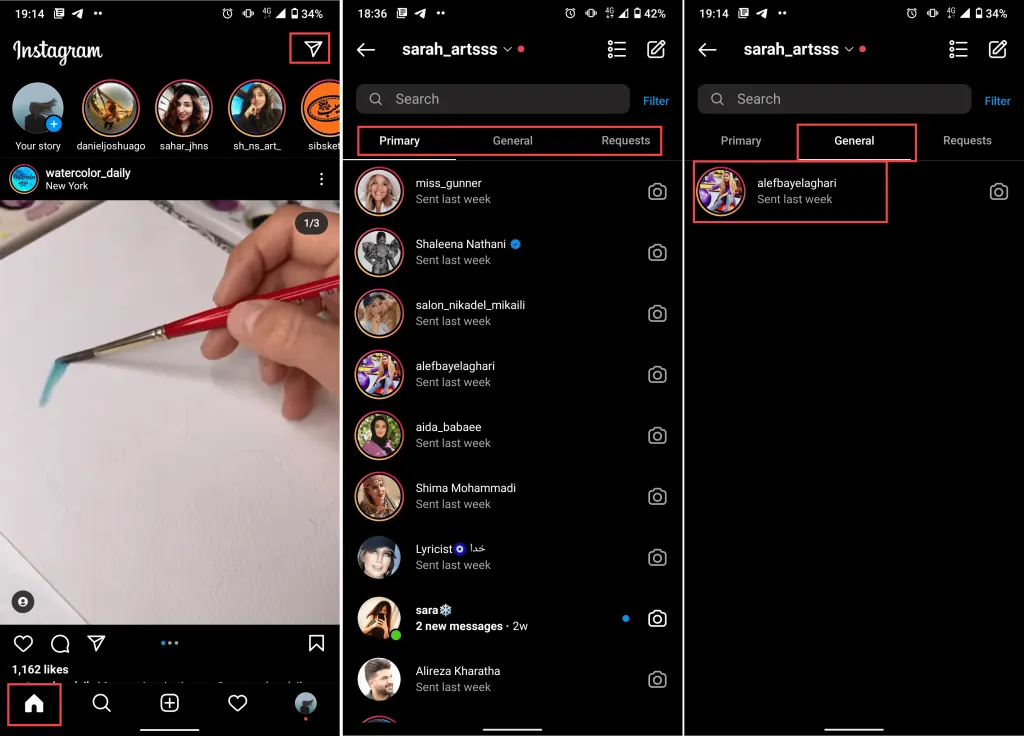
To reply to an Instagram DM, open the conversation and start typing. Also, search for a username in the search tab in your Inbox to start a conversation with your followers.
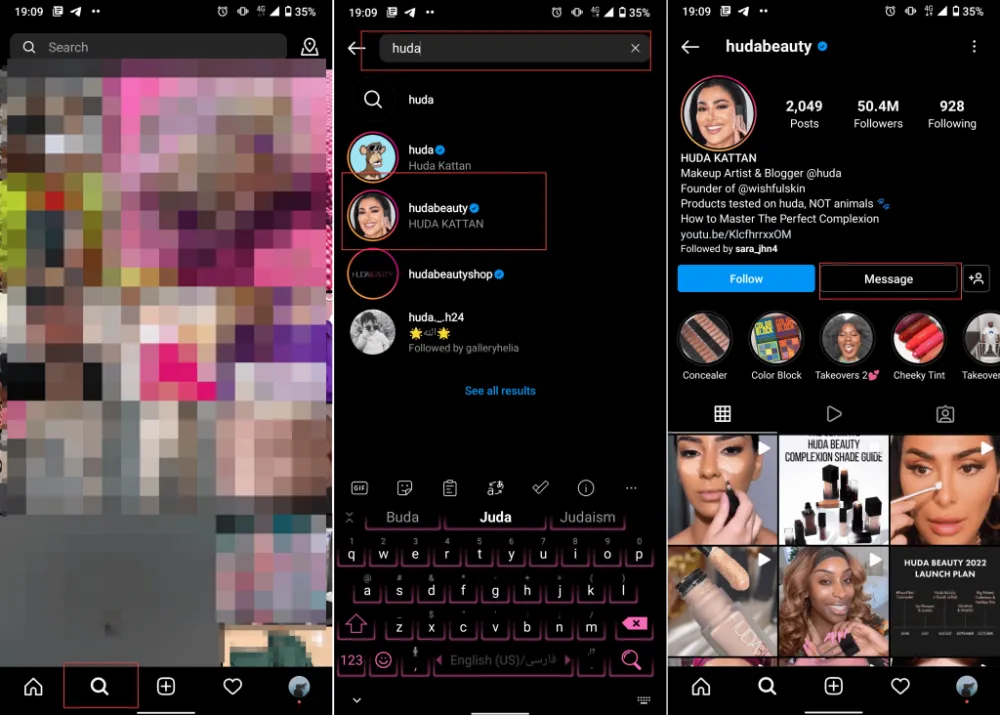
Another way to start a conversation with an Instagram user is by viewing their profile.
- Open the Instagram search tab next to your profile.
- Search the username and open the user’s profile.
- Tap the “Message” button and write your message.
How To Send Instagram DM From PC?
If you don’t have access to your phone and want to know how to dm on Instagram on PC, here is how to do it. You have two options to try; either use the Instagram website or use a trusted third-party tool. This is how to dm on Instagram website:
- Open the Instagram website and log into your account.
- Click on the paper-letter icon from the top of your screen to open your Inbox.
- Select a conversation and start sending DMs.
As you can see, it’s super easy to access DMs on Instagram pc, but the only problem is that you dont have access to full features this way. So let’s see the other solution.
Send Instagram DM using AiGrow.
AiGrow is an Instagram management and growth service with multiple features that every professional Instagrammer needs for growing their account. Some of its main features are
- Post, story, an IGTV scheduler
- Bulk DMs
- Automated Instagram DMs
- Instagram giveaway and contest tool
- Multiple links in bio tool
- Instagram growth engine
With this service, you can easily open your DMs on your PC, answer them, read them without marking the message seen, send photos, etc. Also, another perfect feature that AiGrow provides is the ability to check, read, and send Instagram DMs using your email.
How To Message Someone On Instagram On Laptop Using AiGrow
Up to here, we talked about what does dm mean on Instagram, how to direct message on Instagram and answer your messages using the Instagram app. Now let’s see how to DM on Instagram on the computer using AiGrow. Also, we will introduce you to the professional tools this platform provides for businesses, influencers, and brands.
Check Your Instagram Inbox
In the last parts, we showed you how to get to DMs on Instagram computer using Instagram’s website but you don’t have access to all features, you won’t get message notifications, and you cant send photos and videos. So the best solution on how to access DMs on Instagram online is by using AiGrow. Here is how to use Instagram direct messaging on computer with AiGrow.
- First signup on AiGrow’s website for free and log into your account.
- Click “Add Instagram Account” to connect your Instagram page to AiGrow.
- Select “Manage.”
- To access Instagram dm on mac/windows/linux open the “Direct Messages” tab and click “DM Inbox.”
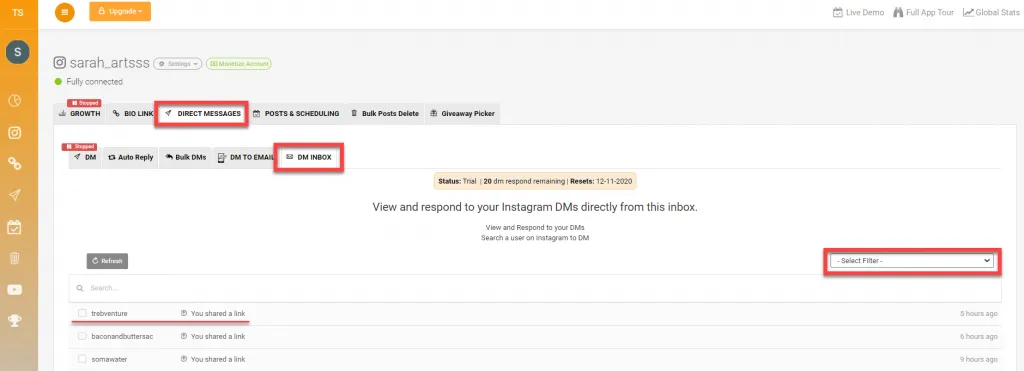
Here you can view all the conversations you had and filter them by read, unread, sent, and all.
Select the conversation you want and start writing your message.
Automated Instagram DM
This is obvious that you cannot always use your mobile phone everywhere. So, you cannot answer your online and Instagram customers. Therefore, this is where the idea of Automated DM comes from.
Using repetitive and exact messages to everyone is something that Instagram doesn’t like. To avoid it, AiGrow has come with a fantastic solution; randomization. To know better how it works, watch the following video.
There are lots of things you can do with this great tool. For example, you can send an Instagram direct message to your current followers, new followers, or an excel list of multiple accounts. So, you can respect your audience and get their interest to have more interactions with you.
Reach Out New Clients Direct Message Marketing
Another way to use Instagram Direct messaging, which is overlooked by many, is to gain more leads. Most of the time, you think you should send DMs to your followers, but this is a mistake. As long as you don’t violate Instagram limitations, you can send direct messages to anyone you like.
However, it’s not feasible and pleasant to chat with strangers, and it may be irritating. Basically, you should know if they are interested in your content, goods, or services you provide or not. This is something that the presence of AiGrow can help you handle.
Let’s imagine you are an Instagram marketer of a restaurant. Apparently, followers of an influencer whose niche is about food are probably those who may want to have a word with you. The story is the same with those who follow a relevant hashtag. For both of them, AiGrow has plans.

As you see in the above picture, you can search for any influencer you like to chat with their followers. Besides, you can search for the hashtag you want to chat with its followers. So, selecting these options will surely give you new clients.
Engage With Your Audience By Using Bulk DM
Sharing what you can offer as a marketer using Instagram direct message may be difficult to do in a short period. With AiGrow, you can bulk Instagram DM to many people in less than 60 minutes. All you need to do is selecting accounts and editing your message.

How To Archive Instagram Messages Of Loyal Customers
What if you want to store some messages with high importance? Dealing can always bring issues with itself. So, maybe you should archive your Instagram messages somewhere. To solve that, AiGrow helps you have your messages in your email. Besides, you can get replies, and even you can send messages through your email too.
This feature can help you with separating your loyal customers too. Those with rich interactions are more likely to become your constant customers. This is another reason that archiving your messages is something important.
How to delete an Instagram DM?
Like most messaging services, you have complete control over which messages get saved and which get deleted on your Instagram DMs.
There are two ways to delete your Instagram messages. You can either delete entire
conversations or delete individual messages.
Read more: How to delete Instagram messages in less than 30 seconds
Delete Instagram DM on app
Now that you know everything about how to get to DMs on Instagram let’s see how to delete a dm you don’t need. Follow these simple steps to delete messages on the Instagram app:
- Log into your Instagram account and go to your inbox.
- Hold a conversation you want to remove and select “Delete.”
- To delete a single message, open the conversation and hold the message you want to delete.
- Tap “Unsend message.”
Delete DMs on AiGrow
If you are using Instagram direct messaging on computer using AiGrow and want to know how to delete a conversation or specific message, here is how.
- Log into your AiGrow account and select “Manage.”
- Open the “Direct Messages” box.
- Click “DM Inbox.”
You can view all the chats you have sent and received in this tab. You can easily select the conversation you want to delete and click “Delete.”
Summing Up
The Instagram direct message is one of the features that many underestimate. This is because maybe you want to focus on other aspects of Instagram, such as creating content. However, tools such as AiGrow can help you maximize your usage for this feature. To get the most out of your Instagram, don’t forget the power of Instagram DMs and the tools it provides. This article showed you everything you need to know about managing, sending, and responding to your DMs. Also, we introduced you to AiGrow to use your DMs for marketing and business purposes.
