


Ever wished you could get all your Instagram stuff in one spot? Well, Instagram lets you do just that by letting you request and download all your data from the platform. Initially, this feature was only available on the computer, but now you can do it on your phone too.
In this blog post, I’ll show you how to download Instagram data and, of course, I’ll spill the beans on how much time it takes.
So, are you ready to know more? Then, just read on. 🙂
What Is Instagram Data Download?
Instagram data download is a feature that allows users to download a copy of their data from Instagram. To use this feature, users must go to the ‘Your activity’ section, where they will find an option to request a download of their data.
After making the request, Instagram processes it and creates a downloadable file containing the specified information. Once the file is ready, users are notified through Email, and they can then download and review the data.
This feature is designed to give users more transparency and control over their data, allowing them to have a copy of their Instagram activity for personal reference or as a backup.
What Does Instagram Data Download Include?
Instagram data download includes a wide range of data users share on the platform like:
- Profile information: username, email, phone number, etc.
- Posts: photos, videos, stories, captions, comments, etc.
- Messages: direct messages, group chats, etc.
- Account activity: login history, search history, etc.
- Ads: information about ads you’ve interacted with.
How to Download Instagram Data?
Downloading your Instagram data is a straightforward process. Simply request your data on Instagram and wait for the completion of the file preparation. Here’s how you can do it:
1. Open Instagram and navigate to your profile.
2. Tap the hamburger menu at the top right of the screen and select ‘Your activity.’

3. Scroll down and tap ‘Download your information.’

4. On the next page, select ‘Request a Download’.

5. Choose between ‘Complete copy’ or ‘Select types of information’ based on your preference. [ I opted for ‘Complete copy’ to access all available information, but you can customize with the second option.]

6. Complete the required information on the next page, including your email address, file format, media quality, and date range.
7. Tap ‘Submit request’ after providing the necessary details.

8. Here, a page will appear confirming that your download is pending, and you have 4 days to retrieve your information.

Note: It took approximately 12 hours for me to receive an email stating that my requested information was ready. Patience is key during this waiting period.

9. Once you receive the email indicating that your information is ready, visit your Instagram profile again, click on the hamburger menu, select ‘Your activity,’ then go to ‘Download your information,’ and finally, ‘Download.’
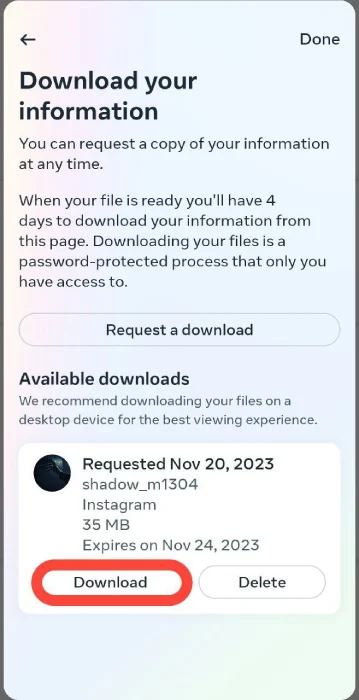
10. To complete the download, you’ll need to re-enter your password for verification. This step ensures that you, as the account owner, have requested the information. Click ‘Continue’ to proceed.

Note: I successfully downloaded the information. Below is an image displaying all the data that Instagram provides.

How Long Does Instagram Data Download Take?
The time it takes to download your data from Instagram can vary based on factors such as the amount of data and current server load. In my personal experience, it took approximately 12 hours.
Keep in mind that download times can fluctuate, and users may experience different durations based on individual circumstances and platform updates.
However, according to Instagram, it could take at most around 30 days for them to send you a link to download your data. [Even if you’ve deleted some info, they might keep it temporarily for safety reasons, but you won’t see it when you check or download your data.]
Also Read: Are Instagram Messages Really Deleted Forever?
Conclusion
Alright, that’s it! Now you know how to download your Instagram data and know how long it takes. Grab all your information in one file – easy and pleasant, right?
You can easily ask for a download on Instagram, and in the worst-case scenario, it might take up to 30 days. But, from my experience, I got my file in just 12 hours. So, fingers crossed, you might get yours pretty quick too! 🙂
Also read: How to See Unsent Messages on Instagram?
FAQs
Up to now, we’ve talked about the main blog topic: how to download Instagram data and how much time it takes. Now, let’s tackle a few related questions.
1. Can You Download the History of Your Data on Instagram?
Use the Data Download option to obtain a copy of your Instagram data. With this tool, you can request a file containing your photos, comments, profile details, and other information.
The downloaded file will be exclusively accessible to you. After making a request, the file will remain available for download for 4 days.
Keep in mind that the file won’t include content you’ve deleted from your Instagram account such as deleted comments and messages.
2. Can I Download Instagram Data On My Mobile Device?
Yes, You can download it on both desktop and mobile devices. However, it’s important to note that the process may be different.
