


Instagram is one of the most popular social media platforms out there, and for a good reason. With its visual focus and powerful tools, it’s a great way to connect with friends, family, and fans. One of the most exciting features of Instagram is the Collab feature, which allows users to collaborate on content creation. In this beginner’s guide, we’ll cover everything you need to know about Instagram Collab feature.
How to Enable Collaboration in Instagram?
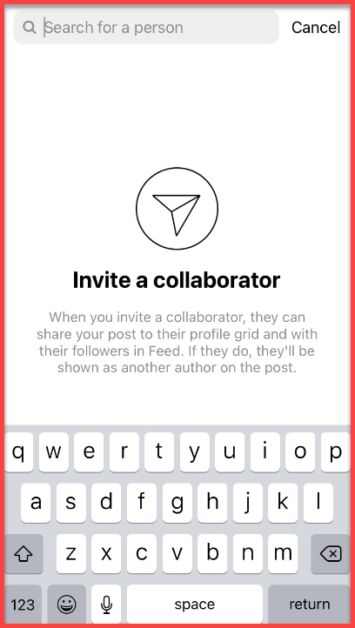
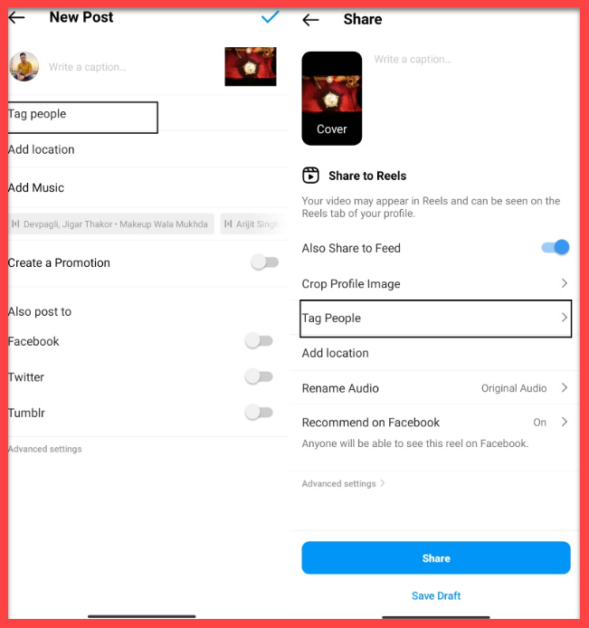
Before we dive into how to use Instagram Collab feature, let’s first discuss how to enable it. The Collab feature is available on both the main Instagram feed and Instagram Reels. To enable collaboration on a post or Reel, follow these steps:
- Open Instagram and create a new post or Reel.
- Once you’ve added your content, tap on the “Tag People” option.
- In the search bar, type the username of the person you want to collaborate with. Note that the person you want to collaborate with must follow you.
- Select the person’s username from the search results.
- Tap on “Collab” to invite them to collaborate on your post or Reel.
How to Use Instagram Collab Feature?
Now that you know how to enable collaboration in Instagram, let’s talk about how to use the Collab feature. Once you’ve invited someone to collaborate on your post or Reel, they’ll receive a notification. If they accept, they’ll be able to add their own content to your post or Reel.
How to Collab Post on Instagram After Posting
If you’ve already posted a photo or video on Instagram and want to collaborate with someone on it, you can still do so using the Collab feature. Here’s how:
- Open the post you want to collaborate on.
- Tap on the three dots in the top right corner.
- Select “Collaborate” from the menu.
- Follow the same steps as before to invite the person you want to collaborate with.
How to Collab on Instagram Reels
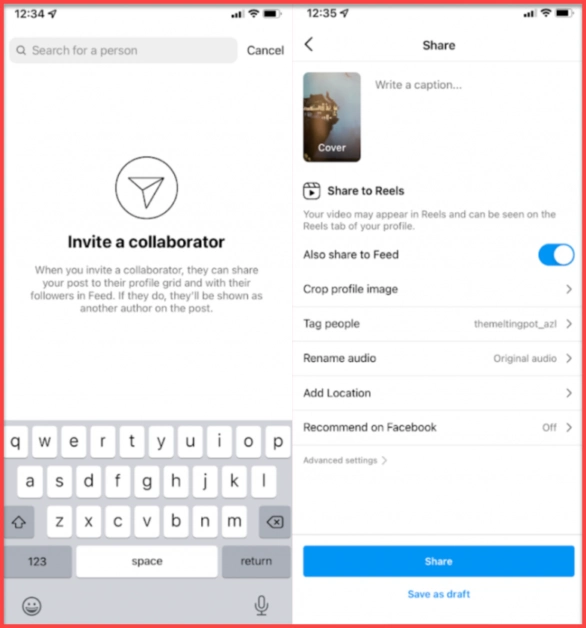
Collaborating on Instagram Reels is similar to collaborating on a post. Here’s how to do it:
- Open Instagram and create a new Reel.
- Once you’ve added your content, tap on the “Tag People” option to tag someone on Instagram.
- In the search bar, type the username of the person you want to collaborate with.
- Select the person’s username from the search results.
- Tap on “Collab” to invite them to collaborate on your Reel.
Instagram Collab Feature Benefits
Instagram Collab feature offers many benefits to users, especially to those who want to grow their following and engagement on the platform. Here are some of the key benefits of using Instagram Collab for your branded content:
Reach a Wider Audience
One of the main benefits of using Instagram Collab is that it allows you to reach a wider audience. By collaborating with another user, you can tap into their audience and attract new followers who may not have discovered you otherwise. This is a great way to increase your visibility on the platform and expand your reach as a brand ambassador.
Build Relationships with Other Creators
Collaborating with other users on Instagram can help you build strong relationships with other creators on the platform. This can lead to future collaborations and opportunities, as well as help you expand your network and connect with other like-minded individuals.
Create Engaging and Unique Content
Collaborative posts often perform better than individual posts, as they offer a fresh perspective and a unique point of view. Using Instagram Collab, you can create engaging and interesting content that your followers will love. This can help you increase your engagement and attract new followers to your profile.
Increase Engagement
Collaborative posts tend to generate more engagement than individual posts, as they encourage interaction and conversation between the collaborators and their followers. This can help you increase your engagement rates and boost your overall performance on the platform.
Expand Your Reach
By collaborating with other users on Instagram, you can expand your reach beyond your existing audience. This can help you attract new followers and increase your visibility on the platform, leading to more opportunities and collaborations in the future.
Overall, Instagram Collab is a powerful tool that can help you grow your following, increase your engagement, and connect with other creators on the platform. By leveraging this feature, you can create unique and engaging content that your followers will love, while also expanding your reach and building strong relationships with other users.
Instagram Collab Feature Issues
The Instagram collab feature can be a great way to create unique and engaging content with other users on the platform. However, there are some issues that users may experience when using this feature. Here are some common issues with the Instagram collab feature:
Instagram Collab Feature Not Showing
If you don’t see the Collab feature on your Instagram account, there are a few things you can try:
- Make sure your app is updated to the latest version.
- Check that the person you want to collaborate with follows you on Instagram.
- Log out and log back in to your Instagram account.
- If all else fails, contact Instagram support for further assistance.
Collab Feature Not Available
One of the most common issues with the Instagram collab feature is that it may not be available to all users. If you don’t have the collab feature on your Instagram account, it may be because it hasn’t been rolled out to your region yet, or because your account doesn’t meet the eligibility requirements. Unfortunately, there’s not much you can do to fix this issue other than wait for the feature to become available or contact Instagram support for assistance.
Instagram Collab Feature Not Working
Even if the collab feature is available and don’t have collab feature on Instagram, you may still experience issues with it not working properly. For example, you may be unable to add a collaborator to your post, or the feature may not work. If this happens, try restarting your device or updating the app to see if that fixes the issue.
Accidentally Removed Collaborator on Instagram
If you’re collaborating with another user on Instagram and accidentally remove them from the post, it can be a frustrating experience. Unfortunately, there’s not much you can do to reverse this action once it’s been taken. The best course of action is to apologize to your collaborator and try to rectify the situation by reposting the content with them included.
Accidentally removed collaborator Instagram
Another issue some users have experienced is accidentally removing a collaborator from a post or reel. If you accidentally remove a collaborator, you can easily add them back by following the steps outlined above.
Instagram Collab Feature for Private Accounts
The Instagram Collab feature is a great way to create engaging and unique content with other users on the platform. However, some users may wonder if they can use this feature on their private accounts. The answer is yes, you can collaborate with other users on Instagram even if your account is private.
When you collaborate with another user on Instagram, you can make the post public or private. If you have a private account and want to collaborate with another user, you can choose to make the collab post private. This means that only your followers and the followers of the user you are collaborating with will be able to see the post.
To use the Instagram Collab feature on your private account, follow these steps:
- Open the Instagram app and go to your profile.
- Tap the “+” icon to create a new post.
- Choose the photo or video you want to use for your collab post.
- Tap on the “Tag People” option and select the user you want to collaborate with.
- Tap on the “Collab” option and choose whether you want the post to be public or private.
- Write a caption for your collab post and add any relevant hashtags.
- Tap on the “Share” button to publish your collab post.
By using Instagram Collab feature on your private account, you can create unique and engaging content with other users without having to make your account public. This can help you maintain your privacy while still collaborating with other users and creating interesting content for your followers.
Tips for a Successful Collab Post
Collaborating with another user on Instagram can be a great way to create unique and engaging content that your followers will love. Here are some tips to help you create a successful collab post on Instagram:
- Choose the Right Partner
When collaborating with another user, it’s important to choose the right partner. Look for users who have a similar aesthetic and style as you, and who have a similar audience. This will help ensure that your collab post resonates with both of your audiences and performs well on the platform.
Plan Your Post in Advance
Before creating your collab post, it’s important to plan it out in advance. Decide on the post’s theme, aesthetic, and style, and make sure that you and your collaborator are on the same page. This will help ensure that the post is cohesive and well-executed.
Set Clear Goals
Before collaborating with another user, it’s important to set clear goals for the collab post. Are you looking to increase your engagement, grow your following, or promote a product or service? Make sure that you and your collaborator are on the same page and clearly understand what you want to achieve with the post.
Use Relevant Hashtags
Hashtags are a great way to increase the visibility of your collab post on Instagram. Make sure to use relevant hashtags that are popular within your niche or industry and that will help your post reach a wider audience.
Engage with Your Followers
After posting your collab post, engage with your followers in the comments section. Respond to comments, answer questions, and encourage conversation. This will help increase your engagement rates and improve the overall performance of your post.
Conclusion
In conclusion, the Instagram collab feature can be a great tool for creating engaging and unique content on the platform. Whether you’re collaborating with other users or simply using the feature to tag other accounts in your posts, there are many benefits to using this feature. By following the tips we’ve outlined for a successful collab post, you can increase your chances of creating content that resonates with your audience and helps you grow your following.
However, it’s also important to be aware of the potential issues with the collab feature, such as it not being available on your account or not working properly. By staying informed and troubleshooting any issues that arise, you can continue to use the feature effectively and create great content with other users on the platform.
Overall, the Instagram collab feature is a powerful tool that can help you connect with other users and grow your presence on the platform. With a little creativity and some strategic thinking, you can use this feature to take your content to the next level and achieve your goals on Instagram.
FAQs
How many collaborators can I add to a post using the Instagram Collab Feature?
- You can add up to one collaborator to your post using the Instagram Collab Feature.
How do I remove a collaborator from an Instagram post?
- To remove a collaborator from your Instagram post, tap on the three dots on the top right corner of your post, select “Edit,” and then tap “Collaborate” to see the list of collaborators. From there, you can remove the collaborator by tapping “X” next to their name.
Do all users need to have the Instagram Collab Feature to collaborate on a post?
- Yes, all users need to have the Instagram Collab Feature to collaborate on a post. If a user does not have the feature enabled on their account, they won’t be able to collaborate on the post.
Can I collab with someone who doesn’t follow me on Instagram?
- Yes, you can collab with someone who doesn’t follow you on Instagram, as long as they have the Instagram Collab Feature enabled on their account.
Are there any restrictions on the type of content that can be collaborated on using the Instagram Collab Feature?
- Instagram has community guidelines that users are expected to follow. Any content that violates these guidelines, such as content that promotes hate speech, nudity, or violence, cannot be collaborated on using the Instagram Collab Feature.
