

Concerned about the hassle of receiving Instagram login codes via SMS, authentication apps, or WhatsApp? Take a breather and learn how to turn off two-factor authentication on Instagram to get rid of them.
In this blog, we’ll walk you through the iPhone, Android, or desktop process, and even cover what to do if you’re not logged in. Keep reading!
Quick Answer: To disable 2fa authentication on Instagram, you need to go to your profile, Settings and Privacy, Account Centre, Password and Security, Two-factor authentication, How you get login codes, and toggle off options for either SMS, authentication app, or WhatsApp. If in a rush, just watch our video to learn.
Note: Two-factor authentication adds an extra layer of security to your IG account.
How to turn off two-factor authentication on Instagram (Android and iPhone)
Disabling two-factor authentication on Instagram for both iPhone and Android devices follows a similar process. Here’s a guide specifically for Android:
- Go to your profile and tap the three-line icon at the top right corner to access Settings and Privacy.
- Then, click on Account Center and choose Password and Security.
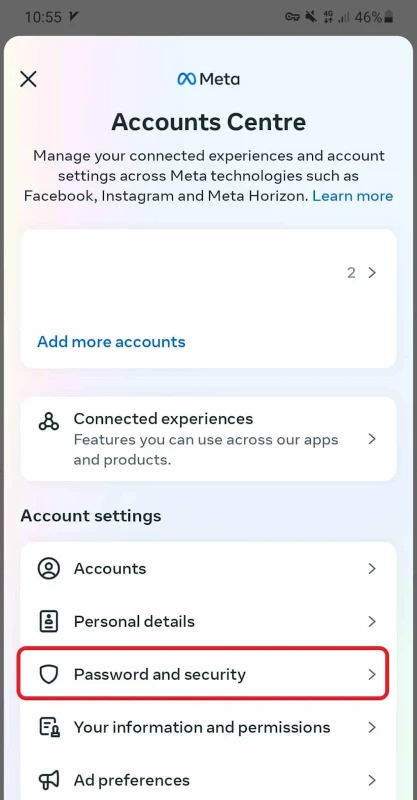
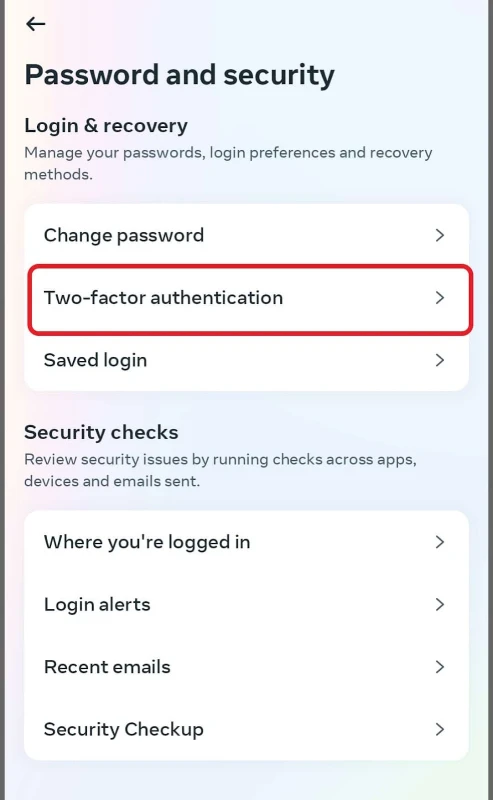
- Tap on Two-factor authentication.
- Select the account you want to turn two-factor authentication off for (if you have multiple accounts).
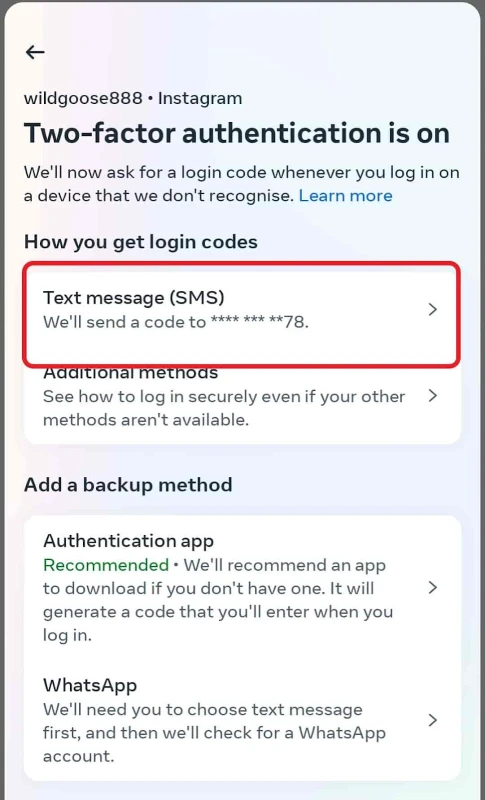
5. Choose the option you have selected to get login codes and turn it off (mine was SMS).

How to turn off two-factor authentication on Instagram(desktop)
Removing 2fa on Instagram’s web version is just as simple as the app. Simply follow these steps:
- Log into your Instagram account on your computer, click on “More” on the left side of the screen, and then select “Settings.”

- In the Account Center, pick “Password and Security.”

- Then, click on Two-factor authentication.

- If you have multiple accounts, simply select the one for which you want to disable two-step verification.

- Tap on the security method you’ve already enabled and turn it off.

How to remove two-factor authentication on Instagram without login?
To be honest, if you can’t log into your account, you won’t be able to turn two factor authentication off. This is for security reasons.
However, if you’ve logged in on other devices previously, use those to manage your two-step verification settings.
In case you’ve forgotten your password, you can simply click on “Forgot my password” on the login screen. Then enter the email or phone number linked to your account, and get the “Reset link”. Read our full post on how to reset your Instagram password.

FAQs
Now, let’s tackle some typical questions that might pop up when you’re thinking about turning Instagram’s 2-factor authentication off.
Does turning off two-factor authentication increase the risk of my account being hacked?
There are cases where people’s Instagram accounts got hacked even with two-factor authentication on. However, for less skilled hackers, this two-step process can still be a solid safeguard for your account.
Can I use Instagram on multiple devices after turning off two-factor authentication?
Yes, you can. However, it’s recommended to take other security actions like strong passwords or regular security checkups.
