

For a long time, everytime I posted on Instagram, I used to see that I have a copy of a picture, just to realize it was the post I uploaded on IG, and it’s been saved on my camera roll again.
I didn’t really need a copy of my Instagram post, I mean I already have that picture, right? This feature is useful when you take a picture with Instagram camera, post it immediately, and then you want to have that picture in your camera roll too.
But then I thought, how to stop Instagram from saving posts to camera roll? Instead of deleting pictures every time, I can just simply turn off auto saving Instagram posts to my camera roll.
If you have the same Idea, that means you’re reading this blog. So stay with me till the end of it to find out how to turn off auto save on IG!
How to stop instagram from saving posts to camera roll ios and android
Android and iOS are not different and they’re both done the same way, but I will explain both. here is how you can do it:
Android:
- Open the Instagram app and tap on your profile picture in the bottom right corner.
- Select the three horizontal lines in the top right corner to open the menu.
- Tap on “Settings”.
- Scroll down and tap on “Archiving and Downloading”.
- Toggle off the switch next to “Save Original Posts”.
Read more: How To Copy My Instagram Profile Link?
iOS:
- Open the Instagram app and tap on your profile picture in the bottom left corner.
- Select the gear icon in the top right corner to open the Settings menu.

- Scroll down and tap on “Archiving and Downloading”.

- Toggle off the switch next to “Save Original Posts”.
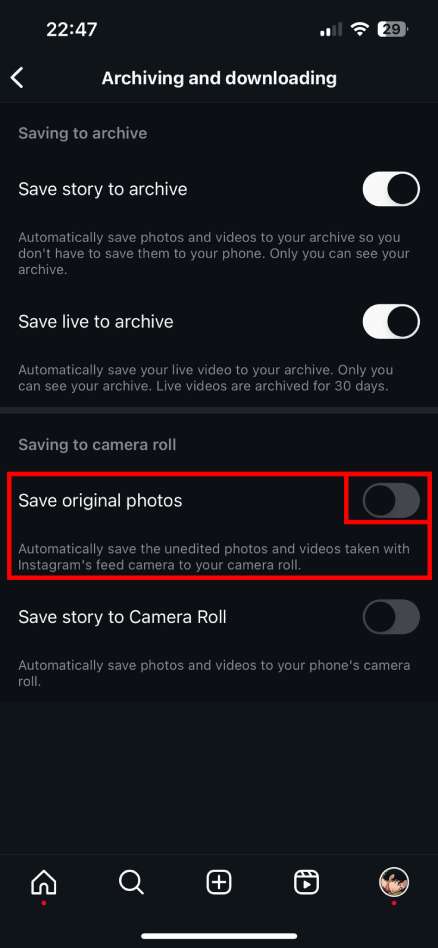
By disabling this setting, Instagram will no longer automatically save posts, photos, and videos to your camera roll.
This will help to free up storage space on your device and prevent clutter in your camera roll.
However, you will still be able to manually save posts to your camera roll by tapping on the three dots below a post and selecting “Download”.
Read more: How to Get Instagram Filters Back? iPhone And Android
FAQs
Now let’s answer some frequently asked questions on this subject:
Why do my Instagram posts go to my camera roll?
Instagram has a feature called “Save Original Posts” that automatically saves copies of your posted photos and videos to your device’s photo library. This is a convenient way to access your Instagram content outside of the app
Read more: How to Make a Group Chat on Instagram
Final Thoughts
Disabling the “Save Original Posts” setting in Instagram can help you manage your storage space and prevent clutter in your camera roll.
By taking control over which posts are saved, you can enjoy a more streamlined experience on the platform without the hassle of unnecessary file duplication.
Also don’t forget that you can always manually save posts you want to keep in your camera roll if you need.
