

Are you ready to elevate your Instagram reels to new heights of reach and engagement? Look no further, for this comprehensive guide will fully teach you how to share Instagram reels to Facebook.
Whether you’re a seasoned Instagrammer or a budding reel creator, this blog will equip you with the knowledge and insights to effortlessly share your captivating video snippets with your Facebook friends and followers. Let’s start!
how to share a reel from instagram to facebook
There are two ways to share an Instagram reel to Facebook:
Method 1: Share an existing reel
- Open the Instagram app and go to your profile.
- Tap the reel you want to share.
- Tap the three dots in the bottom right corner of the screen.

- Tap Share and then select Facebook.
- If your Instagram account is already connected to a Facebook Page, sharing will be turned on by default. If not, you will need to enter your Facebook login information and select the page you want to share your reel to.
- Tap Share and your reel will be posted to your Facebook Page.
Read more: How to Share Full Reels on Instagram Story? IOS and Android
Method 2: Automatically share future reels
- Open the Instagram app and go to your profile.
- Tap the three lines in the top right corner of the screen.
- Tap Settings.
- Tap Account.
- Tap Reels

- Tap Sharing to other apps.
- Tap Facebook.
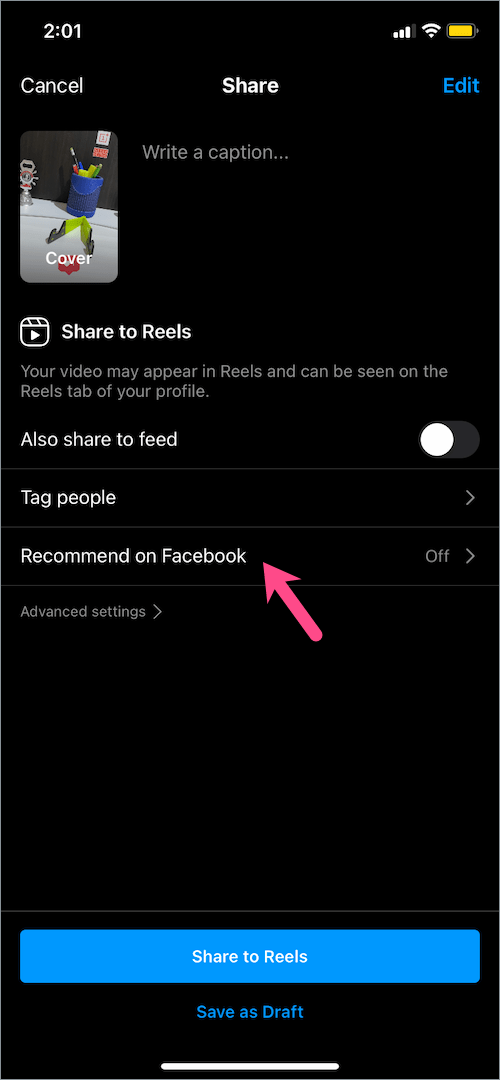
- If your Instagram account is already connected to a Facebook Page, sharing will be turned on by default. If not, you will need to enter your Facebook login information and select the page you want to share your reels to.
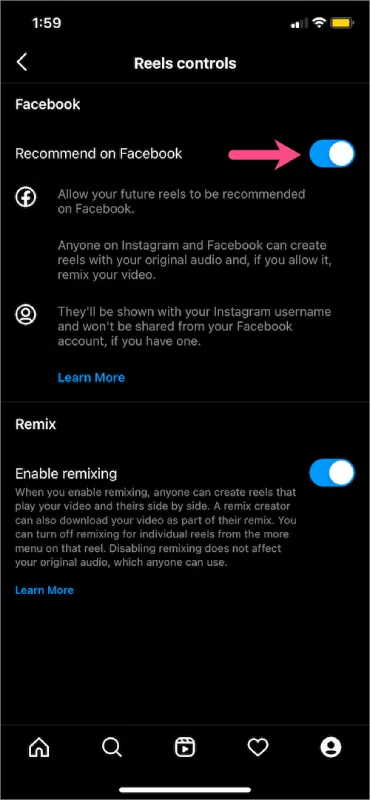
- Toggle the switch next to Your Instagram reels to the on position.
- From now on, all of your Instagram reels will be automatically shared to your Facebook Page.
Read more: How to Add link to Instagram Reel?
how to share instagram reel to facebook business page
- Create and edit your Instagram reel: Create your reel on the Instagram app, adding any music, effects, or captions you want.
- Before sharing, enable Facebook sharing: Before finalizing your reel, toggle the “Share to Facebook” switch on. This will ensure your reel is automatically shared to your connected Facebook business page.
- Select the Facebook page: If you manage multiple Facebook business pages, you’ll be prompted to choose which page you want to share your reel to. Select the appropriate page and proceed.
- Post the reel: Once you’ve selected the Facebook page, tap the “Share” button to post your reel to both Instagram and the chosen Facebook business page.
how to share instagram reel to facebook group
- Download the Instagram reel: Since direct sharing of Instagram reels to Facebook groups is not available, you’ll need to download the reel first. Open the Instagram app, navigate to your reel, tap the three dots icon, and select “Download.”
- Upload the reel to the Facebook group: Open the Facebook app, access the group you want to share the reel in, and tap the “Photo/Video” icon. Select the downloaded reel from your device’s gallery and proceed.
- Add a caption and post: Add any desired caption or description to your reel, and then tap the “Post” button.
Additional notes:
- You can only share reels to Facebook from the Instagram app on Android or iPhone.
- If you want to share your reel to your Facebook News Feed, you will need to manually share it after you have posted it to your Instagram account.
- You can only share reels to Facebook Pages, not to personal Facebook profiles.
how to share instagram reel to facebook story?
Unfortunately, sharing Instagram reels directly to Facebook stories is not currently available. However, you can still share your Instagram reels with your Facebook friends by downloading the reel and then uploading it as a new Facebook story
FAQs
Now let’s answer some frequently asked questions on this subject:
How do I upload a reel to Facebook?
To upload a reel to Facebook, open the Facebook app, tap the Watch icon, tap the + icon, and select Create Reel. Add video clips, music, and effects, then tap Next. Write a caption and choose an audience, then tap Share Reel.
How do I post from Instagram to Facebook?
To post from Instagram to Facebook, open the Instagram app, tap the reel you want to share, tap the three dots in the bottom right corner, tap Share, and select Facebook. If you want to share automatically, go to Settings > Account > Sharing to other apps > Facebook and toggle the switch next to Your Instagram reels to the on position.
How do I share a reel on my story on Facebook?
To share a reel on your story on Facebook, download the reel from Instagram and upload it to your Facebook story. Open the Facebook app and tap your profile picture. Tap + Story, tap the + icon, select Photo/Video, find the downloaded reel, add captions or stickers, and tap Share Story.
Why can’t I share my reel on facebook?
- Your Facebook account is not connected to your Instagram account.
- You are not posting to a Facebook Page, only to your personal profile.
- Your Facebook profile is private and not set to allow sharing.
- The reel is too long or may violate Facebook’s community guidelines.
Final Thoughts
In conclusion, sharing your Instagram reels on Facebook is an effective strategy to expand your audience and amplify your content’s visibility.
Whether you choose to manually share existing reels or utilize the auto-sharing feature, you can seamlessly connect with a broader audience on Facebook.
Remember to adhere to community guidelines and respect copyrights, and you’ll be well on your way to becoming a reel-sharing maestro.
