


Have you ever wondered who has found your posts so captivating that they’ve decided to save them for future reference?
Well, curiosity is a natural instinct, and we’re here to delve into the world of Instagram post saves and explore the possibilities of identifying those who’ve deemed your content worthy of preservation.
While Instagram doesn’t directly reveal the identities of post savers, there are strategies you can employ to gain insights into the engagement your posts are generating.
So, grab your virtual magnifying glasses, and let’s embark on a journey to uncover the mysteries of Instagram post saves!
how to see who saved your post on instagram
Unfortunately, there is currently no way to see who specifically saved your Instagram post. This is a privacy measure implemented by Instagram to protect user privacy.
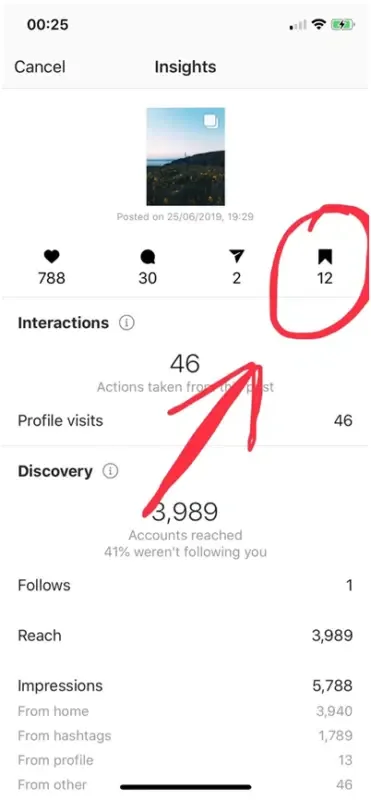
However, you can see how many people saved your post by switching to a Business or Creator account.
Here’s how to do it:
- Go to your Instagram profile and tap on the three lines in the top right corner.
- Select “Settings” and then “Account.”
- Scroll down and tap on “Switch to Professional Account.”
- Choose whether you want a Creator or Business account.
- Follow the on-screen instructions to complete the process.
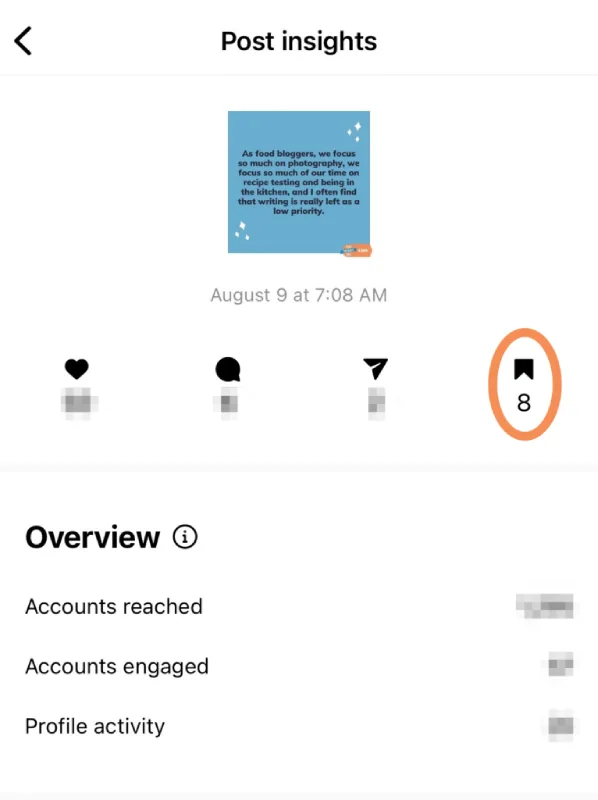
Once you have switched to a Professional account, you can see how many people saved your post by tapping on the “View Insights” button below the post. The number of saves will be displayed next to the bookmark icon.
Read more: How to See Who Doesn’t Follow You Back on Instagram[2023]
FAQs
Now let’s answer some frequently asked questions on this subject:
How do I find out who saved my Instagram post?
Currently, there is no way to see which specific users saved your Instagram post due to privacy reasons. However, you can switch to a Business or Creator account to see how many people saved your post.
Is there a way to see who sent your post on Instagram?
Similar to saved posts, there’s no direct way to see who shared your Instagram post. The only option is to create an Instagram Story or post asking your followers if they shared your content.
Are there third party apps to show you who saved your instagram post?
No, there are no third-party apps that can reliably show you who saved your Instagram post. These apps often violate Instagram’s terms of service and may even compromise your account security.
Read more: How to Hide Followers on Instagram in 2023? 3 Practical Ways
Final Thoughts
Navigating Instagram’s privacy settings can be tricky, especially when it comes to understanding who interacts with your content.
While there’s no direct way to identify specific users who saved your Instagram post, switching to a Business or Creator account provides valuable insights into the engagement your posts are generating.
Although third-party apps claim to offer solutions for revealing who saved your posts, these tools often violate Instagram’s terms of service and may pose security risks.
Ultimately, respecting user privacy remains a priority for Instagram, and direct access to saved post information is not available.
