

Are you tired of seeing those blue ticks on Instagram accounts and wondering how you can get one for yourself?
Having a verified badge on your Instagram account can add credibility to your brand, increase your followers, and help you stand out in a sea of millions of users.
But did you know that getting verified on Instagram doesn’t have to cost you a dime? In this article, I’ll guide you through the process of how to get verified on Instagram (free & paid) without falling for fake tricks. Stay with me!
Instagram Blue Tick: Verified Badges vs. Meta Verified
Instagram offers two types of blue checks to users, each with
| Feature | Verified badges | Meta verified |
| Cost | Free-based on activities on IG & documents | Paid subscription ($14.99 – $149.99) |
| Eligibility | Public figures, celebrities, brands | Personal & Business accounts (18+, government ID) |
| Benefits | It shows the account is confirmed by Instagram and is authentic | Verified badge, impersonation protection, enhanced profile features, and access to direct support |
| Application | Only mobile app (iOS & Android) | Instagram mobile app, Facebook mobile app, Instagram desktop, Facebook desktop |
With a clear understanding of both versions, we can now explore the specific requirements and application process for each one.
Instagram Free Blue Tick Requirements
Only some people are eligible for a free Instagram verification badge, and you must meet certain criteria to be considered.
According to Instagram, you can apply for verification if you’re a public figure, celebrity, brand, or entity and meet the following requirements. [There are also some Instagram blue tick hacks that I do not recommend at all!]
Real: Your account must be a true representation of a real person, official business, or known entity.
One-of-a-Kind: Your account should be the unique face of the person or business it represents.
Complete: Make sure your profile is public and has a bio, profile picture, and at least one post.
Active: Stay engaged by having an account that’s been consistently active for at least six months, showing regular use.
How To Get Verified On Instagram For Free (Verified Badges)
Now that you know the basics of Instagram verification, let’s move on to the steps you need to take to learn how to apply for a free blue tick on Instagram (for both Android and iPhone users):
Step 1: Apply For Verification
1. Log in to the account you want to get verified.
2. Tap your profile picture in the bottom right to access your profile.
3. Open the hamburger menu in the top right, then tap on ‘Settings and privacy’ (or ‘Settings’ in Instagram Lite app).
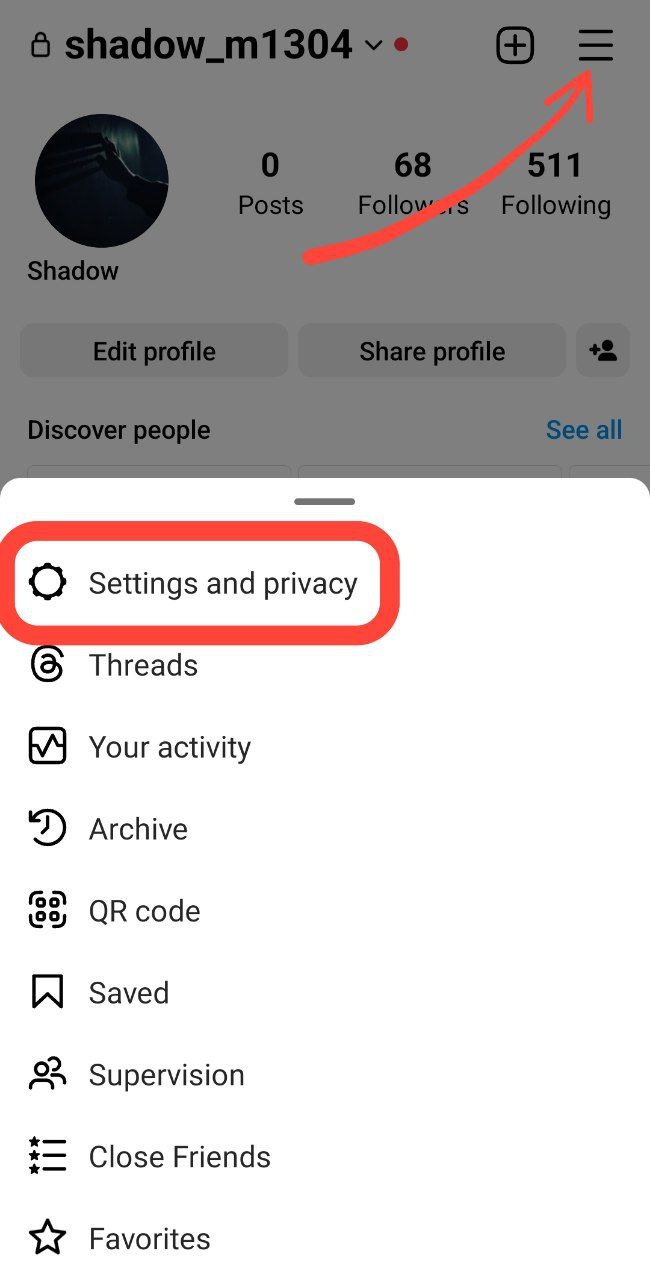
4. Below ‘For professionals,’ tap ‘Account type and tools’ (or tap ‘Account,’ then tap ‘Request verification’ in Instagram Lite app).
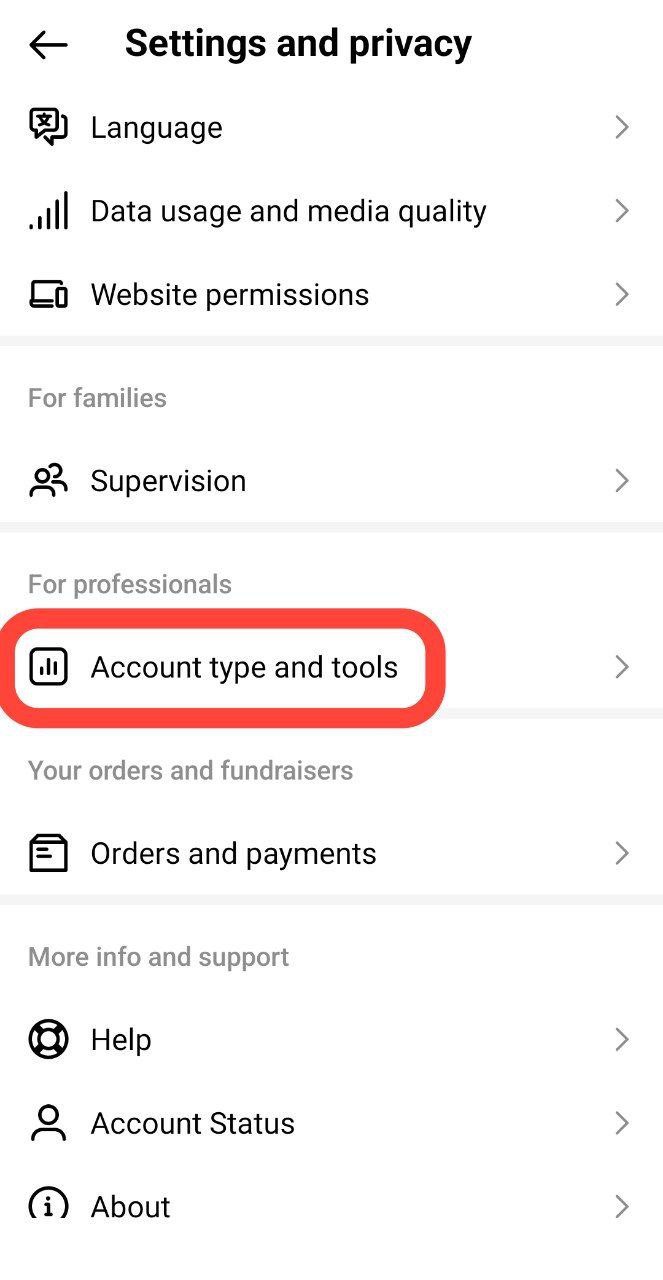
5. Select ‘Request verification.’

6. Enter your full name and provide the required form of identification.

7. Follow the on-screen instructions and tap ‘Submit.’

Important Notes:
– Instagram verification does not transfer to Facebook.
– If false or misleading information is used during the verification process, Instagram may remove the badge and take additional actions, possibly disabling your account.
– Verification is not guaranteed even if your account is eligible.
– Notable profiles with existing verified badges can still apply for a Meta Verified subscription.
– Once verified, you cannot change your account username, and verification cannot be transferred.
– Submitting multiple requests or applying multiple times will cancel your application.
Step 2: Wait For Instagram’s Response
Once you’ve submitted your verification request, you’ll need to be patient and wait for Instagram to review your application. But how long does Instagram verification take?
Instagram will send you a notification within a few days or weeks, informing you of their decision. If your application is rejected, you can reapply after 30 days.
Meta Verified Eligibility Requirements
Business or personal profiles on Instagram and Facebook can apply for a Meta Verified monthly subscription if they meet the following requirements:
- Be at least 18 years old and located in a country where Meta Verified for businesses is available.
- You must enable two-factor authentication on your account.
- Have full control of an existing business portfolio within Meta Business Suite and not exceed the number of changes allowed to the portfolio.
- The business portfolio must not exceed the maximum number of people with full control and be located in a supported country.
- Businesses can verify up to two eligible business assets (one Instagram professional account and one Facebook Page) that belong to the same portfolio and have similar names.
- The Instagram professional account must meet minimum activity requirements, such as prior posting history and follower count, and not exceed the number of allowed changes.
- The Facebook Page must have a profile picture, cover photo, and category, meet minimum activity requirements, and not exceed the number of allowed changes.
How to Apply for Meta Verified on Instagram (Paid Subscription)
You can apply for Meta Verified through the Instagram or Facebook app (iPhone & Android) or the website. Let’s walk through the application process for the paid blue tick on the Android app:
- Go to your profile and tap the three lines at the top right corner to open Settings and Privacy.
- Look for “Meta Verified” in the menu. If you don’t see it, Meta Verified might not be available in your region yet.
- If you see “Meta Verified,” tap on it.
- Choose the profile you want to verify (if you manage multiple accounts).
- Select the “Single profile subscription” option.
- Follow the on-screen instructions to set up your payment method.
- You’ll likely need to turn on two-factor authentication for added security.
- Confirm or edit your profile information as needed (full name, profile picture etc.).
- Finally, go through the steps to confirm your identity (usually submitting a government ID).
How to Get Verified on Instagram Without Being Famous?
Getting verified on Instagram is not an easy feat, but it’s possible to achieve without paying for it. Here are some tips to increase your chances of getting verified for free:
1. Build A Strong Online Presence
As I mentioned earlier, Instagram wants to verify accounts that represent a notable entity. Focus on building a strong brand and online presence across multiple platforms.
To increase your presence on Instagram, you can:
- Post high-quality content that resonates with your audience
- Use relevant hashtags and geotags to reach a wider audience
- Collaborate with other Instagram influencers, brands, or businesses in your niche
- Engage with your followers and respond to their comments and messages
- Use Instagram features like stories, and Reels to showcase your personality or products/services
2. Be Active And Consistent
Instagram wants to verify accounts that are active and consistently posting. So, another solution on how to get a verified blue tick on Instagram for free is to ensure you’re posting high-quality content regularly and engaging with your followers.
3. Increase Your Followers
While the number of followers isn’t the only factor Instagram considers when verifying accounts, it’s still essential. Therefore, focus on growing your following and building an engaged audience.
4. Collaborate With Other Verified Accounts
Collaborating with other verified accounts can help establish your credibility and increase your chances of getting verified.
5. Optimize Your Profile
Ensure that your profile is complete and up-to-date, with a clear and concise bio that accurately represents your brand.

Use high-quality images for your profile picture and posts that are relevant to your niche.
6. Establish Credibility
Establishing credibility is crucial to getting verified on Instagram and is an important step in attaining free Instagram verification.
Share your accomplishments, awards, and media mentions on your profile to demonstrate your authority in your industry.
7. Provide A Clear Explanation Of Why You Should Be Verified
When submitting your verification request, provide a clear explanation of why you should be verified. This could include your accomplishments, awards, or other notable achievements demonstrating your authenticity and credibility.
What Is Instagram Verification?
Before diving into the process of getting verified on Instagram for free, let’s first understand what Instagram verification is all about.
The blue tick you see on certain Instagram accounts indicates that the account is authentic and belongs to a notable public figure, celebrity, brand, or entity.
Instagram verifies accounts to prevent impersonation, identity theft, and fraudulent activities.
Once your account is verified, you’ll get a blue tick badge next to your username, which can help you gain more credibility and visibility on the platform.
What Are the Benefits of Getting a Blue Check on Instagram?
Obtaining an Instagram free blue tick offers several key benefits:
Establishes authenticity: The blue tick visually verifies your account as the genuine profile of a notable person, celebrity, or brand.
Enhances credibility: Verification increases your profile’s trustworthiness and reduces the risk of impersonation.
Increases visibility: Verified accounts may appear higher in search results and be more discoverable by users.
Adds professionalism: The blue checkmark creates a professional look for your profile, making you stand out from others.
Signifies legitimacy: Verification signals to users that they are interacting with a significant and legitimate presence.
FAQs
Now that you know how to get verified on Instagram, it’s time for some frequently asked questions.
How Many Followers on Instagram to Get Verified?
There is no specific number of followers required to get verified on Instagram. The verification process focuses more on the authenticity, uniqueness, and activity of your account rather than the number of followers.
So, whether you have a few hundred or several thousand followers, you can still be eligible for verification if your account meets the other criteria outlined by Instagram.
How Long Does It Take to Get Verified on Instagram?
While there is no fixed timeline for Instagram verification, some users report that the process can take around 30 days.
Can You Buy Instagram Verification?
No, you cannot buy Instagram verification. Any service that claims to offer verification for a fee is likely a scam and could even lead to your account being suspended or terminated. So, I highly recommend you to stay away from unsecure platforms to buy Instagram verification free badge.
Why Meta Verified Is Not Showing in My Instagram Account Center?
If you can’t see the meta verified option in your Instagram settings, there are two possibilities: The program is still being rolled out, so it hasn’t reached your area yet. Or, there’s a technical glitch.
Can A Personal Account Get Verified?
Yes, personal accounts can be verified if they meet Instagram’s verification criteria. It’s not just limited to business accounts.
Can A Verified Account Lose Its Verification Badge?
Yes, a verified account can lose its verification badge if it violates Instagram’s terms of use or community guidelines. It’s important to continue to follow these guidelines even after being verified to maintain your badge.
Can You Request Verification Multiple Times?
Yes, you can request verification multiple times. However, repeatedly requesting verification without any significant changes to your account or information can harm your chances of getting verified. Waiting at least 30 days before submitting a new request is recommended.
Can A Normal User Get Verified on Instagram?
While Instagram’s primary approach to verification is based on notability and authenticity, the platform does offer a paid subscription called Meta Verified that allows some regular individuals to obtain the blue tick.
To be eligible for this service, individuals may need to meet specific criteria set by Instagram, demonstrating factors such as influence, engagement, and adherence to the platform’s guidelines.
Does Instagram Pay You When You Are Verified?
No, Instagram does not pay users simply for being verified. Verification on Instagram is a means of establishing the authenticity and notability of an account, particularly for public figures.
How Does Instagram Notify You for the Blue Tick?
Instagram notifies users about the status of their blue tick verification request through the Activity section of the app.
After you’ve submitted your verification request, Instagram will review it, and within 30 days, you will receive a notification in the Activity tab indicating whether your account has been verified or not. To check for this notification, you can tap the heart icon in the top right corner to access Activity.
If your verification request is denied, you have the option to submit a new request after 30 days. Remember that applying for a verified badge multiple times before receiving a decision will cancel your current application.
Therefore, patience is key, and it’s advisable to wait for Instagram’s response before submitting additional verification requests.
How to Get Verified Without ID?
Getting verified on Instagram without providing some form of ID or official documentation is impossible. However, there are ways to increase your chances of getting verified on Instagram.
One method is to build a strong online presence by creating high-quality content and engaging with your followers. You can also connect with verified accounts and get featured in media outlets to establish your credibility.
