


Note: Not interested in the details and just want to know which tool is best for you? Click here to find out.
Keeping with our series comparing Instagram automation tools from around the web, today we’re looking at Flume.
What is Flume? According to their website:
“Flume is a beautiful Instagram client for macOS Yosemite 10.10 and above. Flume makes browsing Instagram faster, and more efficient than any other platform. With support for uploading, direct messaging, sharing, editing, promoting, and much more, Flume is the best way to use Instagram for both casual and professional Instagram users.”
Flume is right in our neighborhood of Instagram marketing, so we decided to put it to the test against our own Instagram marketing tool, AiGrow.
Our comparison consisted of five categories:
- Setup
- Connecting Instagram account(s)
- Features
- Maintenance and Support
- Price
Flume vs. AiGrow – a comparison of two Instagram growth services
Setup
Flume
Start by going to https://flumeapp.com/ and downloading the Flume software (Flume is only available to Mac users).

AiGrow
AiGrow works on all operating systems.
Get started with AiGrow in three simple steps:
1. Go to AiGrow.me, or search “AiGrow” in Google and choose the first result.
2. When on the homepage, click “START FREE” in the upper right corner. You can also click on the “ GET STARTED” button.

3. Provide your basic information like your name, email, desired password, and click “Register Now”.

Congrats! You’ve just set up AiGrow. No download is required.
Connecting Instagram account(s)
Flume
To connect your Instagram account to Flume, simply provide your login information like you would if you were logging into your Instagram on your phone.

AiGrow
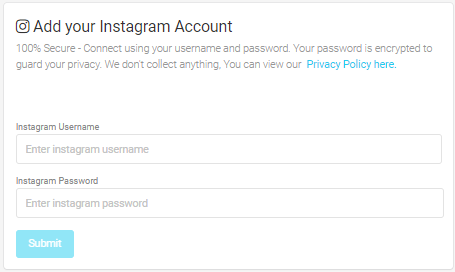
To add your Instagram account to AiGrow, just click “Add Instagram Account” and enter your username and password.
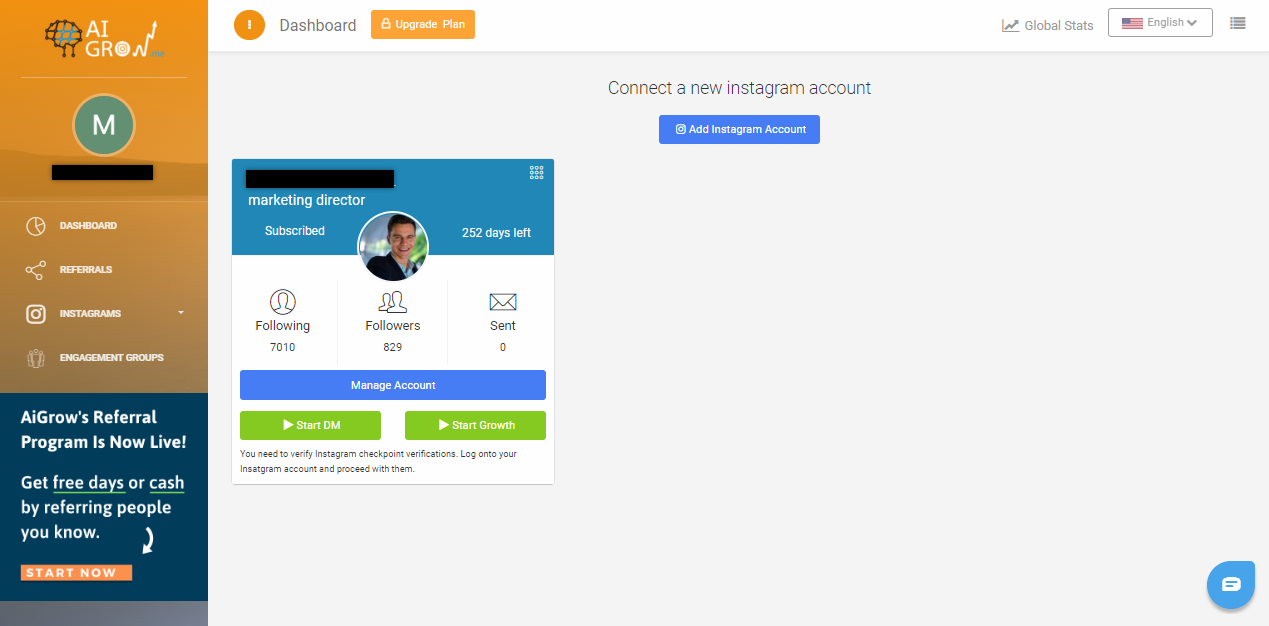
After connecting, your account will be shown on the dashboard. You can add multiple IG accounts to your AiGrow’s dashboard.
Features
Flume
Flume offers the following main features:
- an enhanced Instagram experience on your desktop
- upload your photos and videos directly from your Mac
- send, receive, and manage DMs from your Mac
Browser
Flume allows you to easily view and navigate your Instagram feed on your Mac desktop.


You can also access everything you would normally access on your phone, including:
- Likes
- Followers
- Following
- Hashtags
- Explore Page
- Your Activity
- Search Bar
DMs
Flume allows you to send, receive, and manage your DMs from your Mac desktop.


You can even set up notifications so that you are alerted on your desktop every time someone sends you a DMs, even if the Flume app isn’t open.
Scheduler
Flume allows you to upload photos and videos, write captions, tag users, set cover frames, crop and resize your content, and even share with other linked social media accounts (outside of Instagram).

Flume supports uploading the following formats:
- photos
- videos
- carousel posts (up to 10 photos or videos in a single post)
To avoid cropping, Flume recommends uploading content with a
4:5 (vertical) and 1.91:1 (horizontal) ratio.
Reposter
Flume allows you to repost your own or other Instagram users’ content with the correct attribution.

While you have the option to remove the author tag and original caption, Flume requires you to at least use one form of attribution.
You can also repost videos, but Flume doesn’t currently support tagging the original poster in reposted videos.
Here is a full list of features offered by Flume:

AiGrow
Think of AiGrow as a full-suite Instagram marketing solution.
While it doesn’t provide an enhanced desktop browsing experience like Flume, it does provide a similar Instagram scheduler, reposter, and desktop DM manager.
It also provides an automated growth engine to help organically generate more followers, as well as access to 300+ active engagement groups to guarantee more real Likes and comments on your posts.
Scheduler + Reposter

Here’s what you can do with AiGrow’s scheduler+reposter:
- upload and schedule posts and Stories from your desktop for days, weeks, or months ahead
- post immediately from your desktop
- supports photos, videos, multi-photo, and multi-video posts
- schedule the same post or Story across multiple Instagram accounts (AiGrow will space posting out to avoid flagging)
- write your captions and search and add hashtags from your desktop (hashtags are added as the first comment)
- repost your own posts or other people’s posts
- turn on auto-responses to comments left on your posts
The best part is that unlike Flume, AiGrow’s scheduler and reposter are completely free to use.
DMs
In addition to automated DMs, AiGrow also allows you to send, receive, and manage your DMs from your desktop.


AiGrow’s desktop DM inbox is also completely free-to-use.
Growth Engine
AiGrow uses your account to automatically like, follow, unfollow, comment, and DM on real channels to drive organic traffic back to your own account.
This way, instead of purchasing lots of followers who don’t necessarily fit your target (which is really important if you run a small business or brand), you’re gaining exactly the kinds of new followers you need for your account.

With AiGrow, you can target your activity based on:
- Hashtags
- Location
- Influencer relation
- Lists of usernames
You can also target other activities, such as DMs, based on:
- Hashtags
- Location
- Influencer relation
- Lists of usernames
- new followers
- current followers
Furthermore, you can select a category that you think best fits your business. We’ll use this information to improve your targeting.

Also, you don’t need to worry about engaging with inappropriate or risky accounts as you have complete control over the types of users you interact with. And be sure that AiGrow will never operate any extra actions to your Instagram account without your permission.
AiGrow also automatically unfollows users who you follow but doesn’t follow you back within a certain amount of time to keep your follower/following ratio normal.
Engagement Groups
AiGrow allows you to join over 300 engagement groups FOR FREE which you can use to get more Likes, comments, saves, and shares on every new post you share on Instagram.
Engagement groups are groups of people who agree to engage with every new post uploaded to Instagram by a group member.
With AiGrow, there are two easy steps to getting engagement from your engagement groups:
- Join any groups which are similar to your Instagram page by navigating to the “Engagement Groups” tab on your AiGrow dashboard and clicking “Join” under any groups you wish to join.
- Post to Instagram with AiGrow’s scheduler.

Features available for AiGrow users:
- No app or download required
- Support for all operating systems
- Auto follows, Likes, comments, unfollows and DMs
- Send, reply to, and manage DMs from desktop
- Advanced targeting
- Advanced filtering
- Growth analytics
- Proxy support
- Post (photo, video, and album) and Story scheduling
- Tag location and username in scheduled posts
- Reposting by hashtag, URL, and username
- Post and Story editing tools
- Add hashtags as the first comment
- Auto delete posts after a specific time
- Auto replies to comments
- Access to 300+ active engagement groups
- Dedicated human support
Maintenance and Support
Flume
Flume has a dedicated support channel where you can search any questions or concerns you have.

There are also common questions and topics listed on the same support page.

AiGrow
After setting up your targeting options, simply hit “Start Growth”. AiGrow will start to run and continue until you tell it to stop, never overstepping the limits imposed by Instagram.
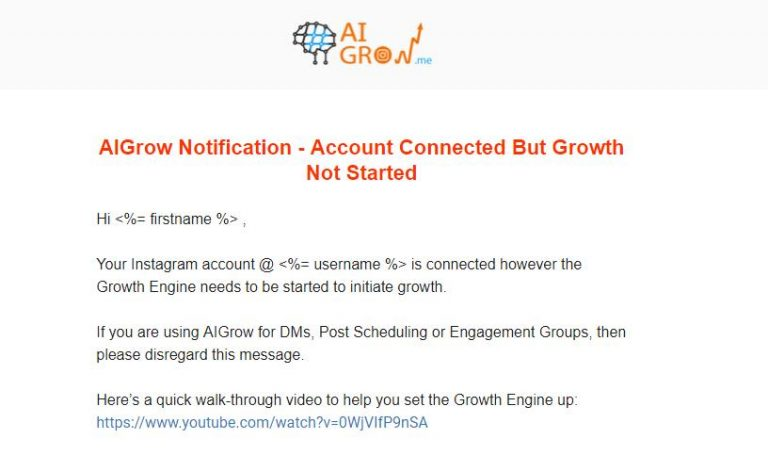
If for whatever reason something forces your growth to stop, we will automatically let you know through email and provide possible solutions, as shown in the example below:
If you experience an issue, you can also likely find an answer in AiGrow’s FAQ page. AiGrow also offers free one-on-one appointments to help get your account set up, and they also have a dedicated support email. AiGrow also offers a live chatbot for anyone with questions.

Price
Flume
Flume’s non-pro version is free to use.
If you want to upgrade to Flume Pro, the price is a one-time payment of $20(Plus applicable taxes).

AiGrow
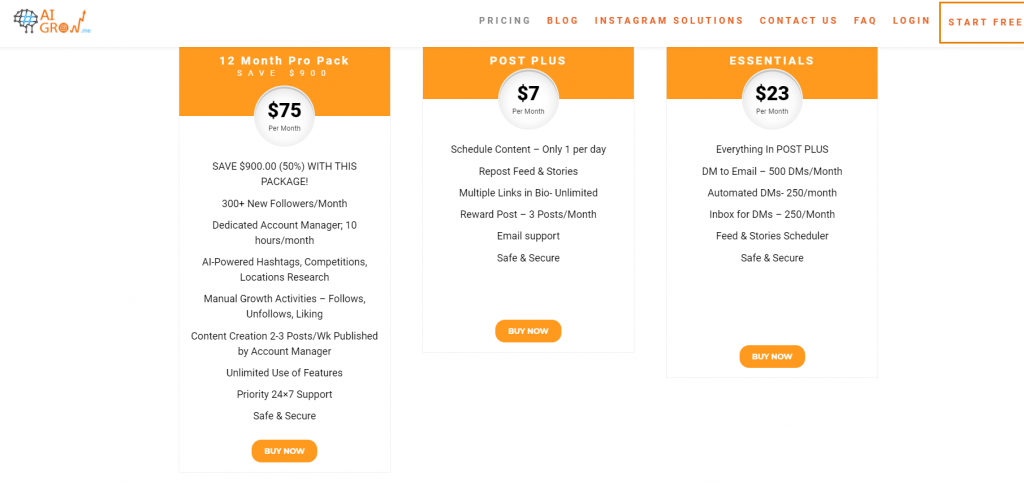
AiGrow offers plenty of different packages and you can choose any of them based on your needs and budget.

its also worth to mention that if you choose a yearly package, you can also save up to $900!
Another great thing is that you can also buy just the management tools in a different package.
AiGrow also has a great offer for the ones who are looking for even more advanced growth, the ones who are looking to stand out in their field and have the upper hand compared to their rivals.
If you are looking for the fastest growth possible on instagram, and also a team of experts who are always there for you, take a look at AiGrow’s VIP packages.
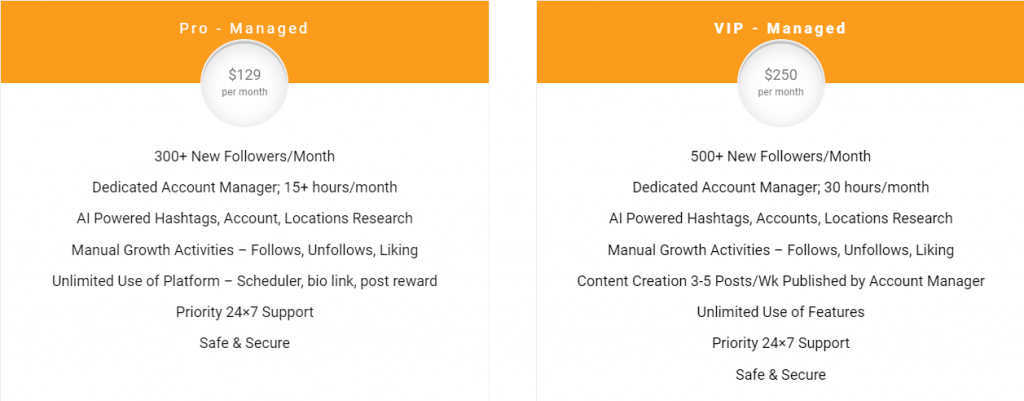
Thats not over yet, It gets even better!
yes, AiGrow also offers a Free package so that you are able to test the services and choose it confidently.

Click Here and sign up on AiGrow for Free!
Conclusion
A flume is a great tool for an enhanced Instagram browsing experience on your Mac. It’s also very useful for posting to Instagram and managing your DMs from your Mac.
While AiGrow doesn’t provide an enhanced browsing experience, it does provide an equal desktop DM experience, as well as a completely free alternative to Flume’s paid scheduler.
Flume is also only available to Mac users and requires you to download an app. AiGrow works with all operating systems and doesn’t require a download and continues working even when you turn off your computer.
In addition to the features listed above, AiGrow also offers:
- Unlimited auto Likes, Follows, Unfollows, Comments, and DMs
- Targeting your growth activity based on Hashtags, Locations, Influencer Relations, and Lists of Usernames
- Growing multiple Instagram accounts at the same time
- Desktop DM inbox
- Post and Story scheduling
- Reposting by hashtag, URL, and username
- Access to 300+ active engagement groups
- Dedicated human support
- Auto-replies to comments
For those interested in AiGrow, click here to sign up for free.
For those interested in trying out Flume, visit their website.
