

Today, digital content is everywhere. For your content to stand out, quality and consistency are key. On Instagram, this means posting solid content on the regular. And that means you need a plan. Enter the content calendar.
A content calendar is a resource used to coordinate digital marketing efforts. Content calendars unite the planning, organization, and scheduling of monthly content, helping you deliver engaging content that drives conversions and grows your social following.
AiGrow is an amazing tool for content calendar creation. In this post, we’ll walk you through how to use the app to create a killer content calendar.
Want to take content off your busy hands? AiGrow can do that too! Sign up for our 12 Month Pro Pack to get follower growth plus content creation.
Step 1: Gather Information
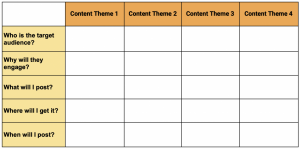
The first step to building a content calendar is gathering information. First, decide on the main themes or categories of content that you’ll post. Then, put together details on the 5Ws of your categories:
Who is your target audience?
Why will they engage? Think about the value you’re offering to your followers, and how you can convey that in the captions and CTAs you’ll schedule throughout the month. Tip: Giveaways boost engagement. What can you offer? Use the AiGrow Post & Reward tool to easily schedule reward posts into your calendar.
What will you post? Tip: Use AiGrow’s social listening features to follow popular hashtags and accounts. Use this information to help you decide on the best content and tags for your chosen themes.
Where will your content come from? Decide on the sources of your content, and how you’ll unite them to give your Instagram a consistent voice and aesthetic. Tip: You can monitor and repost great content directly from your AiGrow app. You can even see who’s mentioned you, and repost mentions!
When (the best dates and times to post for the month). Now that you have your content types and CTAs, decide how best to distribute them through the month. Tip: The Social Calendar on your AiGrow app is a great resource for this, featuring popular holidays and observance dates plus high engagement hashtags.
A content planning grid such as this can help with the task of organizing this information.
From here you can develop templates for the types of posts you’ve chosen and a plan around how you’ll schedule your content.
Step 2: Build Your Content Calendar
After you’ve gathered and organized the information you need, you can start building your content calendar. AiGrow’s scheduling function is a great tool for this. You can schedule content days, weeks, even months in advance to automatically post across multiple accounts. There are four basic types of posts you can schedule through the app, all of which can be used to build out a killer content calendar: Feed Posts, Story Posts, Reposts, and Reward Posts. In this section, we’ll run through how to schedule each of them.
How to schedule a feed post
- Sign up on AiGrow’s website for free.
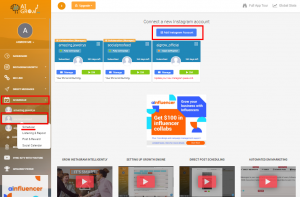
- You can add as many Instagram accounts as you want to AiGrow’s dashboard by simply clicking on Add Instagram Account.
- From the dashboard’s left-sidebar menu, click on Scheduler, the IG account of choice, and then Scheduler.
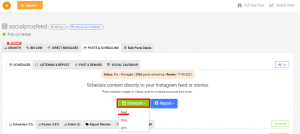
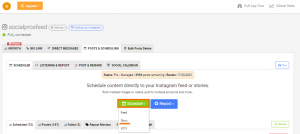
- In the opened window, first, choose the green Schedule button and then click on Feed from the drop-down menu.
- In the opened window, upload your image(s) or video, or search and select an image from the integrated Unsplash database.
Note: AiGrow lets you convert a YouTube video and post it. All you need to do is to paste the desired YouTube video’s URL.
- Tag any accounts you wish, and click save.
- Enter a caption. Remember, a great caption can inspire engagement and even convert.
- Time to choose your hashtags. Use the built-in hashtag search to search hashtags by keyword. You’ll get a list of the top related hashtags. Select a few of these if you choose. You can also add your pre-selected list of hashtags to any post by clicking “Add My Hashtags”.
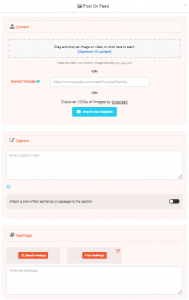
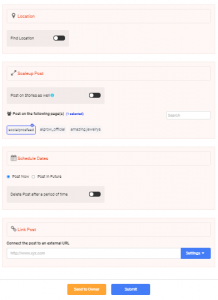
- Select your options: add a location, choose to post your feed post as a story too, delete your post after a period of time, even post on multiple pages. You can also add an external link, a feature which adds your post to a clickable feed on your bio link landing page.
- Click Submit, and select a date and time for your content to automatically post. Check out this blog for tips on the best times to post. Your feed post is now scheduled!
How to schedule a story post
For scheduling your Story post, follow all the above-mentioned steps to be promoted to the page in which you can see the green Schedule button and then follow the steps below.
- Choose Story from the drop-down menu.
Note: By choosing the IGTV option from the drop-down menu, you can schedule your IGTV videos with ease.
- Upload your image(s).
- Use the in-app editor to select a background, and add stickers, doodles and text.
- Select which accounts you’d like your story posted to.
- Optionally, you can add an external link (this feature makes your story a clickable post which can be added to your bio link landing page).
- Click Submit, and select a date and time. Your story is now scheduled!
How to repost
Reposting content is a great way to stay on top of trends and connect with your audience. Whether you’re reposting user generated content, inspiration, or the latest industry stats, there are lots of reasons to share existing content. Just make sure to give credit to the original creator.
- After signing up on AiGrow and connecting your IG account(s) to the dashboard, click on Scheduler on the left and pick the account you’d like to manage.
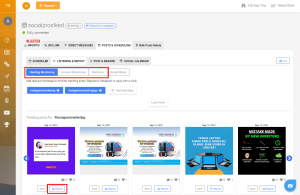
- Head to the Listening & Repost section.
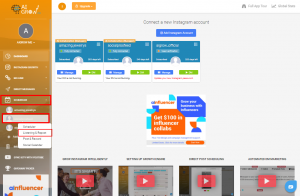
- View top content by Hashtag, or Account, and see your latest Mentions.
- Select a post to repost.
- Tag any accounts, including the original creator. Click save.
- Write your own caption, or use the caption from the original post
- Choose your hashtags.
- Select your options.
- Click Submit, and select a date and time. Your repost is now scheduled!
Tip: You can also repost relevant content from the Social Calendar in your AiGrow app. Just click “Schedule Post” on the date of your choice to be shown a feed of top related posts for that date.
How to schedule a reward post
Running an Instagram contest or giveaway can grow your followers 70% faster in three months. Add regular reward posts into your content calendar to boost engagement and grow your followers with AiGrow’s Post & Reward tool. Simply schedule a post and set criteria. Our AI will monitor and automatically send a DM to followers who complete your conditions.
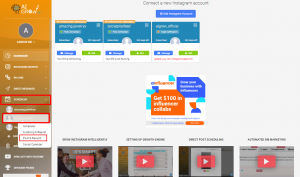
- Head to the Post & Reward tool in your AiGrow app.
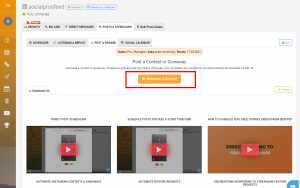
- In the opened window, click on Schedule a Contest.
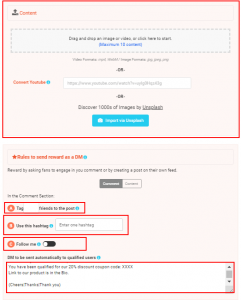
- Upload your image(s) or video, or search and select an image from the integrated Unsplash database.
- Set the Rules of your offer, the activities that users will have to complete in order to receive their DM reward (tag, follow, use this hashtag, etc.)
- Compose the direct message (DM) that will automatically be sent to users who qualify. Make sure to include the discount code or instructions detailing how they can claim their reward.
- Enter a caption that describes your giveaway and how users can enter.
- Search and add some hashtags.
- Toggle on Find Location to search your location.
- Choose the account that you’d like to publish your giveaway post on.
- Set a specific time and date for your post to publish it in the future. You can also choose Post Now to publish your post at the time.
- You can also add an external link to your post in order to make it clickable which can be added to your bio link landing page.
- Click Submit, and select a date and time for your repost to automatically post.
- You have just scheduled your reward post!
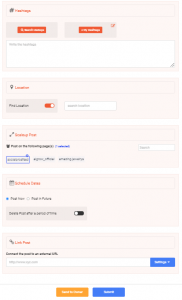
Once you’ve scheduled all of the posts for your content calendar, you can view and edit your scheduled feed, story, and repost posts in the “Scheduled” section of the app. To view the reward posts you’ve scheduled, see the Post & Reward section of the app.
Step 3: Review
Now that you’ve scheduled your content calendar, take a breath! Your scheduled posts are fully automated; you’ll never be asked to approve content before it posts, and you’ll always have fresh, engaging content going live.
Use that time you would have spent posting to interact with followers, analyze your Instagram insights, and review what’s working and what isn’t for next month. Play with your categories, content types, hashtags, and post timing until you have a killer content calendar that works for you and your business.
