

One of the great things about Instagram is that it makes it easy to upload photos and videos from your camera roll. However, in order to do this, you need to allow Instagram access to your photos. In this blog post, we will show you how to allow Instagram access to your photos on both iPhone and Android devices.
We will also answer some common questions about Instagram photo access, such as why you can’t access Instagram photos and how to troubleshoot problems.
Let’s start!
How do I allow Instagram to access my photos?
To allow IG to access your pictures from the app, follow these steps:
- Open the Instagram app.
- Tap on your profile picture in the bottom right corner of the screen.
- Tap on the three lines icon in the top right corner of the screen.
- Tap on Settings.
- Tap on Privacy.
- Tap on Photos.
- Tap on Instagram.
- Select Read and Write or All Photos.
If you are prompted to allow IG access to your photos, tap on Allow.

Once you have granted Instagram access to your photos, you can upload photos and videos to your feed, stories, and reels from your camera roll. Now, you can finally show off your new canvas prints to your friends and families!
Read more: How to Read Instagram Messages Without Being Seen? Full Guide
How to Allow Instagram Access to Photos on iphone?
To allow IG access to your photos on iPhone, follow these steps:
- Open the Settings app.
- Scroll down and tap on Instagram.

- Under Permissions, tap on Photos.
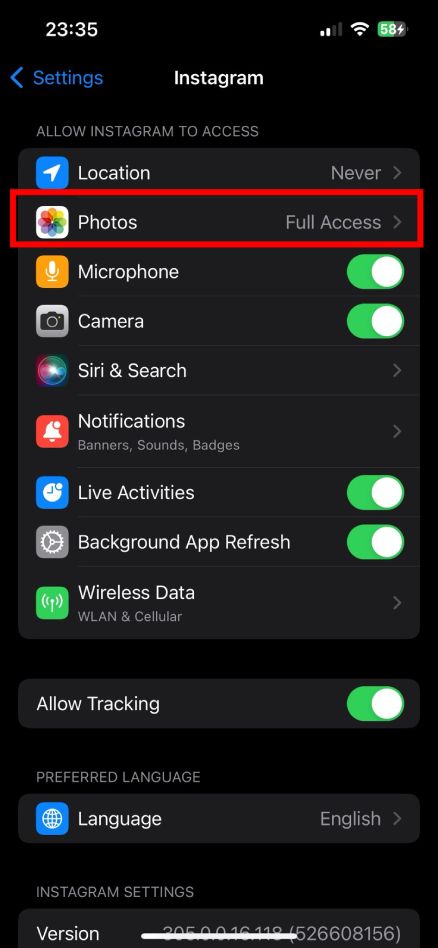
- Select Read and Write or All Photos.

If you don’t see Instagram in your Settings app, it means that you have never granted it permission to access your photos. To fix this, open the Instagram app and try to upload a photo or video from your camera roll. You will be prompted to allow Instagram access to your photos. Tap on Allow to grant permission.
Once you have granted Instagram access to your photos, you can upload photos and videos to your feed, stories, and reels from your camera roll, including wall photos, selfies, portraits, and more.
Read more: How to Reset Instagram Explore Page in 2023? 5 Practical Ways
How to Allow Instagram Access to Photos on Android?
To allow Instagram access to photos on Android, follow these steps:
- Open the Settings app.
- Tap on Apps or App Management, depending on your device model.
- Find and tap on Instagram from the list of apps.
- Tap on Permissions or App Permissions, depending on your device model.
- Make sure the toggle next to Storage or Photos is turned on. If not, tap on it and turn it on.
Once you have granted Instagram access to your photos, you can upload photos and videos to your feed, stories, and reels from your camera roll.
Also read : Can’t Transfer Photos from Mac to USB/External Drive? Fixed!
FAQs
Now let’s answer some frequently asked questions on this matter:
How do I allow Instagram to access my Google photos?
There is no direct way to allow Instagram to access your Google photos. You need to download the photos to your phone and then upload them to Instagram. Another way is to use Canvas Photo Prints.
Why can’t I access Instagram photos?
There are a few possible reasons why you can’t access Instagram photos:
- You have not granted Instagram permission to access your photos.
- You are not connected to the internet.
- The Instagram servers are down.
- The photo or video has been deleted.
- The photo or video is private.
Final Thoughts
In conclusion, allowing Instagram access to your photos is a simple and straightforward process.
By following the steps outlined in this blog post, you can easily grant Instagram permission to access your camera roll and upload photos and videos to your feed, stories, and reels, sharing your memories with your loved ones. However, if you’re looking to preserve those memories in a lasting and artistic way, consider transforming your favorite Instagram photos into high-quality canvas photo prints.
It is important to note that Instagram will not automatically post any of your photos or videos without your permission.
You will always be prompted to confirm before anything is posted. So you can rest assured that your privacy is protected.
