


Instagram has its good and not-so-good sides. Sometimes, a breather is just what we need – and guess what, Instagram understands that too! That’s where Instagram’s quiet mode comes in. Curious to learn more? Let’s dive into the details in this blog.
What is quiet mode on Instagram?
Instagram quiet mode is a pretty new feature that allows you to manage your notifications during a specific time. This feature appears to be a response to growing concerns about its impact on the mental well-being of teenagers.
When you’re in quiet mode on Instagram, you won’t get any notifications. Plus, you’ll see this on your profile:
🌙 In quiet mode.
But don’t worry, only you can see it, not your followers. And here’s the cool part: If someone messages you during quiet mode, Instagram sends an automatic reply. It’s like saying you’re taking a break. So, if your notifications not working, remember you’ve put them on quiet mode.

Note: While Instagram is in quiet mode, you can do other activities on the app like commenting, liking, posting, and more.
How to turn on quiet mode on Instagram: Android
Enabling IG quiet mode is simple on both Android and iPhone devices and requires a few steps. Let’s see how to put Instagram in quiet mode on Android devices.
- Go to your profile and tap the three-line icon in the upper right corner.
- Next, click on “Settings and Privacy,” then tap on “Notifications.”
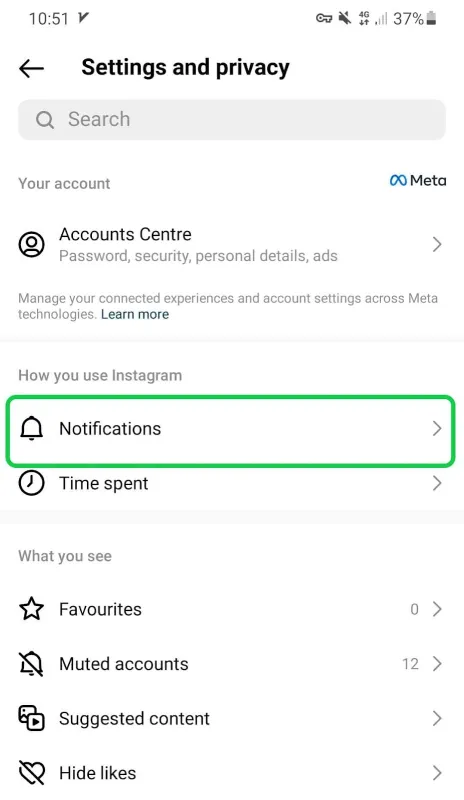
- Now, select Quiet mode.

- And finally, switch on quiet mode. You can also choose when you want it to work.

Wondering how to turn quiet mode on Instagram for iOS devices? The good news – it’s pretty much the same as on Android phones.
How to turn off quiet mode on Instagram on iPhone and Android?
If you’re looking to turn off quiet mode Instagram, you’ve got two choices. First, you can skip it for the next 24 hours, or you can turn it off completely.
If you choose to skip for now, it will automatically come back after about 24 hours. But if you turn it off, it’ll stay off until you decide to switch it on again.

Also read: How to turn off active status on Instagram.
So, just do what you did when turning on quiet mode. Head to Settings and Privacy, then tap on Notifications. Finally, switch the mode off.
Note: Instagram quiet mode turn off for both iPhone and Android devices follows a similar process.
What are the benefits of Instagram quiet mode?
Now that you know the quiet mode meaning on Instagram, let’s figure out if it’s actually helpful or not.
- Quiet mode Instagram feature lets you stay in control of notifications. Whether you’re studying, working, or just need some quiet time, you won’t be constantly distracted by app pings.
- By reducing interruptions, you can concentrate on tasks without losing your flow. This is especially helpful for students who can focus on schoolwork or assignments without being pulled away by notifications.
- Constant notifications can take a toll on your mental well-being. Quiet mode gives you a breather, reducing digital overwhelm and allowing you to enjoy a moment of peace.
- Moreover, using quiet mode during bedtime can help establish healthier sleep routines. Without late-night notifications, you can wind down and get the rest you need.
- Quiet mode on Instagram encourages mindful use of social media. By intentionally engaging with the app during set times, you’re less likely to mindlessly scroll for hours.
- And most importantly, with fewer notifications vying for your attention, you experience a drop in stress levels and can approach your day with a calmer mindset.
What is @silent Instagram feature?
Instagram /silent messaging (still in the testing phase) is a less-known feature allowing you that lets you send silent direct messages. with this feature, the recipient will get your DMs but they won’t receive any notifications.
How can you send /silent Instagram messages?
To use this option, you just need to put @ or / when writing a message. Then, /silent, and a ring bell icon will pop up. Tap it to try silent Instagram DMs.

FAQs
You learned key points about silent mode on Instagram. Here are a few frequent questions that may pop up in your head.
Q: What does quiet mode do on Instagram?
Quiet mode on IG is a feature that stops notifications for a set time. You can use the app normally, but won’t be interrupted by notifications during that period. It’s a way to have focused time without constant alerts.
Q: Is quiet mode on Instagram for everyone?
Yes, quiet mode on Instagram is for everyone including professional and creator accounts.
Q: Why don’t I have quiet mode on Instagram?
There could be a few reasons why you can’t access this feature on your account:
- You’re using an outdated version of the app.
- It’s possible that quiet mode might not be available in your location yet.
- If your account is relatively new or less active, you might not see all the features right away.
- Instagram occasionally tests new features with a small group of users before rolling them out to everyone. If you’re not in the test group, you won’t see the feature until it’s officially released.
Q: Can I use quiet mode on my Instagram pc?
No, the quiet mode is only available on mobile devices.

1 thought on “Instagram Quiet Mode: How to Turn It on & off”
Somebody essentially lend a hand to make significantly posts I might state. That is the very first time I frequented your web page and up to now? I surprised with the research you made to create this particular put up amazing. Excellent job!
Comments are closed.