


Are you tired of having an old Instagram account lying around with no purpose? Or perhaps you’re just looking for a fresh start with a new account? Whatever the reason may be, deleting an old Instagram account is a simple process that can be completed in just a few steps.In this article, we’ll show you how to delete an old Instagram account in just a few simple steps.
How To Get An old Instagram account deleted; step-by-step
Before diving into the steps to delete an old Instagram account, it’s important to note that Instagram does not currently have a specific process for requesting the deletion of an account. However, there are steps you can take to expedite the process of having your account deleted. Here are some tips on how to ask Instagram to delete an old account:
- Contact Instagram support: While Instagram doesn’t have a dedicated contact email or phone number for account deletion requests, you can still contact their support team for assistance. You can do this by navigating to the Instagram Help Center and filling out a support request form.
- Provide necessary information: When filling out the support request form, be sure to provide as much information as possible about the account you want to have deleted. This might include the account’s username, email address associated with the account, and any other relevant details.
- Be patient: While Instagram support typically responds within 24 hours, it may take longer to receive a response depending on the volume of requests they receive.
Now that you know how to ask Instagram to delete an old account, let’s dive into the steps you can take to delete the account yourself.
How Do You Delete An Old Instagram Account On The App?
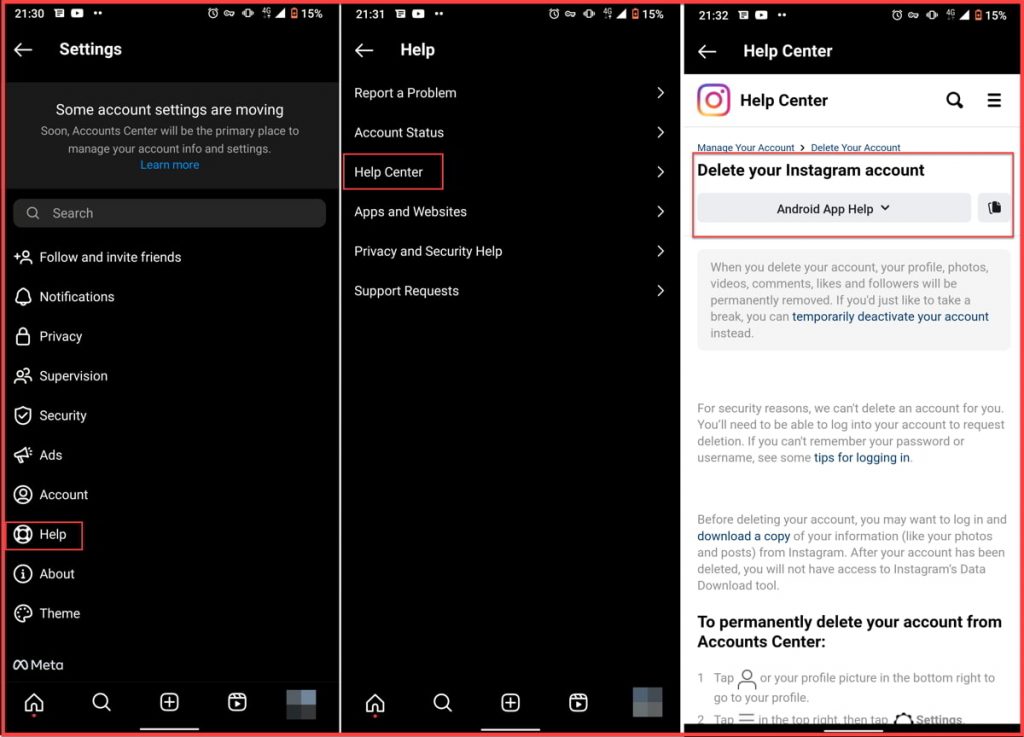
If you still have access to the account you want to delete, the easiest way to delete it is through the Instagram app. Here are the steps to delete an old Instagram account on the app:
- Open the Instagram app on your mobile device and log in to the account you want to delete.
- Tap on your profile icon in the bottom right corner of the screen.
- Tap on the three lines in the top right corner of the screen to open the menu.
- Select “Settings” from the bottom of the menu.
- Scroll down and tap on “Help” at the bottom of the page.
- Tap on “Help Center” and then “Managing Your Account.”
- Select “Delete Your Account” and follow the prompts to complete the process.
How To Delete My Old Instagram Account Without Password And Email?
If you’ve forgotten the password and email associated with your old Instagram account, deleting it can be a bit tricky. However, there are a few steps you can take to delete your old account without a password and email:
- Go to the Instagram login page and click on “Forgot password?”
- Enter the username or email address associated with your old Instagram account.
- Follow the prompts to reset your password.
- Log in to your old Instagram account and delete it following the steps outlined in this article.
How To Delete Old Instagram Account Without Logging In?
Deleting the account can be more challenging if you don’t have access to the email address or phone number associated with your old Instagram account. Here are some steps you can take to delete an old Instagram account without a password or email:
- Use the “Forgot Password” feature: If you’ve forgotten your password, try resetting it using the “Forgot Password” feature. This will only work if you still have access to the email address or phone number associated with the account.
- Contact Instagram support: If you don’t have access to your account’s email address or phone number, you can try contacting Instagram support for assistance. Follow the same steps outlined above for asking Instagram to delete an old account.
- Report the account: If you’re unable to recover your old account and want it deleted, you can report it to Instagram. To do this, go to the account’s profile page, tap the three dots in the top right corner and select “Report.”
If I report my old Instagram account will it be deleted?
Reporting your old Instagram account may or may not result in its deletion. It will depend on the reason for the report and Instagram’s investigation into the matter.
How Do I Recover My Old Instagram Account?
If you change your mind and want to recover your old Instagram account, you can do so by following these steps:
- Go to the Instagram login page.
- Enter your old account username or email address.
- Click on “Forgot password?”
- Follow the prompts to reset your password and regain access to your old account.
These steps for how to get an old Instagram account deleted back require that your account be connected to your email or phone number. Otherwise, you need to contact Instagram support.
The Pros and Cons of Deleting Your old Instagram Account
Before you delete your old Instagram account, consider the pros and cons. Deleting your account can help protect your privacy and reduce your digital footprint, but it can also erase your digital memories and connections.
What to Do Before Deleting An old account on Instagram: A Checklist!
Deleting an old account on Instagram may seem like a simple task, but before you take that step, there are some important things you need to consider. Before you hit the delete button, it’s essential to make sure you have taken all the necessary steps to preserve any content or information that you may need in the future. Here is a checklist of things you should do before deleting your old Instagram account.
1. Backup Your Data
Before deleting your old Instagram account, make sure to back up all your data, including photos, videos, and direct messages. There are various ways to backup your data on Instagram, including using third-party apps or manually saving each file. You can also download a copy of your data directly from Instagram by following these steps:
- Go to your Instagram profile and click on the three horizontal lines in the top right corner.
- Click on “Settings.”
- Click on “Security.”
- Click on “Download Data.”
- Enter your email address and click on “Request Download.”
- Instagram will send you an email with a link to download your data.

2. Notify Your Followers
If you have a significant following on your old Instagram account, it’s essential to let them know that you are deleting your account. You can make a post or story explaining your reasons for deleting the account and provide a way for your followers to stay in touch with you. You can also let them know if you plan to start a new Instagram account.
3. Deactivate Your Account
Before deleting your old Instagram account, consider deactivating it instead. Deactivating your account will remove it from public view, but you will still be able to reactivate it in the future if you change your mind.
4. Review Your Connected Accounts
Before deleting your old Instagram account, review all the accounts connected to it. Check if there are any accounts that you may have linked for login purposes, such as Facebook or Twitter. Make sure to unlink those accounts before deleting your old Instagram account.
Also read: How to link Instagram to your Facebook page?
5. Save Your Login Credentials
If you plan to create a new Instagram account after deleting your old one, make sure to save your login credentials, including your username and password. You can also save your login credentials using a password manager.
Alternatives to Deleting Your Old Instagram Account
If you’re feeling overwhelmed or frustrated with your old Instagram account but need more time to be ready to delete it, there are some alternative options to consider.
1. Deactivate Your Account
Deactivating your account is a temporary measure that essentially “pauses” your account. Your profile, photos, comments, and likes will be hidden until you reactivate your account. Deactivating your account can be a good option if you need to take a break from Instagram for a while or want to protect your account from being hacked.
To deactivate your account:
- Log in to your Instagram account through Instagram desktop and open your settings.
- Scroll down to the bottom of the page and select “Temporarily disable my account
- “Follow the prompts to deactivate your account.
2. Private Your Account
If you’re concerned about your privacy on Instagram but don’t want to delete your account, you can switch to a personal account and make it private. When your account is private, only users who follow you will be able to see your photos, comments, and likes. This can be a good option if you want to maintain a small, private circle of followers.
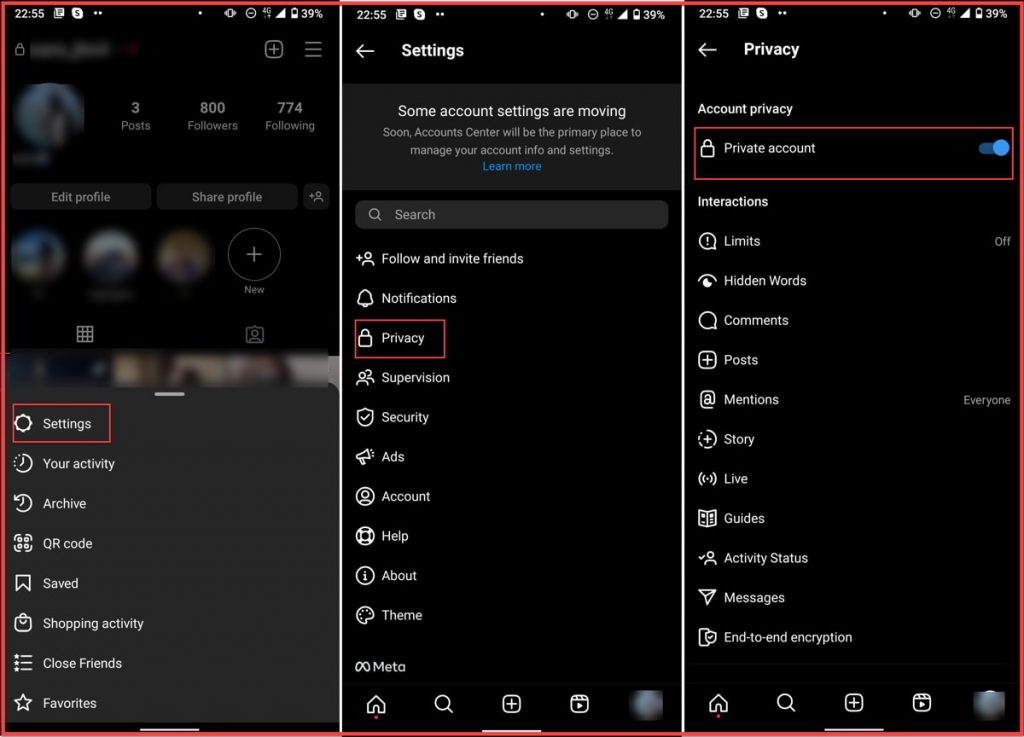
To make your account private, follow these steps:
- Log into your Instagram account and go to your profile.
- Click on the three horizontal lines in the top right corner.
- Select “Settings” from the drop-down menu and then choose “Privacy.”
- Toggle on the “Private Account” option.
3. Archive Your Posts
If you’re concerned about the content of your old posts but don’t want to delete them entirely, you can archive them. Mass archiving your Instagram posts removes them from your public profile but keeps them in a private archive that only you can access. You can also choose to unarchive posts at any time.
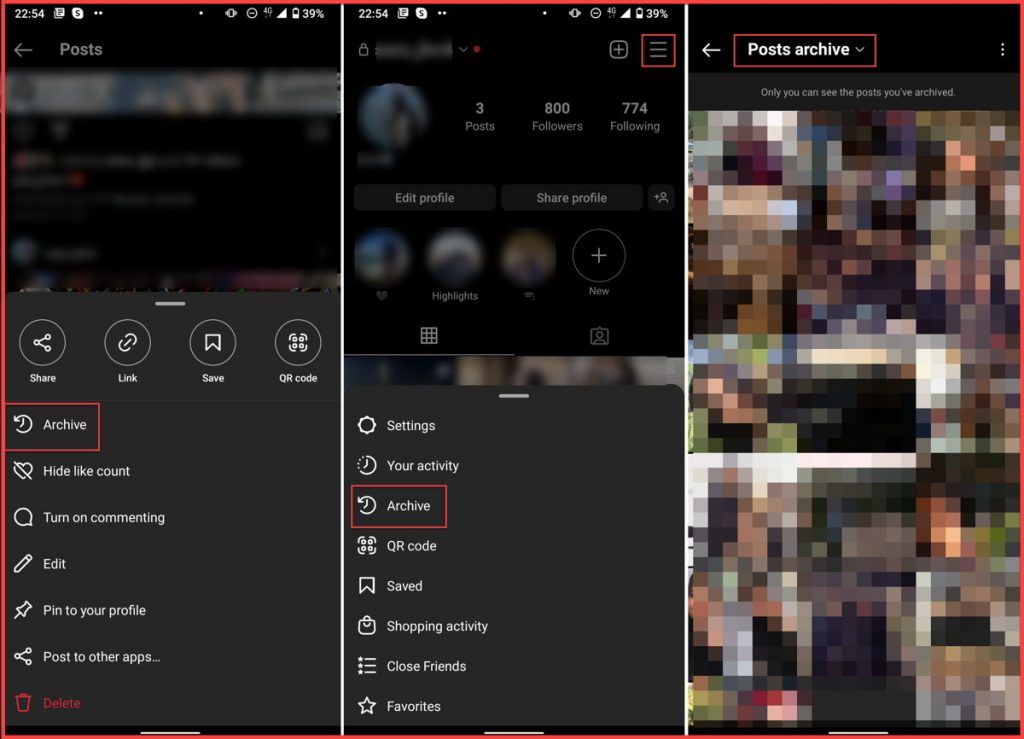
To archive a post, follow these steps:
- Go to the post and tap on the three dots in the top right corner.
- Select “Archive” from the drop-down menu.
- To unarchive a post, go to your profile and select the “Archive” icon in the top right corner.
- From there, you can choose to unarchive individual posts or all of your archived posts.
4. Start Fresh
If you’re unhappy with your old account and don’t want to keep any of your old content, you can always start fresh with a new account. This can be a good option if you want to rebrand yourself on Instagram or start over with a clean slate.
To create a new Instagram account, log out of your current account and click on “Sign Up”. Follow the prompts to create a new account with a different email address or phone number.
Deleting vs. Archiving Instagram Posts: Which Is Better For You?
If you’re considering deleting your old Instagram account, you may also wonder whether to delete or archive your posts. Archiving your posts allows you to hide them from your profile without permanently deleting them. This can be a good option if you want to take a break from Instagram but don’t want to lose your content. However, deleting your posts may be the way to go if you’re looking for a fresh start.
Conclusion
Deleting an old Instagram account can be a daunting task, but it’s important to remember that there are alternative options to consider. Whether you choose to deactivate your account, make it private, archive your posts, or start fresh with a new account, the most important thing is to do what’s best for you and your personal brand. Whatever you choose, make sure to take the time to weigh your options and consider the pros and cons before making a final decision. This article showed you everything you need to know about how to delete an old Instagram account easily.
FAQs
How To Get Into An Old Instagram Account Without Email Or Phone Number?
If you can no longer access the email or password associated with your old Instagram account, you can still delete it. To do it, you need another Instagram account to report your page.
How To Delete An Old Instagram Account Without Human Verification?
If you can access your old account’s email and phone number, you can log into your account on a desktop and follow the steps mentioned to delete your account without verification. Otherwise, the only solution to how to delete an old Instagram account is by reporting it and contacting the Instagram support team.
 Summarize this article with:





