


There are times when you become curious to review your activities during a specific period, and that’s where Instagram provides you with the opportunity to do so. Besides the chance to check the time spent, account history, recent searches, and more, you can also review specific activities like comments, tags, sticker responses, reviews, and likes. In this blog post, I’m going to show you how to see liked posts on Instagram within a few seconds and answer a few other related questions.
So, are you ready to know more? Then, just keep reading.
How to See Liked Posts on Instagram on Android and iPhone?
The process is straightforward. Here’s how to find liked posts on Instagram on your phone:
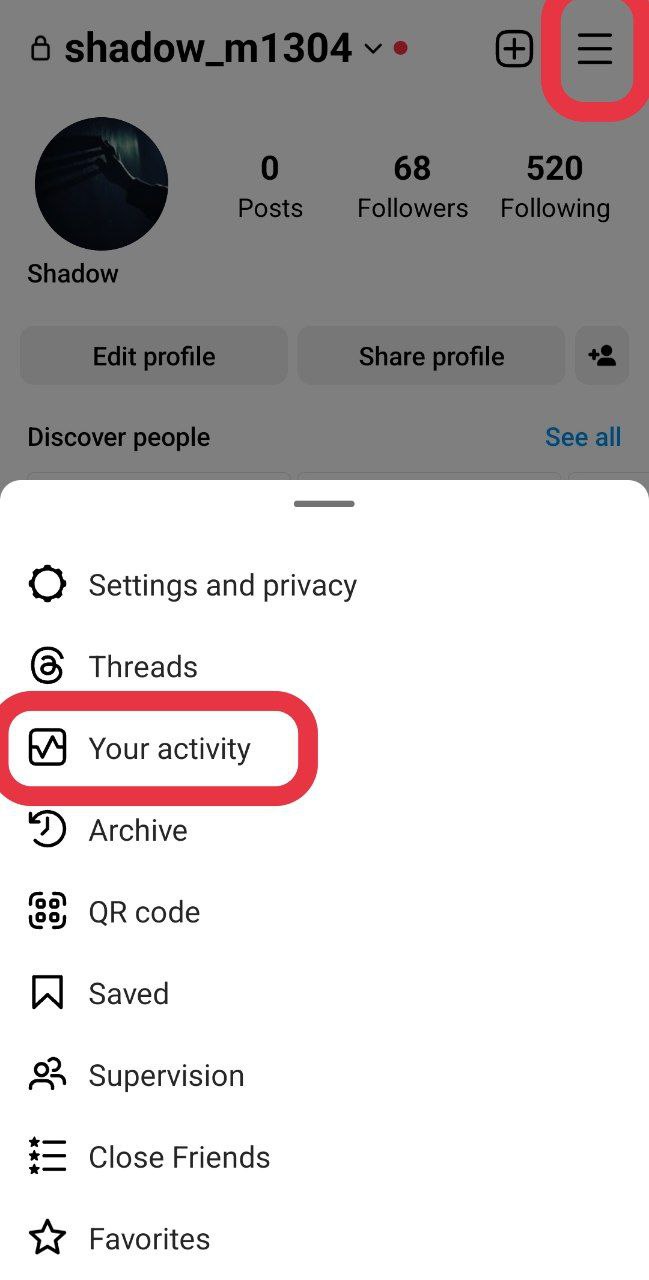
1. Open your Instagram and navigate to your profile. Tap on the hamburger menu at the top right corner and select ‘Your Activity.’
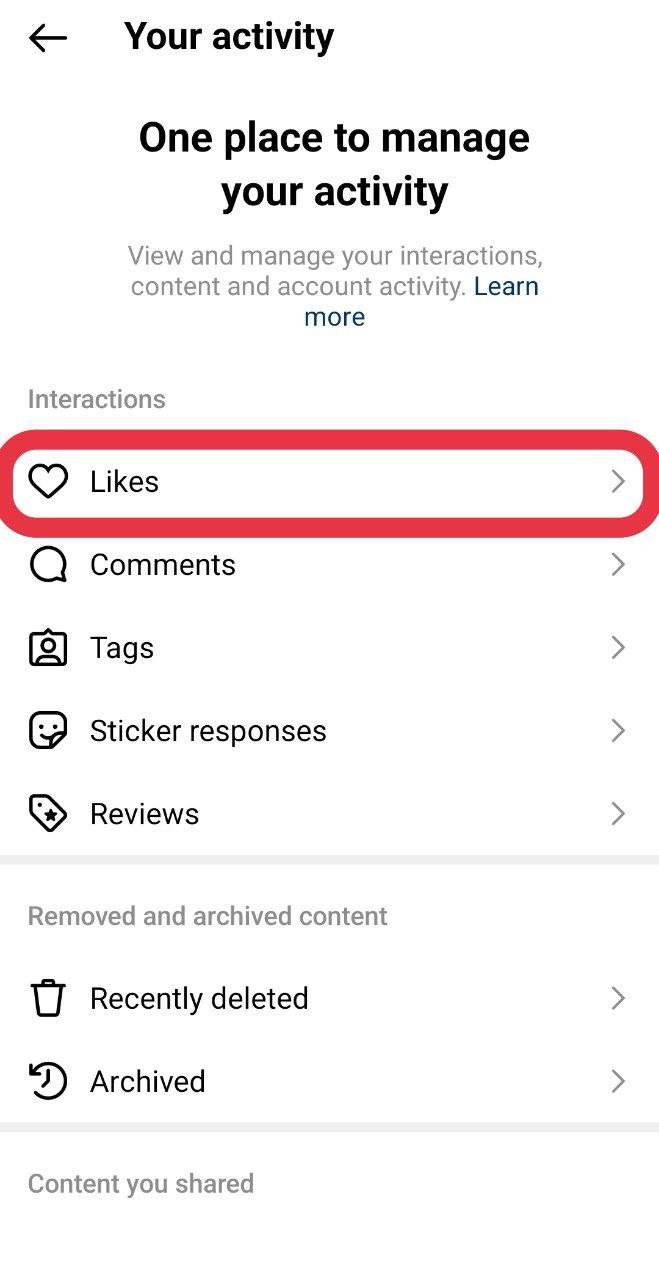
2. Under ‘Interactions,’ tap on ‘Likes.’
3. Here, you can view all the posts that you have liked on Instagram.

Note: You can also choose to remove likes by tapping ‘Select’ at the top right and then ‘Unlike’ at the bottom.

Also Read: How to See Who Doesn’t Follow You Back on Instagram
Additional Tips on How to Use This Feature
In this section, you will find three additional options:

1. Sort by [Newest to Oldest/Oldest to Newest]: Here, you can choose how you want the liked posts to be displayed, whether from newest to oldest or vice versa.

2. Filter by Date: By selecting this option, you can filter liked posts based on specific timeframes, such as all dates, last week, last month, past year, or you can customize a date range by specifying the start and end dates.

3. Filter by Author: This option allows you to select one, two, or more users and view the posts you’ve liked from them.

How to Find Liked Posts on Instagram on PC?
To view Instagram liked posts on a PC, follow these steps:
1. Click on the hamburger menu located at the bottom left of the screen and select ‘Your Activity.’

2. Choose ‘Interactions’ and then click on ‘Likes’ at the top. (Note: By default, selecting the ‘Your Activity’ option will lead you to this section.)
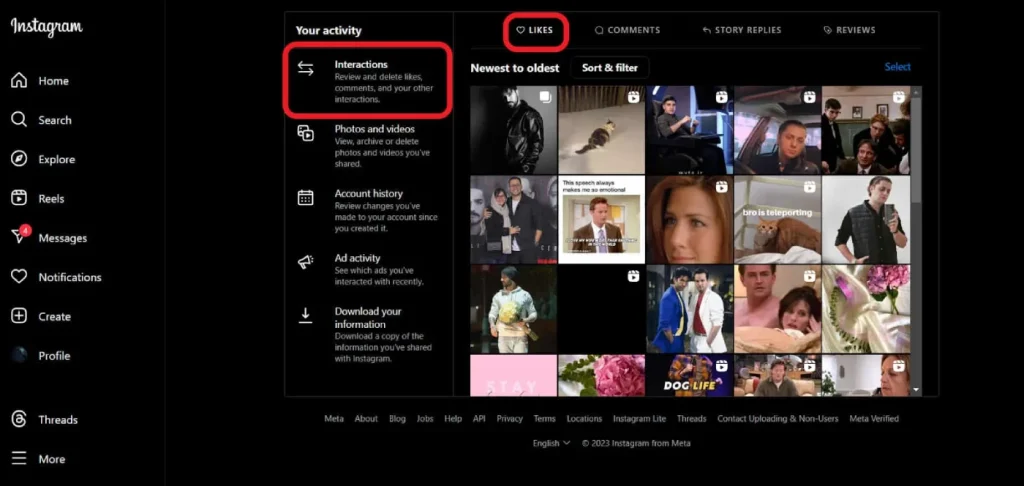
3. Now, you can click on the specific post or video you would like to view.
Also Read: How to See Who Saved Your Instagram Post?
Last Words on How to Find Liked Posts on Instagram
Checking Instagram likes is indeed easy with the provided steps. Actually, everything becomes much easier once you are familiar with the process and know which settings to check. You can also explore other settings related to your activity within minutes or even seconds. To learn more, continue reading the FAQs section.
FAQs
Now that you know how to see liked posts on Instagram, it’s time to answer some other frequently asked questions regarding our topic.
1. How to See Stories You Liked on Instagram?
Unlike Instagram liked posts, which can be easily checked in your settings, liked stories don’t have specific options in the settings. Instead, you can follow these methods:
1. Check Viewed Stories: Review the stories you have viewed to see if you liked them. This can be done by going through the list of stories you have already watched.
2. User’s Highlights: Explore the user’s highlights to identify the stories you’ve liked. Highlights often include past stories that users choose to showcase on their profile.
Note that once a story expires, there is no way to check if you liked it. Therefore, manual checking of available stories and highlights is the primary method for identifying liked stories on Instagram.
2. Is There an App to See What Someone Likes on Instagram?
Instagram no longer allows users to check all the likes they’ve given out. Currently, you can only see posts in your feed that are liked by others, appearing randomly.
However, there are third-party apps like Snoopreport that claim to provide insights into what others are liking.
Remember that the use of such apps may potentially violate Instagram guidelines, and there’s no guarantee of their compliance with Instagram’s terms of service.
Also Read: How to See Who Liked Your Comment on Instagram?
3. Why Is It Important to Find Liked Posts on Instagram?
Discovering liked posts on Instagram is important for a few reasons. First of all, when you like a post, it’s like a personal bookmark. It helps you find and share posts that you enjoyed. It’s a handy way to remember or send something interesting to others.
Moreover, being able to find liked posts is crucial for managing your content preferences. Instagram’s algorithm tailors your explore feed based on your likes.
Sometimes, content related to your liked posts shows up in your Explore feed. If you don’t want to see more of that content, finding the liked posts section allows you to unlike specific posts.
This way, you can influence the algorithm and make sure your feed shows the kind of content you prefer, creating a more personalized Instagram experience.
