


You left a sharp comment under a busy post, and the little heart counter beside it keeps climbing. Naturally, you want to know who is behind those likes. A search for how to see who liked your comment on Instagram only adds to the confusion, because one guide says tap, another says long-press and a third says the feature is gone.
Instagram’s own Help Center settles most of it. It says you can see who liked a comment by tapping the number of likes below it, and on a computer you click that number. Before you try, find the comment you left so you open the right thread.
Below you will find the exact taps, why the list sometimes stays shut, and how to get an alert for each like. Facts come from Help Center pages read in November 2026, and the screenshots come from our own Android walkthrough. We ran no new hands-on test, so confirm each step in your own app.
Key Takeaways
- Instagram’s Help Center says to tap the number of likes below a comment (or click it on a computer) to see who liked it.
- Tap the number, not the heart. The heart likes or unlikes the comment from your own account and opens no list.
- If nothing opens, update the app and check that the comment has likes before trusting a guide that says the feature is gone.
- Turn on Comment likes and pins in your notification settings to get an alert when someone likes your comment.
- Treat your own likes on other people’s comments as visible, because Instagram does not limit the list to the comment’s author.
How to See Who Liked Your Comment on Instagram: Step by Step
The steps match on iPhone and Android, and only the first one changes if you use a computer. Keep the comment in view and follow them in order.
- Open the post you commented on, then tap the comment icon to open the thread.
- Scroll to your comment. A comment that nobody has liked shows no number, so there is no list to open yet.
- Tap the number of likes below your comment. Skip the heart, because it likes or unlikes the comment from your own account.
- Read the list of accounts that liked it, then close the list when you finish.
On a computer, open the post on instagram.com and click the number instead. Instagram’s Help Center page on liking comments gives the same instruction for the phone apps and the website, although one 2026 blog claims the web version cannot show the list. If nothing opens on the web, switch to the app.
The sketch below shows where each tap lands and what it does.
Figure 1. Which tap on an Instagram comment shows who liked it (Instagram Help Center, November 2026).
Most failed attempts come from the heart. A tap there toggles your own like, so a second tap undoes the mistake. The Help Center places the count below the comment, and some app versions show it under the heart, so look for the number instead of a fixed spot.
Can You See Who Liked Someone Else’s Comment on Instagram?
Instagram’s Help Center does not limit the list to the author of a comment, so the same tap should work on any comment you can open. That is how to see who liked a comment on Instagram when the post is not yours.
It conflicts with what you will read elsewhere. A scheduling-tool blog says Instagram removed the liker list in 2022, and a 2025 blog says you must long-press the heart. Neither links to an Instagram page. We found no first-party statement that the list was removed, and the Help Center page read in November 2026 still describes it.
Instagram changes its app often, and a Help Center page can lag behind a rollout. If tapping the number does nothing in your app, treat the list as unavailable on your version instead of hunting for a workaround.
Can People See That You Liked Their Comment?
The Help Center never says that only the comment’s author can open the list, so assume anyone who can see the comment can see your like. Blocking does not hide it either: Instagram says people you block can still see your likes and comments on posts shared by public accounts or accounts they follow.
To take a like back, tap the heart again. The author may already have received an alert, as the notification section below explains. This makes comment likes different from your instagram story viewer list, which Instagram says only you can see.
Why Can’t I See Who Liked My Instagram Comment?
Most failures trace back to a handful of causes, and the first one is a tap on the wrong spot. The table pairs each symptom with its likely cause and a fix to try. Causes marked unconfirmed come from user reports, not from Instagram.
| Symptom | Likely Cause | What to Try |
|---|---|---|
| Nothing opens, or the heart turns red | You tapped the heart, which toggles your own like | Tap the heart again to undo it, then tap the number |
| No number appears | Nobody has liked the comment yet, or it was deleted | Check back later and confirm the comment still shows in the thread |
| The number does nothing | An old app version or a temporary glitch (unconfirmed) | Update Instagram, force close it, reopen it and try again |
| The list opens in the app but not on the website, or the reverse | App and web layouts differ (unconfirmed) | Use the version that works, since Instagram documents both |
| The heart itself will not respond | Comments were turned off, the comment was deleted or Instagram flagged your activity | Reload the post and wait before liking more comments |
The first two rows cover most cases. If the app is current and the comment clearly has likes, one 2025 guide suggests pressing and holding the heart instead of tapping it. Instagram does not document that gesture, so treat it as a last try, and be ready to tap the heart again if you like the comment by mistake.
A heart that will not respond is a different problem. Too many likes in a short time can trigger a warning, and the we restrict certain activity message is the usual form that warning takes.
No app can show a list that Instagram does not send, so any tool that asks for your password to reveal comment likers puts your account at risk.
You can check your own version in about a minute. Open any busy public post, find a comment with a few likes and tap its number. If a list opens, your app has the feature, and any guide that says otherwise is out of date for you.
How to Get an Instagram Comment Like Notification
A list shows who liked a comment today, but an alert tells you the moment it happens. Instagram keeps a switch for this inside its notification settings.
Menu names might be different on your device. Instagram’s push notification page confirms the entry point: Menu, then Notifications under How you use Instagram.
- Tap your profile picture, then tap Menu in the top right.
- Under How you use Instagram, tap Notifications.
- Tap Posts, stories and comments.
- Scroll to Comment likes and pins and choose On.
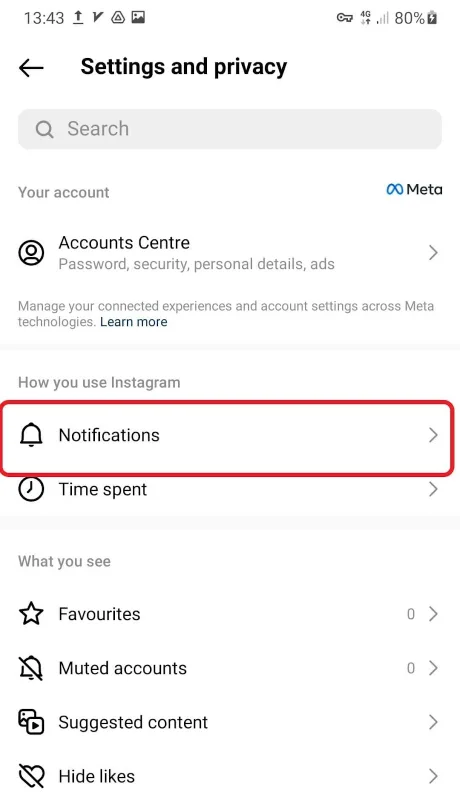
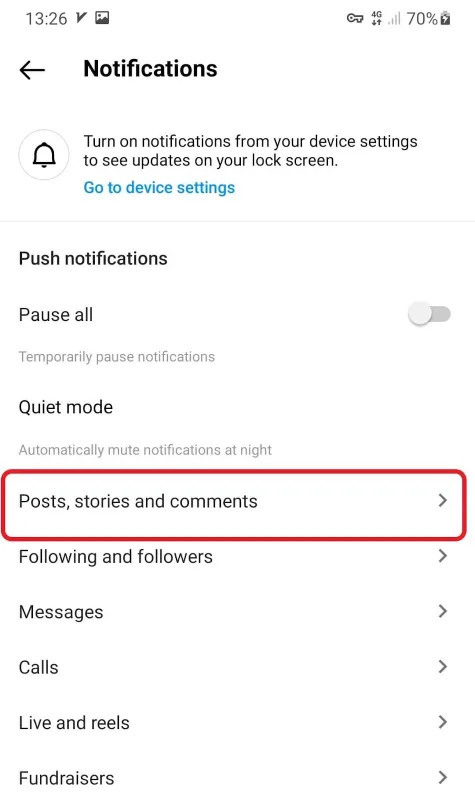

Figure 2. Three screens that lead to the comment like switch (Android). Menu names might be different on your device.
The preview text under the switch reads like a username liked your comment, so the alert names the person. The same switch covers pins, which means you also get an alert when someone pins your comment.
If no alert arrives even with the switch on, the cause is usually the phone or the app. The fixes for Instagram notifications that stop arriving apply here too.
How to See Comments You Liked or Wrote on Instagram
Searches for liked comments usually mean one of two lists, the comments you wrote and the comments you liked, and Instagram treats them differently.
Comments you wrote live in Your activity. Open Menu, tap Your activity, then tap Comments under Interactions. Instagram’s Help Center says you can sort them by date, filter them by account and delete several at once.

Figure 3. The Your activity screen with Likes and Comments under Interactions (Android).
The Likes entry next to it covers posts, so it will not list the comments you liked. We found no in-app list of liked comments in the Help Center pages we read. A January 2025 privacy blog says the data download from Accounts Center includes a liked comments file. That claim is second-hand, so confirm it when your file arrives.
Posts you liked do have a proper list, and seeing liked posts on Instagram takes only a few taps from the same menu.
What Comment Likes Tell You and How to Earn More
A like on a comment is a vote for one specific point, so it reads differently from a like on the post. People who like your comment agreed with your view, not just the photo.
Instagram has not said that comment likes change how a post ranks, so treat them as feedback, not a lever. These habits tend to earn more of them:
- Add a detail the post leaves out, such as a price, a tool or a place.
- Comment while a post is fresh, when the thread is short and your point is easy to find.
- Keep it short enough to read at a glance, and ask a question when you want replies.
- Pin your best comment under your own posts, which keeps it at the top of the thread.
Comment likes also feed your wider picture of engagement. The tactics for getting more engagement on Instagram show how to turn those small signals into followers.
Final Thoughts
Now you know how to see who liked your comment on Instagram: tap the number below the comment, never the heart, and turn on comment like alerts so the names reach you as they happen. If the list stays shut after an update, the likely cause is your app version, not a mistake on your part.
Run the one-minute check from the troubleshooting section and trust what your own app shows. Instagram’s Help Center is the only first-party source, and it says the tap works.
