


There are several reasons why you might need to manage multiple Instagram accounts. Maybe you need one account for your business and another for your personal life, maybe you share your device with someone else, or you are an Instagram page admin who needs to manage multiple Instagram accounts at the same time.
In this article, I’ll explain how to manage multiple Instagram accounts on desktop and phone through the Instagram app itself, and how to manage more than 5 Instagram accounts through AiGrow, the best app to manage multiple Instagram accounts you can find in the market. But before we start click if you want to know Instagram account handling charges in 2023.
Can You Have Multiple Instagram Accounts?
According to Instagram’s Help Center, you can have up to five different Instagram accounts. You can switch between multiple Instagram accounts on your phone or computer without logging out.
Using a third-party app like AiGrow, you can have and manage up to 80 Instagram accounts in one setting and share your Instagram management responsibilities with other team members.
How To Create Multiple Instagram Accounts?
Here is how to have multiple accounts on Instagram both on phone and desktop:
To create several IG accounts on phone just go to your Instagram profile and click on your username, similar to when you’re switching logins.
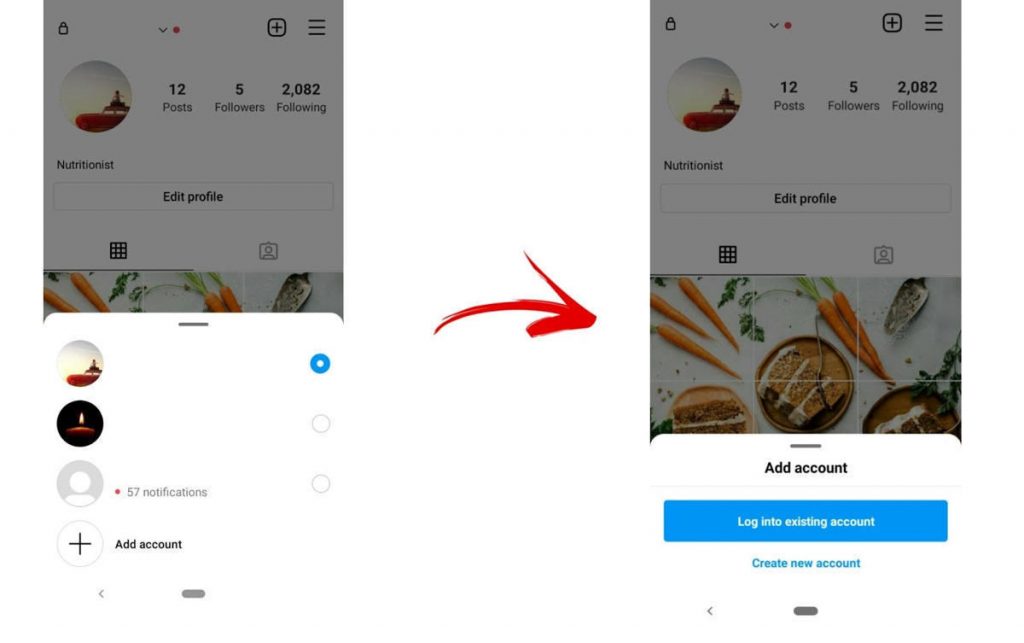
Go to Add Account at the bottom of your screen, click on create a new account and provide your info to create a new account.
Note: If you are wondering, “can I have multiple Instagram accounts on one email” I would say it’s possible to set up all your 5 Instagram accounts under the same email address, but for security reasons, use different emails for your different accounts.
How To Have Multiple Instagram Accounts On Dsktop?
You can’t create a second Instagram account on desktop itself, but you can add and have up to five Instagram accounts on desktop just like a phone and switch between them.
Note: As I mentioned above, using AiGrow management services you can add and manage up to 80 different Instagram accounts through your dashboard on your PC.
Follow these steps to add a second Instagram account on desktop:
- Click on your profile picture

- Click on switch accounts

- Select log in to an existing account

- Log in to a new account using your username and password
How to switch between Instagram accounts on desktop? Simply by going on the switch accounts tab, you can choose from the accounts you once logged in through Instagram on desktop.
After answering the basic questions, you might have had, let’s go on managing multiple Instagram accounts.
How To Manage Multiple Accounts On Instagram?
Suppose you want to start an Instagram business account alongside your personal account and simply want to manage 2 Instagram accounts. In that case, the Instagram app itself might be enough to suit your needs.
But using an Instagram growth agency like AiGrow, you can easily manage up to 80 different accounts from your computer. AiGrow also provides you with more advanced features like a VIP growth service, content creation, scheduling plans, automated DMs, and Instagram account managers.
AiGrow: The Best App For Managing Multiple Instagram Accounts On Desktop
If you’re a professional Instagrammer or entrepreneur, you’ve likely wondered, “what are the best apps to manage multiple Instagram accounts?” in one place, hassle-free?
Rest assured, there are such platforms, and if you’re looking for a tested and proven solution to manage multiple accounts on Instagram, AiGrow is the best manage Instagram accounts app you can find. This is how it works:
How to Add Instagram Accounts To AiGrow’s Dashboard?
First of all, sign up on AiGrow using your email address. Once you sign up successfully, AiGrow provides access to its dashboard.
- From the dashboard, tap Add Instagram Account

- Then in the opened window, enter the username of the account you want to add to the dashboard.

- You can see all the added accounts from AiGrow’s dashboard, and by tapping Manage Account, you can choose the account you want to use.
Get started with AiGrow; it’s risk-free.
Best Way To Manage Multiple Instagram Accounts
The easiest way to manage multiple Instagram accounts is to use an Instagram management platform like AiGrow. This allows you to manage all your Instagram accounts from your mobile device or computer.
As I said earlier, AiGrow offers you some superb features to make the process of managing your account easier.
One of them is the scheduler plan that allows you to schedule posts in advance for each account, and the other top-quality feature is its VIP growth service which guarantees your Instagram account organic growth.
Besides, this service is distinctive from other social media management apps because there is no bot to perform your Instagram actions(like, comment, follow, and unfollow).
As soon as you start using this service, a dedicated account manager will be assigned to perform all these actions on your behalf.
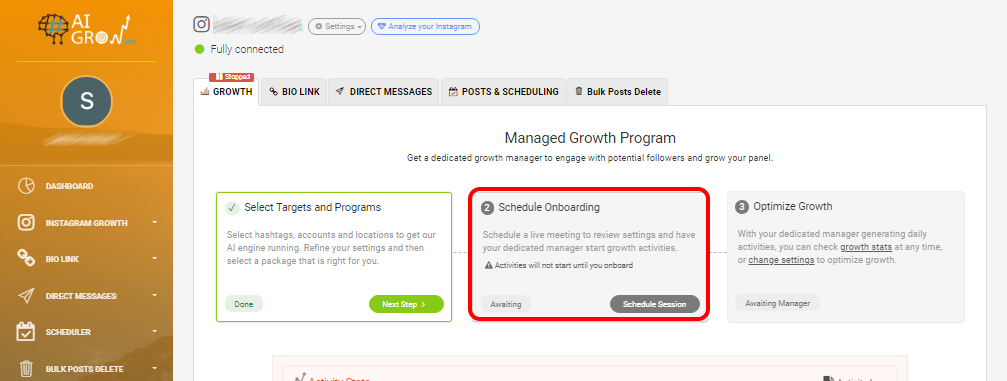
Note: with AiGrow, you can schedule a live meeting with your account manager to review and analyze your goals and talk about the activities you’d like the manager to perform on your behalf. Besides, you also get daily and weekly reports of what they have done for your Instagram account(s).
Sign up and schedule a meeting with an expert.
How The VIP Growth Service of AiGrow Works
Here is a video of how AiGrow VIP growth service works, don’t miss watching it:
And here are the steps:
1- First of all, choose the Instagram growth tab from the dashboard.
2- In the opened window, you can target your prospective followers using AI-powered hashtags, location, and competitor research.
3- by scrolling down, you can select the activities (like, follow, and unfollow) that you’d like our human growth resources to perform on your behalf to grow your following.
4- you have the opportunity to select a category for your account.
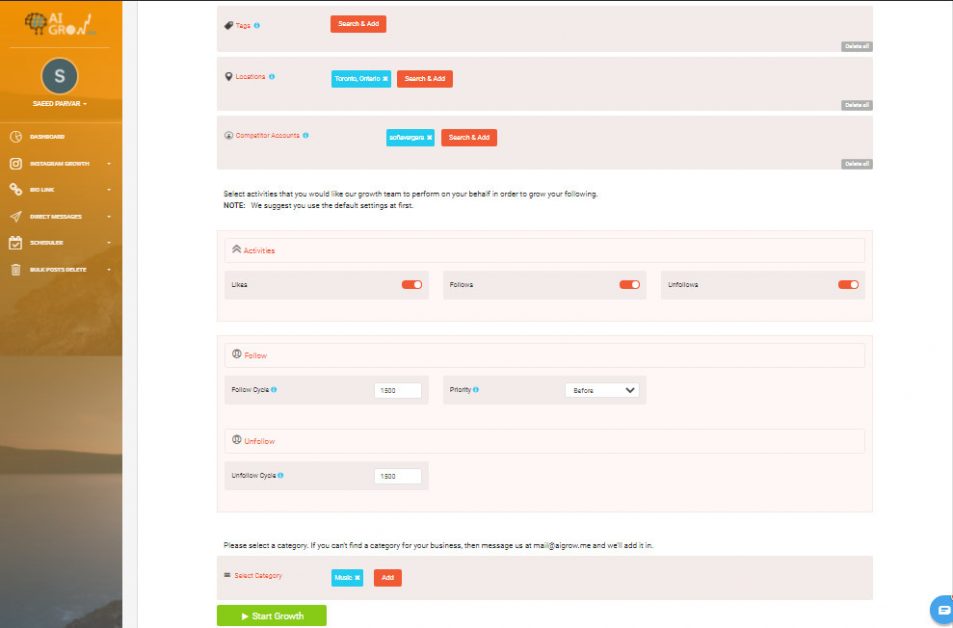
Tip: The above mentioned activities won’t start until you schedule a live meeting with your dedicated account manager. In this meeting, you can review your settings, describe your objectives in detail, etc.
Grow your Instagram safely with AiGrow
How To Post to Multiple Instagram Accounts on AiGrow
You can use AiGrow to post to any Instagram accounts you have added to your AiGrow dashboard. Whether you’re posting on your feed or as a story, the process is almost the same. You can also select and repost content from other Instagram pages, tags, etc. It automatically gives credit to the original page.
Here’s a video overview of how Instagram post to multiple accounts is done through AiGrow dashboard:
Here are the steps in detail:
1- From the dashboard, choose the Scheduler tab on the left. Then from the drop-down menu in which you can see a list of added accounts, choose the account you intend to schedule content on; after that, tap Scheduler.
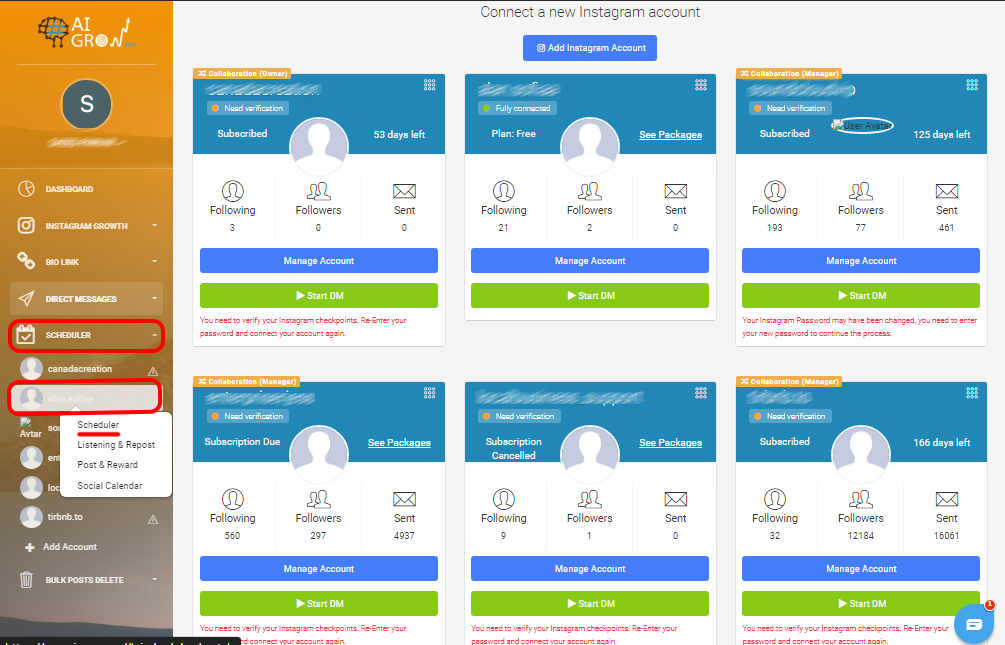
2- In the opened window, tap the Schedule green button. Then from the drop-down menu, select the content you intend to post (story, fee, IGTV). By choosing each kind of content I mentioned, you’ll be taken to a new window in which you can set details, including captions, hashtags, location, schedule dates, etc.
Tip: The hashtag generator tool of AiGrow allows you to enter a keyword in order to search and add a bunch of relevant trendy hashtags to your posts to boost your management and reach.
From this window, you can decide which accounts you want your content to be published on. You’ll be given a list of the accounts you have added to AiGrow’s dashboard to choose from.
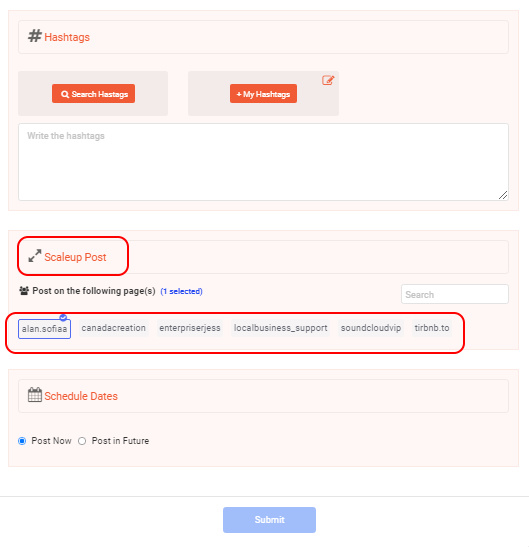
Thanks to this feature, you can keep not only your consistency but also frequency on Instagram to increase your engagement.
This feature makes it possible for you to set different times and dates for your content (story, feed, IGTV) to be published on. Also, you can publish your content at the time if you’d rather.
Related: How much does it cost you to get your Instagram account managed? 10+ samples
How To Remove Multiple Accounts On Instagram?
There are so many reasons why you may decide to remove one of your multiple Instagram accounts from the app.
Before removing an account, make sure that you disable Multiple-Account Login(if you’ve set up Multiple-Account Login).
Are you wondering how you can disable Multiple-Account Login? Follow the steps below:
- Tap the three horizontal lines (hamburger icon) in the top right corner of your profile page.
- Tap Settings, then scroll down and tap Multiple-Account Login.
- Select the account or account you want to remove, then tap Remove in the pop-up box.
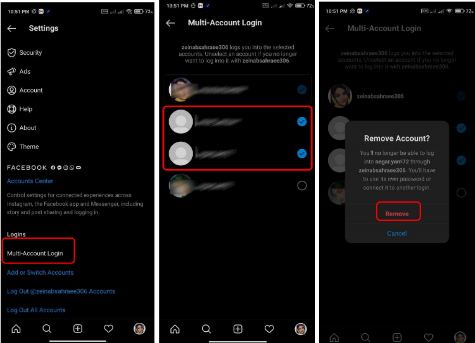
- It should be noted that you haven’t removed the account from the app yet; you have just removed it from your Multiple-Account Login list. Take a few more steps below in order to remove it from the app as well.
1- Go to your profile page, then tap your username and switch to the account you intend to remove.
2- Tap the three horizontal lines in the top corner, then Settings.
3- Scroll down and tap Log Out(username), then in the pop-up box, tap Log Out again.
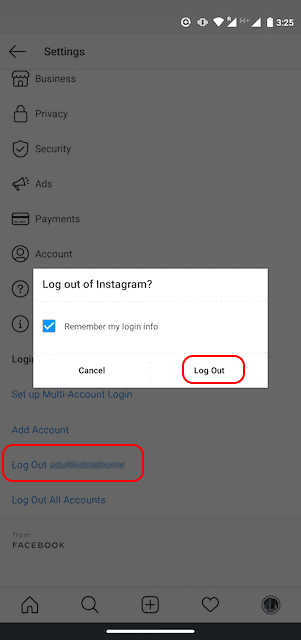
Tip: Bear in mind that removing the account from the app doesn’t mean deleting it forever. If you’d prefer to delete the account forever, have a look at this guide provided by the Instagram help center.
Conclusion
Do you intend to manage multiple Instagram accounts? If yes, you can use AiGrow, the best app for multiple Instagram accounts management. What are the benefits?
On the Instagram app, you are limited to managing 5 Instagram accounts, whereas AiGrow allows you to add up to 80 different accounts and manage them all from your AiGrow dashboard.
Managing multiple Instagram business accounts in AiGrow also allows you to access advanced features, from creating content for your Instagram page, scheduling posts, DMs plans, bulk unfollowing, and deleting posts to a VIP growth service to bring at least 300-500 organic followers each month.
