


If you’re wondering if someone blocked you on Instagram, you can check for signs. However, getting a list of who blocked you? Nope, not a thing. Sounds a bit complicated, right? Don’t worry, it’s not as tricky as it seems!
Let’s get to the heart of the matter: How to see who blocked you on Instagram? How to know if someone blocked you on Instagram? What’s the Instagram block list for? We’ve got all the answers in this blog! Let’s sneak in!
How to See Who Blocked You on Instagram?
Looking to uncover the secret of who’s tossed you into their blocked list on Instagram? Unfortunately, as of now, there’s no direct way to unveil that mystery.
Sure, there are apps out there like Logs+ Profile Viewers and Influxy that claim to let you in on your blockers. But here’s the scoop: they don’t.
Take Influxy, for instance – I gave it a whirl, and it came up empty, even when I intentionally blocked one of my own accounts for testing. Not to mention, these apps are a security red flag, demanding your IG username and password.
If only you think someone might have blocked you, there are ways to find out the truth.
How To Know If Someone Blocked You On Instagram for Free?
Although Instagram doesn’t send you any notification when someone blocks you, there are smart tricks to figure it out. Let’s explore how to tell if someone blocked you on Instagram.
#1. Search for their Accounts
How do you know if someone has blocked you on Instagram? Just do a simple search on the platform. Depending on whether the user’s account is private or public, you’ll see different things as follows.
How to know if someone has blocked you on Instagram with a public account?
Search for their username in the search bar ASAP. If you can still see their username and profile picture with post count, followers, and following in the search bar as you type, chill out! You’re not blocked.
But if you open their profile and it’s like a deserted place with an empty grid and a message saying “No Posts Yet”, you can be pretty sure they’ve blocked you.
How to know if someone blocked you on Instagram with a private account?
Simply type in their username in the search bar. If you can find their username, open their profile, and see their profile picture along with the message “This Account is Private,” then everything is all good! No need to worry about a thing!
Wait, there’s more to it! If the profile doesn’t show up in the search bar at all, there are three possibilities:
- The person has blocked you,
- The person has deleted their Instagram account,
- The person has temporarily deactivated their account.
This is what a blocked account looks like:

#2. Use Instagram Web
Wondering how to check if someone blocked you on Instagram? ge t help from the Instagram web. To do so, open any web browser and go to Instagram.com. If you’re logged in, simply replace “username” with the actual handle of the person you suspect might have blocked you. If you get “Sorry this page isn’t available”, they have probably blocked you.
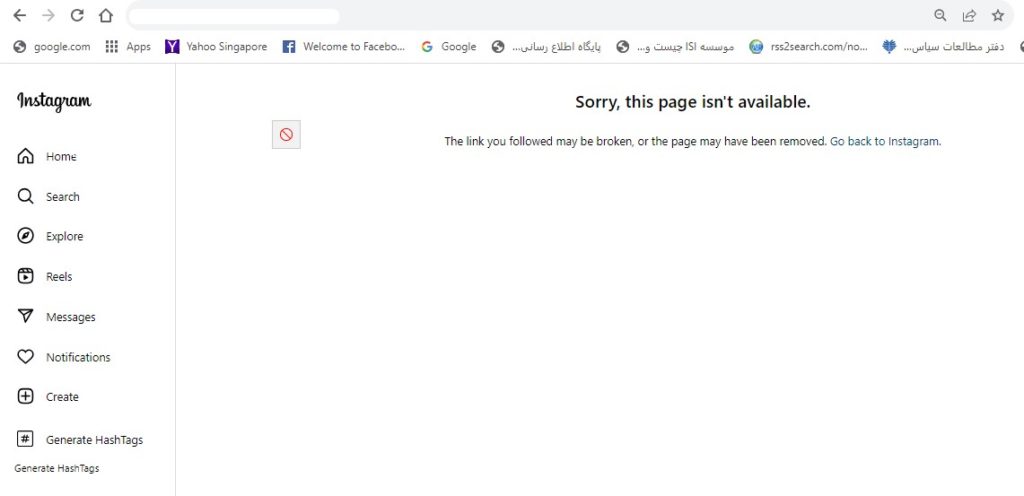
But, there’s another scenario to consider: They may have deleted or deactivated their account. How can you find out for sure?
Log out of your account and perform the search again in an incognito browser. If you can see the profile, it’s probably a block. If not, the account might be inactive.
#3. Tap on comments on your posts
Thankfully, when someone blocks you, Instagram doesn’t delete their old comments or tags from your profile. So, You can tap these tags and comments to access their profile.
If by tapping the comment, you see an empty profile without any posts, well, that’s a clear sign- the person has blocked you.
#4. Check the Messages
Imagine this: you’re scrolling through your DMs, and poof! The chat you were looking for is nowhere to be found. But don’t panic, there could be a couple of reasons for this:
- They might have blocked you.
- The person could be taking a break from Instagram.
- Or, they might have deleted their account.
To make sure, you can check common Instagram groups.
- Open a group chat where you both are members,
- Check if you can see their profile in the group but nowhere else on Instagram,
- If that’s the case, well, it’s probably a block.
#5. Follow That Person Again
If one of your IG followers blocks you on Instagram, you can still see their profile and the follow button. However, it doesn’t mean you can truly follow them. Because as many times as you hit the button, nothing will happen!
#6. Check From A Different Profile
How to know if someone blocked you on Instagram? That’s more simple if you can manage multiple accounts. Create another account, log in, and search for their profile. If you can’t find them, you’re probably blocked.
Or, get your friend to play detective and search for the user’s account. If they can see it, your block suspicion is confirmed!
What happens when someone blocks you on Instagram?
Once someone blocks you on Instagram, you’ll see these changes:
- You can’t view their profile, posts, and stories. Similarly, they won’t be able to see your content;
- You can’t mention their username or tag them;
- Your previous likes and comments on their posts will disappear forever;
- If someone blocks you, you can’t also find their accounts through searching;
- You can’t reshare their content as well;
- And If someone blocked you on Instagram can you still message them? No, while their messaging threads will be visible in their inbox, you can’t send them any messages.
How To see the Instagram block list?
If you need to see the list of your blocked users on Instagram, simply follow these steps:
- Head over to your IG profile and tap the three-line icon at the top right corner;

2. Then, open “Setting and privacy”;
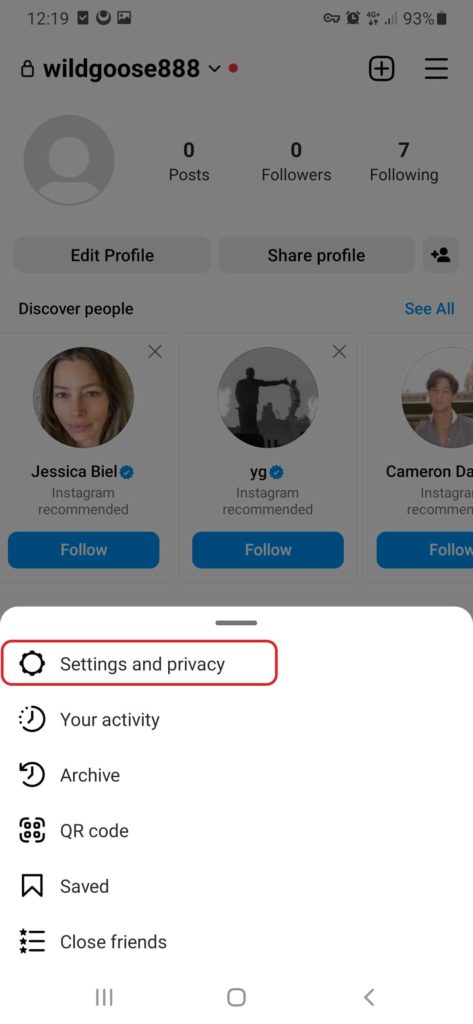
3. Scroll down and choose the “Blocked”;
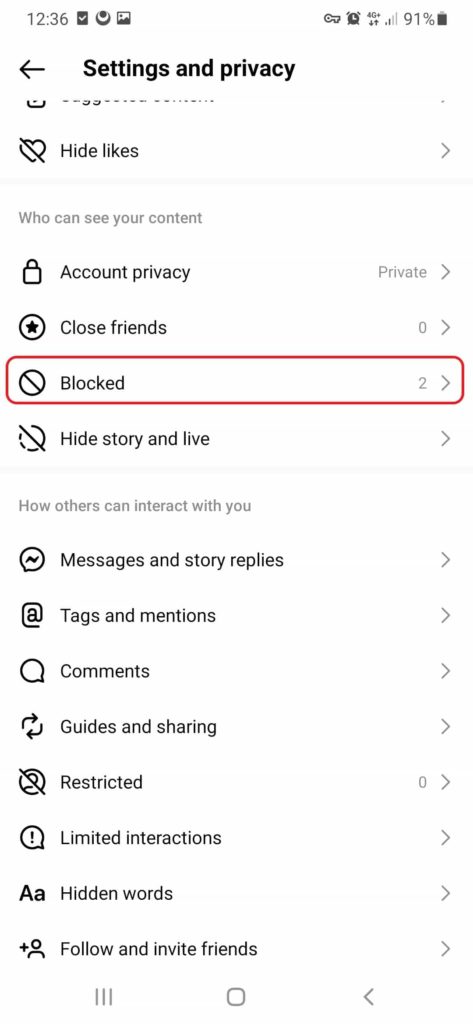
4. Here, you’ll see anyone you blocked on Instagram. If you want to remove a user from the list, just tap the unblock button.

Expert tips to prevent getting blocked on Instagram
Forget about how to know someone blocked you on Instagram. Let’s discover some useful tips to avoid getting blocked.
- Follow Instagram guidelines to avoid any action that could lead to being blocked, such as posting offensive content, spamming, or engaging in harmful behavior.
- Respect others’ privacy. Avoid going Overboard with tags, comments, or DMs without their ok.
- Use relevant hashtags [Read here to learn how to use hashtags] and stay away from banned hashtags.
- Steer clear of overposting. Quality beats quantity, so don’t spam your followers with too many posts; it might lead to unfollows or blocks.
Need a hand with your Instagram account? Get started with Aigrow now!
FAQs on how to know if someone blocked you on Instagram
Now, let’s dive into the most frequently asked questions regarding this topic.
Why Someone Might Block You on Instagram?
There are various reasons why people might block you on Instagram:
Clashes and Fights: If you have some disagreements with a person, they might hit the block button to avoid more!
Too Creepy or Annoying: Going overboard with liking, commenting, or messaging can also make them block you.
Bullying or Harassment: Harassing or bullying behavior will certainly push people to block you on Instagram.
Inappropriate Content: If you post offensive content, not only users but only Instagram itself may block you. It’s absolutely against Instagram rules.
Privacy Matters: People may even block you to keep their personal info safe and sound.
It’s Complicated: Sometimes, just a strained relationship might lead them to push the block button!
How to Block Someone on Instagram?
We’ve already shown you how to block or unblock someone on Instagram, but let’s quickly go over it again.
To block a user on Instagram, there are two simple ways. First, you can go directly to their profile, tap on the three-line icon at the top corner, and block them.

Another way is to tap the message icon in your feed, then select the chat with someone you’d like to block and block them.
If someone blocked me on Instagram, how can I unblock?
Sadly, no. When someone blocks you on Instagram, only the person who blocked you can unblock you.
Does blocking someone on Instagram delete messages?
Blocking a person on Instagram doesn’t automatically delete the messages you sent to each other. But, the messages sent by the blocked user won’t be visible to you.
How to know if someone blocked you on Instagram story?
If you can’t see someone’s stories anymore, they might have hidden them. It’s not easy to confirm, but if you used to see their stories and suddenly can’t, it might mean they excluded you.
One way to find it out is to ask a mutual friend to check if they can see their recent stories. Although it’s not foolproof, it might give you a clue if they’ve excluded you as a viewer.
Do I get a notification if someone blocks me on Instagram?
No, Instagram won’t send you any notifications if someone decides to block you.
Can you see who blocked you on Instagram?
While there is no direct feature on instagram to find out who blocked you, you can try some tricks like searching on Instagram or using the Instagram web. Keep in mind that while you can see who you’ve blocked, you won’t know whose blocked list you’re on.
