

In today’s hyperconnected world, social media platforms like Instagram have become integral parts of our daily lives.
While these platforms offer a plethora of features for connecting with friends and family, they also raise concerns about privacy and security.
With the constant flow of personal information exchanged through messages and calls, it’s crucial to prioritize data protection and safeguard sensitive conversations.
Enter end-to-end encryption (E2EE), a security feature that transforms the way we communicate on social media platforms.
By encrypting messages and calls from the source to the destination, E2EE ensures that only the intended parties can access and view the content, eliminating the risk of interception by third parties, including the social media platform itself.
In this blog post, we delve into the world of E2EE on Instagram, exploring its benefits, implementation, and considerations for using this powerful security feature effectively.
What is end to end encryption on instagram messenger?
End-to-end encryption (E2EE) is a security feature that makes it impossible for anyone, including Instagram, to read your messages or listen to your calls, unless they have access to both of your devices.
This means that your messages and calls are protected from the moment you send them to the moment they reach the recipient’s device.

Benefits of using E2EE on Instagram
- Your messages and calls are private and secure. Only you and the person you are talking to can see or hear them.
- It is more difficult for law enforcement to access your messages and calls. While law enforcement can still obtain access to E2EE communications under certain circumstances, it is more difficult than with traditional unencrypted communications.
- It can help to protect your privacy from other companies. Meta, Instagram’s parent company, cannot access your E2EE messages and calls.
To use E2EE on Instagram, you and the person you are talking to must both be using the latest version of the Instagram app.
You can start an E2EE chat by tapping the “Start secure chat” button in the Direct messages section of Instagram.

Additional things to keep in mind about E2EE on Instagram:
- E2EE is not foolproof. If you lose your device or if someone gains unauthorized access to your device, they may be able to access your E2EE conversations.
- E2EE does not apply to all of Instagram’s features. Messages and calls that are sent to a group chat or that are sent in a regular Direct messages conversation are not encrypted.
Overall, E2EE is a valuable security feature that can help to protect your privacy on Instagram. If you are concerned about the security of your messages and calls, I encourage you to use E2EE whenever possible.
Read more: How to turn off 2-Factor Authentication on Instagram+ Video
how to use end-to-end encryption in instagram?
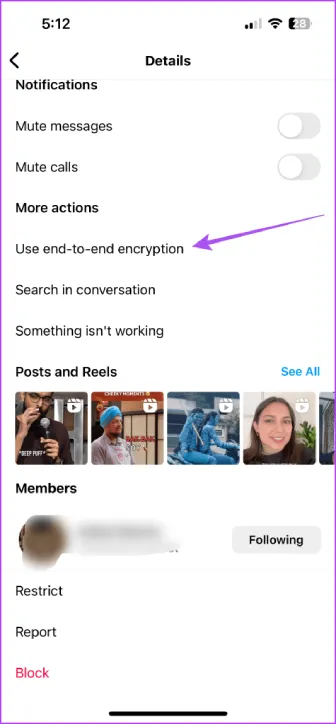
Using end-to-end encryption on Instagram is simple and only requires a few steps. Here’s a guide on how to start and utilize E2EE for private communication on Instagram:
- Launch Instagram: Open the Instagram app on your device, whether it’s an Android or iOS smartphone or tablet.
- Access Direct Messages: Tap on the Direct Messages icon located in the bottom right corner of the app’s main interface. This will open your Direct Messages inbox.
- Select a Chat Partner: Identify the person you want to converse with privately using E2EE encryption. Tap on their name or profile picture to open their chat thread.
- Initiate Secure Chat: Once in the chat window, you’ll see an option to start a secure chat. Look for the “Start secure chat” button, often indicated by a lock icon or similar symbol. Tap on this button to initiate the E2EE chat.
- Confirm Secure Chat: A pop-up confirmation window will appear, asking if you want to start an E2EE chat. Tap on the “Start secure chat” option to confirm and activate the secure communication mode.
- Secure Chat Established: The chat window will now indicate that it’s an E2EE chat. Messages and calls exchanged within this chat will be protected by end-to-end encryption, making them inaccessible to anyone else, including Instagram itself.
- Enjoy Private Communication: Feel free to send messages, share photos, videos, and voice messages without worrying about their privacy. Only you and the other chat participant will have access to these communications.
Remember, E2EE is only available for individual chats, not group conversations or regular Direct Messages exchanges.
To utilize E2EE, both you and the other person must be using the latest version of the Instagram app and have E2EE enabled on their devices.
Read more: 6 Easy Ways to Protect Your Privacy and Stay Secure on Instagram
FAQs
Now let’s answer some frequently asked questions on this subject:
Why can’t I use end to end encryption on instagram?
- You may not be able to use end-to-end encryption if you are using an older version of the Instagram app.
- You may not be able to use end-to-end encryption if the person you are trying to chat with has not enabled end-to-end encryption on their device.
Is it good to turn on end-to-end encryption?
Yes, it is generally good to turn on end-to-end encryption on Instagram if you want to protect your privacy. With end-to-end encryption, your messages and calls are only accessible to you and the person you are talking to.
How do I stop end-to-end encryption on Instagram?
You cannot directly stop end-to-end encryption on Instagram. Once you have started a secure chat with someone, the chat will be encrypted until you both end the chat.
Final Thoughts
End-to-end encryption (E2EE) has become an essential feature for secure communication on social media platforms like Instagram.
With E2EE, your messages and calls are protected from prying eyes, including Instagram itself. This safeguard is crucial for safeguarding sensitive conversations and maintaining privacy in the digital age.
Whether you’re discussing personal matters, sharing confidential information, or simply seeking a more secure messaging experience, E2EE on Instagram offers a layer of protection that is difficult to beat.
By enabling E2EE and using it judiciously, you can ensure that your private communication remains private, even in the vast and interconnected world of social media.
